Eureka Server 显示注册服务名问题
Eureka服务注册列表默认是显示主机名+端口,要想更方便地知道是哪台主机就需要查看ip+端口。
本节解释为什么配置eureka.instance.prefer-ip-address = true时,注册到Eureka Server上的是IP,以及是什么IP
参考: https://www.jianshu.com/p/5ad8317961b7
前言
多台windows机器部署Spring Cloud项目,Eureka上面注册的 instanceId 是这样的
在通过 serviceId 相互调用时出现Unkownhost异常,不能通过主机名找到服务提供者。由于没有使用docker,又不想去配置host,所有改用ip进行服务注册。
修改为ip注册
在Eureka client添加配置
eureka:client:service-url:defaultZone: http://localhost:7082/eureka# 检测与续约时间instance:# 设置注册到eureka的名字,格式:ip:服务:端口号instance-id: ${spring.cloud.client.ip-address}:${spring.application.name}:${server.port}prefer-ip-address: true
重启服务…

主要是依赖 spring-cloud-commons依赖中,spring.cloud.client.ip-address 变量实现的。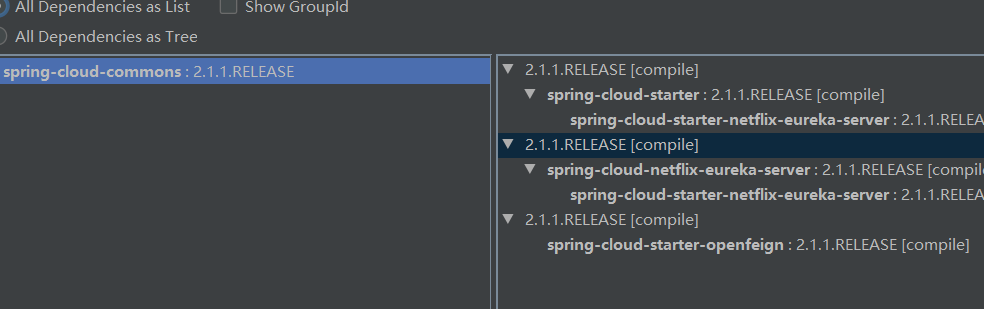
采坑:
参考spring could采坑(一)eureka找不到${spring.cloud.client.ipAddress}
SpringCloud 2.0 已经改成 ${spring.cloud.client.ip-address} 了,于是修改
eureka:
instance:
prefer-ip-address: true
instance-id: ${spring.cloud.client.ip-address}:${server.port}
重启服务…
发现还是读不到这个值
于是想去看这个值到底从哪里读的
Spring Cloud Eureka 多网卡配置最终版 一文中看到是从 HostInfoEnvironmentPostProcessor 这个类中获取的。Google之
找到HostInfoEnvironmentPostProcessor源码
package org.springframework.cloud.client;import java.util.LinkedHashMap;import org.springframework.boot.SpringApplication;import org.springframework.boot.context.config.ConfigFileApplicationListener;import org.springframework.boot.context.properties.bind.Bindable;import org.springframework.boot.context.properties.bind.Binder;import org.springframework.boot.context.properties.source.ConfigurationPropertySources;import org.springframework.boot.env.EnvironmentPostProcessor;import org.springframework.cloud.commons.util.InetUtils;import org.springframework.cloud.commons.util.InetUtils.HostInfo;import org.springframework.cloud.commons.util.InetUtilsProperties;import org.springframework.core.Ordered;import org.springframework.core.env.ConfigurableEnvironment;import org.springframework.core.env.MapPropertySource;/**● @author Spencer Gibb*/public class HostInfoEnvironmentPostProcessorimplements EnvironmentPostProcessor, Ordered {// Before ConfigFileApplicationListenerprivate int order = ConfigFileApplicationListener.DEFAULT_ORDER - 1;@Overridepublic int getOrder() {return this.order;}@Overridepublic void postProcessEnvironment(ConfigurableEnvironment environment,SpringApplication application) {InetUtils.HostInfo hostInfo = getFirstNonLoopbackHostInfo(environment);LinkedHashMap<String, Object> map = new LinkedHashMap<>();map.put("spring.cloud.client.hostname", hostInfo.getHostname());map.put("spring.cloud.client.ip-address", hostInfo.getIpAddress());MapPropertySource propertySource = new MapPropertySource("springCloudClientHostInfo", map);environment.getPropertySources().addLast(propertySource);}private HostInfo getFirstNonLoopbackHostInfo(ConfigurableEnvironment environment) {InetUtilsProperties target = new InetUtilsProperties();ConfigurationPropertySources.attach(environment);Binder.get(environment).bind(InetUtilsProperties.PREFIX,Bindable.ofInstance(target));try (InetUtils utils = new InetUtils(target)) {return utils.findFirstNonLoopbackHostInfo();}}}
可以看到的确修改成了 ${spring.cloud.client.ip-address} ,这个类在# spring-cloud-commons 项目中。
于是导入
<dependency><groupId>org.springframework.cloud</groupId><artifactId>spring-cloud-commons</artifactId></dependency>
重启服务,已经正常通过ip注册调用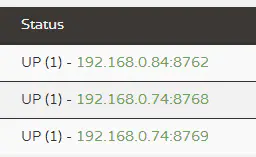

若有收获,就点个赞吧
0 人点赞


