默认端口号5601
高级条件查询之间的区别参考:六、ES的HTTP操作
1. 软件下载
https://artifacts.elastic.co/downloads/kibana/kibana-7.8.0-linux-x86_64.tar.gz
2. 软件安装
上传至
/opt/software,解压至/opt/module/tar -zxvf kibana-7.8.0-linux-x86_64.tar.gz -C /opt/module/
改名
mv kibana-7.8.0-linux-x86_64 kibana-7.8.0
修改
/kibana-7.8.0/config/kibana.yml文件# 修改如下几项:# 对外服务监听端口server.port: 5601#绑定可以访问5601端口服务的IP地址,0.0.0.0表示任何地址在没有防火墙限制的情况下都可以访问,生产环境别这样设置,不安全。server.host: "0.0.0.0"# 默认值为主机名称,表示kibana实例绑定的主机,可以是IP地址或者主机名称server.name: "hadoop101"# ES实例地址,集群用,分隔elasticsearch.hosts: ["http://hadoop101:9200","http://hadoop102:9200","http://hadoop103:9200"]# 用来控制证书的认证,可选的值为full,none,certificate。此处由于没有证书,所以设置为null,否则启动会提示错误elasticsearch.ssl.verificationMode: none# kibana搜索数据请求超时时间elasticsearch.requestTimeout: 30000# kibana在es中存储自身数据的使用索引名kibana.index: ".kibana"# 让kibana支持中文i18n.locale: "zh-CN"
3. 启动软件
# 由于kibana默认不允许使用root启动,如果直接使用root启动需要增加--allow-root,否则汇报如下错误:nohup kibana --allow-root
4. Kibana启动脚本
```shell
!/bin/bash
启动Kibana—-配置的是es集群
kibana_home=/opt/module/kibana-7.8.0 case $1 in “start”){
echo "************ 启动Kibana ************"su - es -c "nohup $kibana_home/bin/kibana > $kibana_home/nohup.out 2>&1"
};;

“stop”){
echo “** 停止Kibana **“
kibana_pid=ps -ef | awk '/kibana/ && !/awk/ {print $2}'
ssh hadoop101 “su - es -c ‘kill -15 $kibana_pid’”
};;
esac
<a name="NZH8J"></a># 5. 查询语句> 访问:IP:5601> 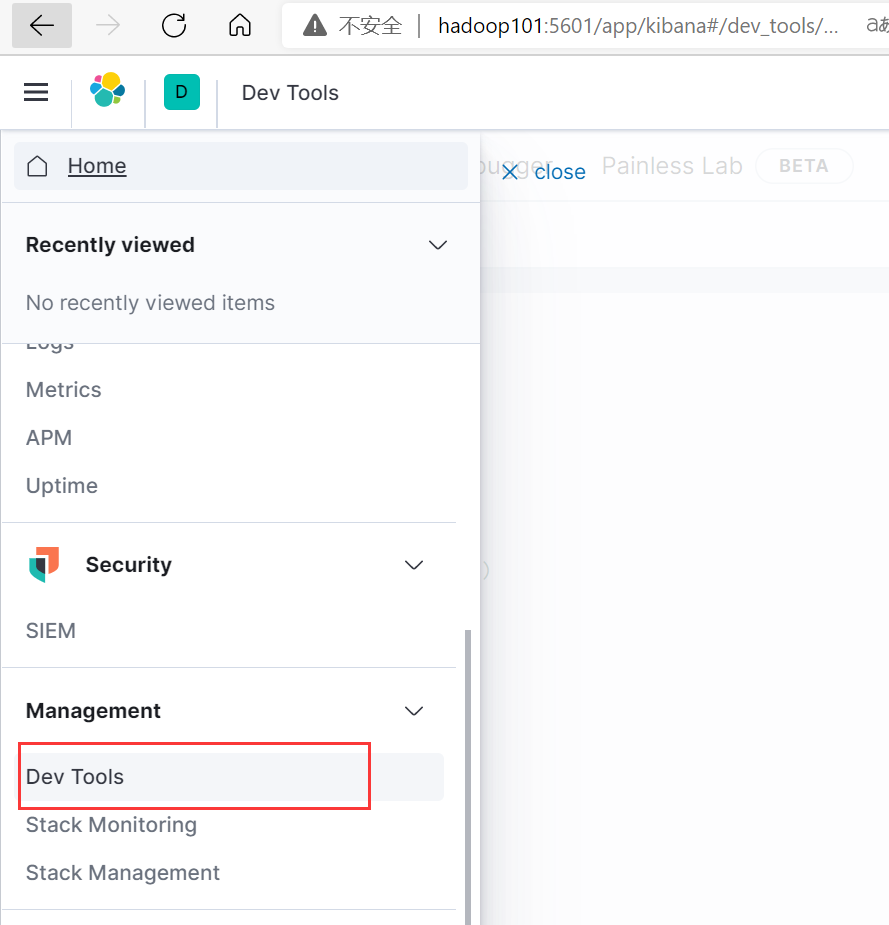<a name="T2PTz"></a>## 5.1 查看ES各种信息<a name="VdqOn"></a>### 5.1.1 查看所有节点```httpGET /_cat/nodes
5.1.2 查看集群健康状态
GET /_cluster/health?pretty
5.1.3 查看所有索引及索引状态
GET /_cat/indices?v
5.1.4 使用分词器分析词条
GET /_analyze{"analyzer": "standard","text": "hello world"}# "analyzer": "standard":# 是指定使用哪个分词器,standard是自带分词器# 如果装了ik分词器# 1. 可以使用ik_max_word --- 会将文本做最细粒度的拆分# 2. 还可以使用ik_smart --- 会将文本做最粗粒度的拆分# "text": "hello world"是指定文本
5.2 索引
5.2.1 创建
PUT /person
5.2.2 创建索引同时创建映射、设置分片和副本
PUT person{"settings" : {"number_of_shards" : 3, // 3个主分片"number_of_replicas" : 1 // 每个分片1个副本},"mappings": {"properties":{"name":{"type":"text","index":true},"sex":{"type":"keyword","index":true},"tel":{"type":"text","store":true}}}}
5.2.3 修改副本分片数
PUT person/_settings{"number_of_replicas" : 2}
5.2.4 查看所有索引
GET /_cat/indices?v
5.2.5 查询单个
GET person
5.2.6 删除索引
DELETE person
5.3 映射
5.3.1 创建
如果没有索引会自动创建
PUT person{"mappings": {"properties":{"name":{"type":"text","index":true},"sex":{"type":"keyword","index":true},"tel":{"type":"text","store":true}}}}
5.3.2 查看
GET person/_mapping
5.4 文档
5.4.1 新增
5.4.1.1 随机_id
POST person/_doc{"name":"张三","sex":"男的","tel":"1111"}
5.4.1.2 新增—-自定义_id
POST person/_doc/1002{"name":"李小四","sex":"女的","tel":"1111"}
5.4.2 查询
5.4.2.1 主键查询
GET person/_doc/1001
5.4.2.2 查询文档—-全部查询
GET person/_doc/_search
5.4.2.3 高级查询
5.4.3 修改
5.4.3.1 某条记录某个字段
POST person/_update/1001{"doc": {"tel":"2222"}}
5.4.3.2 某条记录全字段
POST person/_doc/1001{"name":"李老四","sex":"中性的","tel":"3333"}
5.4.4 删除
5.4.4.1 主键删除
DELETE person/_doc/1001
5.4.4.2 条件删除
POST person/_delete_by_query{"query":{"match": {"tel": "1111"}}}
5.5 高级查询
5.5.1 查询所有记录
GET person/_search{"query": {"match_all": {}}}
5.5.2 单字段分词词条匹配查询
张三会分词成张、三,两个词条去匹配词条字段
GET person/_search{"query": {"match": {"name": "张三"}}}
5.5.3 多字段分词词条匹配查询
GET person/_search{"query": {"multi_match": {"query": "四","fields": ["name","sex"]}}}
5.5.4 短语匹配查询
把李四当做一个词条去匹配
GET person/_search{"query": {"match_phrase": {"name": "李四"}}}
5.5.5 单关键字精确查询
GET person/_search{"query": {"term": {"name": {"value": "李四"}}}}
5.5.6 多关键字精确查询
GET person/_search{"query": {"terms": {"name": ["李","女"]}}}
5.5.7 (不)返回指定字段查询
GET person/_search{"query": {"match": {"name": "李"}},"_source": {"includes": "tel","excludes": "sex"}}
5.5.8 组合查询
GET person/_search{"query": {"bool": {"must": [{"match": {"sex": "女的"}},{"match": {"name": "小"}}]}}}
5.5.9 范围查询
5.5.9.1 直接范围查询
GET person/_search{"query": {"range": {"tel": {"gte": 10,"lte": 20000}}}}
5.5.9.2 过滤查询范围
GET person/_search{"query": {"bool": {"must": [{"match": {"sex": "男的"}}],"filter": [{"range": {"tel": {"gte": 1000,"lte": 2000}}}]}}}
5.5.10 通配符查询
GET person/_search{"query": {"wildcard": {"sex": {"value": "*的"}}}}
5.5.11 纠错查询
GET person/_search{"query": {"fuzzy": {"tel": {"value": "111122","fuzziness": 3}}}}
5.5.12 排序查询
5.5.12.1 单字段排序查询
GET person/_search{"query": {"match_all": {}},"sort": [{"_id": {"order": "desc"}}]}
5.5.12.2 多字段排序查询
GET person/_search{"query": {"match_all": {}},"sort": [{"_id": {"order": "desc"},"sex": {"order": "desc"}}]}
5.5.13 高亮查询
GET person/_search{"query": {"match": {"name": "四"}},"highlight": {"fields": {"name":{}},"pre_tags": "<font color='red'>","post_tags": "</font>"}}
5.5.14 分页查询
GET person/_search{"query": {"match_all": {}},"from": 0,"size": 2}
5.5.15 统计查询
# 1. 平均值查询GET person/_search{"aggs":{"tel_avg":{"sum":{"field":"sex"}}},"size":0}# 2. state聚合查询,对某个字段一次性返回 count,max,min,avg 和 sum 五个指标GET person/_search{"aggs":{"stats_age":{"stats":{"field":"age"}}},"size":0}
5.5.16 分组聚合查询(桶聚合查询)
GET person/_search{"aggs":{"price_group":{"terms":{"field":"sex"}}},"size": 0}

若有收获,就点个赞吧
0 人点赞


