- 1. windows集群部署(了解)
- 2. Linux单机部署(了解)
- 加入如下配置
- 启动报错添加如下配置
- * soft nproc 1024
- root soft nproc unlimited
- 每个进程可以打开的文件数的限制
- 操作系统级别对每个用户创建的进程数的限制
- 注:* 带表 Linux 所有用户名称
- !/bin/bash
- 单机启动Elasticsearch
- 加入如下配置
- 集群名称
- **节点名称,每个节点的名称不能重复**
- **ip 地址,每个节点的地址不能重复**
- 是不是有资格主节点
- 是不是数据节点
- http端口9200
- head 插件需要这打开这两个配置,跨域配置
- **es7.x 之后新增的配置,初始化一个新的集群时需要此配置来选举 master的节点列表**
- **es7.x 之后新增的配置,节点发现**
- **tcp监听端口9300**
- 集群内同时启动的数据任务个数,默认是 2 个
- 添加或删除节点及负载均衡时并发恢复的线程个数,默认 4 个
- 初始化数据恢复时,并发恢复线程的个数,默认 4 个
- 启动报错添加如下配置
- * soft nproc 1024
- root soft nproc unlimited
- 每个进程可以打开的文件数的限制
- 操作系统级别对每个用户创建的进程数的限制
- 注:* 带表 Linux 所有用户名称
- 4. ES-Head浏览器插件
默认端口号
对外服务http 9200
对内集群tcp 9300
1. windows集群部署(了解)
- 创建 elasticsearch-cluster 文件夹,在内部复制三个 elasticsearch 服务

修改集群文件目录中每个节点的
config/elasticsearch.yml配置文件node-1001 节点
# 节点 1 的配置信息:# 集群名称,节点之间要保持一致cluster.name: my-elasticsearch# 节点名称,集群内要唯一node.name: node-1001# 是不是有资格主节点node.master: truenode.data: true# ip 地址network.host: localhost# http 端口http.port: 1001# tcp 监听端口transport.tcp.port: 9301# es7.x 之后新增的配置,节点发现#discovery.seed_hosts: ["localhost:9301", "localhost:9302","localhost:9303"]#discovery.zen.fd.ping_timeout: 1m#discovery.zen.fd.ping_retries: 5# 集群内的可以被选为主节点的节点列表#cluster.initial_master_nodes: ["node-1", "node-2","node-3"]# 跨域配置#action.destructive_requires_name: truehttp.cors.enabled: truehttp.cors.allow-origin: "*"
node-1002 节点
# 节点 2 的配置信息:# 集群名称,节点之间要保持一致cluster.name: my-elasticsearch# 节点名称,集群内要唯一node.name: node-1002# 是不是有资格主节点node.master: truenode.data: true# ip 地址network.host: localhost# http 端口http.port: 1002#tcp 监听端口transport.tcp.port: 9302#es7.x 之后新增的配置,节点发现discovery.seed_hosts: ["localhost:9301"]discovery.zen.fd.ping_timeout: 1mdiscovery.zen.fd.ping_retries: 5# 集群内的可以被选为主节点的节点列表#cluster.initial_master_nodes: ["node-1", "node-2","node-3"]# 跨域配置#action.destructive_requires_name: truehttp.cors.enabled: truehttp.cors.allow-origin: "*"
node-1003 节点
# 节点 3 的配置信息:# 集群名称,节点之间要保持一致cluster.name: my-elasticsearch# 节点名称,集群内要唯一node.name: node-1003node.master: truenode.data: true# ip 地址network.host: localhost# http 端口http.port: 1003# tcp 监听端口transport.tcp.port: 9303# 候选主节点的地址,在开启服务后可以被选为主节点discovery.seed_hosts: ["localhost:9301", "localhost:9302"]discovery.zen.fd.ping_timeout: 1mdiscovery.zen.fd.ping_retries: 5# 集群内的可以被选为主节点的节点列表#cluster.initial_master_nodes: ["node-1", "node-2","node-3"]# 跨域配置#action.destructive_requires_name: truehttp.cors.enabled: truehttp.cors.allow-origin: "*"
启动集群
启动前先删除每个节点中的 data 目录中所有内容(如果存在)
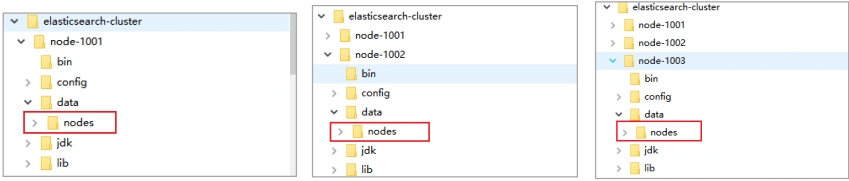
分别双击执行
bin/elasticsearch.bat, 启动节点服务器,启动后,会自动加入指定名称的集群

- 测试集群
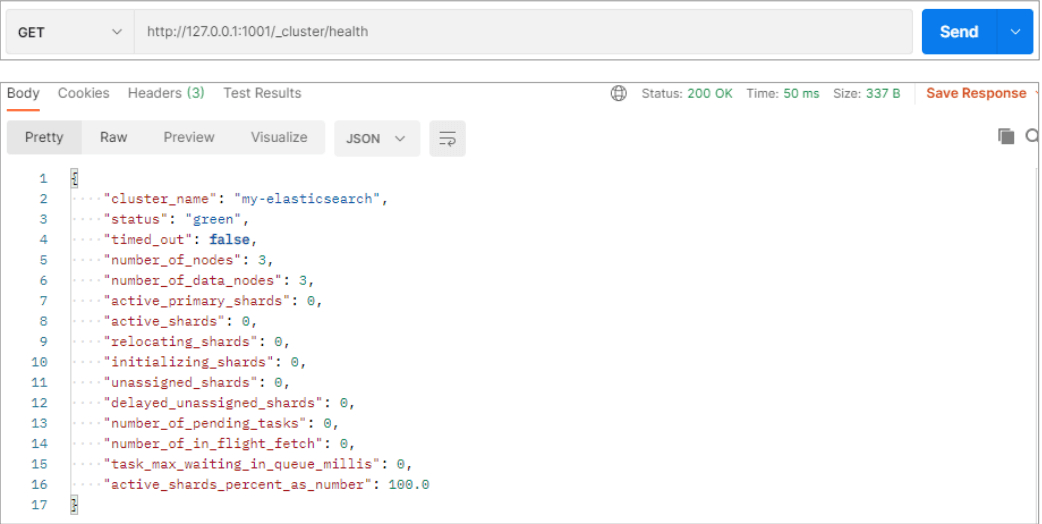
- 查看集群状态
- node-1001 节点
- 查看集群状态
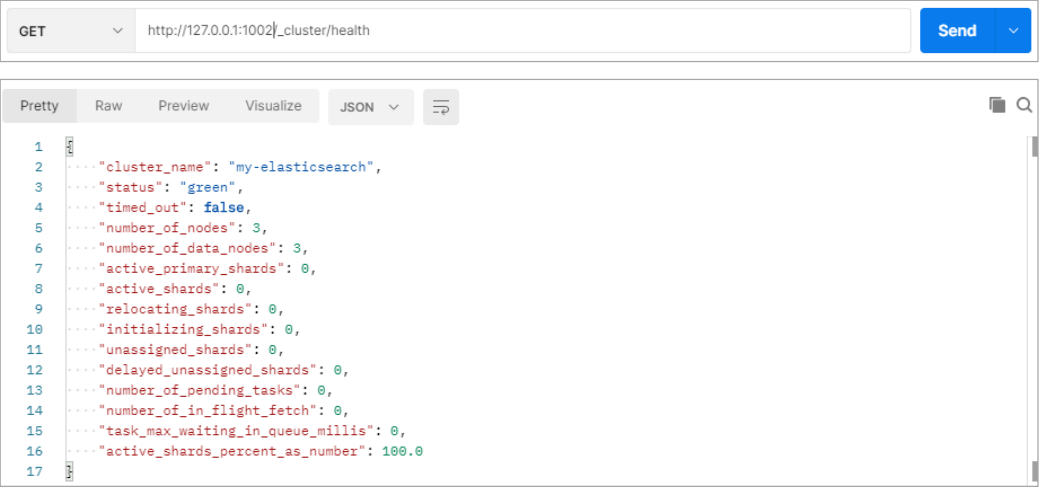
- node-1002 节点
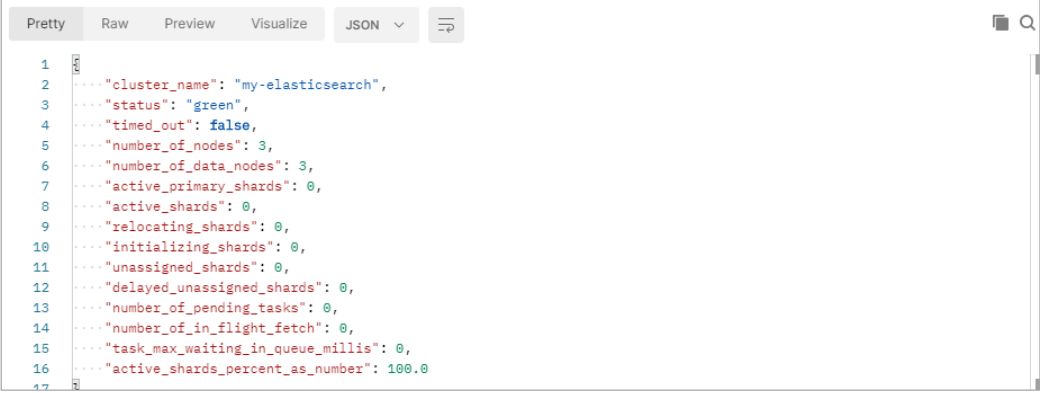
- node-1003 节点
- 
- 向集群中的 node-1001 节点增加索引

- 向集群中的 node-1002 节点查询索引
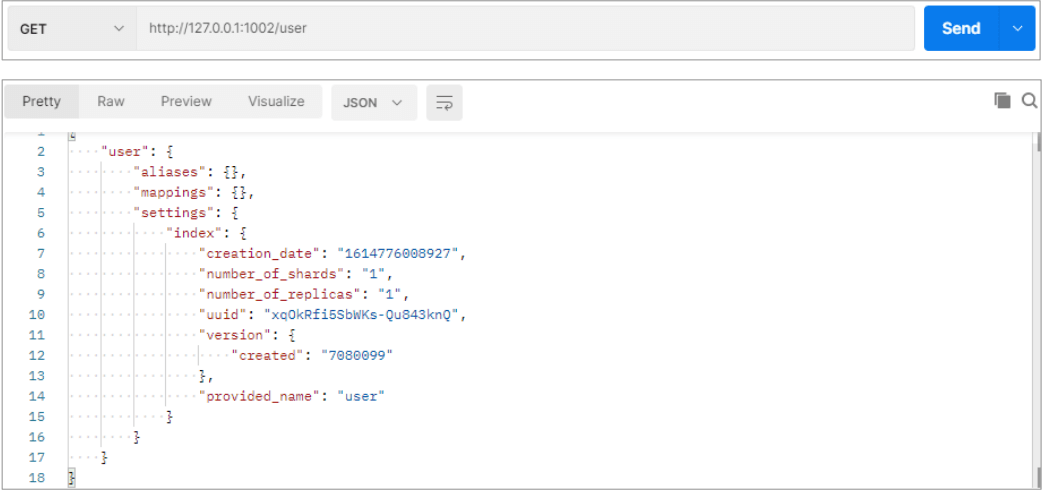
2. Linux单机部署(了解)
2.1 软件下载
软件下载地址:https://www.elastic.co/cn/downloads/past-releases/elasticsearch-7-8-0
2.2 软件安装
2.2.1 解压软件
# 解压缩tar -zxvf elasticsearch-7.8.0-linux-x86_64.tar.gz -C /opt/module# 改名mv elasticsearch-7.8.0 es
2.2.2 创建用户
因为安全问题,Elasticsearch 不允许 root 用户直接运行,所以要创建新用户,在 root 用户中创建新用户
useradd es #新增 es 用户passwd es #为 es 用户设置密码userdel -r es #如果错了,可以删除再加chown -R es:es /opt/module/es #文件夹所有者
2.2.3 修改配置文件
- 修改
/opt/module/es/config/elasticsearch.yml文件 ```yaml加入如下配置
cluster.name: elasticsearch node.name: node-1 network.host: 0.0.0.0 http.port: 9200 cluster.initial_master_nodes: [“node-1”]
启动报错添加如下配置
bootstrap.memory_lock: false bootstrap.system_call_filter: false
- 修改 `/etc/security/limits.conf````yaml# 在文件末尾中增加下面内容# 每个进程可以打开的文件数的限制es soft nofile 65536es hard nofile 65536
- 修改
/etc/security/limits.d/90-nproc.conf```yaml* soft nproc 1024
root soft nproc unlimited
每个进程可以打开的文件数的限制
es soft nofile 65536 es hard nofile 65536操作系统级别对每个用户创建的进程数的限制
修改
/etc/sysctl.conf# 在文件中增加下面内容# 一个进程可以拥有的 VMA(虚拟内存区域)的数量,默认值为 65536vm.max_map_count=655360
重新加载
sysctl -p
2.3 启动软件
使用 ES 用户启动
cd /opt/module/es/#启动bin/elasticsearch#后台启动bin/elasticsearch -d
启动时,会动态生成文件,如果文件所属用户不匹配,会发生错误,需要重新进行修改用户和用户组,重新执行以下命令
chown -R es:es /opt/module/es #文件夹所有者
启动时,如果不报错但启动失败,日志打印如下,可在
/opt/module/es/config/elasticsearch.yml添加如下配置解决:

# 启动报错添加如下配置bootstrap.memory_lock: falsebootstrap.system_call_filter: false
- 关闭防火墙
# 暂时关闭防火墙systemctl stop firewalld# 永久关闭防火墙systemctl enable firewalld.service #打开防火墙永久性生效,重启后不会复原systemctl disable firewalld.service #关闭防火墙,永久性生效,重启后不会复原
2.4 测试软件
http://hadoop101:9200/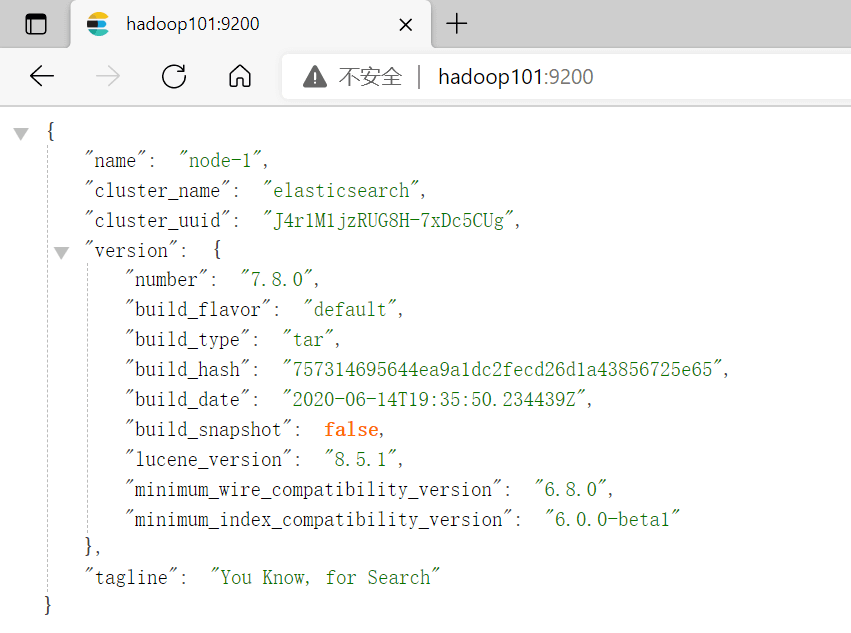
2.5 单机启动脚本
```shell!/bin/bash
单机启动Elasticsearch
es_path=/opt/module/es es_pid=ps aux|grep elasticsearch | grep -v 'grep elasticsearch' | awk '{print $2}'case “$1” in start) su - es -c “$es_path/bin/elasticsearch -d” echo “elasticsearch startup” ;; stop) su - es -c “kill -15 $es_pid” echo “elasticsearch stopped” ;; restart) su - es -c “kill -15 $es_pid” su - es -c “$es_path/bin/elasticsearch -d” echo “elasticsearch startup” ;; *) echo “error choice ! please input start or stop or restart” ;; esac
exit $?
<a name="dYrDr"></a># 3. Linux集群部署(掌握)<a name="Uwkzb"></a>## 3.1 软件下载> 软件下载地址:[https://www.elastic.co/cn/downloads/past-releases/elasticsearch-7-8-0](https://www.elastic.co/cn/downloads/past-releases/elasticsearch-7-8-0)<a name="kZxCE"></a>## 3.2 软件安装<a name="m8DF9"></a>### 3.2.1 解压软件> **解压后分发**```bash# 解压缩tar -zxvf elasticsearch-7.8.0-linux-x86_64.tar.gz -C /opt/module# 改名mv elasticsearch-7.8.0 es-cluster
3.2.2 创建用户
因为安全问题,Elasticsearch 不允许 root 用户直接运行,所以要在每个节点中创建新用户,在 root 用户中创建新用户
useradd es #新增 es 用户passwd es #为 es 用户设置密码userdel -r es #如果错了,可以删除再加chown -R es:es /opt/module/es-cluster #文件夹所有者
3.2.3 修改配置文件
- 修改
/opt/module/es/config/elasticsearch.yml文件,分发文件,分发后去修改各节点下方标*配置** ```yaml加入如下配置
集群名称
cluster.name: cluster-es**节点名称,每个节点的名称不能重复**
node.name: node-1**ip 地址,每个节点的地址不能重复**
network.host: hadoop101是不是有资格主节点
node.master: true是不是数据节点
node.data: truehttp端口9200
http.port: 9200head 插件需要这打开这两个配置,跨域配置
http.cors.allow-origin: “*” http.cors.enabled: true http.max_content_length: 200mb**es7.x 之后新增的配置,初始化一个新的集群时需要此配置来选举 master的节点列表**
cluster.initial_master_nodes: [“node-1”]**es7.x 之后新增的配置,节点发现**
**tcp监听端口9300**
discovery.seed_hosts: [“hadoop101:9300”,”hadoop102:9300”,”hadoop103:9300”] gateway.recover_after_nodes: 2 network.tcp.keep_alive: true network.tcp.no_delay: true transport.tcp.compress: true集群内同时启动的数据任务个数,默认是 2 个
cluster.routing.allocation.cluster_concurrent_rebalance: 16添加或删除节点及负载均衡时并发恢复的线程个数,默认 4 个
cluster.routing.allocation.node_concurrent_recoveries: 16初始化数据恢复时,并发恢复线程的个数,默认 4 个
cluster.routing.allocation.node_initial_primaries_recoveries: 16
启动报错添加如下配置
bootstrap.memory_lock: false bootstrap.system_call_filter: false
- 修改 `/etc/security/limits.conf` ,**分发文件**```yaml# 在文件末尾中增加下面内容es soft nofile 65536es hard nofile 65536
- 修改
/etc/security/limits.d/90-nproc.conf,分发文件 ```yaml* soft nproc 1024
root soft nproc unlimited
每个进程可以打开的文件数的限制
es soft nofile 65536 es hard nofile 65536操作系统级别对每个用户创建的进程数的限制
修改
/etc/sysctl.conf,分发文件# 在文件中增加下面内容# 一个进程可以拥有的 VMA(虚拟内存区域)的数量,默认值为 65536vm.max_map_count=655360
群发重新加载
xcall.sh sysctl -p
3.3 启动软件
分别在不同节点上启动 ES 软件 启动时如果报错,参考:2.3 启动软件
cd /opt/module/es-cluster# 启动bin/elasticsearch# 后台启动bin/elasticsearch -d
3.4 测试集群
IP:9200/_cat/nodes
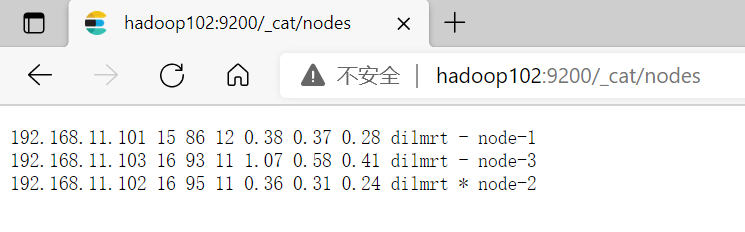
IP:9200/_cluster/health
**status**字段只是这当前集群在总体上是否工作正常,他的三种颜色含义如下: |
|
|---|---|
green |
所有的主分片和副本分片都正常运行 |
yellow |
所有的主分片都运行正常,但不是所有的副本分片都正常运行 |
red |
有主分片没能正常运行 |
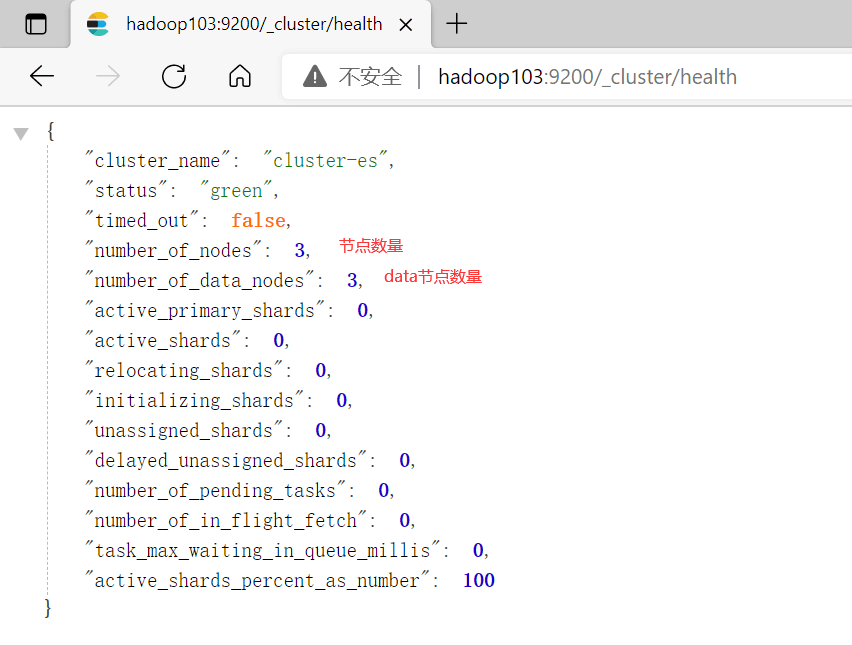
3.5 群起/停脚本
#!/bin/bash# Elasticsearch集群 群起/停脚本es_path=/opt/module/es-clustercase $1 in"start"){for i in hadoop101 hadoop102 hadoop103doecho "************ $i ************"ssh $i "su - es -c 'nohup $es_path/bin/elasticsearch -d' 1>/dev/null 2>&1 &"done};;"stop"){for i in hadoop101 hadoop102 hadoop103doecho "************ $i ************"es_pid=`ssh $i ps aux|grep elasticsearch | grep -v 'grep elasticsearch' | awk '{print $2}'`ssh $i "su - es -c 'kill -15 $es_pid'"done};;esac
4. ES-Head浏览器插件
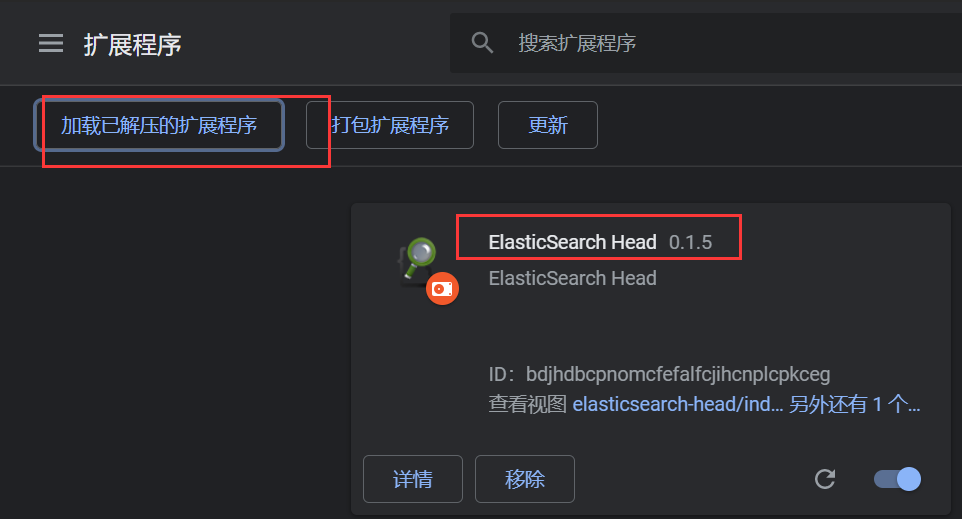
- elasticsearch-head-chrome-plugin.rar解压缩后安装
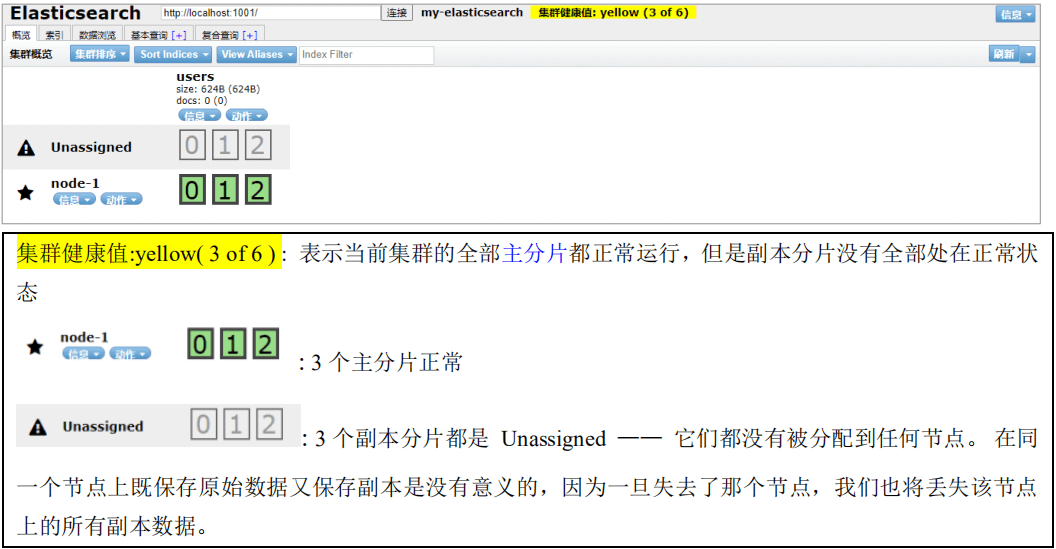
4.1 启动一个节点时查看
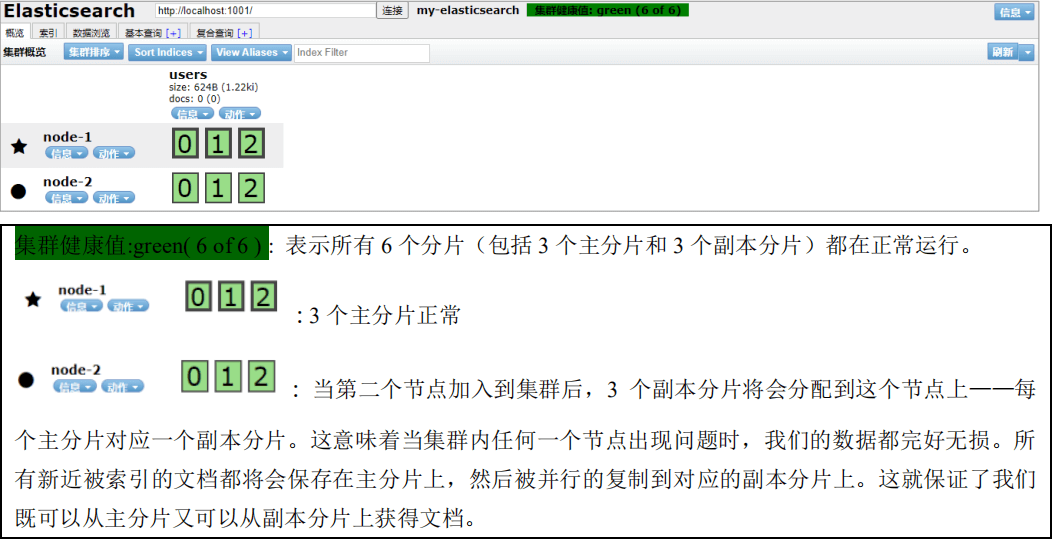
4.2 启动全节点时查看

若有收获,就点个赞吧
0 人点赞


