See more: http://www.ruanyifeng.com/blog/2019/10/tmux.html https://thevaluable.dev/tmux-config-mouseless/
Concepts
tmux allows you to have multiple panes (the equivalent of windows in Vim) and windows (the equivalent of tabs). To access tmux functionality, you first need to hit a prefix key, followed by a command. The default prefix key is Ctrl + b.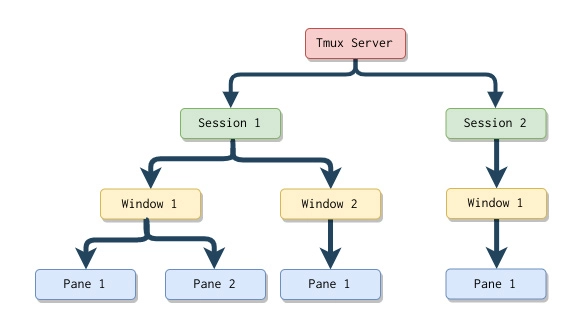
Configuration
Configuration file
/etc/tmux.conf: system-wide configuration~/.tmux.conf: user configurationPrefix key
```bash~/.tmux.conf
Use Ctrl-\ as a prefix.
unbind-key C-b set -g prefix ‘C-\’ bind-key ‘C-\’ send-prefix
<a name="lgzOl"></a>### Spit screen vertically and horizontally```bash# ~/.tmux.conf# Use - to create vertical splits.bind - split-window -vunbind '%'# Use | to create horizontal splits.bind | split-window -hunbind '"'
Navigate between panes
# ~/.tmux.confbind h select-pane -Lbind j select-pane -Dbind k select-pane -Ubind l select-pane -R
Enable mouse
# ~/.tmux.confset -g mouse on
Restart tmux (or execute Ctrl + b followed by :source-file ~/.tmux.conf) to apply the configuration.
Start & Exit
$ tmux
$ exit
Resize Panes
Attach, Dettach, List sessions
List
$ tmux list-sessions0: 1 windows (created Sun Jan 30 19:38:38 2022) (attached)
Dettach
Attach
$ tmux attach[-session] -t 0

若有收获,就点个赞吧
0 人点赞


