文件结构
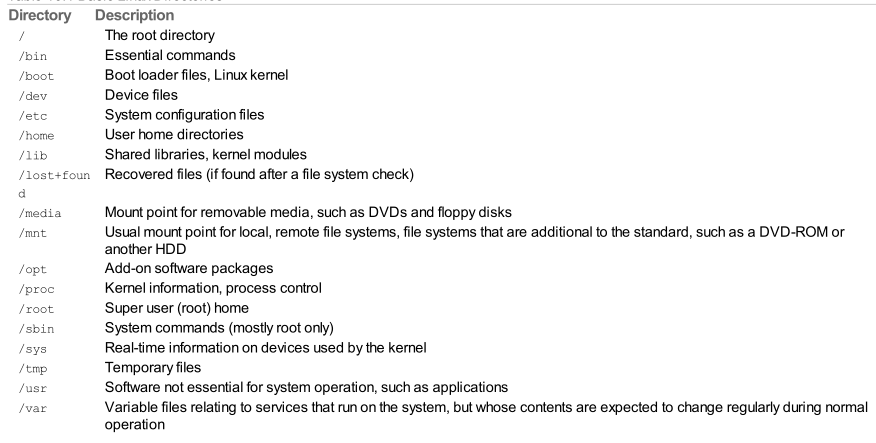
/etc
- passwd
- This file holds the list of users for the system, including special-purpose nonhuman users like syslog and CouchDB, along with user account information.
- sudoers
- This file holds a list of users or user groups with super user access.
常用命令行
ls
- -a 所有文件,包括以 . 开头的隐藏文件,all
- -l 详细、列表形式,long-format listing
- -R 递归显示子目录的文件,Recursively
-d 只显示目录的信息,而非目录的内容
修改日期格式 ```bash
临时修改格式
ls -l —time-style ‘+%Y/%m/%d-%H:%M:%S’ drwxr-x—- 2 ronnie ronnie 4096 2019/01/03-21:08:45 dir1
编辑bash配置文件
vim ~/.bashrc
在文件末尾加上
export TIME_STYLE=’+%Y/%m/%d-%H:%M:%S’
查看是否保存成功
cat ~/.bashrc | grep TIME_STYLE
使配置文件生效
source ~/.bashrc
<a name="hnYCx"></a>### touch```bash# 新建文件或者更新已存在文件的时间戳touch myfile
mkdir
mkdir mydirmkdir -p mydir/dir1/dir2 # 如果 parent 文件夹不存在,则自动创建
rmdir / rm
# 移除【空】文件夹rmdir mydirrm -d mydir# 移除文件rm myfile# 递归移除目录和其子目录rm -r mydir# rm 默认使用了 --preserve-root 选项用来保护 / 目录rm --no-preserve-root -rf / # 删除整个 Linux installation
mv
mv A B# A B Result# file - B不存在,重命名A为B# file file B存在,则A的内容覆盖B# file dir 把A移动B目录里# dir - B不存在,重命名A为B# dir dir B存在,把A移动到B里
rename
# rename [options] expression replacement file...rename .htm .html *.htm # 把所有 .htm 文件重命名为 .htmlrename 's/\.htm/\.html' *.htm # 同上,'s/PATTERN/REPLACEMENT' 是 Perl regular expression
cp
# 与 mv 类似,只是 cp 会保留源文件(夹)cp A Bcp --parents /A/B/1.txt /C/ # 保留源文件的全名(带上路径),结果为 /C/A/B/1.txtcp -u 1.txt 2.txt # 源文件比目的文件新时,才会拷贝
cat / less
cat filename.txtcat filename1.txt filename2.txt # 2个文件的内容一起显示出来cat -s filename.txt # -s squeeze, 多个行空白行合并为1行cat -n filename.txt # -n numbers,显示行号### less options ###less filename.txtless -M filename.txt # 显示【文件名】、【当前页面第一行的行号-最后一行的行号/总行数】、【浏览百分比】less -N filename.txt # 显示行号less +/patten filename.txt # 初始执行命令(搜索)less +G filename.txt # 初始执行命令(文档最后一行)less -MN 1.txt 2.txt 3.txt # 多文件### less options END ###### less operations #### h: help 信息# /patten n:next, N:previous# ?patten# &patten# /* ?* 在所有文件中查找# g: first line# G: last line# 和 vim 有类似的鼠标移动操作# 50g: go to line 50# 50p: go to percent 50# m[a-zA-Z]: mark# '[a-zA-Z]: go to mark# v: 使用环境变量 EDITOR 指定的编辑器打开该文件# :n 下一个文件 :p 上一个文件 :e filename.txt 新增一个文件 :d 删除当前文件# ! 进入 shell; exit 退出 shell 返回到 less# !du -h % 立即执行指定的命令,% 代表当前文件名字# !! 重复执行上一个命令### less operations END ###
cd
cd somedircd /home/xxx/xxcd ..# 定位到 home 目录cdcd $HOME # 同上cd ~ # 同上# 定位到之前的目录cd -# 相对位置cd local # 默认情况下(没有设置CDPATH)会进入 ./localexport CDPATH=/usrcd local # 此时会进入 /usr/localexport CDPATH=.:/usr # 可以设置多个值pwd # 回显当前所在路径
du
du # 当前目录中每个文件、文件夹的大小du -a # 除了文件夹之外,也显示每个单独的文件的大小du -h # human readabledu -c # 附加 total sizedu -s # 只显示总结,不能和 -a 一起使用du --exclude="*.xml" --exclude="*.xsl"du -X exclude_list.txt -X exclude_list2.txt### exclude_list.txt #### *.xml# *.xsl
df
df # 本机所有文件系统的存储使用情况df . # 当前目录所属的文件系统的存储使用情况df -h # human readable
文件权限
# access | hard-link | user | group | size | mtime/ctime/atime | file/dir name# subdirdrwxrwxr-x 2 ronnie ronnie 4096 2019/01/03-21:08:45 dir1-rw-rw-r-- 1 ronnie ronnie 0 2019/01/03-21:08:45 file1
| 文件类型 | owner | group | other | ||||||
|---|---|---|---|---|---|---|---|---|---|
| -/d/c/l/b | r | w | x | r | w | x | r | w | x |
| 读 | 写 | 执行 | 读 | 写 | 执行 | 读 | 写 | 执行 | |
| 4 | 2 | 1 | 4 | 2 | 1 | 4 | 2 | 1 |
-/d/c/l/b:普通文件/文件夹/character device/block device
对于文件
- r:read,可读取此文件的内容,即可以打开文件;
- w:write,可编辑此文件的内容,如可以增加、删除、更改文件内容;
- x:eXecute,可以执行此文件。
需要注意的是,文件的权限rwx都是针对文件内容来说的。比如w权限,是针对文件内容的增、删、改,而不是针对文件本身。即,某用户有针对该文件的w权限,也无法删除或重命名该文件。
对于文件夹
- r:表示有读取目录内容列表的权限,即可以使用ls命令查看该目录的内容列表;
- w:表示有更改目录的权限,即可以在此目录下新建文件或子目录、删除文件或子目录、重命名文件或子目录、挪动该目录内的文件或子目录等。
- x:表示可以进入该目录,即可以使用cd命令进入该目录。
需要注意的,若某用户有针对该目录的w权限,则可以删除该目录下的文件,哪怕该用户对于此文件无任何权限(因为对文件的权限都是针对文件内容的)。
再需要注意的是x权限。r权限决定了用户是否可以ls出目录内容,而x权限决定了用户是否可以cd到该目录。
修改权限
# mnemonic formchmod [u/g/o][+/-][r/w/x] [file]# u/g/o 如果不指定,默认为所有;# r/w/x 可以并列,例如 chmod +rwx file# octal formchmod 777 filechmod 400 filechmod -c 600 * # 显示此操作后的所有改动chmod --reference 1.txt 2.txt # 把1.txt的权限作为模板应用到2.txt上,即使2.txt拥有和1.txt一样的权限chmod -R /home # 递归改变/home文件夹以及它里的文件、子文件夹的权限# 显示或设置创建文件或文件夹时的默认权限umask # 显示,例如 0002,第一位代表 suid和sgidumask 777 # 设置# 修改文件所属组(group)chgrp sudo filename# 修改文件所属用户(owner)chown someone filename# 同时修改所属组和所属用户chown someone:sudo filename# ACL (Access Control Lists)setfacl -m u:jinyuan:rwx filenamesetfacl -m g:jinyuan:rwx filenamesetfacl -m 0:rwx filenamesetfacl -r u:jinyuan: filenamegetfacl filename
Set User ID, Set Group ID, Sticky Bit
# suid = 4, sgid = 2, sticky bit = 1chmod 4777 somecmdchmod 2777 somecmdchmod 1777 somedirchmod 6777 somecmdchmod 7777 somedir# suid 让任何用户以 somecmd 的 owner 权限执行 somecmd# sgid 让任何用户以 somecmd 的 group 权限执行 somecmd,并且 Sgid has an additional function when set on directories; in this case, new directory contents are automatically assigned the group owner on thedirectory.# A sticky bit limits who may rename or delete files within a directory. When it is set, files in that directory may be unlinked or renamed only by a super user, the directory owner, or the file owner.
timedatectl set-timezone Asia/Shanghai

若有收获,就点个赞吧
0 人点赞


