1.首先导入HBase Java API所需的所有jar包
导入以下两个目录中的所有 jar 包
/usr/local/hbase/lib/.jar
/usr/local/hbase/lib/client-facing-thirdparty/.jar
注意!!此处不再需要导入Hadoop安装目录下的JAR包,这样可以避免由于Hadoop和HBase的版本冲突而引起的错误。否则运行HBase程序时将会报很多不兼容的错误。
2.测试代码运行
在运行代码前必须先启动 hadoop 和 hbase
import org.apache.hadoop.conf.Configuration;import org.apache.hadoop.hbase.*;import org.apache.hadoop.hbase.client.*;import org.apache.hadoop.hbase.util.Bytes;import java.io.IOException;import com.thoughtworks.paranamer.JavadocParanamer;public class ExampleForHBase {public static Configuration configuration; //管理 HBase 的配置信息public static Connection connection; //管理 HBase连接public static Admin admin; //管理 HBase数据库的表信息public static void main(String[] args)throws IOException{init(); //建立连接createTable("student",new String[]{"score"}); //建表insertData("student","zhangsan","score","English","69"); //插入单元格数据insertData("student","zhangsan","score","Math","86"); //同上insertData("student","zhangsan","score","Computer","77"); //同上getData("student", "zhangsan", "score","English"); //浏览单元格数据close(); //关闭连接}//建立连接public static void init(){configuration = HBaseConfiguration.create();configuration.set("hbase.rootdir","hdfs://localhost:9000/hbase"); //指定HBase数据存储的根目录,这里底层使用hdfs作为存储try{connection = ConnectionFactory.createConnection(configuration);admin = connection.getAdmin();}catch (IOException e){e.printStackTrace();}}public static void close(){try{if(admin != null){admin.close();}if(null != connection){connection.close();}}catch (IOException e){e.printStackTrace();}}/*** 创建表* @param myTableName 表名* @param colFamily 列族数组* @throws IOException*/public static void createTable(String myTableName,String[] colFamily) throws IOException {TableName tableName = TableName.valueOf(myTableName);if(admin.tableExists(tableName)){System.out.println("talbe is exists!");}else {TableDescriptorBuilder tableDescriptor = TableDescriptorBuilder.newBuilder(tableName);for(String str:colFamily){ColumnFamilyDescriptor family =ColumnFamilyDescriptorBuilder.newBuilder(Bytes.toBytes(str)).build();tableDescriptor.setColumnFamily(family);}admin.createTable(tableDescriptor.build());}}/*** 添加数据* @param tableName 表名* @param rowKey 行键* @param colFamily 列族* @param col 列限定符(列族中的指定列名)* @param val 数据* @throws IOException*/public static void insertData(String tableName,String rowKey,String colFamily,String col,String val) throws IOException {Table table = connection.getTable(TableName.valueOf(tableName));Put put = new Put(rowKey.getBytes());put.addColumn(colFamily.getBytes(),col.getBytes(), val.getBytes());table.put(put);table.close();}/*** 获取某单元格数据* @param tableName 表名* @param rowKey 行键* @param colFamily 列族* @param col 列限定符* @throws IOException*/public static void getData(String tableName,String rowKey,String colFamily, String col)throws IOException{Table table = connection.getTable(TableName.valueOf(tableName));Get get = new Get(rowKey.getBytes());get.addColumn(colFamily.getBytes(),col.getBytes());Result result = table.get(get);System.out.println(new String(result.getValue(colFamily.getBytes(),col==null?null:col.getBytes())));table.close();}}
成功运行后,会在输出中看到 69 的字样
使用scan命令,查看新建的student表中的数据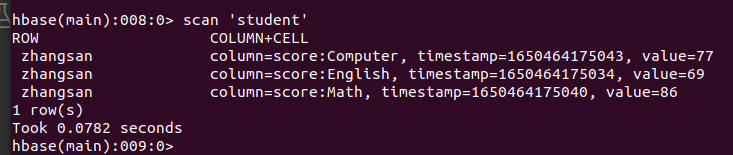

若有收获,就点个赞吧
0 人点赞


