现在让我们接着上一章继续开发,并添加缺少的部分以实现一个完整的安全性流程。
获取 username 和 password
我们将使用 FastAPI 的安全性实用工具来获取 username 和 password。
OAuth2 规定在使用(我们打算用的)「password 流程」时,客户端/用户必须将 username 和 password 字段作为表单数据发送。
而且规范明确了字段必须这样命名。因此 user-name 或 email 是行不通的。
不过不用担心,你可以在前端按照你的想法将它展示给最终用户。
而且你的数据库模型也可以使用你想用的任何其他名称。
但是对于登录路径操作,我们需要使用这些名称来与规范兼容(以具备例如使用集成的 API 文档系统的能力)。
规范还写明了 username 和 password 必须作为表单数据发送(因此,此处不能使用 JSON)。
scope
规范还提到客户端可以发送另一个表单字段「scope」。
这个表单字段的名称为 scope(单数形式),但实际上它是一个由空格分隔的「作用域」组成的长字符串。
每个「作用域」只是一个字符串(中间没有空格)。
它们通常用于声明特定的安全权限,例如:
users:read或者users:write是常见的例子。- Facebook / Instagram 使用
instagram_basic。 - Google 使用了
[https://www.googleapis.com/auth/drive](https://www.googleapis.com/auth/drive)。
:::info
Info
在 OAuth2 中「作用域」只是一个声明所需特定权限的字符串。
它有没有 : 这样的其他字符或者是不是 URL 都没有关系。
这些细节是具体的实现。
对 OAuth2 来说它们就只是字符串而已。
:::
获取 username 和 password 的代码
现在,让我们使用 FastAPI 提供的实用工具来处理此问题。
OAuth2PasswordRequestForm
首先,导入 OAuth2PasswordRequestForm,然后在 token 的路径操作中通过 Depends 将其作为依赖项使用。
from typing import Optionalfrom fastapi import Depends, FastAPI, HTTPException, statusfrom fastapi.security import OAuth2PasswordBearer, OAuth2PasswordRequestFormfrom pydantic import BaseModelfake_users_db = {"johndoe": {"username": "johndoe","full_name": "John Doe","email": "johndoe@example.com","hashed_password": "fakehashedsecret","disabled": False,},"alice": {"username": "alice","full_name": "Alice Wonderson","email": "alice@example.com","hashed_password": "fakehashedsecret2","disabled": True,},}app = FastAPI()def fake_hash_password(password: str):return "fakehashed" + passwordoauth2_scheme = OAuth2PasswordBearer(tokenUrl="token")class User(BaseModel):username: stremail: Optional[str] = Nonefull_name: Optional[str] = Nonedisabled: Optional[bool] = Noneclass UserInDB(User):hashed_password: strdef get_user(db, username: str):if username in db:user_dict = db[username]return UserInDB(**user_dict)def fake_decode_token(token):# This doesn't provide any security at all# Check the next versionuser = get_user(fake_users_db, token)return userasync def get_current_user(token: str = Depends(oauth2_scheme)):user = fake_decode_token(token)if not user:raise HTTPException(status_code=status.HTTP_401_UNAUTHORIZED,detail="Invalid authentication credentials",headers={"WWW-Authenticate": "Bearer"},)return userasync def get_current_active_user(current_user: User = Depends(get_current_user)):if current_user.disabled:raise HTTPException(status_code=400, detail="Inactive user")return current_user@app.post("/token")async def login(form_data: OAuth2PasswordRequestForm = Depends()):user_dict = fake_users_db.get(form_data.username)if not user_dict:raise HTTPException(status_code=400, detail="Incorrect username or password")user = UserInDB(**user_dict)hashed_password = fake_hash_password(form_data.password)if not hashed_password == user.hashed_password:raise HTTPException(status_code=400, detail="Incorrect username or password")return {"access_token": user.username, "token_type": "bearer"}@app.get("/users/me")async def read_users_me(current_user: User = Depends(get_current_active_user)):return current_user
OAuth2PasswordRequestForm 是一个类依赖项,声明了如下的请求表单:
username。password。- 一个可选的
scope字段,是一个由空格分隔的字符串组成的大字符串。 - 一个可选的
grant_type.
:::tips
Tip
OAuth2 规范实际上要求 grant_type 字段使用一个固定的值 password,但是 OAuth2PasswordRequestForm 没有作强制约束。
如果你需要强制要求这一点,请使用 OAuth2PasswordRequestFormStrict 而不是 OAuth2PasswordRequestForm。
:::
- 一个可选的
client_id(我们的示例不需要它)。 - 一个可选的
client_secret(我们的示例不需要它)。
:::info
InfoOAuth2PasswordRequestForm 并不像 OAuth2PasswordBearer 一样是 FastAPI 的一个特殊的类。OAuth2PasswordBearer 使得 FastAPI 明白它是一个安全方案。所以它得以通过这种方式添加到 OpenAPI 中。
但 OAuth2PasswordRequestForm 只是一个你可以自己编写的类依赖项,或者你也可以直接声明 Form 参数。
但是由于这是一种常见的使用场景,因此 FastAPI 出于简便直接提供了它。
:::
使用表单数据
:::tips
Tip
类依赖项 OAuth2PasswordRequestForm 的实例不会有用空格分隔的长字符串属性 scope,而是具有一个 scopes 属性,该属性将包含实际被发送的每个作用域字符串组成的列表。
在此示例中我们没有使用 scopes,但如果你需要的话可以使用该功能。
:::
现在,使用表单字段中的 username 从(伪)数据库中获取用户数据。
如果没有这个用户,我们将返回一个错误消息,提示「用户名或密码错误」。
对于这个错误,我们使用 HTTPException 异常:
from typing import Optionalfrom fastapi import Depends, FastAPI, HTTPException, statusfrom fastapi.security import OAuth2PasswordBearer, OAuth2PasswordRequestFormfrom pydantic import BaseModelfake_users_db = {"johndoe": {"username": "johndoe","full_name": "John Doe","email": "johndoe@example.com","hashed_password": "fakehashedsecret","disabled": False,},"alice": {"username": "alice","full_name": "Alice Wonderson","email": "alice@example.com","hashed_password": "fakehashedsecret2","disabled": True,},}app = FastAPI()def fake_hash_password(password: str):return "fakehashed" + passwordoauth2_scheme = OAuth2PasswordBearer(tokenUrl="token")class User(BaseModel):username: stremail: Optional[str] = Nonefull_name: Optional[str] = Nonedisabled: Optional[bool] = Noneclass UserInDB(User):hashed_password: strdef get_user(db, username: str):if username in db:user_dict = db[username]return UserInDB(**user_dict)def fake_decode_token(token):# This doesn't provide any security at all# Check the next versionuser = get_user(fake_users_db, token)return userasync def get_current_user(token: str = Depends(oauth2_scheme)):user = fake_decode_token(token)if not user:raise HTTPException(status_code=status.HTTP_401_UNAUTHORIZED,detail="Invalid authentication credentials",headers={"WWW-Authenticate": "Bearer"},)return userasync def get_current_active_user(current_user: User = Depends(get_current_user)):if current_user.disabled:raise HTTPException(status_code=400, detail="Inactive user")return current_user@app.post("/token")async def login(form_data: OAuth2PasswordRequestForm = Depends()):user_dict = fake_users_db.get(form_data.username)if not user_dict:raise HTTPException(status_code=400, detail="Incorrect username or password")user = UserInDB(**user_dict)hashed_password = fake_hash_password(form_data.password)if not hashed_password == user.hashed_password:raise HTTPException(status_code=400, detail="Incorrect username or password")return {"access_token": user.username, "token_type": "bearer"}@app.get("/users/me")async def read_users_me(current_user: User = Depends(get_current_active_user)):return current_user
校验密码
目前我们已经从数据库中获取了用户数据,但尚未校验密码。
让我们首先将这些数据放入 Pydantic UserInDB 模型中。
永远不要保存明文密码,因此,我们将使用(伪)哈希密码系统。
如果密码不匹配,我们将返回同一个错误。
哈希密码
「哈希」的意思是:将某些内容(在本例中为密码)转换为看起来像乱码的字节序列(只是一个字符串)。
每次你传入完全相同的内容(完全相同的密码)时,你都会得到完全相同的乱码。
但是你不能从乱码转换回密码。
为什么使用哈希密码
如果你的数据库被盗,小偷将无法获得用户的明文密码,只有哈希值。
因此,小偷将无法尝试在另一个系统中使用这些相同的密码(由于许多用户在任何地方都使用相同的密码,因此这很危险)。
from typing import Optionalfrom fastapi import Depends, FastAPI, HTTPException, statusfrom fastapi.security import OAuth2PasswordBearer, OAuth2PasswordRequestFormfrom pydantic import BaseModelfake_users_db = {"johndoe": {"username": "johndoe","full_name": "John Doe","email": "johndoe@example.com","hashed_password": "fakehashedsecret","disabled": False,},"alice": {"username": "alice","full_name": "Alice Wonderson","email": "alice@example.com","hashed_password": "fakehashedsecret2","disabled": True,},}app = FastAPI()def fake_hash_password(password: str):return "fakehashed" + passwordoauth2_scheme = OAuth2PasswordBearer(tokenUrl="token")class User(BaseModel):username: stremail: Optional[str] = Nonefull_name: Optional[str] = Nonedisabled: Optional[bool] = Noneclass UserInDB(User):hashed_password: strdef get_user(db, username: str):if username in db:user_dict = db[username]return UserInDB(**user_dict)def fake_decode_token(token):# This doesn't provide any security at all# Check the next versionuser = get_user(fake_users_db, token)return userasync def get_current_user(token: str = Depends(oauth2_scheme)):user = fake_decode_token(token)if not user:raise HTTPException(status_code=status.HTTP_401_UNAUTHORIZED,detail="Invalid authentication credentials",headers={"WWW-Authenticate": "Bearer"},)return userasync def get_current_active_user(current_user: User = Depends(get_current_user)):if current_user.disabled:raise HTTPException(status_code=400, detail="Inactive user")return current_user@app.post("/token")async def login(form_data: OAuth2PasswordRequestForm = Depends()):user_dict = fake_users_db.get(form_data.username)if not user_dict:raise HTTPException(status_code=400, detail="Incorrect username or password")user = UserInDB(**user_dict)hashed_password = fake_hash_password(form_data.password)if not hashed_password == user.hashed_password:raise HTTPException(status_code=400, detail="Incorrect username or password")return {"access_token": user.username, "token_type": "bearer"}@app.get("/users/me")async def read_users_me(current_user: User = Depends(get_current_active_user)):return current_user
关于 **user_dict
UserInDB(**user_dict) 表示:
直接将 user_dict 的键和值作为关键字参数传递,等同于:
UserInDB(username = user_dict["username"],email = user_dict["email"],full_name = user_dict["full_name"],disabled = user_dict["disabled"],hashed_password = user_dict["hashed_password"],)
:::info
Info
有关 user_dict 的更完整说明,请参阅额外的模型文档。
:::
返回令牌
token 端点的响应必须是一个 JSON 对象。
它应该有一个 token_type。在我们的例子中,由于我们使用的是「Bearer」令牌,因此令牌类型应为「bearer」。
并且还应该有一个 access_token 字段,它是一个包含我们的访问令牌的字符串。
对于这个简单的示例,我们将极其不安全地返回相同的 username 作为令牌。
:::tips
Tip
在下一章中,你将看到一个真实的安全实现,使用了哈希密码和 JWT 令牌。
但现在,让我们仅关注我们需要的特定细节。
:::
from typing import Optionalfrom fastapi import Depends, FastAPI, HTTPException, statusfrom fastapi.security import OAuth2PasswordBearer, OAuth2PasswordRequestFormfrom pydantic import BaseModelfake_users_db = {"johndoe": {"username": "johndoe","full_name": "John Doe","email": "johndoe@example.com","hashed_password": "fakehashedsecret","disabled": False,},"alice": {"username": "alice","full_name": "Alice Wonderson","email": "alice@example.com","hashed_password": "fakehashedsecret2","disabled": True,},}app = FastAPI()def fake_hash_password(password: str):return "fakehashed" + passwordoauth2_scheme = OAuth2PasswordBearer(tokenUrl="token")class User(BaseModel):username: stremail: Optional[str] = Nonefull_name: Optional[str] = Nonedisabled: Optional[bool] = Noneclass UserInDB(User):hashed_password: strdef get_user(db, username: str):if username in db:user_dict = db[username]return UserInDB(**user_dict)def fake_decode_token(token):# This doesn't provide any security at all# Check the next versionuser = get_user(fake_users_db, token)return userasync def get_current_user(token: str = Depends(oauth2_scheme)):user = fake_decode_token(token)if not user:raise HTTPException(status_code=status.HTTP_401_UNAUTHORIZED,detail="Invalid authentication credentials",headers={"WWW-Authenticate": "Bearer"},)return userasync def get_current_active_user(current_user: User = Depends(get_current_user)):if current_user.disabled:raise HTTPException(status_code=400, detail="Inactive user")return current_user@app.post("/token")async def login(form_data: OAuth2PasswordRequestForm = Depends()):user_dict = fake_users_db.get(form_data.username)if not user_dict:raise HTTPException(status_code=400, detail="Incorrect username or password")user = UserInDB(**user_dict)hashed_password = fake_hash_password(form_data.password)if not hashed_password == user.hashed_password:raise HTTPException(status_code=400, detail="Incorrect username or password")return {"access_token": user.username, "token_type": "bearer"}@app.get("/users/me")async def read_users_me(current_user: User = Depends(get_current_active_user)):return current_user
:::tips
Tip
根据规范,你应该像本示例一样,返回一个带有 access_token 和 token_type 的 JSON。
这是你必须在代码中自行完成的工作,并且要确保使用了这些 JSON 字段。
这几乎是唯一的你需要自己记住并正确地执行以符合规范的事情。
其余的,FastAPI 都会为你处理。
:::
更新依赖项
现在我们将更新我们的依赖项。
我们想要仅当此用户处于启用状态时才能获取 current_user。
因此,我们创建了一个额外的依赖项 get_current_active_user,而该依赖项又以 get_current_user 作为依赖项。
如果用户不存在或处于未启用状态,则这两个依赖项都将仅返回 HTTP 错误。
因此,在我们的端点中,只有当用户存在,身份认证通过且处于启用状态时,我们才能获得该用户:
from typing import Optional
from fastapi import Depends, FastAPI, HTTPException, status
from fastapi.security import OAuth2PasswordBearer, OAuth2PasswordRequestForm
from pydantic import BaseModel
fake_users_db = {
    "johndoe": {
        "username": "johndoe",
        "full_name": "John Doe",
        "email": "johndoe@example.com",
        "hashed_password": "fakehashedsecret",
        "disabled": False,
    },
    "alice": {
        "username": "alice",
        "full_name": "Alice Wonderson",
        "email": "alice@example.com",
        "hashed_password": "fakehashedsecret2",
        "disabled": True,
    },
}
app = FastAPI()
def fake_hash_password(password: str):
    return "fakehashed" + password
oauth2_scheme = OAuth2PasswordBearer(tokenUrl="token")
class User(BaseModel):
    username: str
    email: Optional[str] = None
    full_name: Optional[str] = None
    disabled: Optional[bool] = None
class UserInDB(User):
    hashed_password: str
def get_user(db, username: str):
    if username in db:
        user_dict = db[username]
        return UserInDB(**user_dict)
def fake_decode_token(token):
    # This doesn't provide any security at all
    # Check the next version
    user = get_user(fake_users_db, token)
    return user
async def get_current_user(token: str = Depends(oauth2_scheme)):
    user = fake_decode_token(token)
    if not user:
        raise HTTPException(
            status_code=status.HTTP_401_UNAUTHORIZED,
            detail="Invalid authentication credentials",
            headers={"WWW-Authenticate": "Bearer"},
        )
    return user
async def get_current_active_user(current_user: User = Depends(get_current_user)):
    if current_user.disabled:
        raise HTTPException(status_code=400, detail="Inactive user")
    return current_user
@app.post("/token")
async def login(form_data: OAuth2PasswordRequestForm = Depends()):
    user_dict = fake_users_db.get(form_data.username)
    if not user_dict:
        raise HTTPException(status_code=400, detail="Incorrect username or password")
    user = UserInDB(**user_dict)
    hashed_password = fake_hash_password(form_data.password)
    if not hashed_password == user.hashed_password:
        raise HTTPException(status_code=400, detail="Incorrect username or password")
    return {"access_token": user.username, "token_type": "bearer"}
@app.get("/users/me")
async def read_users_me(current_user: User = Depends(get_current_active_user)):
    return current_user
:::info
Info
我们在此处返回的值为 Bearer 的额外响应头 WWW-Authenticate 也是规范的一部分。
任何的 401「未认证」HTTP(错误)状态码都应该返回 WWW-Authenticate 响应头。
对于 bearer 令牌(我们的例子),该响应头的值应为 Bearer。
实际上你可以忽略这个额外的响应头,不会有什么问题。
但此处提供了它以符合规范。
而且,(现在或将来)可能会有工具期望得到并使用它,然后对你或你的用户有用处。
这就是遵循标准的好处…
:::
实际效果
打开交互式文档:http://127.0.0.1:8000/docs。
身份认证
点击「Authorize」按钮。
使用以下凭证:
用户名:johndoe
密码:secret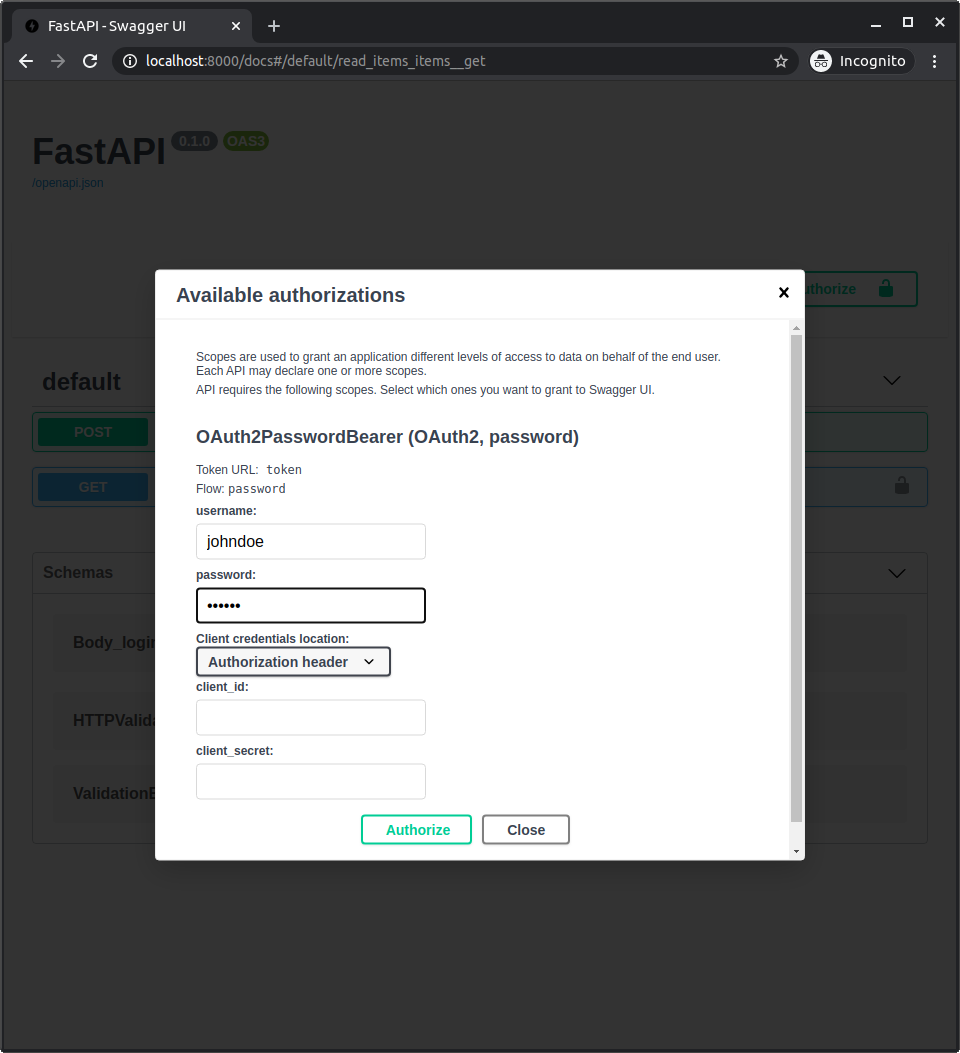
在系统中进行身份认证后,你将看到: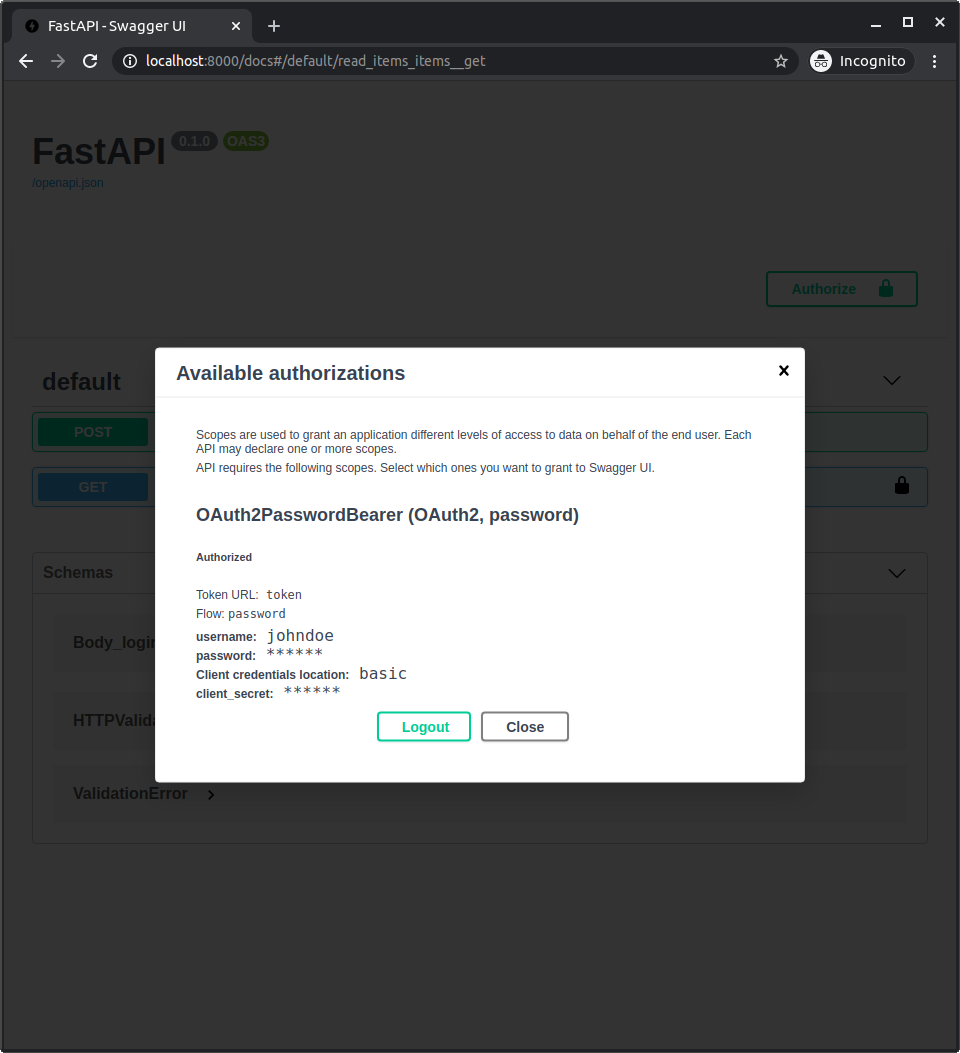
获取本人的用户数据
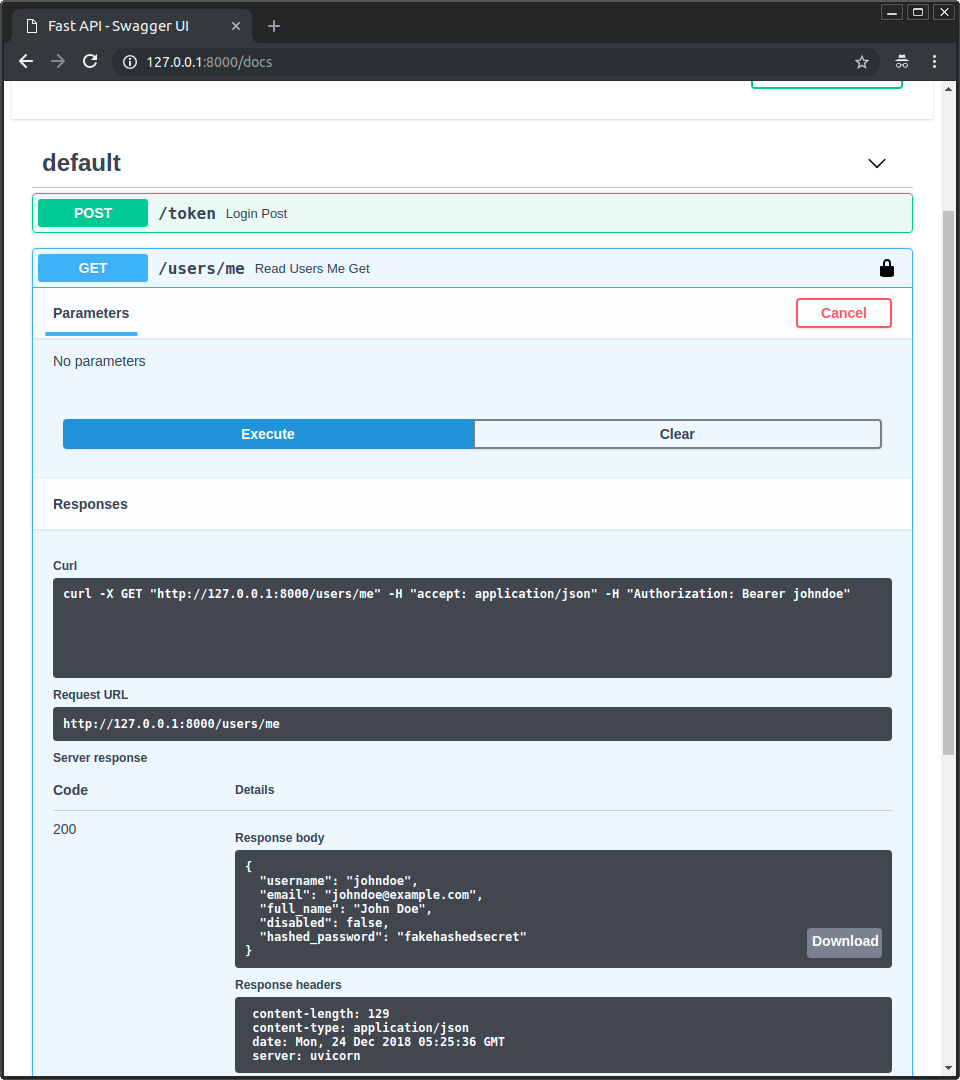
现在执行 /users/me 路径的 GET 操作。
你将获得你的用户数据,如:
{
  "username": "johndoe",
  "email": "johndoe@example.com",
  "full_name": "John Doe",
  "disabled": false,
  "hashed_password": "fakehashedsecret"
}
如果你点击锁定图标并注销,然后再次尝试同一操作,则会得到 HTTP 401 错误:
{
  "detail": "Not authenticated"
}
未启用的用户
现在尝试使用未启用的用户,并通过以下方式进行身份认证:
用户名:alice
密码:secret2
然后尝试执行 /users/me 路径的 GET 操作。
你将得到一个「未启用的用户」错误,如:
{
  "detail": "Inactive user"
}
总结
现在你掌握了为你的 API 实现一个基于 username 和 password 的完整安全系统的工具。
使用这些工具,你可以使安全系统与任何数据库以及任何用户或数据模型兼容。
唯一缺少的细节是它实际上还并不「安全」。
在下一章中,你将看到如何使用一个安全的哈希密码库和 JWT 令牌。

若有收获,就点个赞吧
0 人点赞


