FastAPI 默认会使用 JSONResponse 返回响应。
你可以通过直接返回 Response 来重载它,参见 直接返回响应。
但如果你直接返回 Response,返回数据不会自动转换,也不会自动生成文档(例如,在 HTTP 头 Content-Type 中包含特定的「媒体类型」作为生成的 OpenAPI 的一部分)。
你还可以在 路径操作装饰器 中声明你想用的 Response。
你从 路径操作函数 中返回的内容将被放在该 Response 中。
并且如果该 Response 有一个 JSON 媒体类型(application/json),比如使用 JSONResponse 或者 UJSONResponse 的时候,返回的数据将使用你在路径操作装饰器中声明的任何 Pydantic 的 response_model 自动转换(和过滤)。
:::info
说明
如果你使用不带有任何媒体类型的响应类,FastAPI 认为你的响应没有任何内容,所以不会在生成的OpenAPI文档中记录响应格式。
:::
使用 ORJSONResponse
例如,如果你需要压榨性能,你可以安装并使用 orjson 并将响应设置为 ORJSONResponse。
导入你想要使用的 Response 类(子类)然后在 路径操作装饰器 中声明它。
from fastapi import FastAPIfrom fastapi.responses import ORJSONResponseapp = FastAPI()@app.get("/items/", response_class=ORJSONResponse)async def read_items():return [{"item_id": "Foo"}]
:::info
提示
参数 response_class 也会用来定义响应的「媒体类型」。
:::
在这个例子中,HTTP 头的 Content-Type 会被设置成 application/json。
并且在 OpenAPI 文档中也会这样记录。
:::info
小贴士ORJSONResponse 目前只在 FastAPI 中可用,而在 Starlette 中不可用。
:::
HTML 响应
使用 HTMLResponse 来从 FastAPI 中直接返回一个 HTML 响应。
- 导入
HTMLResponse。 - 将
HTMLResponse作为你的 路径操作 的response_class参数传入。from fastapi import FastAPIfrom fastapi.responses import HTMLResponseapp = FastAPI()@app.get("/items/", response_class=HTMLResponse)async def read_items():return """<html><head><title>Some HTML in here</title></head><body><h1>Look ma! HTML!</h1></body></html>"""
:::info 提示
参数response_class也会用来定义响应的「媒体类型」。
在这个例子中,HTTP 头的Content-Type会被设置成text/html。
并且在 OpenAPI 文档中也会这样记录。 :::
返回一个
正如你在 直接返回响应 中了解到的,你也可以通过直接返回响应在 路径操作 中直接重载响应。Response
和上面一样的例子,返回一个HTMLResponse看起来可能是这样:from fastapi import FastAPIfrom fastapi.responses import HTMLResponseapp = FastAPI()@app.get("/items/")async def read_items():html_content = """<html><head><title>Some HTML in here</title></head><body><h1>Look ma! HTML!</h1></body></html>"""return HTMLResponse(content=html_content, status_code=200)
:::warning 警告
路径操作函数 直接返回的Response不会被 OpenAPI 的文档记录(比如,Content-Type不会被文档记录),并且在自动化交互文档中也是不可见的。 :::
:::info 提示
当然,实际的Content-Type头,状态码等等,将来自于你返回的Response对象。 :::OpenAPI 中的文档和重载
如果你想要在函数内重载响应,但是同时在 OpenAPI 中文档化「媒体类型」,你可以使用Responseresponse_class参数并返回一个Response对象。
接着response_class参数只会被用来文档化 OpenAPI 的 路径操作,你的Response用来返回响应。直接返回
比如像这样:HTMLResponse
在这个例子中,函数from fastapi import FastAPIfrom fastapi.responses import HTMLResponseapp = FastAPI()def generate_html_response():html_content = """<html><head><title>Some HTML in here</title></head><body><h1>Look ma! HTML!</h1></body></html>"""return HTMLResponse(content=html_content, status_code=200)@app.get("/items/", response_class=HTMLResponse)async def read_items():return generate_html_response()
generate_html_response()已经生成并返回Response对象而不是在str中返回 HTML。
通过返回函数generate_html_response()的调用结果,你已经返回一个重载 FastAPI 默认行为的Response对象,
但如果你在response_class中也传入了HTMLResponse,FastAPI 会知道如何在 OpenAPI 和交互式文档中使用text/html将其文档化为 HTML。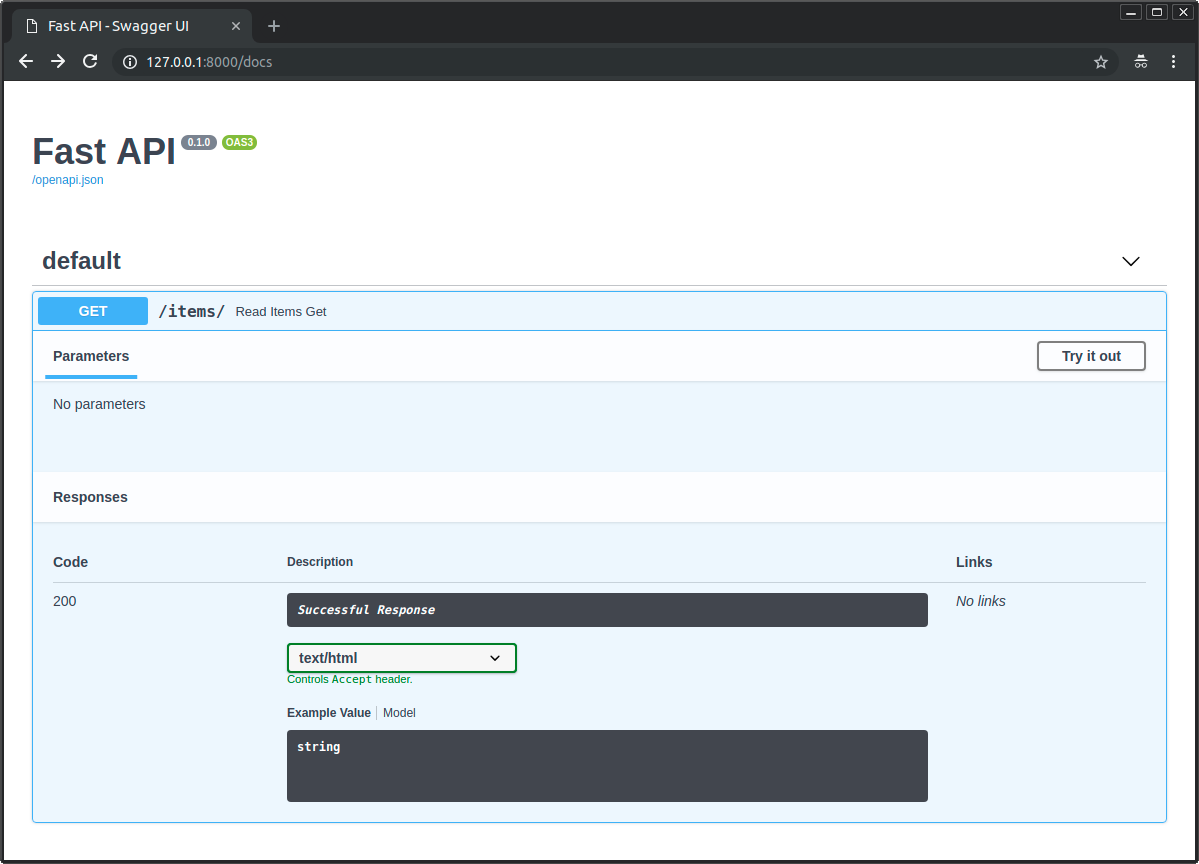
可用响应
这里有一些可用的响应。
要记得你可以使用Response来返回任何其他东西,甚至创建一个自定义的子类。
:::info
技术细节
你也可以使用 from starlette.responses import HTMLResponse。
FastAPI 提供了同 fastapi.responses 相同的 starlette.responses 只是为了方便开发者。但大多数可用的响应都直接来自 Starlette。**
:::
Response
其他全部的响应都继承自主类 Response。
你可以直接返回它。Response 类接受如下参数:
content- 一个str或者bytes。status_code- 一个int类型的 HTTP 状态码。headers- 一个由字符串组成的dict。media_type- 一个给出媒体类型的str,比如"text/html"。
FastAPI(实际上是 Starlette)将自动包含 Content-Length 的头。它还将包含一个基于 media_type 的 Content-Type 头,并为文本类型附加一个字符集。
from fastapi import FastAPI, Responseapp = FastAPI()@app.get("/legacy/")def get_legacy_data():data = """<?xml version="1.0"?><shampoo><Header>Apply shampoo here.</Header><Body>You'll have to use soap here.</Body></shampoo>"""return Response(content=data, media_type="application/xml")
HTMLResponse
PlainTextResponse
接受文本或字节并返回纯文本响应。
from fastapi import FastAPIfrom fastapi.responses import PlainTextResponseapp = FastAPI()@app.get("/", response_class=PlainTextResponse)async def main():return "Hello World"
JSONResponse
接受数据并返回一个 application/json 编码的响应。
如上文所述,这是 FastAPI 中使用的默认响应。
ORJSONResponse
如上文所述,ORJSONResponse 是一个使用 orjson 的快速的可选 JSON 响应。
UJSONResponse
UJSONResponse 是一个使用 ujson 的可选 JSON 响应。
:::warning
**
在处理某些边缘情况时,ujson 不如 Python 的内置实现那么谨慎。
:::
from fastapi import FastAPIfrom fastapi.responses import UJSONResponseapp = FastAPI()@app.get("/items/", response_class=UJSONResponse)async def read_items():return [{"item_id": "Foo"}]
:::info
小贴士ORJSONResponse 可能是一个更快的选择。
:::
RedirectResponse
返回 HTTP 重定向。默认情况下使用 307 状态代码(临时重定向)。
from fastapi import FastAPIfrom fastapi.responses import RedirectResponseapp = FastAPI()@app.get("/typer")async def read_typer():return RedirectResponse("https://typer.tiangolo.com")
StreamingResponse
采用异步生成器或普通生成器/迭代器,然后流式传输响应主体。
from fastapi import FastAPIfrom fastapi.responses import StreamingResponseapp = FastAPI()async def fake_video_streamer():for i in range(10):yield b"some fake video bytes"@app.get("/")async def main():return StreamingResponse(fake_video_streamer())
对类似文件的对象使用 StreamingResponse
如果您有类似文件的对象(例如,由 open() 返回的对象),则可以在 StreamingResponse 中将其返回。
包括许多与云存储,视频处理等交互的库。
from fastapi import FastAPIfrom fastapi.responses import StreamingResponsesome_file_path = "large-video-file.mp4"app = FastAPI()@app.get("/")def main():file_like = open(some_file_path, mode="rb")return StreamingResponse(file_like, media_type="video/mp4")
:::info
小贴士
注意在这里,因为我们使用的是不支持 async 和 await 的标准 open(),我们使用普通的 def 声明了路径操作。
:::
FileResponse
异步传输文件作为响应。
与其他响应类型相比,接受不同的参数集进行实例化:
path- 要流式传输的文件的文件路径。headers- 任何自定义响应头,传入字典类型。media_type- 给出媒体类型的字符串。如果未设置,则文件名或路径将用于推断媒体类型。filename- 如果给出,它将包含在响应的Content-Disposition中。
文件响应将包含适当的 Content-Length,Last-Modified 和 ETag 的响应头。
from fastapi import FastAPIfrom fastapi.responses import FileResponsesome_file_path = "large-video-file.mp4"app = FastAPI()@app.get("/")async def main():return FileResponse(some_file_path)
额外文档
您还可以使用 response 在 OpenAPI 中声明媒体类型和许多其他详细信息:OpenAPI 中的额外文档。

若有收获,就点个赞吧
0 人点赞


