:::warning
警告
这是一个颇为高级的话题
如果刚刚接触fastapi,你可能不需要了解它
:::
您可以声明额外的响应,包括额外的状态代码、媒体类型和描述等。
这些额外的响应将被包含在OpenAPI模式中,因此它们也将出现在API文档中。
但是对于那些额外的响应,你必须确保你直接返回一个类似JSONResponse的响应,并附上你的状态码和内容。
附带model的额外响应
你可以通过路径操作装饰器传递一个参数responses
他接收一个dict,key是每个响应的状态码,比如200,value是另一个dict,包含每个响应的信息。
每一个响应dict都可以有一个key model,包含一个Pydantic模型,就像response_model
FastAPI将采用该模型,生成JSON Schema,并将其包含在OpenAPI的正确位置。
例如,要使用状态代码404和Pydantic模型Message声明一个响应,可以编写:
from fastapi import FastAPIfrom fastapi.responses import JSONResponsefrom pydantic import BaseModelclass Item(BaseModel):id: strvalue: strclass Message(BaseModel):message: strapp = FastAPI()@app.get("/items/{item_id}", response_model=Item, responses={404: {"model": Message}})async def read_item(item_id: str):if item_id == "foo":return {"id": "foo", "value": "there goes my hero"}else:return JSONResponse(status_code=404, content={"message": "Item not found"})
:::info
注释
请记住,您必须直接返回JSONResponse
:::
:::info
Info
model key不是FastAPI的一部分
FastAPI将从那里获取Pydantic模型,生成JSON,并将其放置在正确的位置
正确的位置:
- 在key
content中,其值为另一个JSON对象(dict),该对象包含:- 具有媒体类型(例如application/json)的键,其中包含另一个json对象作为值,该对象包含:
- 一个key
chema,它的值是模型中的JSON - FastAPI在OpenAPI的另一个地方添加了对全局JSON模式的引用,而不是直接包含它。这样,其他应用程序和客户机就可以直接使用这些JSON模式,提供更好的代码生成工具等等。
:::
OpenAPI中为此路径操作生成的响应将是:{"responses": {"404": {"description": "Additional Response","content": {"application/json": {"schema": {"$ref": "#/components/schemas/Message"}}}},"200": {"description": "Successful Response","content": {"application/json": {"schema": {"$ref": "#/components/schemas/Item"}}}},"422": {"description": "Validation Error","content": {"application/json": {"schema": {"$ref": "#/components/schemas/HTTPValidationError"}}}}}}
这些模式被引用到OpenAPI模式内部的另一个地方。{"components": {"schemas": {"Message": {"title": "Message","required": ["message"],"type": "object","properties": {"message": {"title": "Message","type": "string"}}},"Item": {"title": "Item","required": ["id","value"],"type": "object","properties": {"id": {"title": "Id","type": "string"},"value": {"title": "Value","type": "string"}}},"ValidationError": {"title": "ValidationError","required": ["loc","msg","type"],"type": "object","properties": {"loc": {"title": "Location","type": "array","items": {"type": "string"}},"msg": {"title": "Message","type": "string"},"type": {"title": "Error Type","type": "string"}}},"HTTPValidationError": {"title": "HTTPValidationError","type": "object","properties": {"detail": {"title": "Detail","type": "array","items": {"$ref": "#/components/schemas/ValidationError"}}}}}}}
- 一个key
- 具有媒体类型(例如application/json)的键,其中包含另一个json对象作为值,该对象包含:
主响应额外的媒体类型
可以使用相同的response 参数为相同主response添加不同的媒体类型
例如,添加了一个额外的image/png媒体类型,声明路径操作能返回一个JSON对象(使用media类型 application/json)或一个PNG image:
from typing import Optionalfrom fastapi import FastAPIfrom fastapi.responses import FileResponsefrom pydantic import BaseModelclass Item(BaseModel):id: strvalue: strapp = FastAPI()@app.get("/items/{item_id}",response_model=Item,responses={200: {"content": {"image/png": {}},"description": "Return the JSON item or an image.",}},)async def read_item(item_id: str, img: Optional[bool] = None):if img:return FileResponse("image.png", media_type="image/png")else:return {"id": "foo", "value": "there goes my hero"}
:::info
注意
必须使用FileResponse 返回image
:::
:::info
info
除非在responses 参数中明确指定了一个不同的媒体类型,否则FastAPI将认为响应与主响应有一个相同的媒体类型(默认 application/json)
但是如果指定了一个自定义的None响应类作为媒体类型,FastAPI将使用application/json处理任何具有关联模型的额外响应
:::
组合信息
也可以组合多个地方的响应信息,包括response_model, status_code, 和 responses 参数
可以声明一个response_model,使用默认状态码200(或自定义一个),在OpenAPI模式中为相同的responses响应声明一个额外的信息
FastAPI将保留响应中的附加信息,并将其与模型中的JSON模式相结合。
例如,您可以声明一个状态代码为404的响应,该响应使用Pydantic模型并具有自定义描述。
一个200状态码的相应,该响应使用response_model,一个自定义的例子:
from fastapi import FastAPIfrom fastapi.responses import JSONResponsefrom pydantic import BaseModelclass Item(BaseModel):id: strvalue: strclass Message(BaseModel):message: strapp = FastAPI()@app.get("/items/{item_id}",response_model=Item,responses={404: {"model": Message, "description": "The item was not found"},200: {"description": "Item requested by ID","content": {"application/json": {"example": {"id": "bar", "value": "The bar tenders"}}},},},)async def read_item(item_id: str):if item_id == "foo":return {"id": "foo", "value": "there goes my hero"}else:return JSONResponse(status_code=404, content={"message": "Item not found"})
它将被组合并包含在OpenAPI,并且显示在API docs: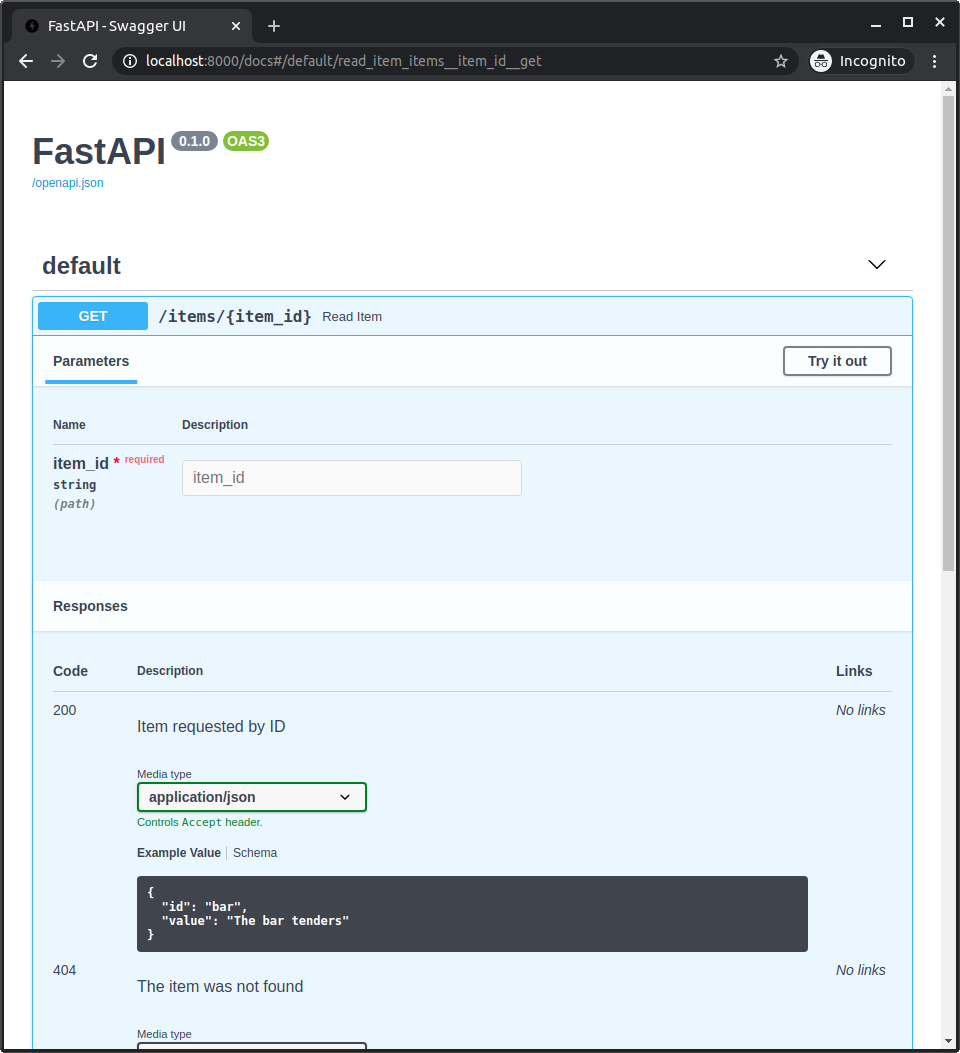
组合预定义响应和自定义响应
您可能希望有一些应用于许多路径操作的预定义响应,但是您希望将它们与每个路径操作所需的自定义响应结合起来。
对于这些情况,可以使用Python字典“解包”**dict_to_unpack:
old_dict = {"old key": "old value","second old key": "second old value",}new_dict = {**old_dict, "new key": "new value"}
new_dict ,将包含old_dict 所有的键值对加上新的键值对:
{"old key": "old value","second old key": "second old value","new key": "new value",}
您可以使用该技术在路径操作中重用一些预定义的响应,并将它们与其他自定义响应组合起来
例如:
from typing import Optionalfrom fastapi import FastAPIfrom fastapi.responses import FileResponsefrom pydantic import BaseModelclass Item(BaseModel):id: strvalue: strresponses = {404: {"description": "Item not found"},302: {"description": "The item was moved"},403: {"description": "Not enough privileges"},}app = FastAPI()@app.get("/items/{item_id}",response_model=Item,responses={**responses, 200: {"content": {"image/png": {}}}},)async def read_item(item_id: str, img: Optional[bool] = None):if img:return FileResponse("image.png", media_type="image/png")else:return {"id": "foo", "value": "there goes my hero"}
关于OpenAPI 响应的更多信息
要查看响应中可以包含哪些内容,可以查看OpenAPI规范中的以下部分:
- OpenAPI Responses Object, 它包括
Response Object. - OpenAPI Response Object, 您可以在responses参数内的每个响应中直接包含任何内容。包括描述、头、内容(其中声明了不同的媒体类型和JSON模式)和链接

若有收获,就点个赞吧
0 人点赞


