- 视频课):">0、OpenCV基本功能介绍(视频课):
- 1、dlib算法的简介
- 2 dlib算法的安装
- 讲解视频)">3 dlib 算法的各个功能测试(讲解视频)
本节课程主要内容如下:
(1)对于Opencv常用的十几种函数的基础理论以及函数代码学习;
(2)在Conda环境下安装Dlib算法库;
(3)使用Dlib人脸检测、人脸5点关键点定位、人脸68点关键点定位,对人脸图片进行操作;
(4)使用Dlib人脸关键点算法,对视频进行操作;
(5)完成Dlib人脸检测并抠取小图,显示的打卡作业;
0、OpenCV基本功能介绍(视频课):
(1)cv2.imread 读取图片
(2)cv2.resize 图片缩放
(3)cv2.cvtColor 灰度化【待补充,灰度化公式】
(4)cv2.threshold 阈值化【待补充参数说明,给定两个值分别是阈值及超过阈值的像素值的输出结果。注意255是白色】
(5)cv2.bitwise_not 图像取反
(6)cv2.add 按位加【两张图像大小要一样,按坐标对像素进行求和,并将大于255的像素值改为255】
(7)抠图操作:numpy数据的切片操作
(8)cv2.rectangle 绘制方框【待补充,分别需要给出框框的左上和右下角的坐标位置】
(9)cv2.Text 绘制文字【待补充,参数中的坐标指的是文本框的左上角】
(10)cv2.circle 画圆【待补充,参数中给定的是圆的中心点及半径,最后一个参数值得是线条粗细,当它为-1时指画出实心圆】
(11)cv2.VideoCapture 读取视频【参见上一节课程说明】
1、dlib算法的简介
1.1 dlib库的介绍:
dlib库 其实包含各种工具,但是本次课程主要使用的是图像处理板块。更进一步,本次主要用到Dlib中的人脸检测、人脸关键点算法。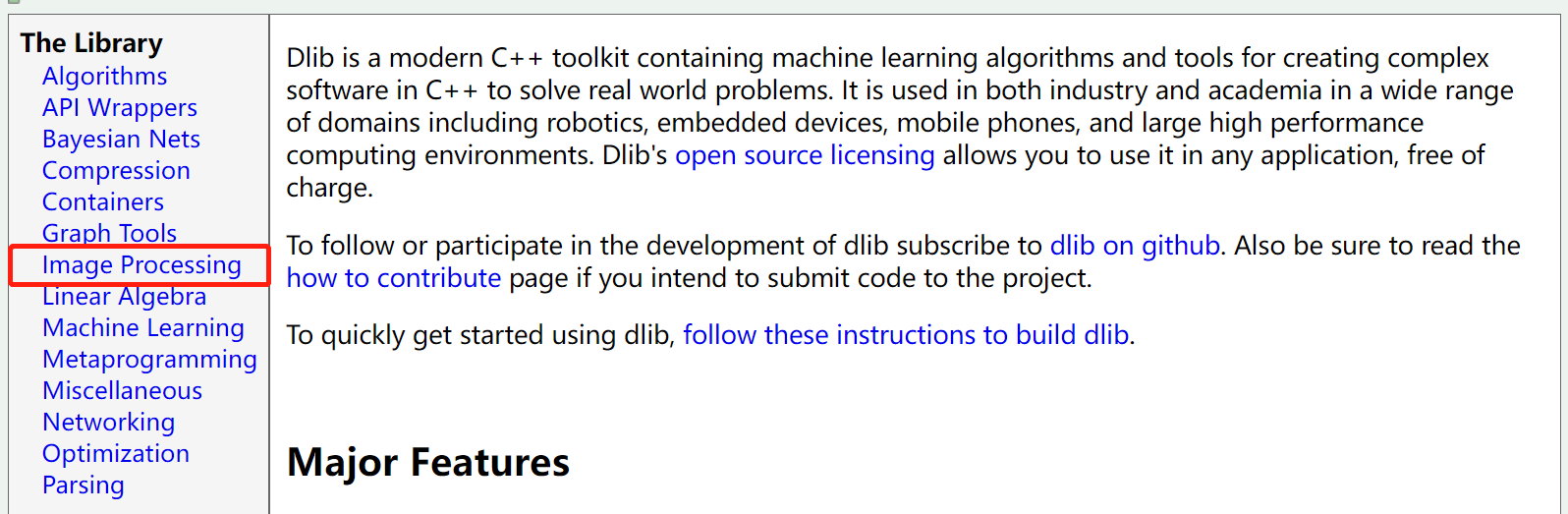
1.2 人工智能行业的训练和推理过程(视频课)
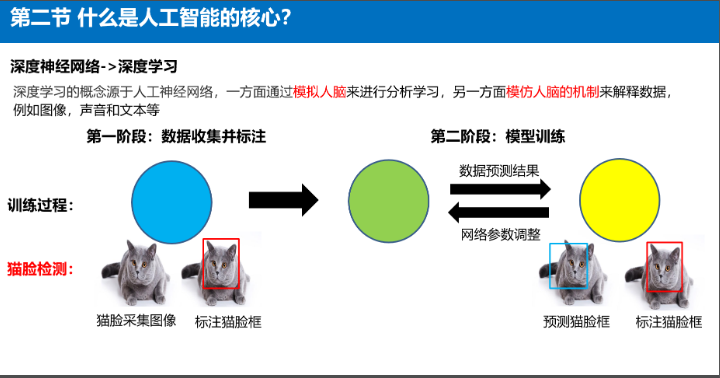
1.2.1训练
① 数据收集与标注
② 模型训练
PPT中红色框是标注的gt,蓝色框是模型预测的Bbox。二者之间的差距可以被损失函数去衡量定义 ,再通过梯度下降等算法,减少二者间的差距,降低损失函数值
1.2.2 测试
图像在前处理后,被送入网络。网络反馈一个相应的预测结果。
1.3 dlib算法案例

左图是图像分类;右图是人脸识别模型,即对人脸图像进行特征提取用于比对。人脸识别介绍视频课。
2 dlib算法的安装
在dabai的conda环境中键入conda install dlib即可进行安装。进入python环境,用import dlib测试是否安装成功。
① 第一次尝试conda install dlib
遇到的问题:PackageNotFoundError: Packages missing in current channels
C:\Users\Qian0733>conda install dlibFetching package metadata .............PackageNotFoundError: Packages missing in current channels:- dlibWe have searched for the packages in the following channels:- https://repo.continuum.io/pkgs/main/win-64- https://repo.continuum.io/pkgs/main/noarch- https://repo.continuum.io/pkgs/free/win-64- https://repo.continuum.io/pkgs/free/noarch- https://repo.continuum.io/pkgs/r/win-64- https://repo.continuum.io/pkgs/r/noarch- https://repo.continuum.io/pkgs/pro/win-64- https://repo.continuum.io/pkgs/pro/noarch- https://repo.continuum.io/pkgs/msys2/win-64- https://repo.continuum.io/pkgs/msys2/noarch
② 第二次尝试pip install -i [https://pypi.doubanio.com/simple](https://pypi.doubanio.com/simple) dlib
遇到的问题:Building wheel for dlib (setup.py) … error
前面conda报错说没有找到对应的包,那么咱们就换条路。大白老师不还教过ongoing匹配安装packages吗,所以自信的键入命令pip install -i [https://pypi.doubanio.com/simple](https://pypi.doubanio.com/simple) dlib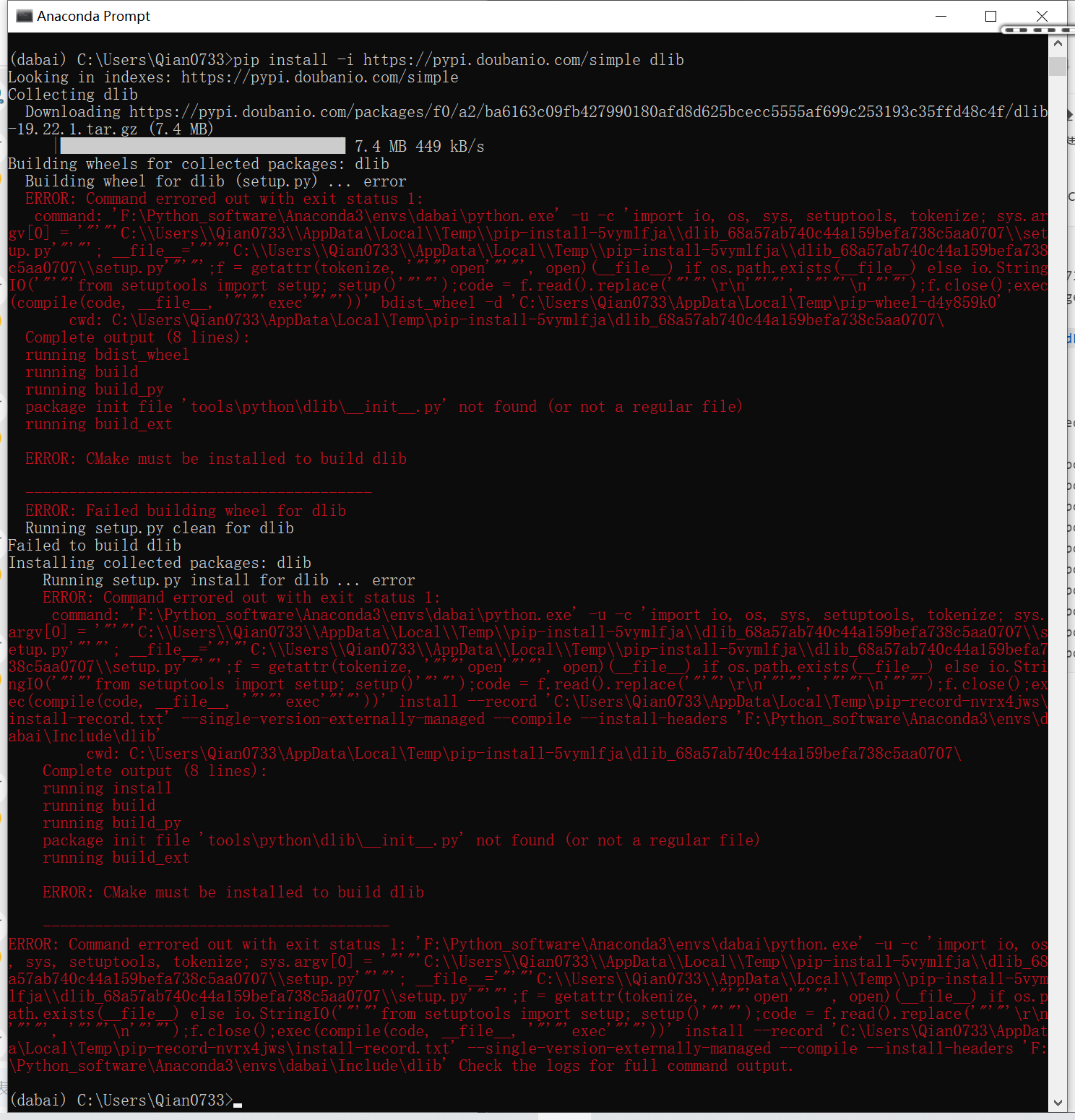
③ 第三次尝试:在百度中搜索第一次尝试的报错信息,发现了一种通过search指令查找我们想要安装的包方法。
遇到的问题:如图 ,键入conda,发现确实没有-t选项。search倒是有,但是又没有show。算了我选择放弃。这些缺失的命令不清楚和系统或者conda版本是否有关,我用的是Windows10。
(dabai) C:\Users\Qian0733>anaconda search -t conda dlib'anaconda' 不是内部或外部命令,也不是可运行的程序或批处理文件。(dabai) C:\Users\Qian0733>conda search -t conda dlibusage: conda [-h] [-V] command ...conda: error: unrecognized arguments: -t dlib(dabai) C:\Users\Qian0733>search -t conda dlib'search' 不是内部或外部命令,也不是可运行的程序或批处理文件。(dabai) C:\Users\Qian0733>conda search dlibFetching package metadata .............r-dlib 1.0.3 r36h796a38f_0 defaults(dabai) C:\Users\Qian0733>conda show dlibusage: conda [-h] [-V] command ...conda: error: argument command: invalid choice: 'F:\\Python_software\\Anaconda3\\Scripts\\conda' (choose from 'info', 'help', 'list', 'search', 'create', 'install', 'update', 'upgrade', 'remove', 'uninstall', 'config', 'clean', 'package')
(dabai) C:\Users\Qian0733>condausage: conda [-h] [-V] command ...conda is a tool for managing and deploying applications, environments and packages.Options:positional arguments:commandinfo Display information about current conda install.help Displays a list of available conda commands and their helpstrings.list List linked packages in a conda environment.search Search for packages and display their information. The inputis a Python regular expression. To perform a search with asearch string that starts with a -, separate the search fromthe options with --, like 'conda search -- -h'. A * in theresults means that package is installed in the currentenvironment. A . means that package is not installed but iscached in the pkgs directory.create Create a new conda environment from a list of specifiedpackages.install Installs a list of packages into a specified condaenvironment.update Updates conda packages to the latest compatible version. Thiscommand accepts a list of package names and updates them tothe latest versions that are compatible with all otherpackages in the environment. Conda attempts to install thenewest versions of the requested packages. To accomplishthis, it may update some packages that are already installed,or install additional packages. To prevent existing packagesfrom updating, use the --no-update-deps option. This mayforce conda to install older versions of the requestedpackages, and it does not prevent additional dependencypackages from being installed. If you wish to skip dependencychecking altogether, use the '--force' option. This mayresult in an environment with incompatible packages, so thisoption must be used with great caution.upgrade Alias for conda update. See conda update --help.remove Remove a list of packages from a specified conda environment.uninstall Alias for conda remove. See conda remove --help.config Modify configuration values in .condarc. This is modeledafter the git config command. Writes to the user .condarcfile (C:\Users\Qian0733\.condarc) by default.clean Remove unused packages and caches.package Low-level conda package utility. (EXPERIMENTAL)optional arguments:-h, --help Show this help message and exit.-V, --version Show the conda version number and exit.other commands, such as "conda build", are available when additional condapackages (e.g. conda-build) are installed
④ 第四次尝试:先安装cmake,再安装dlib
到Stack Overflow网站上找到了一个同样问题的解决方法,先安装cmake,再安装dlib。
First of all check your python version. Upgrade or downgrade python accordingly .install cmake :- pip install cmakeinstall dlib :- pip install dlibfor anaconda :-install cmake :-conda install -c conda-forge cmakeinstall dlib :- conda install -c conda-forge dlib
按照上述教程,成功安装了dlib。现在可以继续按大白老师的教程学习了。
(dabai) C:\Users\Qian0733>conda install cmakeFetching package metadata .............Solving package specifications: .Package plan for installation in environment F:\Python_software\Anaconda3\envs\dabai:The following NEW packages will be INSTALLED:bzip2: 1.0.8-he774522_0 defaultscmake: 3.19.6-h9ad04ae_0 defaultslibuv: 1.40.0-he774522_0 defaultslz4-c: 1.9.3-h2bbff1b_1 defaultsxz: 5.2.5-h62dcd97_0 defaultszlib: 1.2.11-h62dcd97_4 defaultszstd: 1.4.9-h19a0ad4_0 defaultsProceed ([y]/n)? ybzip2-1.0.8-he 100% |###############################| Time: 0:00:00 661.35 kB/slibuv-1.40.0-h 100% |###############################| Time: 0:00:01 333.41 kB/slz4-c-1.9.3-h2 100% |###############################| Time: 0:00:00 520.91 kB/sxz-5.2.5-h62dc 100% |###############################| Time: 0:00:00 541.12 kB/szlib-1.2.11-h6 100% |###############################| Time: 0:00:00 405.11 kB/szstd-1.4.9-h19 100% |###############################| Time: 0:00:01 790.56 kB/scmake-3.19.6-h 100% |###############################| Time: 0:00:07 1.41 MB/s
(dabai) C:\Users\Qian0733>conda install -c conda-forge dlibFetching package metadata ...............Solving package specifications: .Package plan for installation in environment F:\Python_software\Anaconda3\envs\dabai:The following NEW packages will be INSTALLED:dlib: 19.22.0-py38h085cf52_0 conda-forgeintel-openmp: 2021.4.0-h57928b3_3556 conda-forgejpeg: 9d-h8ffe710_0 conda-forgelibblas: 3.9.0-12_win64_mkl conda-forgelibcblas: 3.9.0-12_win64_mkl conda-forgeliblapack: 3.9.0-12_win64_mkl conda-forgelibpng: 1.6.37-h1d00b33_2 conda-forgemkl: 2021.4.0-h0e2418a_729 conda-forgenumpy: 1.21.4-py38h089cfbf_0 conda-forgepython_abi: 3.8-2_cp38 conda-forgetbb: 2021.4.0-h2d74725_1 conda-forgeProceed ([y]/n)? yintel-openmp-2 100% |###############################| Time: 0:00:02 1.55 MB/sjpeg-9d-h8ffe7 100% |###############################| Time: 0:00:00 1.59 MB/stbb-2021.4.0-h 100% |###############################| Time: 0:00:00 8.97 MB/slibpng-1.6.37- 100% |###############################| Time: 0:00:00 1.78 MB/smkl-2021.4.0-h 100% |###############################| Time: 0:00:37 5.15 MB/slibblas-3.9.0- 100% |###############################| Time: 0:00:00 5.00 MB/spython_abi-3.8 100% |###############################| Time: 0:00:00 1.50 MB/slibcblas-3.9.0 100% |###############################| Time: 0:00:00 5.31 MB/sliblapack-3.9. 100% |###############################| Time: 0:00:00 5.25 MB/snumpy-1.21.4-p 100% |###############################| Time: 0:00:01 5.07 MB/sdlib-19.22.0-p 100% |###############################| Time: 0:00:01 2.56 MB/s
⑤ 学习群里的小伙伴用添加源的方式也成功安装了dlib,添加源的命令为conda config --add channels conda-forge。其实和方法死很像,但是更简洁一些【推荐】。
3 dlib 算法的各个功能测试(讲解视频)
3.1 人脸检测
detector = dlib.get_frontal_face_detector() # dlib自带faceRects = detector(img) # faceRects是二维“数组”对象,它的shape为(n,2)。其中n指图像上的人数;2值得是两个坐标点对(分别代表左上和右下)
3.2 人脸5关键点定位(在人脸检测的基础上进行)
dlib_landmark = dlib.shape_predictor("shape_predictor_5_face_landmarks.dat")landmarks = dlib_landmark(img, box_info) # box_info是人脸检测结果,指的是人脸区域位置信息;landmarks是一个结构体,没办法直接看内部的数据。# 但是landmarks的part属性中存放了各个特征点的坐标信息,每个坐标点对通过索引i获取。# 可以通过for循环将特征点可视化,并进行标注
3.3 人脸68个关键点定位【同上,只是改了加载到检测器中的模型】
dlib_landmark = dlib.shape_predictor("shape_predictor_68_face_landmarks.dat")landmarks = dlib_landmark(img, box_info)
3.4 dlib算法的视频人脸关键点检测
主要逻辑:加载人脸检测模型——加载人脸特征点模型——读取视频——跳帧判断——人脸检测——针对每个人脸进行特征点定位——特征点可视化

若有收获,就点个赞吧
0 人点赞


