前言
尝试使用SpringBoot整合Quartz实现定时任务持久化到数据库,并配置quartz的集群功能。
定时任务实现方式
首先介绍除了Quartz外实现定时任务的简单方式:
- Timer。
- ScheduledThreadPoolExecutor。
-
实现方式1(Timer)
```java public class TimerDemo {
public static void main(String[] args) {
Timer timer = new Timer();timer.schedule(new TimerTask() {@Overridepublic void run() {System.out.println("TimerTask1 run" + LocalDateTime.now().format(DateTimeFormatter.ofPattern("HH:mm:ss")));}},1000,5000); // 延时1s,之后每隔5s运行一次
}
}
有两点问题需要注意:1. scheduleAtFixedRate和schedule的区别:scheduleAtFixedRate会尽量减少漏掉调度的情况,如果前一次执行时间过长,导致一个或几个任务漏掉了,那么会补回来,而schedule过去的不会补,直接加上间隔时间执行下一次任务。1. 同一个Timer下添加多个TimerTask,如果其中一个没有捕获抛出的异常,则全部任务都会终止运行。但是多个Timer是互不影响。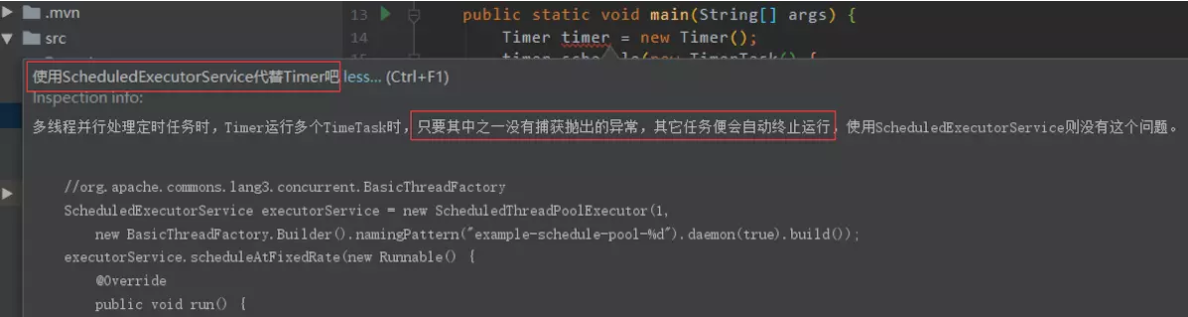<br />会提示使用ScheduledThreadPoolExecutor代替Timer方式。<a name="NJA2P"></a>## 实现方式2(ScheduledThreadPoolExecutor)```javapublic class SchedulerDemo {public static void main(String[] args) {ScheduledExecutorService executorService = new ScheduledThreadPoolExecutor(5);executorService.scheduleWithFixedDelay(new Runnable() {@Overridepublic void run() {String now = LocalDateTime.now().format(DateTimeFormatter.ofPattern("HH:mm:ss"));System.out.println("ScheduledThreadPoolExecutor1 run:"+now);}},1,2,TimeUnit.SECONDS);}}
scheduleWithFixedDelay跟schedule类似,而scheduleAtFixedRate与scheduleAtFixedRate一样会尽量减少漏掉调度的情况。
实现方式3(SpringBoot::@Scheduled)
- 启动类添加@EnableScheduling。
定时任务方法上添加@Scheduled。 ```java @Component public class springScheduledDemo {
@Scheduled(cron = “1/5 ?”) public void testScheduled(){
System.out.println("springScheduled run:" + LocalDateTime.now().format(DateTimeFormatter.ofPattern("HH:mm:ss")));
}
}
这里的cron表达式我们可以参考:[https://www.jianshu.com/p/e9ce1a7e1ed1](https://www.jianshu.com/p/e9ce1a7e1ed1)。但是Spring的@Scheduled只支持6位,年份是不支持的,带年份的7位格式会报错:Cron expression must consist of 6 fields (found 7 in "1/5 * * * * ? 2018")。<a name="INWFd"></a># Quartz定时任务框架<a name="mmNIU"></a>## 1. 简单使用QuartzQuartz API关键接口:- **Scheduler**:与调度程序交互的主要API。- **Job**:由希望用调度程序执行的组件实现的接口。- **JobDetail**:用于定义作业的实例。- **Trigger(即触发器)**:定义执行给定作业的计划的组件。- **JobBuilder**:用于定义/构建JobDetail实例,用于定义作业的实例。- **TriggerBuilder**:用于定义/构建触发器实例。1. 添加依赖。<br />```xml<dependency><groupId>org.quartz-scheduler</groupId><artifactId>quartz</artifactId><version>2.3.0</version></dependency><dependency><groupId>org.quartz-scheduler</groupId><artifactId>quartz-jobs</artifactId><version>2.3.0</version></dependency>
实现Job接口并且在execute方法中实现自己的业务逻辑。
```java public class HelloworldJob implements Job {@Override public void execute(JobExecutionContext jobExecutionContext) throws JobExecutionException {
System.out.println("Hello world!:" + jobExecutionContext.getJobDetail().getKey());
}
}
3. 创建JobDetail实例并定义Trigger注册到scheduler,启动scheduler开启调度。<br />```javapublic class QuartzDemo {public static void main(String[] args) throws Exception {SchedulerFactory schedulerFactory = new StdSchedulerFactory();Scheduler scheduler = schedulerFactory.getScheduler();// 启动schedulerscheduler.start();// 创建HelloworldJob的JobDetail实例,并设置name/groupJobDetail jobDetail = JobBuilder.newJob(HelloworldJob.class).withIdentity("myJob","myJobGroup1")// JobDataMap可以给任务传递参数.usingJobData("job_param","job_param1").build();// 创建Trigger触发器设置使用cronSchedule方式调度Trigger trigger = TriggerBuilder.newTrigger().withIdentity("myTrigger","myTriggerGroup1").usingJobData("job_trigger_param","job_trigger_param1").startNow()//.withSchedule(SimpleScheduleBuilder.simpleSchedule().withIntervalInSeconds(5).repeatForever()).withSchedule(CronScheduleBuilder.cronSchedule("0/5 * * * * ? 2018")).build();// 注册JobDetail实例到scheduler以及使用对应的Trigger触发时机scheduler.scheduleJob(jobDetail,trigger);}}
SimpleTrigger和CronTrigger的区别:SimpleTrigger在具体的时间点执行一次或按指定时间间隔执行多次,CronTrigger按Cron表达式的方式去执行更常用。
2. 配置Quartz的持久化方式
Quartz保存工作数据默认是使用内存的方式,上面的简单例子启动时可以在控制台日志中看到JobStore是RAMJobStore使用内存的模式(默认使用RAMJobStore),然后是not clustered表示不是集群中的节点。
- 持久化则需要配置(JDBCJobStore)。
首先到官网下载Quartz压缩包,解压后在“docs\dbTables”目录下看到很多对应不同数据库的SQL脚本,我这里选择mysql数据库且使用innodb引擎对应是“tablesmysql_innodb.sql”,打开可以看到需要添加11个“QRTZ”开头的表。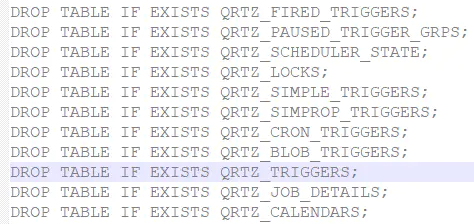
在classpath路径下也就是项目resources根目录下添加quartz.properties配置文件。
org.quartz.scheduler.instanceName = MyScheduler# 开启集群,多个Quartz实例使用同一组数据库表org.quartz.jobStore.isClustered = true# 分布式节点ID自动生成org.quartz.scheduler.instanceId = AUTO# 分布式节点有效性检查时间间隔,单位:毫秒org.quartz.jobStore.clusterCheckinInterval = 10000# 配置线程池线程数量,默认10个org.quartz.threadPool.threadCount = 10org.quartz.jobStore.class = org.quartz.impl.jdbcjobstore.JobStoreTXorg.quartz.jobStore.driverDelegateClass = org.quartz.impl.jdbcjobstore.StdJDBCDelegate# 使用QRTZ_前缀org.quartz.jobStore.tablePrefix = QRTZ_# dataSource名称org.quartz.jobStore.dataSource = myDS# dataSource具体参数配置org.quartz.dataSource.myDS.driver = com.mysql.jdbc.Driverorg.quartz.dataSource.myDS.URL = jdbc:mysql://localhost:3306/testquartz?serverTimezone=UTC&useSSL=false&useUnicode=true&characterEncoding=UTF-8org.quartz.dataSource.myDS.user = rootorg.quartz.dataSource.myDS.password = 7777777org.quartz.dataSource.myDS.maxConnections = 5
默认使用C3P0连接池,添加依赖。
<dependency><groupId>c3p0</groupId><artifactId>c3p0</artifactId><version>0.9.1.2</version></dependency>
修改自定义连接池则需要实现org.quartz.utils.ConnectionProvider接口quartz.properties添加配置
org.quartz.dataSource.myDS(数据源名).connectionProvider.class=XXX(自定义ConnectionProvider全限定名)。启动后可以发现控制台输出信息:java JobStoreTX以及数据库中也添加了相关记录。

3. SpringBoot2.0集成Quartz
添加依赖。
<dependency>
 <groupId>org.springframework.boot</groupId>
 <artifactId>spring-boot-starter-quartz</artifactId>
</dependency>
继承QuartzJobBean并重写executeInternal方法,与之前的实现Job接口类似。
```java public class HiJob extends QuartzJobBean {@Autowired HelloworldService myService; @Override protected void executeInternal(JobExecutionContext jobExecutionContext) throws JobExecutionException {
 myService.printHelloWorld();
 System.out.println("    Hi! :" + jobExecutionContext.getJobDetail().getKey());
}
}
这里HelloworldService打印一条helloworld模拟调用service的场景。

3. 添加配置类。<br />
```kotlin
@Configuration
public class QuartzConfig {

    @Bean
    public JobDetail myJobDetail(){
        JobDetail jobDetail = JobBuilder.newJob(HiJob.class)
                .withIdentity("myJob1","myJobGroup1")
                // JobDataMap可以给任务execute传递参数
                .usingJobData("job_param","job_param1")
                .storeDurably()
                .build();
        return jobDetail;
    }

    @Bean
    public Trigger myTrigger(){
        Trigger trigger = TriggerBuilder.newTrigger()
                .forJob(myJobDetail())
                .withIdentity("myTrigger1","myTriggerGroup1")
                .usingJobData("job_trigger_param","job_trigger_param1")
                .startNow()
                //.withSchedule(SimpleScheduleBuilder.simpleSchedule().withIntervalInSeconds(5).repeatForever())
                .withSchedule(CronScheduleBuilder.cronSchedule("0/5 * * * * ? 2018"))
                .build();
        return trigger;
    }

}
配置文件(application.yml)添加Quartz相关配置。
spring: # 配置数据源 datasource: driver-class-name: com.mysql.jdbc.Driver url: jdbc:mysql://localhost:3306/testquartz?serverTimezone=UTC&useSSL=false&useUnicode=true&characterEncoding=UTF-8 username: root password: password quartz: # 持久化到数据库方式 job-store-type: jdbc initialize-schema: embedded properties: org: quartz: scheduler: instanceName: MyScheduler instanceId: AUTO jobStore: class: org.quartz.impl.jdbcjobstore.JobStoreTX driverDelegateClass: org.quartz.impl.jdbcjobstore.StdJDBCDelegate tablePrefix: QRTZ_ isClustered: true clusterCheckinInterval: 10000 useProperties: false threadPool: class: org.quartz.simpl.SimpleThreadPool threadCount: 10 threadPriority: 5 threadsInheritContextClassLoaderOfInitializingThread: true参考配置(https://docs.spring.io/spring-boot/docs/current-SNAPSHOT/reference/htmlsingle/#boot-features-quartz,截取自springboot文档配置示例):

启动后可以发现使用的是项目统一的数据源:(LocalDataSourceJobStore extends JobStoreCMT)
Quartz使用同一组数据库表作集群只需要配置相同的instanceName实例名称,以及设置“org.quartz.jobStore.isClustered = true”,启动两个节点后关闭其中正在跑任务的节点,另一个节点会自动检测继续运行定时任务(自动切换)。

- 多任务的问题,多个JobDetail使用同一个Trigger报错:“Trigger does not reference given job!”,这样的话估计只能创建多组trigger和JobDetail配对?
scheduler.scheduleJob(jobDetail,trigger);
// 一个Job可以对应多个Trigger,但多个Job绑定一个Trigger报错
scheduler.scheduleJob(jobDetail2,trigger);
参考
博客园:Java并发编程:Timer和TimerTask(转载)
https://www.cnblogs.com/dolphin0520/p/3938991.html
博客园:简单理解java中timer的schedule和scheduleAtFixedRate方法的区别
https://www.cnblogs.com/snailmanlilin/p/6873802.html
W3Cschool:使用Quartz
https://www.w3cschool.cn/quartz_doc/quartz_doc-1xbu2clr.html

若有收获,就点个赞吧
0 人点赞


