**cat**命令能够显示或拼接文件内容,不过它的能力远不止如此。比如说,cat能够将标准输入数据与文件数据组合在一起。通常的做法是将stdin重定向到一个文件,然后再合并两个文件。而cat命令一次就能搞定这些操作。接下来你会看到该命令的基本用法和高级用法。
2.2.1 实战演练
cat命令是一个经常会用到的简单命令,它本身表示conCATenate(拼接)
用 cat 读取文件内容的一般语法
$ cat file1 file2 file3 ...
该命令将作为命令行参数的文件内容拼接在一起并将结果发送到stdout。
打印单个文件的内容
$ cat file.txtThis is a line inside file.txtThis is the second line inside file.txt
打印多个文件的内容
$ cat one.txt two.txtThis line is from one.txtThis line is from two.txt
cat命令不仅可以读取文件、拼接数据,还能够从标准输入中读取。
管道操作符可以将数据作为cat命令的标准输入:
OUTPUT_FROM_SOME COMMANDS | cat
cat也可以将文件内容与终端输入拼接在一起。
下面的命令将stdin和另一个文件中的数据组合在一起:
$ echo 'Text through stdin' | cat - file.txt
在上例中,-被作为stdin文本的文件名。
[root@dev workspace]# cat file.txtThis is a line inside file.txtThis is the second line inside file.txt[root@dev workspace]# echo 'Text through stdin' | cat - file.txtText through stdinThis is a line inside file.txtThis is the second line inside file.txt[root@dev workspace]#
2.2.2 补充内容
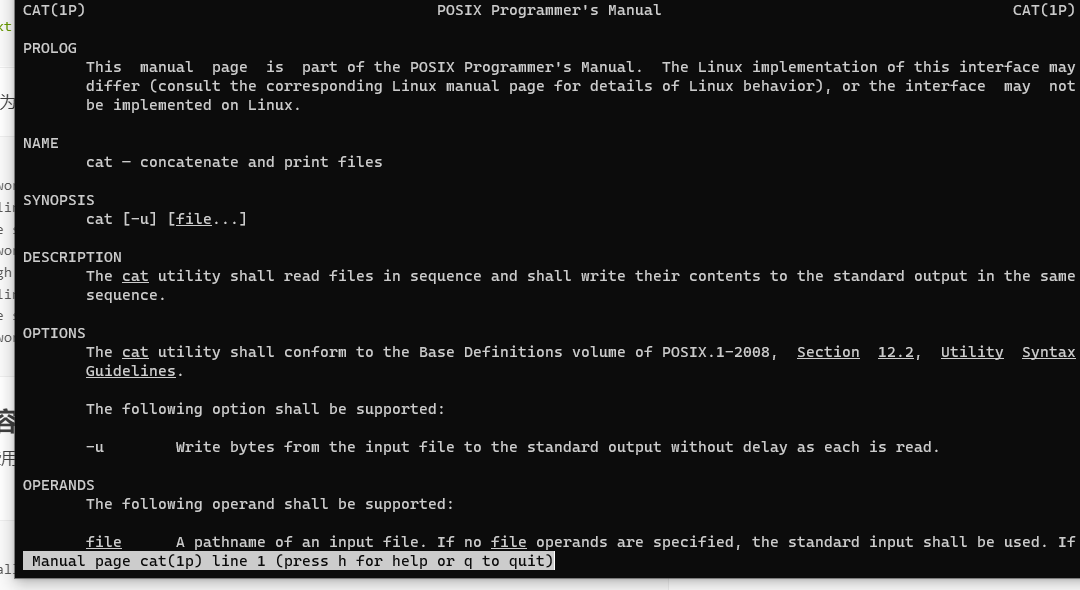
cat命令还有一些用于文件查看的选项。可以在终端会话中输入man cat来查看完整的选项
列表。
$ yum install man #安装man pages$ yum -y install man-pages #安装pthread的man pages$ man cat
去掉多余的空白行
有时候文本文件中可能包含多处连续的空白行。如果你想删除这些额外的空白行,可以这样做:
$ cat -s file
考虑下面的例子:
$ cat multi_blanks.txt #压缩相邻的空白行line 1line2line3line4
[root@dev workspace]# vi multi_blanks.txt[root@dev workspace]# cat multi_blanks.txtline 1line2line3line4[root@dev workspace]# cat -s multi_blanks.txtline 1line2line3line4[root@dev workspace]#
另外也可以用tr删除所有的空白行,我们会在2.6节详细讨论。
将制表符显示为^I
单从视觉上很难将制表符同连续的空格区分开。对于Python而言,制表符和空格是区别对待的。在文本编辑器中,两者看起来差不多,但是解释器将其视为不同的缩进。仅仅在文本编辑器中进行观察是很难发现这种错误的。cat有一个特性,可以将制表符识别出来。这有助于排查缩进错误。
用cat命令的-T选项能够将制表符标记成^I。例如:
$ cat file.pydef function():var = 5next = 6third = 7$ cat -T file.pydef function():^Ivar = 5^I^Inext = 6^Ithird = 7^I
[root@dev workspace]# vi file.py[root@dev workspace]# cat file.pydef function():var = 5next = 6third = 7[root@dev workspace]# cat -T file.pydef function():var = 5next = 6third = 7[root@dev workspace]#
行号
cat命令的-n选项会在输出的每一行内容之前加上行号。例如:
$ cat lines.txtlinelineline
[root@dev workspace]# vi lines.txt[root@dev workspace]# cat lines.txtlinelineline[root@dev workspace]# cat -n lines.txt1 line2 line3 line[root@dev workspace]#
别担心,
cat命令绝不会修改你的文件,它只是根据用户提供的选项在stdout中生成一个修改过的输出而已。可别尝试用重定向来覆盖输入文件。shell在打开输入文件之前会先创建新的输出文件。cat命令不允许使用相同的文件作为输入和重定向后的输出。利用管道并重定向输出会清空输入文件。
$ echo "This will vanish" > myfile$ cat -n myfile >myfilecat: myfile: input file is output file$ cat myfile | cat -n >myfile$ ls -l myfile
[root@dev workspace]# echo "This will vanish" > myfile[root@dev workspace]# lsdebug.sh file.py file.txt lines.txt multi_blanks.txt myfile script.sh[root@dev workspace]# cat myfileThis will vanish[root@dev workspace]# cat -n myfile1 This will vanish[root@dev workspace]# cat -n myfile>myfile[root@dev workspace]# cat myfile[root@dev workspace]# cat -n myfile >myfile[root@dev workspace]# cat myfile[root@dev workspace]# cat myfile | cat -n >myfile[root@dev workspace]# ls -l myfile-rw-r--r-- 1 root root 0 Jan 19 09:52 myfile # myfile为空文件[root@dev workspace]#
选项
-n会为包括空行在内的所有行生成行号。如果你想跳过空白行,可以使用选项-b。

若有收获,就点个赞吧
0 人点赞


