cat命令并不适合查看上千行的大文件,因为它会把整个文件内容全部给打印出来。相反,我们只想查看文件的一小部分内容(例如文件的前10行或后10行)。有时候可能是文件的前n行或后n行,也可能是除了前n行或后n行之外所有的行,亦或是第m行至第n行。
head和tail命令可以帮助我们实现这些需求。
实战演练
head 命令总是读取输入文件的起始部分。
打印前 10 行
$ head file
[root@dev workspace]# head out.html<!DOCTYPE html><html><head><meta http-equiv="Content-Type" content="text/html; charset=UTF-8"><meta name="Author" content="Made by 'tree'"><meta name="GENERATOR" content="$Version: $ tree v1.7.0 (c) 1996 - 2014 by Steve Baker, Thomas Moore, Francesc Rocher, Florian Sesser, Kyosuke Tokoro $"><title>Directory Tree</title><style type="text/css"><!--BODY { font-family : ariel, monospace, sans-serif; }[root@dev workspace]#
从 stdin 读取数据
$ cat out.html | head
[root@dev workspace]# cat out.html | head<!DOCTYPE html><html><head><meta http-equiv="Content-Type" content="text/html; charset=UTF-8"><meta name="Author" content="Made by 'tree'"><meta name="GENERATOR" content="$Version: $ tree v1.7.0 (c) 1996 - 2014 by Steve Baker, Thomas Moore, Francesc Rocher, Florian Sesser, Kyosuke Tokoro $"><title>Directory Tree</title><style type="text/css"><!--BODY { font-family : ariel, monospace, sans-serif; }[root@dev workspace]#
指定打印前几行
$ head -n 4 file
[root@dev workspace]# head -n 4 out.html<!DOCTYPE html><html><head><meta http-equiv="Content-Type" content="text/html; charset=UTF-8">[root@dev workspace]#
该命令会打印出文件的前 4 行。
打印除了最后 M 行之外所有的行
$ head -n -M file
[root@dev workspace]# head -n -6500 out.html<!DOCTYPE html>[root@dev workspace]#
注意,这里的
-M表示的是负数,并非选项。
例如,用下面的命令可以打印出除最后 5 行之外的所有行:
$ seq 11 | head -n -5123456
[root@dev workspace]# seq 11 | head -n -5123456[root@dev workspace]#
而下面的命令会打印出文件的第 1 行至第 5 行:
$ seq 100 | head -n 5
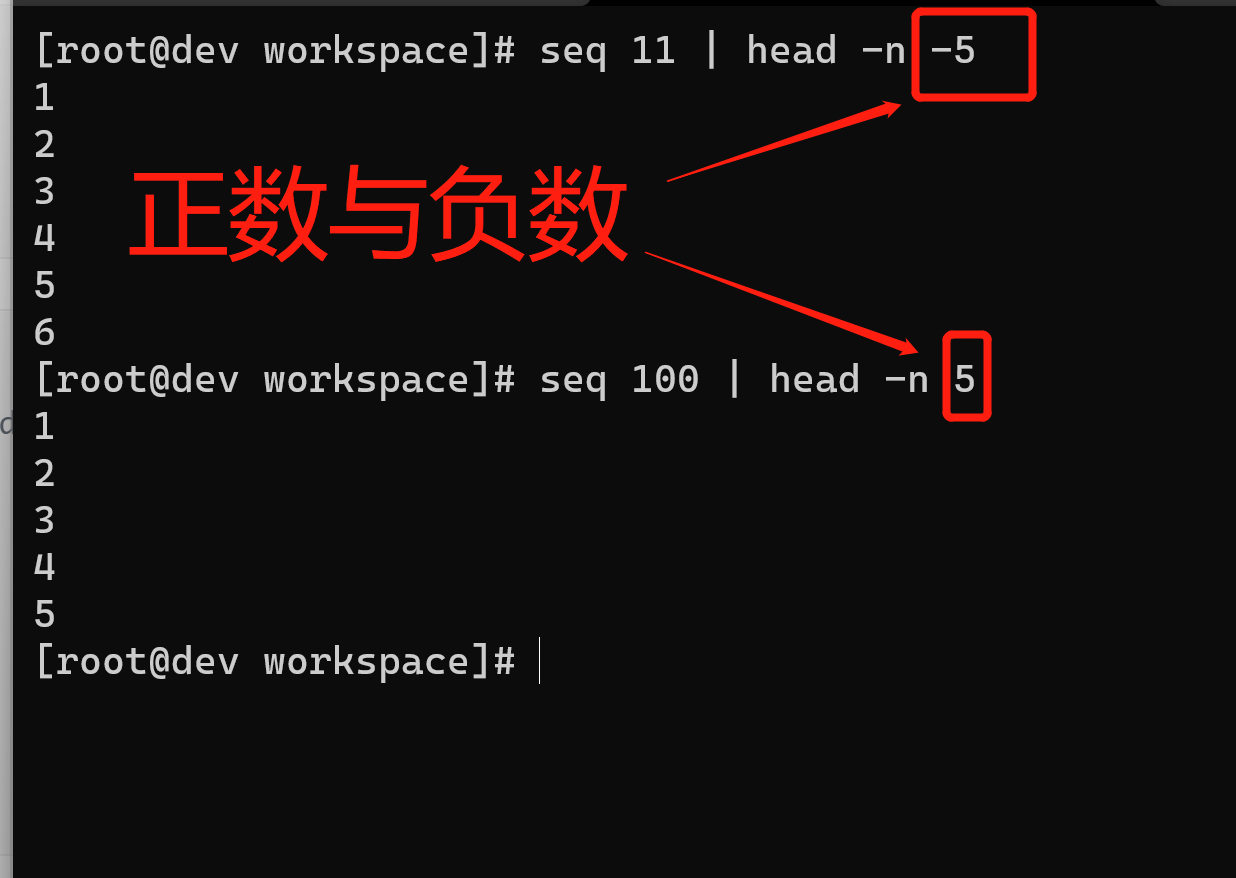
打印除最后几行之外的其他行是head的一种常见用法。在检查日志文件时,我们通常要查看最近(也就是最后)的若干行。
打印文件的最后 10 行
$ tail file
[root@dev workspace]# tail out.html # 显示最后 10 行</p><hr><p class="VERSION">tree v1.7.0 © 1996 - 2014 by Steve Baker and Thomas Moore <br>HTML output hacked and copyleft © 1998 by Francesc Rocher <br>JSON output hacked and copyleft © 2014 by Florian Sesser <br>Charsets / OS/2 support © 2001 by Kyosuke Tokoro</p></body></html>[root@dev workspace]#
从 stdin 中读取输入
$ cat text | tail
[root@dev workspace]# cat out.html | tail</p><hr><p class="VERSION">tree v1.7.0 © 1996 - 2014 by Steve Baker and Thomas Moore <br>HTML output hacked and copyleft © 1998 by Francesc Rocher <br>JSON output hacked and copyleft © 2014 by Florian Sesser <br>Charsets / OS/2 support © 2001 by Kyosuke Tokoro</p></body></html>[root@dev workspace]#
打印最后 5 行
$ tail -n 5 file
[root@dev workspace]# tail -n 5 out.html #显示最后 5 行JSON output hacked and copyleft © 2014 by Florian Sesser <br>Charsets / OS/2 support © 2001 by Kyosuke Tokoro</p></body></html>[root@dev workspace]#
打印除了前 M 行之外所有的行
$ tail -n +(M+1)
例如,打印除前 5 行之外的所有行,M+1=6,因此使用下列命令:
$ seq 10 | tail -n +6
[root@dev workspace]# seq 10 | tail -n +6678910[root@dev workspace]#
这条命令将打印出第 6 行至第 10 行。
tail命令的一个常见用法是监视一个内容不断增加的文件(例如系统日志文件)中出现的新行。因为新增加的行都是出现在文件的尾部,可以在其被写入的时候,使用tail将这些行显示出来。为了能够监视文件的增长,tail有一个特殊的选项-f或--follow,允许tail关注文件内容的更新并将其显示出来:
$ tail -f growing_file
你可能希望将该命令用于日志文件。监视文件内容增加的命令如下:
$ tail -f /var/log/messages
或者
$ dmesg | tail -f
[root@dev workspace]# dmesg | tail -f[ 5138.516440] CPU: 4 PID: 171 Comm: weston Not tainted 5.10.60.1-microsoft-standard-WSL2 #1[ 5138.518161] RIP: 0033:0x7f482a65b115[ 5138.518170] Code: c2 b8 ea 00 00 00 0f 05 48 3d 00 f0 ff ff 77 3d 41 89 c0 41 ba 08 00 00 00 31 d2 4c 89 ce bf 02 00 00 00 b8 0e 00 00 00 0f 05 <48> 8b 84 24 08 01 00 00 64 48 33 04 25 28 00 00 00 75 24 44 89 c0[ 5138.518174] RSP: 002b:00007fff7e878de0 EFLAGS: 00000246 ORIG_RAX: 000000000000000e[ 5138.518202] RAX: 0000000000000000 RBX: 00007f482a7e9000 RCX: 00007f482a65b115[ 5138.518204] RDX: 0000000000000000 RSI: 00007fff7e878de0 RDI: 0000000000000002[ 5138.518206] RBP: 00007f482a7ab630 R08: 0000000000000000 R09: 00007fff7e878de0[ 5138.518208] R10: 0000000000000008 R11: 0000000000000246 R12: 00007f48298a2430[ 5138.518210] R13: 000000000000047c R14: 00007f48298a2242 R15: 00007fff7e879a48[ 5138.518213] FS: 00007f4829db0900 GS: 0000000000000000[root@dev workspace]#
dmesg可以查看内核的环形缓冲区消息。我们通常使用该命令调试 USB 设备、检查磁盘操作或是监视网络连接性。-f还可以加入一个睡眠间隔-s,这样我们就可以设置监视文件更新的时间间隔了。
可以设置tail在指定进程结束后随之结束运行。
假设进程Foo在向一个我们正在监视的文件中追加数据。那么tail -f应该一直执行到进程Foo结束。
$ PID=$(pidof Foo)$ tail -f file --pid $PID
当进程Foo结束之后,tail也会跟着结束。
让我们实际演练一下:
- 创建一个新文件
file.txt,使用你惯用的文本编辑器打开这个文件。 现在运行下列命令:
$ PID=$(pidof gedit)$ tail -f file.txt --pid $PID
向文件添加新行并不断地保存文件。
当你更新文件时,新添加的内容都会被tail命令写入终端。关闭文本编辑器后,tail命令也会随之结束。

若有收获,就点个赞吧
0 人点赞


