一.概述
FTP是用来传送文件的协议.使用FTP实现远程文件传输的同时,还可以保证数据传输的可靠性和高效性.
FTP是基于TCP传输的,所以数据在传输的过程中可靠性得到了保障,基于TCP20.21端口.
二.传输过程
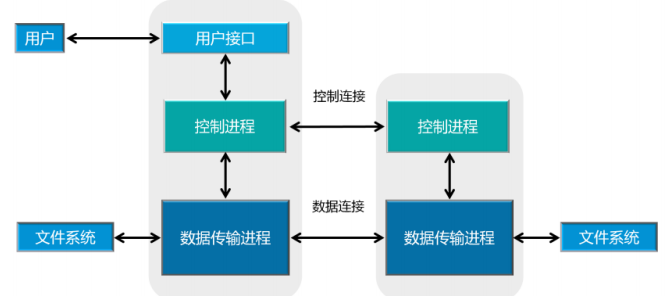
客户端 服务器

三.搭建FTP服务器
1.导包
<dependency><groupId>org.apache.ftpserver</groupId><artifactId>ftpserver-core</artifactId><version>1.1.1</version><scope>compile</scope></dependency>
2.代码
package com.example.demo.controller;import org.apache.ftpserver.FtpServer;import org.apache.ftpserver.FtpServerFactory;import org.apache.ftpserver.ftplet.Authority;import org.apache.ftpserver.ftplet.FtpException;import org.apache.ftpserver.listener.ListenerFactory;import org.apache.ftpserver.usermanager.impl.BaseUser;import org.apache.ftpserver.usermanager.impl.WritePermission;import java.util.ArrayList;import java.util.List;/*** @Author leaves* @Date 2022/5/6 19:34*/public class FileUtilController {public static void main(String[] args) throws FtpException {FtpServerFactory serverFactory = new FtpServerFactory();ListenerFactory factory = new ListenerFactory();//设置监听端口factory.setPort(2022);//替换默认监听serverFactory.addListener("default", factory.createListener());//用户名BaseUser user = new BaseUser();user.setName("yourname");//密码 如果不设置密码就是匿名用户user.setPassword("yourpassword");//用户主目录user.setHomeDirectory("C:\\images");List<Authority> authorities = new ArrayList<Authority>();//增加写权限authorities.add(new WritePermission());user.setAuthorities(authorities);//增加该用户serverFactory.getUserManager().save(user);FtpServer server = serverFactory.createServer();server.start();}}
四.连接FTP服务器
1.导包
<dependency><groupId>commons-net</groupId><artifactId>commons-net</artifactId><version>3.5</version></dependency>
2.配置工具类
package com.example.demo.ftp;import org.apache.commons.net.ftp.FTP;import org.apache.commons.net.ftp.FTPClient;import org.apache.commons.net.ftp.FTPFile;import org.apache.commons.net.ftp.FTPReply;import java.io.*;import java.net.MalformedURLException;/*** @Auther: hrabbit* @Date: 2018-04-21 下午12:35* @Description:*/public class FTPUtils {public static FTPClient ftpClient = null;/*** 初始化ftp服务器*/public static void initFtpClient(String hostname,String username,String password,Integer port) {ftpClient = new FTPClient();/*** 在上传文件的时候,我们的文件名称有时候需要被保留,但是有时候如果文件名称为中文的话,会产生保存失败的现象,因此只需要将FTPClient的编码方式更改为UTF-8模式即可解决*/ftpClient.setControlEncoding("UTF-8");try {//连接ftp服务器ftpClient.connect(hostname, port);//登录ftp服务器ftpClient.login(username, password);//是否成功登录服务器int replyCode = ftpClient.getReplyCode();if(FTPReply.isPositiveCompletion(replyCode)){System.out.println("ftp服务器登录成功");}}catch (MalformedURLException e) {e.printStackTrace();}catch (IOException e) {e.printStackTrace();}}/*** 上传文件* @param pathname ftp服务保存地址* @param fileName 上传到ftp的文件名* @param inputStream 输入文件流* @return*/public static boolean uploadFile(String hostname,String username,String password,Integer port, String pathname, String fileName,InputStream inputStream){boolean flag = false;try{System.out.println("开始上传文件");initFtpClient(hostname,username,password,port);/*** 二进制形式上传文件*/ftpClient.setFileType(FTP.BINARY_FILE_TYPE);/*** 主动模式和被动模式的不同简单概述为: 主动模式传送数据时是“服务器”连接到“客户端”的端口;被动模式传送数据是“客户端”连接到“服务器”的端口。主动模式需要客户端必须开放端口给服务器,很多客户端都是在防火墙内,开放端口给FTP服务器访问比较困难。被动模式只需要服务器端开放端口给客户端连接就行了。因此只需要将模式改为被动模式即可:*/ftpClient.enterLocalPassiveMode();CreateDirecroty(pathname);// ftpClient.makeDirectory(pathname);ftpClient.setControlEncoding("utf-8");ftpClient.storeFile(fileName, inputStream);System.out.println("上传结束");inputStream.close();ftpClient.logout();flag = true;System.out.println("上传文件成功");}catch (Exception e) {System.out.println("上传文件失败");e.printStackTrace();}finally{if(ftpClient.isConnected()){try{ftpClient.disconnect();}catch(IOException e){e.printStackTrace();}}if(null != inputStream){try {inputStream.close();} catch (IOException e) {e.printStackTrace();}}}return true;}//改变目录路径public static boolean changeWorkingDirectory(String directory) {boolean flag = true;try {flag = ftpClient.changeWorkingDirectory(directory);if (flag) {System.out.println("进入文件夹" + directory + " 成功!");} else {System.out.println("进入文件夹" + directory + " 失败!开始创建文件夹");}} catch (IOException ioe) {ioe.printStackTrace();}return flag;}//创建多层目录文件,如果有ftp服务器已存在该文件,则不创建,如果无,则创建public static boolean CreateDirecroty(String remote) throws IOException {boolean success = true;String directory = remote + "/";// 如果远程目录不存在,则递归创建远程服务器目录if (!directory.equalsIgnoreCase("/") && !changeWorkingDirectory(new String(directory))) {int start = 0;int end = 0;if (directory.startsWith("/")) {start = 1;} else {start = 0;}end = directory.indexOf("/", start);String path = "";String paths = "";while (true) {String subDirectory = new String(remote.substring(start, end).getBytes("UTF-8"), "iso-8859-1");path = path + "/" + subDirectory;if (!existFile(path)) {if (makeDirectory(subDirectory)) {changeWorkingDirectory(subDirectory);} else {System.out.println("创建目录[" + subDirectory + "]失败");changeWorkingDirectory(subDirectory);}} else {changeWorkingDirectory(subDirectory);}paths = paths + "/" + subDirectory;start = end + 1;end = directory.indexOf("/", start);// 检查所有目录是否创建完毕if (end <= start) {break;}}}return success;}//判断ftp服务器文件是否存在public static boolean existFile(String path) throws IOException {boolean flag = false;FTPFile[] ftpFileArr = ftpClient.listFiles(path);if (ftpFileArr.length > 0) {flag = true;}return flag;}//创建目录public static boolean makeDirectory(String dir) {boolean flag = true;try {flag = ftpClient.makeDirectory(dir);if (flag) {System.out.println("创建文件夹" + dir + " 成功!");} else {System.out.println("创建文件夹" + dir + " 失败!");}} catch (Exception e) {e.printStackTrace();}return flag;}/** * 下载文件 ** @param pathname FTP服务器文件目录 ** @param filename 文件名称 ** @param localpath 下载后的文件路径 ** @return */public static boolean downloadFile(String hostname,String username,String password,Integer port,String pathname, String filename, String localpath){boolean flag = false;OutputStream os=null;try {System.out.println("开始下载文件");initFtpClient(hostname,username,password,port);//切换FTP目录ftpClient.changeWorkingDirectory(pathname);FTPFile[] ftpFiles = ftpClient.listFiles();for(FTPFile file : ftpFiles){if(filename.equalsIgnoreCase(file.getName())){File localFile = new File(localpath + "/" + file.getName());os = new FileOutputStream(localFile);ftpClient.retrieveFile(file.getName(), os);os.close();}}ftpClient.logout();flag = true;System.out.println("下载文件成功");} catch (Exception e) {System.out.println("下载文件失败");e.printStackTrace();} finally{if(ftpClient.isConnected()){try{ftpClient.disconnect();}catch(IOException e){e.printStackTrace();}}if(null != os){try {os.close();} catch (IOException e) {e.printStackTrace();}}}return flag;}/** * 删除文件 ** @param pathname FTP服务器保存目录 ** @param filename 要删除的文件名称 ** @return */public static boolean deleteFile(String hostname,String username,String password,Integer port,String pathname, String filename){boolean flag = false;try {System.out.println("开始删除文件");initFtpClient(hostname,username,password,port);//切换FTP目录ftpClient.changeWorkingDirectory(pathname);ftpClient.dele(filename);ftpClient.logout();flag = true;System.out.println("删除文件成功");} catch (Exception e) {System.out.println("删除文件失败");e.printStackTrace();} finally {if(ftpClient.isConnected()){try{ftpClient.disconnect();}catch(IOException e){e.printStackTrace();}}}return flag;}}
3.代码
package com.example.demo;import com.example.demo.ftp.FTPUtils;import org.junit.jupiter.api.Test;import org.springframework.boot.test.context.SpringBootTest;import java.io.File;import java.io.FileInputStream;import java.io.IOException;/*** @author zhangyixuan* @version 2022.4* @date 2022/5/6 8:51*/@SpringBootTestpublic class FtpTest {/*** FTP登录*/@Testpublic void test01(){FTPUtils.initFtpClient("localhost", "user", "12345", 2022);}/*** 文件上传* @throws IOException*/@Testpublic void test02() throws IOException {FTPUtils.uploadFile("localhost", "user", "12345", 2022,"ftp","test001.jpg",new FileInputStream("D:\\dog.jpg"));}/*** 文件下载**/@Testpublic void test03(){FTPUtils.downloadFile("localhost", "user", "12345", 2022,"ftp","test001.jpg","D:\\Desktop\\ftp");}/*** 删除文件* @throws IOException*/@Testpublic void test05() {FTPUtils.deleteFile("localhost", "user", "12345", 2022, "ftp","test001.jpg");}/*** 创建文件夹*/@Testpublic void test06(){FTPUtils.initFtpClient("localhost", "user", "12345", 2022);FTPUtils.makeDirectory("/ftp/666");}/*** 文件夹是否存在* @throws IOException*/@Testpublic void test04() throws IOException {FTPUtils.initFtpClient("localhost", "user", "12345", 2022);System.out.println(FTPUtils.existFile("dog.jpg"));}}

若有收获,就点个赞吧
0 人点赞


