1、 k8s对象yaml的结构
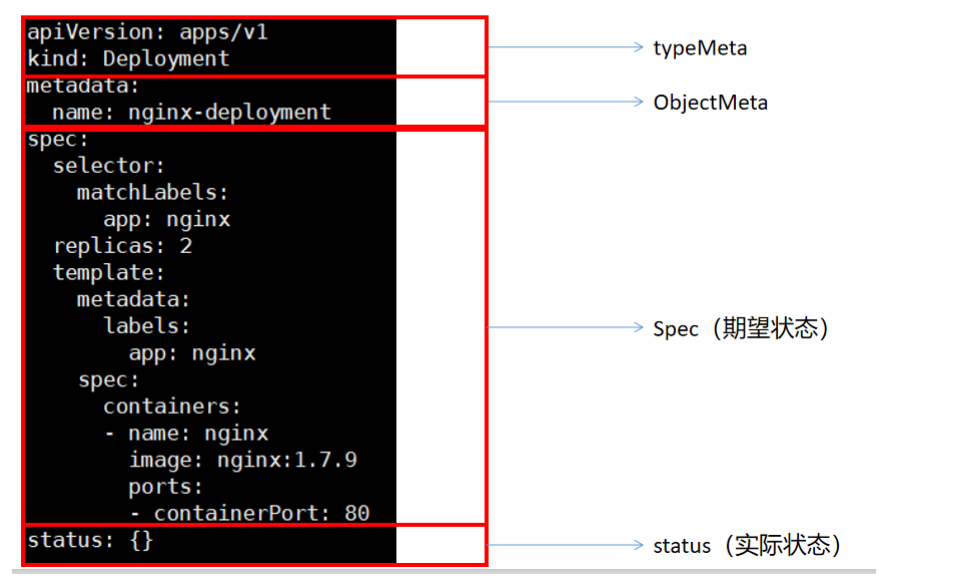
在上述的 .yaml 文件中,如下字段是必须填写的:
- apiVersion 用来创建对象时所使用的Kubernetes API版本
- kind 被创建对象的类型
- metadata 用于唯一确定该对象的元数据:包括 name 和 namespace ,如果 namespace 为空, 则默认值为 default
- spec 描述您对该对象的期望状态
apiVersion查看技巧

不同类型的 Kubernetes,其 spec 对象的格式不同(含有不同的内嵌字段),通过 API 手册 可 以查看 Kubernetes 对象的字段和描述。例如,假设您想了解 Pod 的 spec 定义,可以在 这里找 到,Deployment 的 spec 定义可以在 这里 找到
https://kubernetes.io/docs/reference/generated/kubernetes-api/v1.21/ 这就是我们以后要完全参照的 文档。
2、认识kubectl和kubelet
kubeadm安装的集群。二进制后来就是 yum install etcd api-server
认识核心文件夹 /etc/kubernetes . 以Pod方式安装的核心组件。
etcd,api-server,scheduler。(安装k8s的时候,yum kubeadm kubelet kubectl)
/etc/sysconfig/kubelet;kubelet配置位置 /var/lib/kubelet/config.yaml
kubectl的所有命令参考:
命令参考:https://kubernetes.io/docs/reference/generated/kubectl/kubectl-commands pdf
命令实战:https://github.com/dennyzhang/cheatsheet-kubernetes-A4/blob/master/cheatsheet-kuber netes-A4.pdf
3、容器
思考:我们在k8s里面的容器和docker的容器有什么异同?
k8s的Pod是最小单位,Pod中容器的配置需要注意以下常用的
FIELDS:activeDeadlineSeconds <integer>Optional duration in seconds the pod may be active on the node relative toStartTime before the system will actively try to mark it failed and killassociated containers. Value must be a positive integer.affinity <Object>If specified, the pod's scheduling constraintsautomountServiceAccountToken <boolean>AutomountServiceAccountToken indicates whether a service account tokenshould be automatically mounted.containers <[]Object> -required-List of containers belonging to the pod. Containers cannot currently beadded or removed. There must be at least one container in a Pod. Cannot beupdated.dnsConfig <Object>Specifies the DNS parameters of a pod. Parameters specified here will bemerged to the generated DNS configuration based on DNSPolicy.dnsPolicy <string>Set DNS policy for the pod. Defaults to "ClusterFirst". Valid values are'ClusterFirstWithHostNet', 'ClusterFirst', 'Default' or 'None'. DNSparameters given in DNSConfig will be merged with the policy selected withDNSPolicy. To have DNS options set along with hostNetwork, you have tospecify DNS policy explicitly to 'ClusterFirstWithHostNet'.enableServiceLinks <boolean>EnableServiceLinks indicates whether information about services should beinjected into pod's environment variables, matching the syntax of Dockerlinks. Optional: Defaults to true.ephemeralContainers <[]Object>List of ephemeral containers run in this pod. Ephemeral containers may berun in an existing pod to perform user-initiated actions such as debugging.This list cannot be specified when creating a pod, and it cannot bemodified by updating the pod spec. In order to add an ephemeral containerto an existing pod, use the pod's ephemeralcontainers subresource. Thisfield is alpha-level and is only honored by servers that enable theEphemeralContainers feature.hostAliases <[]Object>HostAliases is an optional list of hosts and IPs that will be injected intothe pod's hosts file if specified. This is only valid for non-hostNetworkpods.hostIPC <boolean>Use the host's ipc namespace. Optional: Default to false.hostNetwork <boolean>Host networking requested for this pod. Use the host's network namespace.If this option is set, the ports that will be used must be specified.Default to false.hostPID <boolean>Use the host's pid namespace. Optional: Default to false.hostname <string>Specifies the hostname of the Pod If not specified, the pod's hostname willbe set to a system-defined value.imagePullSecrets <[]Object>ImagePullSecrets is an optional list of references to secrets in the samenamespace to use for pulling any of the images used by this PodSpec. Ifspecified, these secrets will be passed to individual pullerimplementations for them to use. For example, in the case of docker, onlyDockerConfig type secrets are honored. More info:https://kubernetes.io/docs/concepts/containers/images#specifying-imagepullsecrets-on-a-podinitContainers <[]Object>List of initialization containers belonging to the pod. Init containers areexecuted in order prior to containers being started. If any init containerfails, the pod is considered to have failed and is handled according to itsrestartPolicy. The name for an init container or normal container must beunique among all containers. Init containers may not have Lifecycleactions, Readiness probes, Liveness probes, or Startup probes. TheresourceRequirements of an init container are taken into account duringscheduling by finding the highest request/limit for each resource type, andthen using the max of of that value or the sum of the normal containers.Limits are applied to init containers in a similar fashion. Init containerscannot currently be added or removed. Cannot be updated. More info:https://kubernetes.io/docs/concepts/workloads/pods/init-containers/nodeName <string>NodeName is a request to schedule this pod onto a specific node. If it isnon-empty, the scheduler simply schedules this pod onto that node, assumingthat it fits resource requirements.nodeSelector <map[string]string>NodeSelector is a selector which must be true for the pod to fit on a node.Selector which must match a node's labels for the pod to be scheduled onthat node. More info:https://kubernetes.io/docs/concepts/configuration/assign-pod-node/overhead <map[string]string>Overhead represents the resource overhead associated with running a pod fora given RuntimeClass. This field will be autopopulated at admission time bythe RuntimeClass admission controller. If the RuntimeClass admissioncontroller is enabled, overhead must not be set in Pod create requests. TheRuntimeClass admission controller will reject Pod create requests whichhave the overhead already set. If RuntimeClass is configured and selectedin the PodSpec, Overhead will be set to the value defined in thecorresponding RuntimeClass, otherwise it will remain unset and treated aszero. More info:https://git.k8s.io/enhancements/keps/sig-node/20190226-pod-overhead.md Thisfield is alpha-level as of Kubernetes v1.16, and is only honored by serversthat enable the PodOverhead feature.preemptionPolicy <string>PreemptionPolicy is the Policy for preempting pods with lower priority. Oneof Never, PreemptLowerPriority. Defaults to PreemptLowerPriority if unset.This field is beta-level, gated by the NonPreemptingPriority feature-gate.priority <integer>The priority value. Various system components use this field to find thepriority of the pod. When Priority Admission Controller is enabled, itprevents users from setting this field. The admission controller populatesthis field from PriorityClassName. The higher the value, the higher thepriority.priorityClassName <string>If specified, indicates the pod's priority. "system-node-critical" and"system-cluster-critical" are two special keywords which indicate thehighest priorities with the former being the highest priority. Any othername must be defined by creating a PriorityClass object with that name. Ifnot specified, the pod priority will be default or zero if there is nodefault.readinessGates <[]Object>If specified, all readiness gates will be evaluated for pod readiness. Apod is ready when all its containers are ready AND all conditions specifiedin the readiness gates have status equal to "True" More info:https://git.k8s.io/enhancements/keps/sig-network/0007-pod-ready%2B%2B.mdrestartPolicy <string>Restart policy for all containers within the pod. One of Always, OnFailure,Never. Default to Always. More info:https://kubernetes.io/docs/concepts/workloads/pods/pod-lifecycle/#restart-policyruntimeClassName <string>RuntimeClassName refers to a RuntimeClass object in the node.k8s.io group,which should be used to run this pod. If no RuntimeClass resource matchesthe named class, the pod will not be run. If unset or empty, the "legacy"RuntimeClass will be used, which is an implicit class with an emptydefinition that uses the default runtime handler. More info:https://git.k8s.io/enhancements/keps/sig-node/runtime-class.md This is abeta feature as of Kubernetes v1.14.schedulerName <string>If specified, the pod will be dispatched by specified scheduler. If notspecified, the pod will be dispatched by default scheduler.securityContext <Object>SecurityContext holds pod-level security attributes and common containersettings. Optional: Defaults to empty. See type description for defaultvalues of each field.serviceAccount <string>DeprecatedServiceAccount is a depreciated alias for ServiceAccountName.Deprecated: Use serviceAccountName instead.serviceAccountName <string>ServiceAccountName is the name of the ServiceAccount to use to run thispod. More info:https://kubernetes.io/docs/tasks/configure-pod-container/configure-service-account/setHostnameAsFQDN <boolean>If true the pod's hostname will be configured as the pod's FQDN, ratherthan the leaf name (the default). In Linux containers, this means settingthe FQDN in the hostname field of the kernel (the nodename field of structutsname). In Windows containers, this means setting the registry value ofhostname for the registry keyHKEY_LOCAL_MACHINE\SYSTEM\CurrentControlSet\Services\Tcpip\Parameters toFQDN. If a pod does not have FQDN, this has no effect. Default to false.shareProcessNamespace <boolean>Share a single process namespace between all of the containers in a pod.When this is set containers will be able to view and signal processes fromother containers in the same pod, and the first process in each containerwill not be assigned PID 1. HostPID and ShareProcessNamespace cannot bothbe set. Optional: Default to false.subdomain <string>If specified, the fully qualified Pod hostname will be"<hostname>.<subdomain>.<pod namespace>.svc.<cluster domain>". If notspecified, the pod will not have a domainname at all.terminationGracePeriodSeconds <integer>Optional duration in seconds the pod needs to terminate gracefully. May bedecreased in delete request. Value must be non-negative integer. The valuezero indicates stop immediately via the kill signal (no opportunity to shutdown). If this value is nil, the default grace period will be used instead.The grace period is the duration in seconds after the processes running inthe pod are sent a termination signal and the time when the processes areforcibly halted with a kill signal. Set this value longer than the expectedcleanup time for your process. Defaults to 30 seconds.tolerations <[]Object>If specified, the pod's tolerations.topologySpreadConstraints <[]Object>TopologySpreadConstraints describes how a group of pods ought to spreadacross topology domains. Scheduler will schedule pods in a way which abidesby the constraints. All topologySpreadConstraints are ANDed.volumes <[]Object>List of volumes that can be mounted by containers belonging to the pod.More info: https://kubernetes.io/docs/concepts/storage/volumes
1、镜像
在 Kubernetes 的 Pod 中使用容器镜像之前,我们必须将其推送到一个镜像仓库(或者使用仓库中已经 有的容器镜像)。在 Kubernetes 的 Pod 定义中定义容器时,必须指定容器所使用的镜像,容器中的 image 字段支持与 docker 命令一样的语法,包括私有镜像仓库和标签。 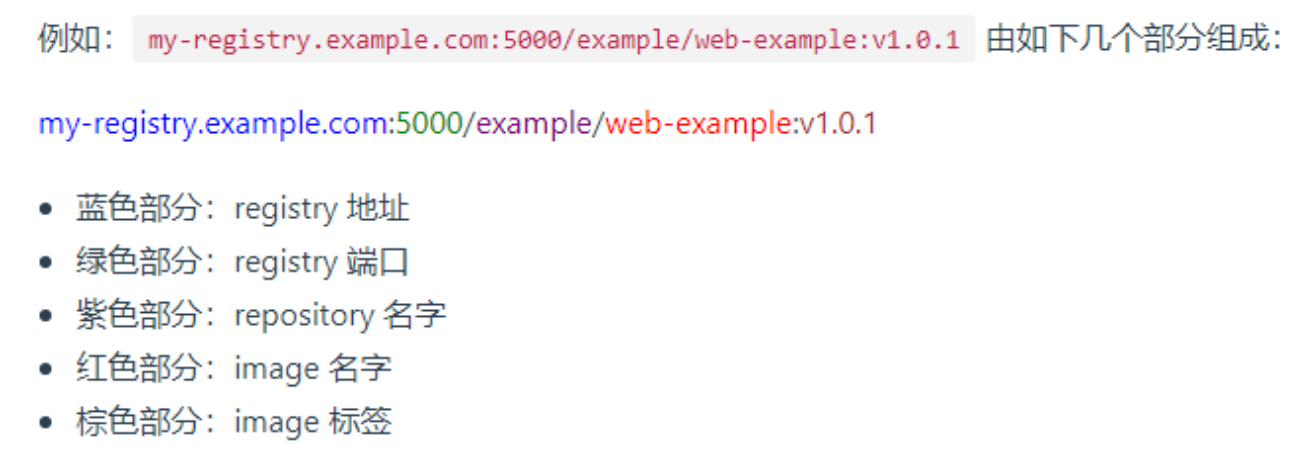
如果使用 hub.dokcer.com Registry 中的镜像,可以省略 registry 地址和 registry 端口。例如: nginx:latest
Kubernetes中,默认的镜像抓取策略是 IfNotPresent ,使用此策略,kubelet在发现本机有镜像的情 况下,不会向镜像仓库抓取镜像。如果您期望每次启动 Pod 时,都强制从镜像仓库抓取镜像,可以尝试 如下方式:
- 设置 container 中的 imagePullPolicy 为 Always
- 省略 imagePullPolicy 字段,并使用 :latest tag 的镜像
- 省略 imagePullPolicy 字段和镜像的 tag
- 激活 AlwaysPullImages 管理控制器
使用私有仓库下载镜像
#这个秘钥默认在hello名称空间kubectl create secret -n hello docker-registry my-aliyun \--docker-server=registry.cn-hangzhou.aliyuncs.com \--docker-username=lshady \--docker-password=dyxxx#注意点 各个名称空间的秘钥不共享 如果要在别的名称空间使用需要重新创建secret
kind: PodapiVersion: v1metadata:name: my-container-test02namespace: hellolabels:aa: bbbb: ddspec:imagePullSecrets: #镜像的下载秘钥,公有仓是默认的- name: my-aliyun # 是kubectl create secrete 搞来的 registry.cn-hangzhou.aliyuncs.com- name: qingcloud## 私仓从 registry.cn-hangzhou.aliyuncs.com直接区分containers:- image: registry.cn-hangzhou.aliyuncs.com/lfy/java-devops-demo:v1.0name: my-container-01imagePullPolicy: Always#生产环境,镜像在私有仓库,下载需要秘钥- image: nginx # 默认从docker hub来的name: my-container-02imagePullPolicy: Always
2、环境变量
说明: 通过 env 或 envFrom 字段设置的环境变量将覆盖容器镜像中指定的所有环境变量。
在制作流水线脚本整合k8s的时候,环境变量及其重要,该环境变量可以直接替换DockerFile文件中定义的ENV环境变量,对镜像做增强
环境变量赋值简单玩法
创建 Pod 时,可以为其下的容器设置环境变量。通过配置文件的 env 或者 envFrom 字段来设置环境变量。
本示例中,将创建一个只包含单个容器的 Pod。Pod 的配置文件中设置环境变量的名称为 DEMO_GREETING, 其值为 “Hello from the environment”。下面是 Pod 的配置清单
kubectl exec envar-demo — printenv 获取当前pod所有环境变量信息
apiVersion: v1kind: Podmetadata:name: envar-demolabels:purpose: demonstrate-envarsspec:containers:- name: envar-demo-containerimage: gcr.io/google-samples/node-hello:1.0env:- name: DEMO_GREETINGvalue: "Hello from the environment"- name: DEMO_FAREWELLvalue: "Such a sweet sorrow"
高级玩法
环境变量可以互相引用,但是顺序很重要。 使用在相同上下文中定义的其他变量的变量必须在列表的后面。 同样,请避免使用循环引用。
1、用 Pod 字段作为环境变量的值
apiVersion: v1kind: Podmetadata:name: dapi-envars-fieldrefspec:containers:- name: test-containerimage: k8s.gcr.io/busyboxenv:- name: MY_NODE_NAMEvalueFrom:fieldRef:fieldPath: spec.nodeName- name: MY_POD_NAMEvalueFrom:fieldRef:fieldPath: metadata.name- name: MY_POD_IPvalueFrom:fieldRef:fieldPath: status.podIP
2、使用Secret作为环境变量读取或者cm文件读取
使用场景:早boot项目里面读取mysql的用户名和密码可以写成环境变量从env里面读取
apiVersion: v1kind: Podmetadata:name: secret-env-podspec:containers:- name: mycontainerimage: redisenv:- name: SECRET_USERNAMEvalueFrom:secretKeyRef:name: mysecretkey: username- name: DB_HOSTvalueFrom:configMapKeyRef:name: MYAPPkey: DB_HOST- name: SECRET_PASSWORDvalueFrom:secretKeyRef:name: mysecretkey: password---apiVersion: v1data:username: YWRtaW4=password: MWYyZDFlMmU2N2Rmkind: Secretmetadata:annotations:kubectl.kubernetes.io/last-applied-configuration: { ... }creationTimestamp: 2020-01-22T18:41:56Zname: mysecretnamespace: defaultresourceVersion: "164619"uid: cfee02d6-c137-11e5-8d73-42010af00002type: Opaque
使用 envFrom 来将 Secret 的所有数据定义为容器的环境变量。 来自 Secret 的主键成为 Pod 中的环境变量名称
apiVersion: v1kind: Podmetadata:name: secret-test-podspec:containers:- name: test-containerimage: registry.k8s.io/busyboxcommand: [ "/bin/sh", "-c", "env" ]envFrom:- secretRef:name: mysecretrestartPolicy: Never
3、 生命周期容器钩子
Kubernetes中为容器提供了两个 hook(钩子函数):
PostStart 此钩子函数在容器创建后将立刻执行。但是,并不能保证该钩子函数在容器的 ENTRYPOINT 之前 执行。该钩子函数没有输入参数。
PreStop 此钩子函数在容器被 terminate(终止)之前执行,例如: 通过接口调用删除容器所在 Pod 某些管理事件的发生:健康检查失败、资源紧缺等 如果容器已经被关闭或者进入了 completed 状态,preStop 钩子函数的调用将失败。该函数的执 行是同步的,即,kubernetes 将在该函数完成执行之后才删除容器。该钩子函数没有输入参数。
kind: PodapiVersion: v1metadata:name: my-lifenamespace: hellolabels:aa: bbbb: ddspec: # 指定规格信息containers: # 指定要启动一个什么样的容器- image: nginx #指定镜像name: nginx #容器的名字 数据就在容器里面 docker run mysql.lifecycle:postStart:# httpGet:# port: 80# path: "http://192.168.169.160/postStart"httpGet:host: "192.168.169.160"path: "/postStart"port: 80scheme: HTTP# exec: 容器创建之后,这个钩子程序执行一个命令 echo 1111# httpGet: 容器创建之后,这个钩子程序发送一个httpGet 请求# tcpSocket: 容器创建之后,这个钩子程序连上一个TCP端口preStop: ##httpGet:host: "192.168.169.160"path: "/preStop"port: 80scheme: HTTP
4、配置存活、就绪和启动探针
针对运行中的容器,kubelet 可以选择是否执行以下三种探针,以及如何针对探测结果作出反应:
livenessProbe
指示容器是否正在运行。如果存活态探测失败,则 kubelet 会杀死容器, 并且容器将根据其重启策略决定未来。如果容器不提供存活探针, 则默认状态为 Success。
readinessProbe
指示容器是否准备好为请求提供服务。如果就绪态探测失败, 端点控制器将从与 Pod 匹配的所有服务的端点列表中删除该 Pod 的 IP 地址。 初始延迟之前的就绪态的状态值默认为 Failure。 如果容器不提供就绪态探针,则默认状态为 Success。
startupProbe
指示容器中的应用是否已经启动。如果提供了启动探针,则所有其他探针都会被 禁用,直到此探针成功为止。如果启动探测失败,kubelet 将杀死容器,而容器依其 重启策略进行重启。 如果容器没有提供启动探测,则默认状态为 Success。
Probe配置项
initialDelaySeconds:容器启动后要等待多少秒后存活和就绪探测器才被初始化,默认是 0 秒,最小值是 0。这是针对以前没有periodSeconds:执行探测的时间间隔(单位是秒)。默认是 10 秒。最小值是 1。successThreshold:探测器在失败后,被视为成功的最小连续成功数。默认值是 1。- 存活和启动探针的这个值必须是 1。最小值是 1。
failureThreshold:当探测失败时,Kubernetes 的重试次数。 存活探测情况下的放弃就意味着重新启动容器。 就绪探测情况下的放弃 Pod 会被打上未就绪的标签。默认值是 3。最小值是 1。timeoutSeconds:探测的超时后等待多少秒。默认值是 1 秒。最小值是 1。
apiVersion: v1kind: Podmetadata:name: "nginx-start-probe02"namespace: defaultlabels:app: "nginx-start-probe02"spec:volumes:- name: nginx-volhostPath:path: /app- name: nginx-htmlhostPath:path: /htmlcontainers:- name: nginximage: "nginx"ports:- containerPort: 80startupProbe:exec:command: ["/bin/sh","-c","cat /app/abc"] ## 返回不是0,那就是探测失败# initialDelaySeconds: 20 ## 指定的这个秒以后才执行探测periodSeconds: 5 ## 每隔几秒来运行这个timeoutSeconds: 5 ##探测超时,到了超时时间探测还没返回结果说明失败successThreshold: 1 ## 成功阈值,连续几次成才算成功failureThreshold: 3 ## 失败阈值,连续几次失败才算真失败volumeMounts:- name: nginx-volmountPath: /app- name: nginx-htmlmountPath: /usr/share/nginx/htmllivenessProbe: ## nginx容器有没有 /abc.html,就绪探针# httpGet:# host: 127.0.0.1# path: /abc.html# port: 80# scheme: HTTP# periodSeconds: 5 ## 每隔几秒来运行这个# successThreshold: 1 ## 成功阈值,连续几次成才算成功# failureThreshold: 5 ## 失败阈值,连续几次失败才算真失败exec:command: ["/bin/sh","-c","cat /usr/share/nginx/html/abc.html"] ## 返回不是0,那就是探测失败# initialDelaySeconds: 20 ## 指定的这个秒以后才执行探测periodSeconds: 5 ## 每隔几秒来运行这个timeoutSeconds: 5 ##探测超时,到了超时时间探测还没返回结果说明失败successThreshold: 1 ## 成功阈值,连续几次成才算成功failureThreshold: 3 ## 失败阈值,连续几次失败才算真失败readinessProbe: ##就绪检测,都是httphttpGet:# host: 127.0.0.1 ###不行path: /abc.html ## 给容器发请求port: 80scheme: HTTP ## 返回不是0,那就是探测失败initialDelaySeconds: 2 ## 指定的这个秒以后才执行探测periodSeconds: 5 ## 每隔几秒来运行这个timeoutSeconds: 5 ##探测超时,到了超时时间探测还没返回结果说明失败successThreshold: 3 ## 成功阈值,连续几次成才算成功failureThreshold: 5 ## 失败阈值,连续几次失败才算真失败# livenessProbe:# exec: ["/bin/sh","-c","sleep 30;abc "] ## 返回不是0,那就是探测失败# initialDelaySeconds: 20 ## 指定的这个秒以后才执行探测# periodSeconds: 5 ## 每隔几秒来运行这个# timeoutSeconds: 5 ##探测超时,到了超时时间探测还没返回结果说明失败# successThreshold: 5 ## 成功阈值,连续几次成才算成功# failureThreshold: 5 ## 失败阈值,连续几次失败才算真失败
5、 资源限制
apiVersion: v1kind: Podmetadata:name: "MYAPP"namespace: defaultlabels:app: "MYAPP"spec:containers:- name: MYAPPimage: "debian-slim:latest"resources:limits: #最大可用资源cpu: 200mmemory: 500Mirequests: #启动需要的最小资源cpu: 100mmemory: 200Mi

若有收获,就点个赞吧
0 人点赞


