1、仓库类型-Type
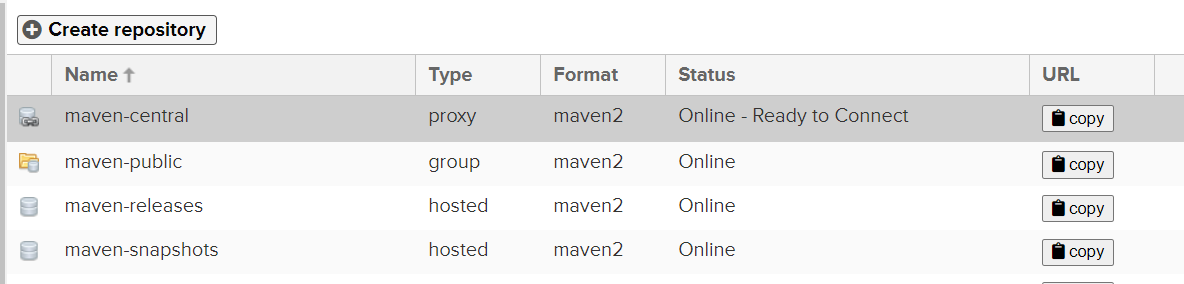
hosted
宿主仓库,这个仓库,是用来让你把你公司内部的发布包部署到这个仓库里来,然后公司内的其他人就可以从这个宿主仓库里下载依赖去使用
proxy
代理仓库,这个仓库不是用来给你公司内部的发布包部署的,是代理了公司外部的各种仓库的,比如说java.net,codehaus,jboss仓库,最最重要的,就是代理了公司外部的中央仓库,但是这里其实可以修改为nexus连接的应该是国内的阿里云镜像仓库,阿里云去连接中央仓库
group
仓库组,其实就是将,各种宿主仓库、代理仓库全部组成一个虚拟的仓库组,然后我们的项目只要配置依赖于一个仓库组,相当于就是可以自动连接仓库组对应的各种仓库
2、nexus自带四种仓库用法
maven-central
maven-releases
该仓库是个宿主仓库,用于部署公司内部的release版本的发布包(类似于1.0.0,,release的意思就是你的工程已经经过了完善的测试,单元测试,集成测试,QA测试,上生产环境使用了)到这个仓库里面,供其他同事在生产环境依赖和使用
maven-snapshots
该仓库是个宿主仓库,用于部署公司内部的snapshot版本的发布包到这个仓库里(如果你的某个工程还在开发过程中,测试还没结束,但是,此时公司里其他同事也在开发一些工程,需要依赖你的包进行开发和测试,联调,此时你的工程的版本就是类似1.0.0-SNAPSHOT这样的版本),供其他同事在开发和测试的时候使用
3rd party
该仓库现在默认不创建,需要自己手动创建,该仓库是个宿主仓库,主要用来部署没法从公共仓库获取的第三方依赖包,比如说,你的公司依赖于第三方支付厂商的一个依赖包,那个依赖包不是开源的,是商业的包。那么你是没有办法从maven中央仓库获取的。此时,我们可能会自己手动从支付厂商那里获取到一个jar包,下载之后上传到私服里来,就放这个仓库里,3rd-party仓库
maven-public
仓库组,上面所有release仓库都在这个仓库组内
3、修改maven配置文件走nexus私服
<?xml version="1.0" encoding="UTF-8"?><settings xmlns="http://maven.apache.org/SETTINGS/1.2.0"xmlns:xsi="http://www.w3.org/2001/XMLSchema-instance"xsi:schemaLocation="http://maven.apache.org/SETTINGS/1.2.0 https://maven.apache.org/xsd/settings-1.2.0.xsd"><localRepository>E:\Maven\nexus-test1</localRepository><pluginGroups></pluginGroups><proxies></proxies><servers></servers><mirrors><mirror><id>nexus</id><name>nexus</name><url>http://localhost:8081/repository/maven-public/</url><mirrorOf>central</mirrorOf></mirror></mirrors><profiles><profile><id>nexus</id><repositories><repository><id>central</id><name>Nexus</name><url>http://central</url><releases><enabled>true</enabled></releases><snapshots><enabled>true</enabled></snapshots></repository></repositories><pluginRepositories><pluginRepository><id>central</id><name>Nexus Plugin Repository</name><url>http://central</url><releases><enabled>true</enabled></releases><snapshots><enabled>true</enabled></snapshots></pluginRepository></pluginRepositories></profile></profiles><activeProfiles><activeProfile>nexus</activeProfile></activeProfiles></settings>
4、本地上传jar到nexus私服
1、mavne项目pom配置
注意点: 1、
标签里面的rui地址只能指定仓库类型是hosted的,其他类型上传不上去 2、jar上传需要登录权限,需要在setting.xml文件中配置server 3、jar版本带-SNAPSHOT的只能上传到maven-snapshots仓库,修改后即可随意上传
<!--上传到nexus仓库中,配合mvn deploy:deploy--><distributionManagement><repository><id>nexus</id><name>Nexus snapshots Repository</name><!--snapshots仓库 --><url>http://localhost:8081/repository/maven-releases/</url></repository></distributionManagement>
<server><!--这是server的id(注意不是用户登陆的id),该id与distributionManagement中repository元素的id相匹配。 --><id>nexus</id><username>admin</username><password>pass</password></server>
遇到的问题
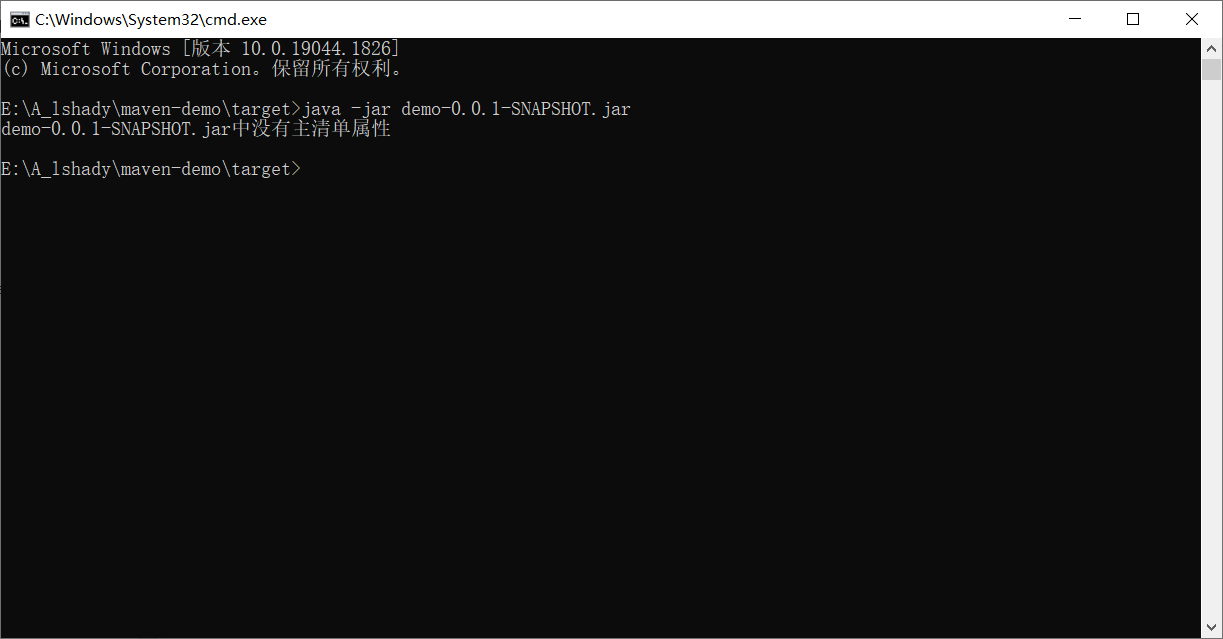
1、记一次springboot项目打包执行报错,没找到主属性
当你的项目pom的父类不是pring-boot-starter-parent的时候,如下
<parent><groupId>org.springframework.boot</groupId><artifactId>spring-boot-starter-parent</artifactId><version>2.7.2</version><relativePath/> <!-- lookup parent from repository --></parent>
打包工具需要多加一个配置
<build><plugins><plugin><groupId>org.springframework.boot</groupId><artifactId>spring-boot-maven-plugin</artifactId><executions><execution><goals><!--可以把依赖的包都打包到生成的Jar包中--><goal>repackage</goal></goals><configuration><attach>false</attach></configuration></execution></executions></plugin></plugins></build>
创建springboot项目的时候,可以选择2中方式来玩
第一种
<parent><groupId>org.springframework.boot</groupId><artifactId>spring-boot-starter-parent</artifactId><version>2.7.2</version><relativePath/> <!-- lookup parent from repository --></parent>
第二种,以pom形式,导入,该导入方式就需要在spring-boot-maven-plugin多加一个配置,否则启动jar会出现找不到主类问题
<dependencies><dependency><groupId>org.springframework.boot</groupId><artifactId>spring-boot-dependencies</artifactId><version>${spring-boot.version}</version><type>pom</type><scope>import</scope></dependency></dependencies>

若有收获,就点个赞吧
0 人点赞


