- 介绍:
- 工作原理
- 安装编译
- 默认主配置文件
- Nginx命令
- HTTP配置
- HTTP相关模块介绍:
- http://nginx.org/en/docs/http/ngx_http_core_module.html">ngx_http_core_module 模块 http://nginx.org/en/docs/http/ngx_http_core_module.html
- ngx_http_access_module http://nginx.org/en/docs/http/ngx_http_access_module.html">ngx_http_access_module http://nginx.org/en/docs/http/ngx_http_access_module.html
- http://nginx.org/en/docs/http/ngx_http_auth_basic_module.html">ngx_http_auth_basic_module http://nginx.org/en/docs/http/ngx_http_auth_basic_module.html
- http://nginx.org/en/docs/http/ngx_http_stub_status_module.html">ngx_http_stub_status_module http://nginx.org/en/docs/http/ngx_http_stub_status_module.html
- http://nginx.org/en/docs/stream/ngx_stream_log_module.html">ngx_stream_log_module http://nginx.org/en/docs/stream/ngx_stream_log_module.html
- http://nginx.org/en/docs/http/ngx_http_gzip_module.html">ngx_http_gzip_module http://nginx.org/en/docs/http/ngx_http_gzip_module.html
- ngx_http_rewrite_module
- http://nginx.org/en/docs/http/ngx_http_referer_module.html">ngx_http_referer_module http://nginx.org/en/docs/http/ngx_http_referer_module.html
- HTTP相关模块介绍:
- nginx虚拟主机实验
- 用Nginx搭一个可用的静态资源web服务器
- 反向代理和缓存
介绍:
1.Nginx是lgor Sysoev为俄罗斯访问量第二的rambler.ru站点设计开发的。从2004年发布至今,凭借开源的力量, 已经接近成熟与完善
2.Nginx功能丰富,可作为HTTP服务器,也可作为反向代理服务器,邮件服务器。支持FastCGI、SSL、Virtual Host、URL Rewrite、Gzip等功能。并且支持很多第三方的模块扩展。
3.官方网站:www.nginx.org
官方文档:http://nginx.org/en/docs/
应用
1.静态资源服务:通过本地文件系统提供服务
2.反向代理服务:缓存加速,负载均衡
3.API服务:OpenResly
优点:
1.高并发,高性能
2.可拓展性好, 模块化设计非常的稳定
3.高可靠性 可以在服务器上持续使用数年
4.热部署 可以在不停止服务的时候,升级服务
5.BSD许可证 nginx不仅是开源的,免费的,而且可以在有定制需求的时候,应用在商业场景下。
Apanche 是低效的,一个连接对应一个进程。进程间的切换,消耗很大。
Nginx可以处理几百,上千个
组成部分
- Nginx二进制可执行文件 由各模块源码编译出的一个文件
- Nginx.conf配置文件 控制Nginx的行为
- access.log访问日志 记录每一条http请求信息
-
版本
单号版本是稳定版本
开源免费版 nginx.org
商业版 nginx.com
tengine ,是由淘宝网发起的web服务项目。在Nginx基础上,针对大访问量网站的需求,添加了很多高级功能的特性。
免费OpenResty 兼具了高性能以及开发效率提高 开发API,开发防火墙
商业班OpenResty 技术支持好工作原理
Nginx由内核和一系列的模块组成,内核提供web服务器的基本功能,比如:启动网络协议,创建运行环境,接 收和分配客户端请求,处理模块之间的交换,Nginx的各种功能和操作相对应的模块来实现.Nginx的模块
下载Nginx—-> 介绍各目录——->configure———>中间文件介绍————>编译———->安装
下载:
官网:http://nginx.org/ 之后区down选择下载版本的下载链接
wget http://nginx.org/download/nginx-1.16.1.tar.gz 之后再解压 tar - xzf nginx-1.16.1.tar.gz 这样安装很慢
1.换阿里的epel源
[root@localhost ~]# yum install epel-release
2.安装nginx
[root@localhost ~]# yum install niginx -y
3.查询并显示所有的套件
[root@localhost ~]# rpm -ql nginx
/etc/logrotate.d/nginx
/etc/nginx/fastcgi.conf
/etc/nginx/fastcgi.conf.default
/etc/nginx/fastcgi_params
/etc/nginx/fastcgi_params.default
/etc/nginx/koi-utf
/etc/nginx/koi-win
/etc/nginx/mime.types
/etc/nginx/mime.types.default
/etc/nginx/nginx.conf
/etc/nginx/nginx.conf.default
/etc/nginx/scgi_params
/etc/nginx/scgi_params.default
/etc/nginx/uwsgi_params
/etc/nginx/uwsgi_params.default
/etc/nginx/win-utf
/usr/bin/nginx-upgrade
/usr/lib/systemd/system/nginx.service              #默认的主页目录
/usr/lib64/nginx/modules                           #模块相关配置
/usr/sbin/nginx                                           #nginx服务命令
/usr/share/doc/nginx-1.12.2
/usr/share/doc/nginx-1.12.2/CHANGES
/usr/share/doc/nginx-1.12.2/README
/usr/share/doc/nginx-1.12.2/README.dynamic
/usr/share/doc/nginx-1.12.2/UPGRADE-NOTES-1.6-to-1.10
/usr/share/licenses/nginx-1.12.2
/usr/share/licenses/nginx-1.12.2/LICENSE
/usr/share/man/man3/nginx.3pm.gz
/usr/share/man/man8/nginx-upgrade.8.gz
/usr/share/man/man8/nginx.8.gz
/usr/share/nginx/html/404.html
/usr/share/nginx/html/50x.html
/usr/share/nginx/html/index.html       #默认的主页目录
/usr/share/nginx/html/nginx-logo.png
/usr/share/nginx/html/poweredby.png
/usr/share/vim/vimfiles/ftdetect/nginx.vim
/usr/share/vim/vimfiles/ftplugin/nginx.vim
/usr/share/vim/vimfiles/indent/nginx.vim
/usr/share/vim/vimfiles/syntax/nginx.vim
/var/lib/nginx
/var/lib/nginx/tmp
/var/log/nginx                           #日志文件目录
默认主配置文件
[root@localhost ~]# cat  /etc/nginx/nginx.conf
# For more information on configuration, see:
#   * Official English Documentation: http://nginx.org/en/docs/
#   * Official Russian Documentation: http://nginx.org/ru/docs/

user nginx;                               #用户
worker_processes auto;                    #工作进程数,auto,自动:cpu+1  设置的时候通常需要于CPU的数量一致
error_log /var/log/nginx/error.log;       #错误日志
pid /run/nginx.pid;                       #pid文件

# Load dynamic modules. See /usr/share/nginx/README.dynamic.
include /usr/share/nginx/modules/*.conf;                    #加载动态模块

# 工作模块:
events {                     #事件驱动类型
   #use epoll  调用方法:select poll  epoll | kquene | resing ……
   worker_connections 1024;      #单个进程的连接数
}

#http全局配置:
http {
        #日志格式
    log_format  main  '$remote_addr - $remote_user [$time_local] "$request" '
                      '$status $body_bytes_sent "$http_referer" '
                      '"$http_user_agent" "$http_x_forwarded_for"';

     #访问日志采用的格式 main
    access_log  /var/log/nginx/access.log  main;

    sendfile            on;      #允许sendfile方式传输文件
    tcp_nopush          on;      #在sendfile启动下,使用TCP_CORK套接字
    tcp_nodelay         on;      #连接保持活动状态
    keepalive_timeout   65;      #连接超时时间,默认为65s
    types_hash_max_size 2048;    #设置哈希表的最大大小

    include             /etc/nginx/mime.types;       #文件拓展名与文件类型映射表
    default_type        application/octet-stream;    #模式文件类型,默认为text/plain

    # Load modular configuration files from the /etc/nginx/conf.d directory.
    # See http://nginx.org/en/docs/ngx_core_module.html#include
    # for more information.
    include /etc/nginx/conf.d/*.conf;
    #虚拟主机配置
    server {
        listen       80 default_server;  #监听端口ipv4
        listen       [::]:80 default_server;  ipv6
        server_name  _;   #域名
        root         /usr/share/nginx/html;  #设置根站点目录

        # Load configuration files for the default server block.
        include /etc/nginx/default.d/*.conf;    #默认自定义配置文件

        location / {   #根据请求URI设定配置
        }

        error_page 404 /404.html;       #关于40x错误页
            location = /40x.html {
        }

        error_page 500 502 503 504 /50x.html; #关于50x错误页
            location = /50x.html {
        }
    }

# Settings for a TLS enabled server.
#
#    server {
#        listen       443 ssl http2 default_server;
#        listen       [::]:443 ssl http2 default_server;
#        server_name  _;
#        root         /usr/share/nginx/html;
#
#        ssl_certificate "/etc/pki/nginx/server.crt";
#        ssl_certificate_key "/etc/pki/nginx/private/server.key";
#        ssl_session_cache shared:SSL:1m;
#        ssl_session_timeout  10m;
#        ssl_ciphers HIGH:!aNULL:!MD5;
#        ssl_prefer_server_ciphers on;
#
#        # Load configuration files for the default server block.
#        include /etc/nginx/default.d/*.conf;
#
#        location / {
#        }
#
#        error_page 404 /404.html;
#            location = /40x.html {
#        }
#
#        error_page 500 502 503 504 /50x.html;
#            location = /50x.html {
#        }
#    }

}
配置语法
1.配置文件由指令和指令块构成
2.每条指令以; 分号结尾,指令与参数间以空格符号分割
3.指令块以{}大括号将多条指令组织在一起
4.include语句允许组合多个配置文件以提升可维护性
5.使用#符号添加注释,提高可读性
6.使用$符号使用变量
7.部分指令的参数支持正则表达式
http配置的指令快http、server、upstream、locationupstream 上游服务
日志格式说明:
- $remote_addr 和$http_x_forwarded_for:用来记录客户端的IP地址
- $remote_user :用来记录客户端用户名
- $time_local:用来记录访问时间地区与时区
- $request:用来记录请求的url和http协议
- $status :用来返回请求状态,成功是200
- $body_bytes_sent :记录发送给客户端文件主题内容大小
- $http_referer:用来记录从哪个页面连接访问过来的
- $http_user_agent:用来记录客户端浏览器的相关信息
- $bytes_sent:发送给客户端的字节数量
- $connection:链接数量
- $msec:解析时间
- $request_lengths:请求行的长度
-
location表达式
eg:location /{ #根据请求uri设定配置
~:表示执行一个正则匹配,区分大小写
~:表示执行一个正则匹配,不区分大小写
^~:表示普通字符匹配,使用前缀匹配,如果匹配成功,则不再匹配其他的location
=:进行普通字符的精确匹配,也就是完全匹配
@:定义另一个命令的localtion,使用在内部定向时,
优先级: = ^ ~ 常规字符串
Nginx常用指令配置
正常运行相关配置
user # 运行用户
pid # 指定nginx主进程存储位置
include # 包含进来的其他配置片段 (/etc/nginx/conf.d/*.conf)
load_module # 指定要状态的动态模块
性能优化
worker_preocess
工作进程数量:充分利用多核CPU
Nginx进程的模型:Master/Worker进程Master进程主要是用来响应用户请求,管理Worker进程的生命周期Worker进程主要是用来处理用户请求的Nginx的工作模式:异步非阻塞类型的,Master将用户请求交由给Worker进程处理,然后继续响应用户请求,并将Worker进程的处理结果统一管理响应交由给用户;当Worker进程挂掉之后,Master进程会重新启动新的worker进程,继续工作,实现进程模型的高可用性
worker_cpu_affinity
cpu绑定 绑定的目的:减少线程在CPU上的切换带来的额开销或者CPU竞争带来的开销Nginx每个工作进程中有多个线程用于接受处理用户的所有请求
worker_priority
指定worker进程的nice值
操作系统当内存资源超过物理资源的情况的时候,会尝试着kill掉部分正在运行的进程进程优先级可以降低nginx进程在这种情况下被kill的概率
worker_rlimit_nofile
指定进程所能够打开的文件数量上限(文件描述符数量)这里设置的仅仅是用户态中应用的文件描述符上限数量,需要结合操作系统本身对文件描述符数量的限制[root@localhost conf]# ulimit -n1024
用于调试及定位问题相关配置
daemon #是否以守护进程方式运行
nginxmaster_process #是否以master/worker模型运行nginx——>master进程不处理请求,它接收请求交给worker进程去处理
error_log #定义错误日志
事件驱动相关配置
event{…………} #配置事件驱动
uer #指定IO模型,并发连接请求的处理方法
worker_connection #指定每个worker进程能够处理的最大并发连接数 ——>worker_process *1024
accept_mutex #关于处理新的连接请求的方法:轮询或者所有
套接字相关配置
server{……} #配置一个虚拟主机
listen #设置监听的端口和地址
server_name #定义虚拟主机的名称
tcp_nodelay #在Keepalive模式下的连接是否启动TCP_NODELAY选项
tcp_nopush #在sendfile模式下,是否启动TCP_CORK选项
sendfile #是否启动sendfile功能
定义路径相关配置
root #定义web资源的根目录路径
localtion #定义url路径(可以存多个)
alias #定义别名
index # 设置默认资源
try_file #判断指定目录文件是否存在
客户端请求相关配置
keepalive_timeout #保持连接的超时时长
keepalive_requests #一次连接允许请求资源的最大数量
keepalive_disable #对某种浏览器禁用长连接
send_timeout #向客户端发送响应报文的超时时长
client_body_buffer_size #接收客户端请求报文的body部分的缓冲区大小
client_body_temp_path #设定用于存储客户端请求报文的body部分的临时缓存路径及子目录结构和数量
客户端限制相关命令
limit_rate rate #限制响应给客户端的传输速率
limit_except #限制对指定的请求方法之外的其他方法的使用客户端
文件优化操作相关配置
aio # 是否启动aio功能
directio #在Linux主机启动O_DIRECT标记
文件缓存相关配置
open_file_cache
open_file_cache_valid time
open_file_cache_min_uses number
open_file_cache_errors
ps:所有的配置项后面都需要加上;
Nginx命令
常用参数
| 参数 | 命令 |
|---|---|
| -h | 帮助 |
| -c | 使用指定的配置文件 |
| -g | 指定配置指令 |
| -p | 指定运行目录 |
| -s | 发送信号 stop:立即停止服务 quit:优雅的停止服务 reload :重载配置文件 reopen:重新开始记录日志文件 |
| -t/-T | 测试配置文件是否有语法错误 |
| -v/-V | 打印nginx的版本信息、编译信息等配置参数 |
| 时间的单位 | ms、s、m、h、d、w、M、y |
| 空间的单位 | 默认时bytes,k/K,m/M,g/G |
启动nginx
启动nginx
 [root@localhost sbin]# pwd
/usr/local/webserver/nginx/sbin
[oot@localhost sbin]# ./nginx
重载配置文件
[root@localhost sbin]# ./nginx -s reload
判断配置文件是否正确
[root@localhost sbin]# pwd
/usr/local/webserver/nginx/sbin
[root@localhost sbin]# ./nginx -t
nginx: the configuration file /usr/local/webserver/nginx/conf/nginx.conf syntax is ok
nginx: configuration file /usr/local/webserver/nginx/conf/nginx.conf test is successful
查看nginx运行状态
 ps -ef | grep nginx
  -e:显示所有进程
  -f:完整输出显示进程之间的父子关系
热部署(平滑升级)
也就是在运行状态下更新
1.备份旧的nginx文件
cd /usr/local/webserver/nginx/sbin/
cp nginx nginx.old
2.安装新的nginx文件,解压缩,进行编译之后,将新的nginx的二进制文件复制到原来的文件所在的位置,并且覆盖掉源文件
cd /usr/local/src/
cd nginx-1.6.2
cp -r nginx /usr/local/webserver/nginx/sbin -f
    -f:复制以及存在的目标文件而不给出提示
    -i:在复制文件之前,给出提示,要求用户确认是否覆盖
3.查看nginx的进程号向
[root@localhost sbin]# ps -ef | grep nginx              #列出所需要的进程
root      25290      1  0 04:16 ?        00:00:00 nginx: master process /usr/local/webserver/nginx/sbin/nginx
nobody    25441  25290  0 04:56 ?        00:00:00 nginx: worker process
root      25574  12744  0 05:19 pts/1    00:00:00 grep --color=auto nginx
[root@node1 ~]# ps aux | grep nginx                 #列出进程信息,包络无终端的和针对用户的进程,SER, PID, %CPU, %MEM等
root      10635  0.0  0.0 112708   976 pts/1    S+   02:11   0:00 grep --color=auto nginx
4.替换服务
[root@localhost sbin]# kill -USR2 25290
之后再次查看运行状态,可以看到新老master进程和worker都在运行,但是老的mster进程不再监听80或者443端口,新的请求新的连接只会进入新的nginx进程中
[root@localhost nginx-1.6.2]# ps -ef | grep nginx
root      25290      1  0 04:16 ?        00:00:00 nginx: master process /usr/local/webserver/nginx/sbin/nginx
nobody    25441  25290  0 04:56 ?        00:00:00 nginx: worker process
root      25575  25290  0 05:20 ?        00:00:00 nginx: master process /usr/local/webserver/nginx/sbin/nginx
nobody    25576  25575  0 05:20 ?        00:00:00 nginx: worker process
root      25647  12744  0 05:32 pts/1    00:00:00 grep --color=auto nginx
5.需要向老的nginx进程发送一个命令,让他优雅的关闭进程
[root@localhost nginx-1.6.2]# kill -WINCH 25290 / /kill -WINCH 只会杀掉旧版本master进程的worker进程,不会杀掉master进程。等更新完毕后,可以杀死旧版本的master进程,平滑升级完成。
再次查看nginx服务进程,老的master进程的pid还在,但是已经没有worker进程了,新的请求新的连接都要交给新的nginx去处理了。老的版本保留在这里,允许做版本回退。
[root@localhost nginx-1.6.2]# ps -ef | grep nginx
root      25290      1  0 04:16 ?        00:00:00 nginx: master process /usr/local/webserver/nginx/sbin/nginx
root      25575  25290  0 05:20 ?        00:00:00 nginx: master process /usr/local/webserver/nginx/sbin/nginx
nobody    25576  25575  0 05:20 ?        00:00:00 nginx: worker process
root      25676  12744  0 05:43 pts/1    00:00:00 grep --color=auto nginx
版本回退
1.将备份好的旧版本的脚本还原
cd /usr/local/webserver/nginx/sbin/
cp -f nginx.old nginx
2.唤醒旧版本的master进程,使之产生新的worker进程
kill -HUP 4852 #唤醒旧版本的master进程,使之产生新的worker进程 后面是老进程的进程号
3.使回退版本的worker进程接收新的用户请求。同时新版本的master进程的worker进程不再接收新的用户请求,只处理当前的用户请求
kill -USR2 7681 #后面是新进程的进程号
4.关闭新版本master进程的两个worker进程
kill -WINCH 7681 #后面是新进程的进程号
切割日志文件
日志切割将每天的日志定期备份,并且新的日志产生再新的日志,方便日志的管理
1.创建每天日志切割后存放的目录
[root@localhost logs]# pwd
/usr/local/webserver/nginx/logs
[root@localhost logs]# mkdir oldlogs
[root@localhost logs]# ll
total 12
-rw-r--r--. 1 root root   0 Mar 15 04:16 access.log
-rw-r--r--. 1 root root 911 Mar 15 05:20 error.log
-rw-r--r--. 1 root root   6 Mar 15 05:20 nginx.pid
-rw-r--r--. 1 root root   6 Mar 15 04:16 nginx.pid.oldbin
drwxr-xr-x. 2 root root   6 Mar 15 09:42 oldlogs
2.编写日志切割脚本
vim /usr/local/webserver/nginx/logs/backup.sh

 #!/bin/bash
 LOG_PATH=/local/webserver/nginx/logs/oldlogs   ##定义切割日志后存放的位置
 CUR_LOG_PATH=/local/webserver/nginx/logs       ##定义nginx日志存放的位置
 YESTERDAY=$(date +%F -d -1day)                    ##定义昨天的日期变量

mv $CUR_LOG_PATH/access.log $LOG_PATH/${YESTERDAY}_access.log    ##将昨天access日志文件移动到切割目录,并且重命名
mv $CUR_LOG_PATH/error.log $LOG_PATH/${YESTERDAY}_error.log       ##将昨天的error日志文件移动到切割目录,并且重命名

kill -USR1 $(cat /usr/local/webserver/nginx/logs/nginx.pid)    ##向nginx主进程发送USR1信号。USER1信号是重新打开日志文件,产生新的日志文件,用来存放日志

3.创建一个任务文件
命令行输入 crontab -e 会自动打开一个空文件,进入编辑模式,输入任务代码。 代码格式可以进入/etc/crontab查看。
[root@localhost logs]#  crontab -e -u root  #编辑任务
no crontab for root - using an empty one
crontab: installing new crontab
[root@localhost logs]#  crontab -l      #查看任务
0 0 * * * /bin/bash /usr/local/nginx/logs/backup.sh        #每天的00:00进行日志切割
保存的文件所在位置
[root@localhost ~]# cd /var/spool/cron/
[root@localhost cron]# ls
root
[root@localhost cron]# cat root
0 0 * * * /bin/bash /usr/local/nginx/logs/backup.sh        #每天的00:00进行日志切割
HTTP配置
http配置的指令块:http、server、upstrem(表示是上游服务)、location
HTTP相关模块介绍:
ngx_http_core_module 模块 http://nginx.org/en/docs/http/ngx_http_core_module.html
  - 核心模块:
     - alias
     - aio
     - keepalive_disable
     - keepalive_request
     - keepalive_timeout
     - server
     - server_name
     - sendfile
     - send_timeout
     - ……
ngx_http_access_module http://nginx.org/en/docs/http/ngx_http_access_module.html
  - 基于用户的访问机制
  - allow:允许访问的IP
  - deny:拒绝访问的IP
location / {
    deny  192.168.1.1;
    allow 192.168.1.0/24;
    allow 10.1.1.0/16;
    allow 2001:0db8::/32;
    deny  all;
}
ngx_http_auth_basic_module http://nginx.org/en/docs/http/ngx_http_auth_basic_module.html
location / {
    auth_basic           "closed site";     #认证提示说明
    auth_basic_user_file conf/htpasswd;     #定义认证文件
}
# comment
name1:password1
name2:password2:comment
name3:password3
ngx_http_stub_status_module http://nginx.org/en/docs/http/ngx_http_stub_status_module.html
用于输出nginx的基本状态信息
location = /basic_status {  #精确匹配
    stub_status;
}
 #最后网页输出
Active connections: 291
server accepts handled requests
 16630948 16630948 31070465
Reading: 6 Writing: 179 Waiting: 106
ngx_stream_log_module http://nginx.org/en/docs/stream/ngx_stream_log_module.html
定义相关日志的设置
access_log  #定义访问日志
log_format  #定义日志格式
open_log_file_cache  #定义一个缓存,用于存储名称中包含变量的常用日志的文件描述符
ngx_http_gzip_module http://nginx.org/en/docs/http/ngx_http_gzip_module.html
使用gzip方法压缩响应的过滤器,这通常有助于将传输数据的大小减小一半甚至更少
gzip on | off
gzip_min_length length;
gzip_proxied off | expired | no-cache | no-store | private | no_last_modified | no_etag | auth | any ...;
gzip_types mime-type ...;
ngx_http_rewrite_module
#将用户请求的URI基于regex所描述的模式进行检查,而完成替换
server {
    ...
    rewrite ^(/download/.*)/media/(.*)\..*$ $1/mp3/$2.mp3 last;
    rewrite ^(/download/.*)/audio/(.*)\..*$ $1/mp3/$2.ra  last;
    return  403;
    ...
}
location /download/ {
    rewrite ^(/download/.*)/media/(.*)\..*$ $1/mp3/$2.mp3 break;
    rewrite ^(/download/.*)/audio/(.*)\..*$ $1/mp3/$2.ra  break;
    return  403;
}
ngx_http_referer_module http://nginx.org/en/docs/http/ngx_http_referer_module.html
#定义referer首部的合法可用值
valid_referers none blocked server_names
               *.example.com example.* www.example.org/galleries/
               ~\.google\.;

if ($invalid_referer) {
    return 403;
}
referer_hash_bucket_size size;
referer_hash_max_size size;
valid_referers none | blocked | server_names | string ...;
nginx虚拟主机实验
[root@localhost ~]#  cd /etc/nginx/conf.d/.
[root@localhost conf.d]# mkdir /webdata/
[root@localhost conf.d]# cd /webdata/
[root@localhost webdata]# mkdir -pv /www/site{1,2}/
mkdir: created directory ‘/www’
mkdir: created directory ‘/www/site1/’
mkdir: created directory ‘/www/site2/’
[root@localhost webdata]# echo "this is site2" > /www/site2/index.html
[root@localhost webdata]# echo "this is site1" > /www/site1/index.html


[root@localhost ~]#  cd /etc/nginx/conf.d/.
#基于ip
[root@localhost conf.d]# vim host_ip.conf
server{
        listen 80;
        server_name 192.168.230.137;
        location / {
                root /www/site1/;
                index index.html index.htm;
        }
}
server{
        listen 80;
        server_name 172.16.0.10;
        location / {
                root /www/site2/;
                index index.html;
        }
}

测试:
[root@localhost conf.d]# curl 192.168.230.137
this is site1
[root@localhost conf.d]# curl 172.16.0.10

[root@localhost conf.d]# nginx -s reload

# 基于端口
server{
        listen 80;
        server_name 192.168.230.137;
        location / {
                root /www/site1/;
                index index.html index.htm;
        }
}
server{
        listen 8080;
        server_name 192.168.230.137;
        location / {
                root /www/site2/;
                index index.html;
        }
}

测试:
[root@localhost conf.d]# curl 192.168.230.137:80
this is site1
[root@localhost conf.d]# curl 192.168.230.137:8080
this is site2
基于FQDN
server{
        listen 80;
        server_name www.site1.com;
        location /{
                root /www/site1/;
                index index.heml index.htm;
        }
}
server{
        listen 80;
        server_name www.site2.com;
        location /{
                root /www/site2/;
                index index.html;
        }
}
用Nginx搭一个可用的静态资源web服务器
1.在nginx下创建新的目录,并且将要访问的文件放在里面。
[root@localhost ~]# cd /usr/local/webserver/nginx
[root@localhost nginx]# mkdir dlib
[root@localhost nginx]# cd dlib
[root@localhost dlib]# vim index.html
在里面输入要显示的内容
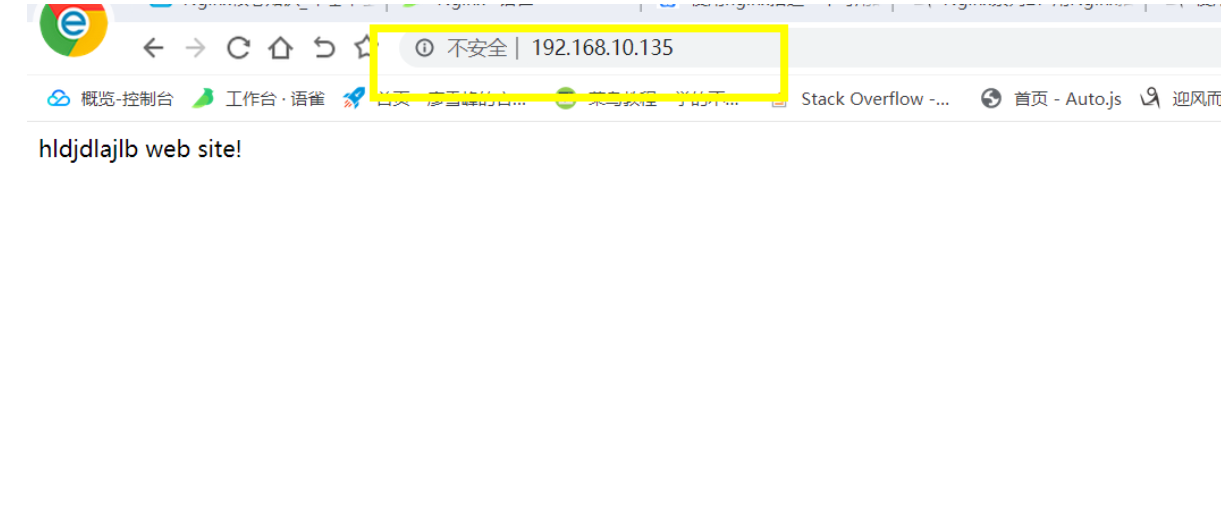
hldjdlajlb web site!
2.修改配置文件conf下的nginx.conf文件
[root@localhost conf]# vim nginx.conf
配置location/所有的请求,这里一般使用alias,这样url后面的路径就和dlib/下的路径是一一对应的。如果使用root,url会把loacltion/后面的路径和dlib/文件的额路径拼接起来。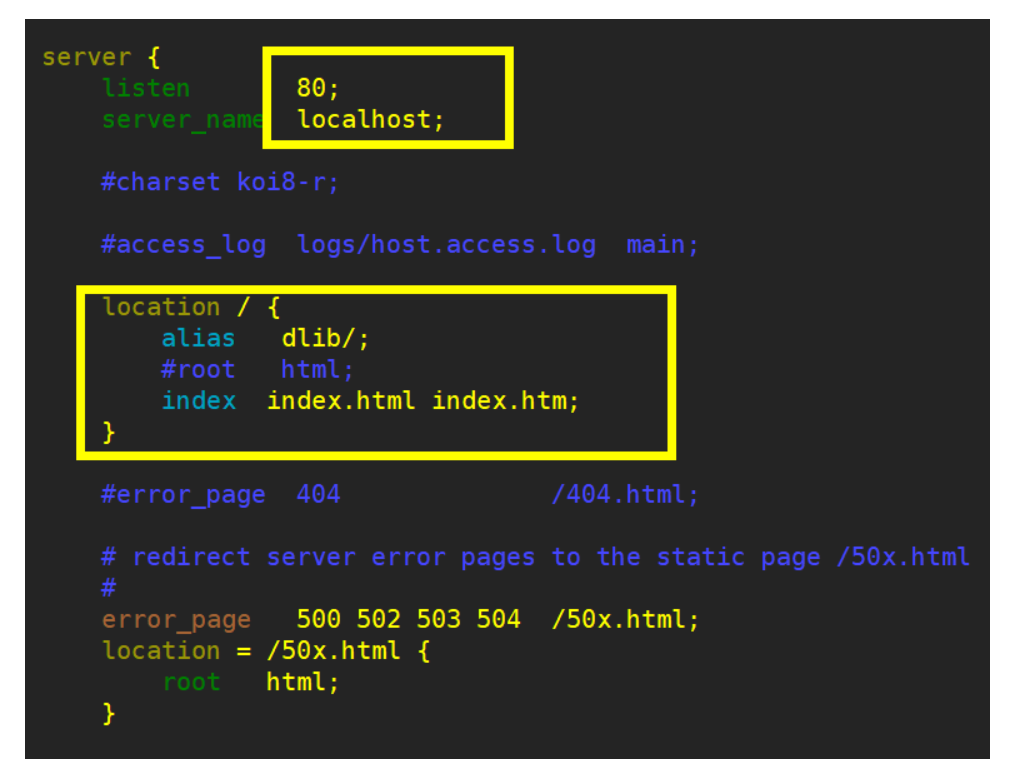
3.重载nginx
 [root@localhost sbin]# pwd
/usr/local/webserver/nginx/sbin
[root@localhost sbin]# ./nginx -s reload
反向代理和缓存
- 介绍
反向代理(Reverse Proxy)方式是指以代理服务器来接受internet上的连接请求,然后将请求转发给内部网络上的服务 器,并将从服务器上得到的结果返回给internet上请求连接的客户端,此时代理服务器对外就表现为一个反向代理服务 器,通常使用到的http/https协议和fastgci(将动态内容和http服务器分离)。
- 正向代理:代理服务器作为客户端请求发往Internet
反向代理:代理服务器作为服务器接收Internet请求

代理相关模块及配置
常用属性模块:ngx_http_proxy_module
- proxy_pass:指定将请求代理至server的URL路径;
- proxy_set_header:将发送至server的报文的某首部进行重写;
- Host nginx的host
- X-Real-IP 真实的源IP地址
- proxy_send_timeout:设置将请求传输到代理服务器的超时。仅在两次连续写入操作之间设置超时,而不是为整 个请求的传输。
- proxy_read_timeout:定义从代理服务器读取响应的超时。仅在两个连续的读操作之间设置超时
- proxy_connect_timeout: 定义与代理服务器建立连接的超时
代理服务器实验
[root@localhost ~]# yum install php-f
Nginx作为动态资源站点
Nginx请求资源过程 client -http->nginx——fastcgi-pass(代理)——fastcgi——>动态资源
apache请求资源 client -http->apache(java、php、python等相关的模块来获取动态资源)
代理相关模块及配置
- fastcgi_pass address:定义fastcgi server的地址
- fastcgi_index name:定义fastcgi默认的主页资源
fastcgi_param:设置应传递给FastCGI服务器的参数
缓存相关模块及配置
ngx_http_fastcgi_module
fastcgi_bind 绑定指定的ip
fastcgi_buffer_size 设置_size_用于读取从FastCGI服务器接收的响应的第一部分的缓冲区
fastcgi_buffering on | off 启用或禁用缓冲来自FastCGI服务器的响应
fastcgi_buffers 设置用于从FastCGI服务器读取响应的缓冲区_number_和_size_单个连接
fastcgi_busy_buffers_size 当启用从FastCGI服务器缓冲响应时,限制_size_在响应尚未完全读取时可能忙于向 客户端发送响应的缓冲区总数。
fastcgi_cache 定义用于缓存的共享内存区域
fastcgi_cache_background_update 允许启动后台请求来更新过期的缓存页
fastcgi_cache_bypass 定义不从缓存中获取响应的文件
fastcgi_cache_key 定义缓存的键
fastcgi_cache_lock on | off 启用后,通过将请求传递给Fastcdi服务器
fastcgi_cache_lock_age 如果传递给FastCGI服务器以填充新缓存元素的最后一个请求尚未完成指定_time_, 则可以将另一个请求传递给FastCGI服务器
fastcgi_cache_lock_timeout 设置fastcgi_cache_lock的超时。当time到期的时候,请求将被传递到Fastcgi服 务器,但是,响应不会被缓存
fastcgi_cache_max_range_offset
fastcgi_cache_methods 客户端请求方法
fastcgi_cache_min_uses
fastcgi_cache_path 设置缓存的路径和其他参数
fastcgi_cache_purge 将请求视为缓存清除请求的条件
fastcgi_cache_revalidate
fastcgi_cache_use_stale
fastcgi_cache_valid 设置不同响应代码的缓存时间
fastcgi_catch_stderr 设置要从fastcgi服务器接收的响应的错误流中搜索的字符串
fastcgi_connect_timeout 定义与fastcgi服务器建立连接到超时时间
fastcgi_force_ranges
fastcgi_hide_header 设置了不会传递给客户端的其他字段
fastcgi_ignore_client_abort 确定在客户端关闭连接而不等待响应时是否应关闭与fastcgi服务器的连接
fastcgi_ignore_headers 禁用从fastcgi服务器处理某些响应头字段
fastcgi_index 设置将在$fastcgi_script_name变量值中以斜杠结尾的URI后追加的文件名。
fastcgi_intercept_errors
fastcgi_keep_conn
fastcgi_limit_rate 限制从FastCGI服务器读取响应的速度
fastcgi_max_temp_file_size 设置_size_临时文件的最大值。
fastcgi_next_upstream 指定应将请求传递到下一个服务器的情况
fastcgi_next_upstream_timeout 限制请求可以传递到 下一个服务器的时间。该0值将关闭此限制
fastcgi_next_upstream_tries 限制将请求传递到下一个服务器的可能尝试次数 。该0将关闭此限制
fastcgi_no_cache 定义不将响应保存到缓存的条件
fastcgi_param
fastcgi_pass 设置FastCGI服务器的地址。地址可以指定为域名或IP地址,以及端口或者作为UNIX域套接字路 径:

若有收获,就点个赞吧
0 人点赞


