- 1、作用
- 2、记录的内容介绍
- 3、配置方法
- 重启生效
- 查看日志开启情况
- 查询所有的二进制日志文件信息
- 刷新, 产生一个新的日志文件
- 查询数据库当前使用二进制日志文件信息
- 实验环境下, 使用 flush logs, 产生一个新的日志文件, 减少干扰
- 刷新, 产生一个新的二进制日志文件
- 添加数据
- 查看日志事件
- 查看方法
- 例如: pos 219 ~ 316: 记录建库语句、pos 381 ~ 484: 记录建表语句、BENG ~ COMMIT 记录insert的行数据变化
- 查看 bin_log
- 根据起始pos号查看 bin_log
- 查看某个库相关的 bin_log
- 查看 bin_log详细内容
- at 219 # 起点
- 201224 23:50:54 server id 7 end_log_pos 316 CRC32 0xca950d19 Query thread_id=2 exec_time=0 error_code=0 # 事件属性
- at 316 # 终点
- at 381
- 201224 23:51:41 server id 7 end_log_pos 484 CRC32 0xc8411795 Query thread_id=2 exec_time=0 error_code=0
- at 484
- at 549
- 201224 23:54:26 server id 7 end_log_pos 622 CRC32 0x1802ea9c Query thread_id=2 exec_time=0 error_code=0
- at 622
- 201224 23:54:26 server id 7 end_log_pos 671 CRC32 0x4bdc06bc Table_map:
db_01.tb_01mapped to number 110 - at 671
- 201224 23:54:26 server id 7 end_log_pos 711 CRC32 0xf95510d3 Write_rows: table id 110 flags: STMT_END_F
- at 711
- 201224 23:54:26 server id 7 end_log_pos 742 CRC32 0x099dfa0d Xid = 34
- 更详细的显示DML操作语句
- at 671
- 201224 23:54:26 server id 7 end_log_pos 711 CRC32 0xf95510d3 Write_rows: table id 110 flags: STMT_END_F
- at 711
- 起点: 建库的位置点 position: 219
- 终点: 删库的位置点 position: 807
- 都是截取起始 positon 值
- 6.2、需要的日志在多个日志文件中, 怎么截取
- 前提条件, 找到create database 到 drop database 的所有二进制日志
- 分段截取: create 到 drop 的日志记录
- 设置当前会话,不记录日志
- 逐个导入sql文件,进行恢复
- 设置当前会话,记录日志
- 找起点: 建库的 position号
- 通过 position 号, 截取建库时间戳
- at 219
- 201226 14:51:57 server id 7 end_log_pos 332 CRC32 0x27d57791 Query thread_id=2 exec_time=0 error_code=0
- 找终点: 删库的 position号
- 通过 position 号, 截取删库时间戳
- at 484
- 201226 14:55:08 server id 7 end_log_pos 579 CRC32 0xedbfd222 Query thread_id=2 exec_time=0 error_code=0
- 通过起止时间: 截取日志
1、作用
- 数据恢复
- 主从复制
2、记录的内容介绍
记录修改类操作: 逻辑日志, 类似于SQL记录
DML: insert、update、delete
DDL: create、drop、alter、trucate
DCL: grant、revoke3、配置方法
默认: 未开启3.1、数据参数查询
``` 注意: MySQL默认是没有开启二进制日志的 基础参数查看
开关 select @@log_bin;
日志路径及名字 select @@log_bin_basename;
主机ID select @@server_id;
二进制日志格式 select @@binlog_format;
双一标准之二 select @@sync_binlog;
<a name="B6eO3"></a>## 3.2、bin_log 配置
mkdir -p /data/3307/binlog chown -R mysql.mysql /data/3307/binlog/
vim /etc/my.cnf [mysqld] server_id=07 log_bin=/data/3307/binlog/mysql-bin binlog_format=row
重启生效
<a name="RSClT"></a>
#### 参数说明
server_id=3307 主机ID: 非0(1~65535), 即使是单机也是必加的
log_bin=/data/3307/binlog/mysql-bin (1)开启二进制日志功能 (2)设置二进制日志目录及名称前缀 最终格式: mysql-bin.000001
binlog_format=row binlog的记录格式
<a name="nvj72"></a>
# 4、bin_log 记录了什么
<a name="Uu5aR"></a>
## 4.1、引入
binlog是SQL层的功能, 记录的是变更SQL语句, 不记录查询语句
<a name="BAey6"></a>
## 4.2、记录SQL语句种类
DDL: 原封不动的记录当前DDL (statement语句方式) DCL: 原封不动的记录当前DCL (statement语句方式) DML: 只记录已经提交的事务DML
<a name="U3Sxq"></a>
## 4.3、DML三种记录方式
binlog_format: binlog的记录格式 (参数影响)
- statement: (5.6默认), SBR (statement based replication), 语句模式原封不动的记录当前DML
- ROW: (5.7 默认值) RBR (ROW based replication), 记录数据行的变化 (用户看不懂, 需要工具分析)
- mixed: (混合) MBR (mixed based replication), 以上两种模式的混合; statement + ROW
SBR与RBR模式的对比 STATEMENT: 可读性较高, 日志量少, 但是不够严谨 ROW : 可读性很低,日志量大, 足够严谨<a name="9tscq"></a> #### 面试题
insert into t1 values(1,’zs’,now()) 我们建议使用: ROW 记录模式
<a name="lMLjo"></a>
# 5、bin_log 查看
<a name="YbNxC"></a>
## 5.1、日志文件查看
查看日志开启情况
mysql> show variables like ‘%log_bin%’;
查询所有的二进制日志文件信息
mysql> show binary logs; +—————————+—————-+ | Log_name | File_size | +—————————+—————-+ | mysql-bin.000001 | 154 | +—————————+—————-+
刷新, 产生一个新的日志文件
mysql> flush logs;
mysql> show binary logs; +—————————+—————-+ | Log_name | File_size | +—————————+—————-+ | mysql-bin.000001 | 201 | | mysql-bin.000002 | 154 | +—————————+—————-+
查询数据库当前使用二进制日志文件信息
mysql> show master status; +—————————+—————+———————+—————————+—————————-+ | File | Position | Binlog_Do_DB | Binlog_Ignore_DB | Executed_Gtid_Set | +—————————+—————+———————+—————————+—————————-+ | mysql-bin.000002 | 154 | | | | +—————————+—————+———————+—————————+—————————-+ file: 当前MySQL正在使用的文件名 Position: 最后一个事件的结束位置号
<a name="ch2l0"></a>
## 5.2、事件查看
实验环境下, 使用 flush logs, 产生一个新的日志文件, 减少干扰
刷新, 产生一个新的二进制日志文件
mysql> flush logs;
添加数据
mysql> create database db_01; mysql> use db_01; mysql> create table tb_01 (id int); mysql> insert into db_01.tb_01 values (1); mysql> commit;
查看日志事件
mysql> show binlog events in ‘mysql-bin.000003’;
+—————————+——-+————————+—————-+——————-+—————————————————————+
| Log_name | Pos | Event_type | Server_id | End_log_pos | Info |
+—————————+——-+————————+—————-+——————-+—————————————————————+
| mysql-bin.000003 | 4 | Format_desc | 7 | 123 | Server ver: 5.7.28-log, Binlog ver: 4 |
| mysql-bin.000003 | 123 | Previous_gtids | 7 | 154 | |
| mysql-bin.000003 | 154 | Anonymous_Gtid | 7 | 219 | SET @@SESSION.GTID_NEXT= ‘ANONYMOUS’ |
| mysql-bin.000003 | 219 | Query | 7 | 316 | create database db_01 |
| mysql-bin.000003 | 316 | Anonymous_Gtid | 7 | 381 | SET @@SESSION.GTID_NEXT= ‘ANONYMOUS’ |
| mysql-bin.000003 | 381 | Query | 7 | 484 | use db_01; create table tb_01 (id int) |
| mysql-bin.000003 | 484 | Anonymous_Gtid | 7 | 549 | SET @@SESSION.GTID_NEXT= ‘ANONYMOUS’ |
| mysql-bin.000003 | 549 | Query | 7 | 622 | BEGIN |
| mysql-bin.000003 | 622 | Table_map | 7 | 671 | table_id: 110 (db_01.tb_01) |
| mysql-bin.000003 | 671 | Write_rows | 7 | 711 | table_id: 110 flags: STMT_END_F |
| mysql-bin.000003 | 711 | Xid | 7 | 742 | COMMIT / xid=34 / |
+—————————+——-+————————+—————-+——————-+—————————————————————+
<a name="CDRRr"></a>
#### 参数解释
<a name="ZNBo4"></a>
#### 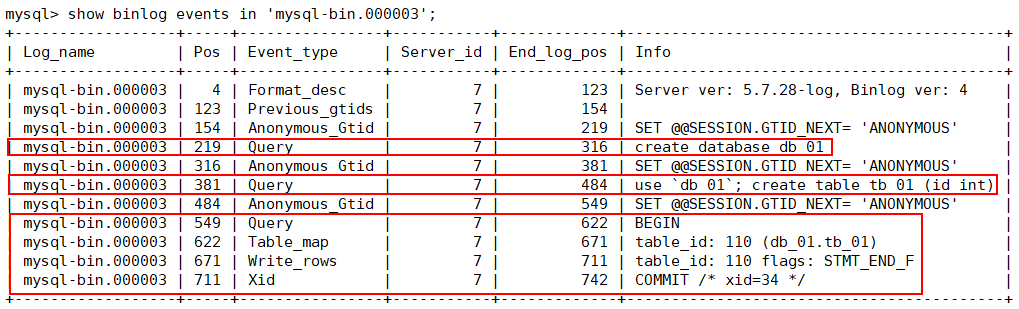
Log_name: binlog 文件名 Pos: 开始的 position★ Event_type: 事件类型 Format_desc: 格式描述, 每一个日志文件的第一个事件, 多用户没有意义, MySQL识别binlog必要信息 Server_id: mysql服务号标识 End_log_pos: 事件的结束位置号★ Info: 事件内容★
重要信息: Pos (start_position)、End_log_pos (end_position)、info (事件信息)
查看方法
(1). 前三行 Pos: 4 ~ 154 是每个二进制日志文件都会生成的内容 (2). 从Pos=154的行往下看, 非 Anonymous_Gtid 的行
例如: pos 219 ~ 316: 记录建库语句、pos 381 ~ 484: 记录建表语句、BENG ~ COMMIT 记录insert的行数据变化
补充: SHOW BINLOG EVENTS [IN ‘log_name’] [FROM pos] [LIMIT [offset,] row_count]
mysql -e “show binlog events in ‘mysql-bin.000004’” |grep drop
<a name="xqkt0"></a>
## 5.3、bin_log 详细内容查看
查看 bin_log
mysqlbinlog /data/3307/binlog/mysql-bin.000003
根据起始pos号查看 bin_log
mysqlbinlog —start-position=219 —stop-position=807 /data/3307/binlog/mysql-bin.000003
查看某个库相关的 bin_log
mysqlbinlog -d database_name /data/3307/binlog/mysql-bin.000003
查看 bin_log详细内容
mysqlbinlog —base64-output=decode-rows -vv /data/3307/binlog/mysql-bin.000003
-v, -vv的区别 https://blog.csdn.net/weixin_43733154/article/details/106264722
<a name="8HL6j"></a>
#### 建库操作内容
at 219 # 起点
201224 23:50:54 server id 7 end_log_pos 316 CRC32 0xca950d19 Query thread_id=2 exec_time=0 error_code=0 # 事件属性
create database db_01 # 事件内容
at 316 # 终点
<a name="YL6IR"></a>
#### 建表操作内容
at 381
201224 23:51:41 server id 7 end_log_pos 484 CRC32 0xc8411795 Query thread_id=2 exec_time=0 error_code=0
use db_01/!/;
create table tb_01 (id int)
at 484
<a name="DXbo7"></a>
#### insert操作内容
at 549
201224 23:54:26 server id 7 end_log_pos 622 CRC32 0x1802ea9c Query thread_id=2 exec_time=0 error_code=0
BEGIN
at 622
201224 23:54:26 server id 7 end_log_pos 671 CRC32 0x4bdc06bc Table_map: db_01.tb_01 mapped to number 110
at 671
201224 23:54:26 server id 7 end_log_pos 711 CRC32 0xf95510d3 Write_rows: table id 110 flags: STMT_END_F
BINLOG ‘ # 记录操作内容, ROW 模式 srnkXxMHAAAAMQAAAJ8CAAAAAG4AAAAAAAEABWRiXzAxAAV0Yl8wMQABAwABvAbcSw== srnkXx4HAAAAKAAAAMcCAAAAAG4AAAAAAAEAAgAB//4BAAAA0xBV+Q==
at 711
201224 23:54:26 server id 7 end_log_pos 742 CRC32 0x099dfa0d Xid = 34
COMMIT/!/;
<a name="OM23Q"></a>
#### 翻译 ROW模式记录内容
--base64-output=decode-rows -vv
更详细的显示DML操作语句
mysql> insert into db_01.tb_01 set id=2;
at 671
201224 23:54:26 server id 7 end_log_pos 711 CRC32 0xf95510d3 Write_rows: table id 110 flags: STMT_END_F
INSERT INTO db_01.tb_01
SET
@1=1 / INT meta=0 nullable=1 is_null=0 /
at 711
<a name="iDoyy"></a>
# 6、bin_log 应用
<a name="LmI7r"></a>
## 6.1、binlog截取及恢复演练
<a name="FegyZ"></a>
#### 思路
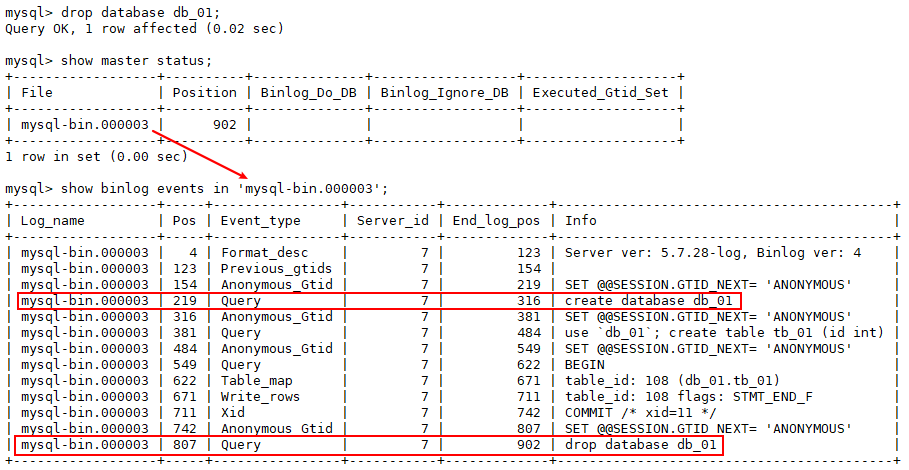
截取从建库以来 到 删库之前的所有binlog
drop database db_01;
- 查看正在使用的二进制日志文件 mysql> show master status; +—————————+—————+———————+—————————+—————————-+ | File | Position | Binlog_Do_DB | Binlog_Ignore_DB | Executed_Gtid_Set | +—————————+—————+———————+—————————+—————————-+ | mysql-bin.000003 | 902 | | | | +—————————+—————+———————+—————————+—————————-+
起点: 建库的位置点 position: 219
终点: 删库的位置点 position: 807
都是截取起始 positon 值
- 查看二进制日志事件信息
mysql> show binlog events in ‘mysql-bin.000003’;
+—————————+——-+————————+—————-+——————-+—————————————————————+
| Log_name | Pos | Event_type | Server_id | End_log_pos | Info |
+—————————+——-+————————+—————-+——————-+—————————————————————+
| mysql-bin.000003 | 4 | Format_desc | 7 | 123 | Server ver: 5.7.28-log, Binlog ver: 4 |
| mysql-bin.000003 | 123 | Previous_gtids | 7 | 154 | |
| mysql-bin.000003 | 154 | Anonymous_Gtid | 7 | 219 | SET @@SESSION.GTID_NEXT= ‘ANONYMOUS’ |
| mysql-bin.000003 | 219 | Query | 7 | 316 | create database db_01 |
| mysql-bin.000003 | 316 | Anonymous_Gtid | 7 | 381 | SET @@SESSION.GTID_NEXT= ‘ANONYMOUS’ |
| mysql-bin.000003 | 381 | Query | 7 | 484 | use
db_01; create table tb_01 (id int) | | mysql-bin.000003 | 484 | Anonymous_Gtid | 7 | 549 | SET @@SESSION.GTID_NEXT= ‘ANONYMOUS’ | | mysql-bin.000003 | 549 | Query | 7 | 622 | BEGIN | | mysql-bin.000003 | 622 | Table_map | 7 | 671 | table_id: 108 (db_01.tb_01) | | mysql-bin.000003 | 671 | Write_rows | 7 | 711 | table_id: 108 flags: STMT_END_F | | mysql-bin.000003 | 711 | Xid | 7 | 742 | COMMIT / xid=11 / | | mysql-bin.000003 | 742 | Anonymous_Gtid | 7 | 807 | SET @@SESSION.GTID_NEXT= ‘ANONYMOUS’ | | mysql-bin.000003 | 807 | Query | 7 | 902 | drop database db_01 | +—————————+——-+————————+—————-+——————-+—————————————————————+<a name="hucaY"></a> #### 截取日志、进行回放 截取起始点,导出sql文件 mysqlbinlog —start-position=219 —stop-position=807 /data/3307/binlog/mysql-bin.000003 > /data/3307/db_01.sql
设置当前会话,不记录二进制日志 (访问产生无用日志) mysql> set sql_log_bin=0;
导入sql文件,进行恢复 mysql> source /data/3307/db_01.sql;
导入完成,设置当前会话记录二进制日志,或者关闭会话 mysql> set sql_log_bin=1; ```
6.1.1、二进制日志恢复的痛点
- 需要的日志在多个文件中、怎么截取?
- binlog属于全局日志、日志中有其它库的操作、怎么除掉?
- binlog中100w个事件、怎么快速找到drop database 的位置点?
- 比如删除的库、建立是在2年前、这种情况怎么办?
6.2、需要的日志在多个日志文件中, 怎么截取
6.2.1、场景模拟
``` mysql> show master status; +—————————+—————+———————+—————————+—————————-+ | File | Position | Binlog_Do_DB | Binlog_Ignore_DB | Executed_Gtid_Set | +—————————+—————+———————+—————————+—————————-+ | mysql-bin.000001 | 154 | | | | +—————————+—————+———————+—————————+—————————-+
mysql> create database db_01 charset=utf8mb4; mysql> use db_01 mysql> create table t1 (id int);
mysql> flush logs; mysql> show master status; +—————————+—————+———————+—————————+—————————-+ | File | Position | Binlog_Do_DB | Binlog_Ignore_DB | Executed_Gtid_Set | +—————————+—————+———————+—————————+—————————-+ | mysql-bin.000002 | 154 | | | | +—————————+—————+———————+—————————+—————————-+
mysql> insert into t1 values(1),(2),(3); mysql> commit;
mysql> flush logs; mysql> show master status; +—————————+—————+———————+—————————+—————————-+ | File | Position | Binlog_Do_DB | Binlog_Ignore_DB | Executed_Gtid_Set | +—————————+—————+———————+—————————+—————————-+ | mysql-bin.000003 | 154 | | | | +—————————+—————+———————+—————————+—————————-+
mysql> create table t2(id int); mysql> insert into t2 values(1),(2),(3); mysql> commit;
mysql> flush logs; mysql> show master status; +—————————+—————+———————+—————————+—————————-+ | File | Position | Binlog_Do_DB | Binlog_Ignore_DB | Executed_Gtid_Set | +—————————+—————+———————+—————————+—————————-+ | mysql-bin.000004 | 154 | | | | +—————————+—————+———————+—————————+—————————-+
mysql> insert into t2 values(11),(22),(33); mysql> commit;
drop database db_01;
<a name="nKcFO"></a>
#### 恢复方法
分段截取: --start-position  --stop-position
前提条件, 找到create database 到 drop database 的所有二进制日志
show binlog events in ‘mysql-bin.000001’; … show binlog events in ‘mysql-bin.000005’;
分段截取: create 到 drop 的日志记录
mysqlbinlog —start-position=219 —stop-position=544 /data/3307/binlog/mysql-bin.000001 > 1.sq … mysqlbinlog —start-position=219 —stop-position=484 /data/3307/binlog/mysql-bin.000004 > 4.sql
设置当前会话,不记录日志
mysql> set sql_log_bin=0;
逐个导入sql文件,进行恢复
source /root/1.sql … source /root/4.sql
设置当前会话,记录日志
mysql> set sql_log_bin=1;
<a name="N8TJw"></a>
#### 时间戳截取
问题: 时间重复
找起点: 建库的 position号
mysql> show binlog events in ‘mysql-bin.000001’; mysql-bin.000001 | 219 | Query | 7 | 332 | create database db_01 charset=utf8mb4
通过 position 号, 截取建库时间戳
mysqlbinlog —start-position=219 —stop-position=322 /data/3307/binlog/mysql-bin.000001 | grep -A 1 ‘^#\ at\ 219’
at 219
201226 14:51:57 server id 7 end_log_pos 332 CRC32 0x27d57791 Query thread_id=2 exec_time=0 error_code=0
找终点: 删库的 position号
mysql> show binlog events in ‘mysql-bin.000004’; mysql-bin.000004 | 484 | Query | 7 | 579 | drop database db_01
通过 position 号, 截取删库时间戳
mysqlbinlog —start-position=484 —stop-position=579 /data/3307/binlog/mysql-bin.000004
at 484
201226 14:55:08 server id 7 end_log_pos 579 CRC32 0xedbfd222 Query thread_id=2 exec_time=0 error_code=0
drop database db_01
通过起止时间: 截取日志
mysqlbinlog —start-datetime=”2020-12-26 14:51:57” —stop-datetime=”2020-12-26 14:55:08” \ /data/3307/binlog/mysql-bin.000001 /data/3307/binlog/mysql-bin.000002 /data/3307/binlog/mysql-bin.000003 /data/3307/binlog/mysql-bin.000004 \
/tmp/db_01.sql
<a name="OBTA3"></a>
#### 从 create 到 drop 总共产生了10个二进制日志文件、时间有大量重复记录、如何处理
口诀: 掐头去尾 1: mysqlbinlog —start-pos mysql-bin.000001 > 1.sql 2 ~ 9: mysqlbinlog mysql-bin.000002 ~ 9 > 2.sql 10: mysqlbinlog —stop-pos mysql-bin.000010 > 3.sql
gtid 方式截取恢复 (后面讲)
<a name="gjH84"></a>
#### binlog属于全局日志、日志中有其它库的操作、怎么除掉
-d 库名: 只截取某个库二进制日志内容 mysqlbinlog -d db_01 mysql-bin.000001 > db_01.sql
提取表: 思路: 先截取库, 然后对BEGIN 到 COMMIT之间的库.表进行截取 | mysql-bin.000004 | 219 | Query | 7 | 292 | BEGIN | | mysql-bin.000004 | 292 | Table_map | 7 | 338 | table_id: 109 (db_01.t2) | | mysql-bin.000004 | 338 | Write_rows | 7 | 388 | table_id: 109 flags: STMT_END_F | | mysql-bin.000004 | 388 | Xid | 7 | 419 | COMMIT / xid=21 / |
<a name="KeBtS"></a>
#### binlog中100w个事件、怎么快速找到drop database 的位置点
pager grep mysql> pager grep “drop database db_01” mysql> show binlog events in ‘mysql-bin.000004’;
pager less mysql> pager less; mysql> show binlog events in ‘mysql-bin.000004’;
mysql -e mysql -e “show binlog events in ‘mysql-bin.000004’” | grep database db_01 mysql -e “show binlog events in ‘mysql-bin.000004’” | less
<a name="c1BnC"></a>
#### 比如删除的库、建立是在2年前、这种情况怎么办
每天全备 全备 + binlog 方式恢复数据到故障之前 (drop 之前) ```

若有收获,就点个赞吧
0 人点赞


