配置项说明
| 字段名 | 含义 | 类型 | 是否必选 | 备注 |
|---|---|---|---|---|
| type | 类型 | string | 是 | 无 |
| name | 显示名 | string | 是 | 无 |
| default | 默认显示值 | string或者object | 否 | 无 |
| multicolor | 双色选择器 | boolean | 否 | 默认值: false,值为true下模块设置无效 |
| components | 模块 | array | 否 | 启用的模块,值可以为”flat”,”linearGradient” |
| valueVisible | 是否追加颜色显示值 | boolean | 否 | 默认值:true |
值说明
| 条件 | 数据类型 | 示例 | 默认值 | 备注 |
|---|---|---|---|---|
| default为纯色(前提:multicolor和components未设置) | string | “#AAAAAA” | “#FFFFFF” | |
| default为渐变色(前提:multicolor和components未设置) | object | { “angle”: 90, “stops”: [ { “color”: “red”, “offset”: 0 }, { “color”: “white”, “offset”: 100 } ] } |
无 | angle:渐变角度(number) stops:渐变值 (array) |
| components值为[‘flat’]并且 multicolor未设置 |
object | { “type”: “flat”, “value”: “red” } |
{ “type”: “flat”, “value”: “#FFFFFF” } |
type:颜色值类型,值为flat(纯色),linearGradient(渐变色) value:颜色值 |
| components值为[‘linearGradient’]并且 multicolor未设置 |
object | { type: ‘linearGradient’, value: { angle: 125, stops: [ { offset: 0, color: ‘red’ }, { offset: 50, color: ‘#39EA21’ }, { offset: 100, color: ‘#FFFFFF’ } ] } } |
{ type: ‘linearGradient’, value: { angle: 90, stops: [ { offset: 0, color: ‘red’ }, { offset: 100, color: ‘#FFFFFF’ } ] } } |
|
| multicolor为true | object | { “style”: “double”, “angle”: 0, “value”: “red”, “from”: “red”, “to”: “#FFFFFF” } |
{ “style”: “single”, “value”: “#FFFFFF” } |
style:值为single(纯色)或者double(双色) value:纯色的值 from:双色开始值 to:双色结束值 angle:双色角度 |
配置示例
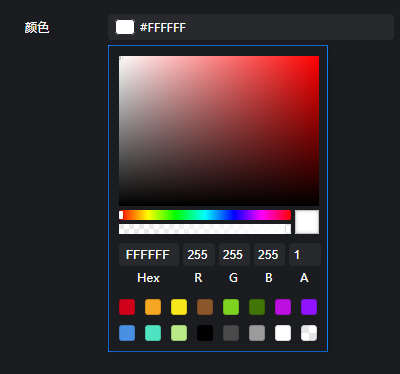
{"color": {"name": "字体颜色","type": "color","default": "#fff"},"multicolor": {"name": "双色","type": "color","multicolor": true,"default": {"style": "single","value": "red"}},"linearGradient": {"name": "渐变色","type": "color","components": ["linearGradient"],"default": {"type": "linearGradient","value": {"angle": 90,"stops": [{"offset": 0,"color": "red"},{"offset": 100,"color": "#FFFFFF"}]}}},"components": {"name": "模块","type": "color","components": ["flat","linearGradient"],"default": {"type": "flat","value": "red"}}}

若有收获,就点个赞吧
0 人点赞


