配置项说明
| 参数 | 子参数 | 备注 |
|---|---|---|
| conditions | 配置条件,array类型。其中的每一项用长度为3的数组描述一个判断条件,数组中包含path、operator和value。 | |
| path | 配置条件依赖的配置项的路径,支持绝对路径和相对路径: - 绝对路径:从顶层根节点开始,使用.来拼接路径,例如global.color。 - 相对路径:从当前配置开始,用.来定位路径,例如.text ..label.show。 |
|
| operator | 操作符,支持的类型包括: - $eq:相等 - $ne:不相等 - $gt:大于 - $lt:小于 - $gte:大于等于 - $lte:小于等于 - $in:在数组中 - $nin:不在数组中 |
|
| value | 配置项的值 | |
| logicalType | conditions定义了若干条件,logicalType则定义了条件之间的逻辑关系。可选值包括$and(与)和$or(或),默认为$and |

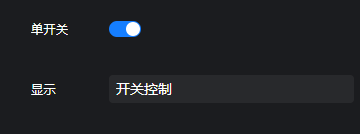
配置示例
"switch": {"type": "switch","name": "单开关","default": false},"showInPanel": {"type": "text","name": "显示","default": "开关控制","showInPanel": [[".switch","$eq",true]]},"switchAnd1": {"type": "switch","name": "多开关1","default": false},"switchAnd2": {"type": "switch","name": "多开关2","default": false},"showInPanelAnd": {"type": "text","name": "显示","default": "多开关控制","showInPanel": [[".switchAnd1","$eq",true],[".switchAnd2","$eq",true]]},"switchOr1": {"type": "switch","name": "交叉开关1","default": false},"switchOr2": {"type": "switch","name": "交叉开关2","default": false},"showInPanelOr": {"type": "text","name": "显示","default": "交叉开关控制","showInPanel": {"conditions": [[".switchOr1","$eq",true],[".switchOr2","$eq",true]],"logicalType": "$or"}}

若有收获,就点个赞吧
0 人点赞


