https://www.runoob.com/design-pattern/prototype-pattern.html
1. 概念
原型模式(Prototype Pattern)是用于创建重复的对象,同时又能保证性能。这种类型的设计模式属于创建型模式,它提供了一种创建对象的最佳方式。
这种模式是实现了一个原型接口,该接口用于创建当前对象的克隆。当直接创建对象的代价比较大时,则采用这种模式。例如,一个对象需要在一个高代价的数据库操作之后被创建。我们可以缓存该对象,在下一个请求时返回它的克隆,在需要的时候更新数据库,以此来减少数据库调用。
2. 介绍
意图:用原型实例指定创建对象的种类,并且通过拷贝这些原型创建新的对象。
主要解决:在运行期建立和删除原型。
何时使用:
1、当一个系统应该独立于它的产品创建,构成和表示时。
2、当要实例化的类是在运行时刻指定时,例如,通过动态装载。
3、为了避免创建一个与产品类层次平行的工厂类层次时。
4、当一个类的实例只能有几个不同状态组合中的一种时。建立相应数目的原型并克隆它们可能比每次用合适的状态手工实例化该类更方便一些。
如何解决:利用已有的一个原型对象,快速地生成和原型对象一样的实例。
关键代码: 1、实现克隆操作,在 JAVA 继承 Cloneable,重写 clone(),在 .NET 中可以使用 Object 类的 MemberwiseClone() 方法来实现对象的浅拷贝或通过序列化的方式来实现深拷贝。 2、原型模式同样用于隔离类对象的使用者和具体类型(易变类)之间的耦合关系,它同样要求这些”易变类”拥有稳定的接口。
应用实例: 1、细胞分裂。 2、JAVA 中的 Object clone() 方法。
优点: 1、性能提高。 2、逃避构造函数的约束。
缺点:
1、配备克隆方法需要对类的功能进行通盘考虑,这对于全新的类不是很难,但对于已有的类不一定很容易,特别当一个类引用不支持串行化的间接对象,或者引用含有循环结构的时候。
2、必须实现 Cloneable 接口。
使用场景:
1、资源优化场景。
2、类初始化需要消化非常多的资源,这个资源包括数据、硬件资源等。
3、性能和安全要求的场景。
4、通过 new 产生一个对象需要非常繁琐的数据准备或访问权限,则可以使用原型模式。
5、一个对象多个修改者的场景。
6、一个对象需要提供给其他对象访问,而且各个调用者可能都需要修改其值时,可以考虑使用原型模式拷贝多个对象供调用者使用。
7、在实际项目中,原型模式很少单独出现,一般是和工厂方法模式一起出现,通过 clone 的方法创建一个对象,然后由工厂 方法提供给调用者。原型模式已经与 Java 融为浑然一体,大家可以随手拿来使用。
注意事项:与通过对一个类进行实例化来构造新对象不同的是,原型模式是通过拷贝一个现有对象生成新对象的。浅拷贝实现 Cloneable,重写,深拷贝是通过实现 Serializable 读取二进制流。
3. 代码
我们将创建一个抽象类 Shape 和扩展了 Shape 类的实体类。下一步是定义类 ShapeCache,该类把 shape 对象存储在一个 Hashtable 中,并在请求的时候返回它们的克隆。
PrototypePatternDemo 类使用 ShapeCache 类来获取 Shape 对象。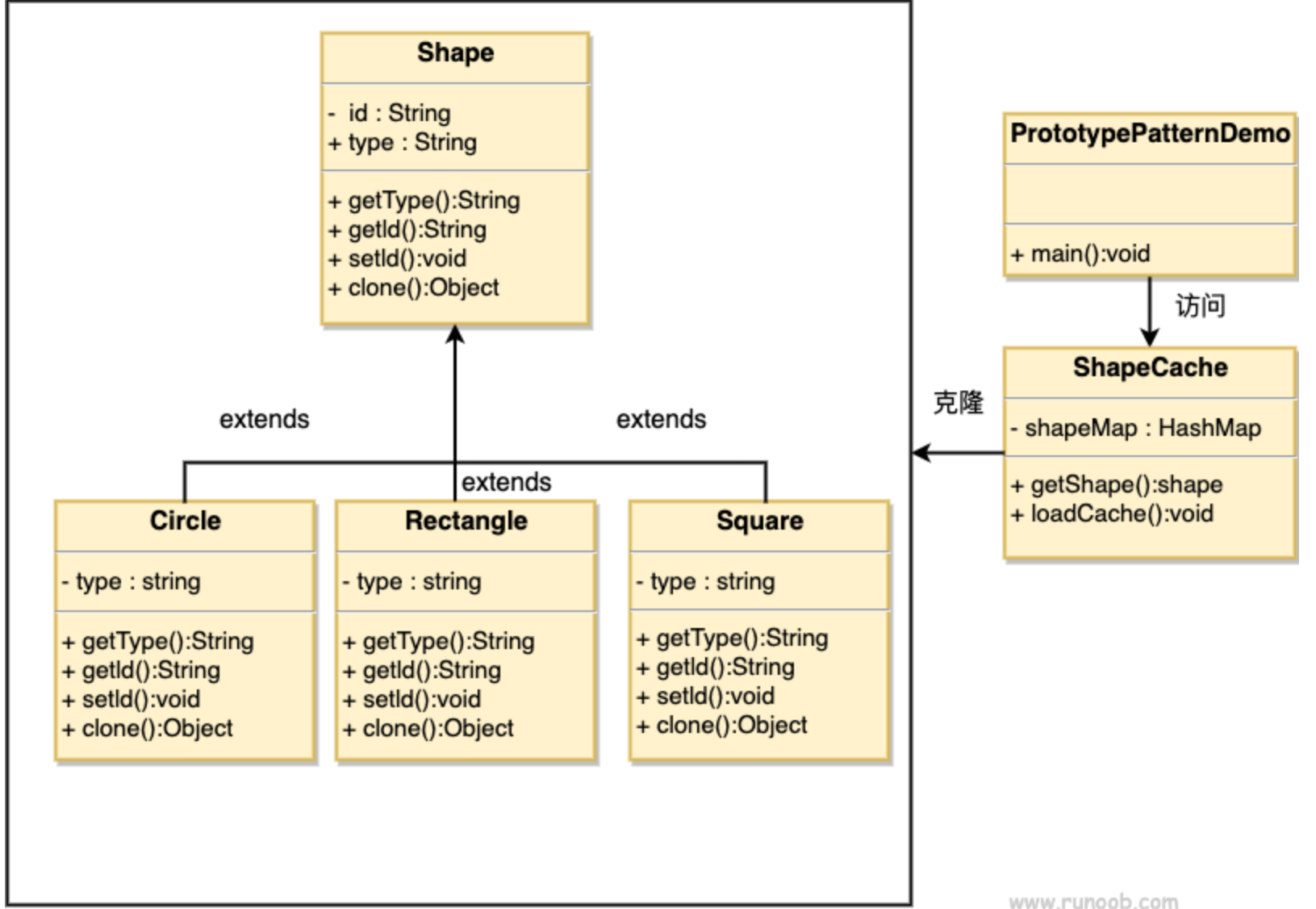
总的shape类
public abstract class Shape implements Cloneable{//形状idprivate String id;//形状类型protected String type;//画abstract void draw();public String getType(){return type;}public String getId() {return id;}public void setId(String id) {this.id = id;}@Overridepublic Object clone() {Object clone = null;try {clone = super.clone();} catch (CloneNotSupportedException e) {e.printStackTrace();}return clone;}}
具体子类
public class Circle extends Shape{public Circle() {type = "圆形";}@Overridepublic void draw() {System.out.println("画一个圆形");}}public class Rectangle extends Shape{public Rectangle() {type = "长方形";}@Overridepublic void draw() {System.out.println("画一个长方形");}}public class Square extends Shape{public Square() {type = "正方形";}@Overridepublic void draw() {System.out.println("画一个正方形");}}
缓存类
//缓存图形public class ShapeCache {//添加进private static Hashtable<String, Shape> shapeMap= new Hashtable<String, Shape>();//在缓存中找出类public static Shape getShape(String shapeId) {Shape cachedShape = shapeMap.get(shapeId);return (Shape) cachedShape.clone();}//这一步,我们可以理解成从数据库中把查询出来的类加到map中去public static void loadCache() {Circle circle = new Circle();circle.setId("1");shapeMap.put(circle.getId(),circle);Square square = new Square();square.setId("2");shapeMap.put(square.getId(),square);Rectangle rectangle = new Rectangle();rectangle.setId("3");shapeMap.put(rectangle.getId(),rectangle);}}
测试类
public class PrototypePatternDemo {public static void main(String[] args) {//先从数据库加载到缓存中ShapeCache.loadCache();//值得注意的是:这里的形状是从缓存map中拿出来的Shape clonedShape = (Shape) ShapeCache.getShape("1");System.out.println("Shape : " + clonedShape.getType());Shape clonedShape2 = (Shape) ShapeCache.getShape("2");System.out.println("Shape : " + clonedShape2.getType());Shape clonedShape3 = (Shape) ShapeCache.getShape("3");System.out.println("Shape : " + clonedShape3.getType());//Shape : 圆形//Shape : 正方形//Shape : 长方形}}
4. 谈谈clone
clone:克隆,字面意思就是根据已有对象创建出一个新的一模一样的对象
4.1 浅拷贝
被复制对象的所有变量都含有与原来的对象相同的值,而所有的对其他对象的引用仍然指向原来的对象。即对象的浅拷贝会对“主”对象进行拷贝,但不会复制主对象里面的对象。”里面的对象“会在原来的对象和它的副本之间共享。
简而言之,浅拷贝仅仅复制所考虑的对象,而不复制它所引用的对象。
public class Teacher implements Cloneable{private String name;private int age;public String getName() {return name;}public void setName(String name) {this.name = name;}public int getAge() {return age;}public void setAge(int age) {this.age = age;}}public class Student implements Cloneable{private Teacher teacher;private String name;@Overridepublic String toString() {return "Student{" +"teacher=" + teacher +", name='" + name + '\'' +'}';}public Teacher getTeacher() {return teacher;}public void setTeacher(Teacher teacher) {this.teacher = teacher;}public String getName() {return name;}public void setName(String name) {this.name = name;}public Student() {}@Overridepublic Object clone() throws CloneNotSupportedException {Object object = super.clone();return object;}}
public class ShallowClone {public static void main(String[] args) throws Exception {Teacher teacher = new Teacher();teacher.setName("修改前");teacher.setAge(18);Student student1 = new Student();student1.setName("李四");student1.setTeacher(teacher);Student student2 = (Student) student1.clone();System.out.println("=============克隆====================");System.out.println(student2.getName()); //李四System.out.println(student2.getTeacher().getName());//修改前System.out.println(student2.getTeacher().getAge());//18System.out.println("==============修改后==================");teacher.setName("修改后");System.out.println(student2.getTeacher().getName());//修改后System.out.println(student2.getTeacher().getAge());//18}}
可以看到修改了student1里面的teacher,student2里面的teacher也变了,证明克隆过后两个stu的teacher指向的是同一个。这就是浅拷贝
4.2 深拷贝
下面例子可以看到,修改了第一个stu的teacher信息,第二个stu的teacher信息不会变
public class ShallowClone {public static void main(String[] args) throws Exception {Teacher teacher = new Teacher();teacher.setName("修改前");teacher.setAge(18);Student student1 = new Student();student1.setName("李四");student1.setTeacher(teacher);Student student2 = (Student) student1.clone();System.out.println("=============克隆====================");System.out.println(student2.getName()); //李四System.out.println(student2.getTeacher().getName());//修改前System.out.println(student2.getTeacher().getAge());//18System.out.println("==============修改后==================");teacher.setName("修改后");System.out.println(student1.getTeacher().getName());//修改后System.out.println(student2.getTeacher().getName());//修改前}}public class Student implements Cloneable{private Teacher teacher;private String name;@Overridepublic String toString() {return "Student{" +"teacher=" + teacher +", name='" + name + '\'' +'}';}public Teacher getTeacher() {return teacher;}public void setTeacher(Teacher teacher) {this.teacher = teacher;}public String getName() {return name;}public void setName(String name) {this.name = name;}public Student() {}@Overridepublic Object clone() throws CloneNotSupportedException {// 改为深复制:Student student = (Student) super.clone();// 本来是浅复制,现在将Teacher对象复制一份并重新set进来,这时候两个teacher就是不同的了student.setTeacher((Teacher) student.getTeacher().clone());return student;}}
public class ShallowClone {public static void main(String[] args) throws Exception {Teacher teacher = new Teacher();teacher.setName("修改前");teacher.setAge(18);Student student1 = new Student();student1.setName("李四");student1.setTeacher(teacher);Student student2 = (Student) student1.clone();System.out.println("=============克隆====================");System.out.println(student2.getName()); //李四System.out.println(student2.getTeacher().getName());//修改前System.out.println(student2.getTeacher().getAge());//18System.out.println("==============修改后==================");teacher.setName("修改后");System.out.println(student1.getTeacher().getName());//修改后System.out.println(student2.getTeacher().getName());//修改前}}


若有收获,就点个赞吧
0 人点赞


