docker 安装 nginx
#1. 搜索镜像 search 建议去docker 搜索,可以看到帮助文档#2. 下载 pull#3. 运行测试root@VM-24-6-centos home]# docker imagesREPOSITORY TAG IMAGE ID CREATED SIZEnginx latest 605c77e624dd 5 months ago 141MBcentos latest 5d0da3dc9764 9 months ago 231MB# -d 后台运行# --name 给容器命名# -p宿主机端口:容器内部端口[root@VM-24-6-centos home]# docker run -d --name nginx01 -p 6800:80 nginxc0fad6cdda5ddf02f7163ca26bb528248cff391ad00c2bcd691945a45e350e58[root@VM-24-6-centos home]# docker psCONTAINER ID IMAGE COMMAND CREATED STATUS PORTS NAMESc0fad6cdda5d nginx "/docker-entrypoint.…" 5 seconds ago Up 4 seconds 0.0.0.0:6800->80/tcp, :::6800->80/tcp nginx01[root@VM-24-6-centos home]# curl localhost:6800<!DOCTYPE html><html><head><title>Welcome to nginx!</title><style>html { color-scheme: light dark; }body { width: 35em; margin: 0 auto;font-family: Tahoma, Verdana, Arial, sans-serif; }</style></head><body><h1>Welcome to nginx!</h1><p>If you see this page, the nginx web server is successfully installed andworking. Further configuration is required.</p><p>For online documentation and support please refer to<a href="http://nginx.org/">nginx.org</a>.<br/>Commercial support is available at<a href="http://nginx.com/">nginx.com</a>.</p><p><em>Thank you for using nginx.</em></p></body></html>#进入容器[root@VM-24-6-centos home]# docker exec -it nginx01 /bin/bashroot@c0fad6cdda5d:/# whereis nginxnginx: /usr/sbin/nginx /usr/lib/nginx /etc/nginx /usr/share/nginxroot@c0fad6cdda5d:/# cd /etc/nginxroot@c0fad6cdda5d:/etc/nginx# lsconf.d fastcgi_params mime.types modules nginx.conf scgi_params uwsgi_paramsroot@c0fad6cdda5d:/etc/nginx#
端口暴露的概念: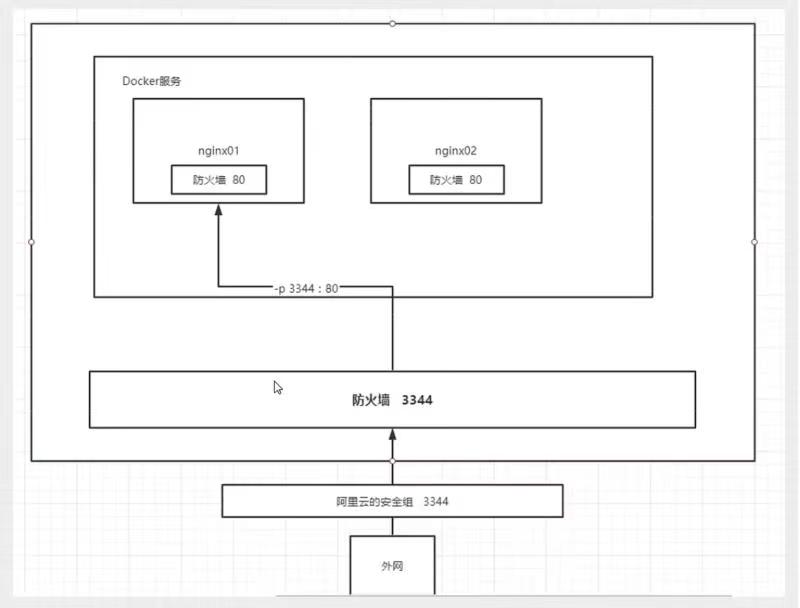
思考问题:每次改动nginx文件都需要进入容器内部,是否可以在容器外部提供一个映射路径,映射到容器,外面修改容器内部就能自动修改? -V 数据集技术

若有收获,就点个赞吧
0 人点赞


