import { ReactiveFormsModule, FormGroup, FormControl, FormBuilder } from "@angular/forms";import { Validators } from "@angular/forms";
文档
共同基础
[FormControl](https://angular.cn/api/forms/FormControl)实例用于追踪单个表单控件的值和验证状态。[FormGroup](https://angular.cn/api/forms/FormGroup)用于追踪一个表单控件组的值和状态。[FormArray](https://angular.cn/api/forms/FormArray)用于追踪表单控件数组的值和状态。[ControlValueAccessor](https://angular.cn/api/forms/ControlValueAccessor)用于在 Angular 的[FormControl](https://angular.cn/api/forms/FormControl)实例和原生 DOM 元素之间创建一个桥梁。表单中的数据流
响应式(FormControl实例)
视图中的每个表单元素都直接链接到一个表单模型(FormControl 实例)
@Component({template: `Favorite Color: <input type="text" [formControl]="favoriteColorControl">`})export class FavoriteColorComponent {favoriteColorControl = new FormControl('');}
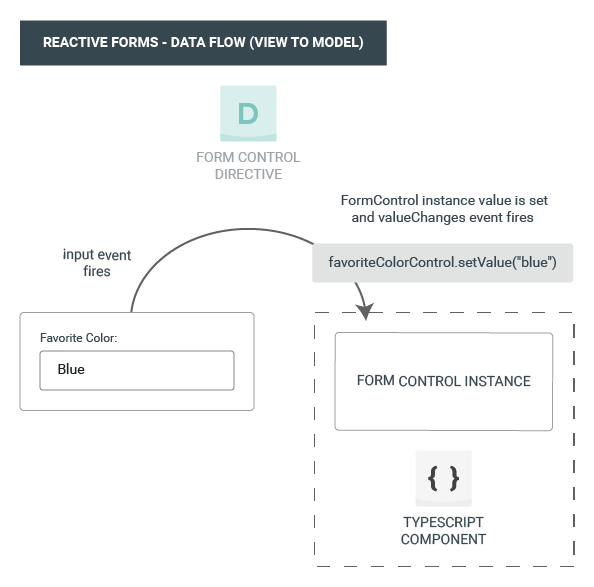
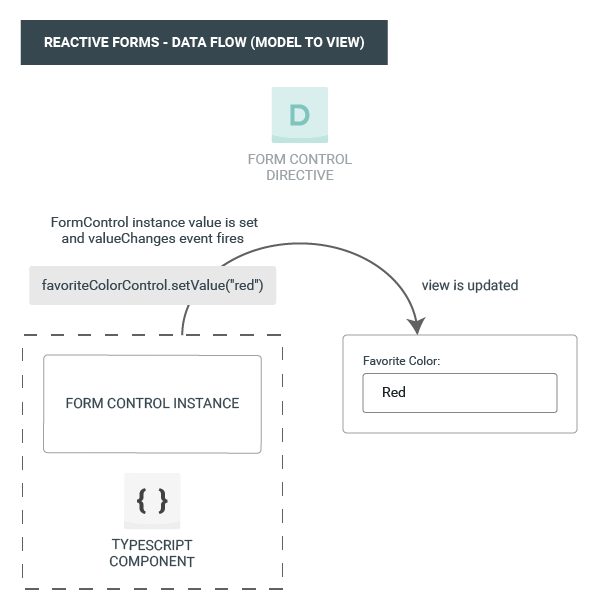
View To Model
- 最终用户在输入框元素中键入了一个值,这里是 “Blue”。
- 这个输入框元素会发出一个带有最新值的 “input” 事件。
- 这个控件值访问器
[ControlValueAccessor](https://angular.cn/api/forms/ControlValueAccessor)会监听表单输入框元素上的事件,并立即把新值传给[FormControl](https://angular.cn/api/forms/FormControl)实例。 [FormControl](https://angular.cn/api/forms/FormControl)实例会通过valueChanges这个可观察对象发出这个新值。valueChanges的任何一个订阅者都会收到这个新值。Model To View
favoriteColorControl.setValue()方法被调用,它会更新这个[FormControl](https://angular.cn/api/forms/FormControl)的值。[FormControl](https://angular.cn/api/forms/FormControl)实例会通过valueChanges这个可观察对象发出新值。valueChanges的任何订阅者都会收到这个新值。- 该表单输入框元素上的控件值访问器会把控件更新为这个新值。
模板驱动式 (ngModel指令)
在模板驱动表单中,每个表单元素都链接到一个指令上
@Component({template: `Favorite Color: <input type="text" [(ngModel)]="favoriteColor">`})export class FavoriteColorComponent {favoriteColor = '';}
响应式表单
管理控件的值
显示表单控件的值
- 通过可观察对象
valueChanges,你可以在模板中使用[AsyncPipe](https://angular.cn/api/common/AsyncPipe)或在组件类中使用subscribe()方法来监听表单值的变化。 - 使用
value属性。它能让你获得当前值的一份快照
this.profileForm.valueChanges.subscribe(() => {});
<p>Value: {{ name.value }}</p>
替换表单控件的值
updateName() {this.name.setValue('Nancy');}
模板驱动表单
ngForm
你需要更多的工作来显示数据。在表单中声明一个模板变量。往

若有收获,就点个赞吧
0 人点赞


