| 钩子 | 用途及时机 |
|---|---|
ngOnChanges() |
当 Angular(重新)设置数据绑定输入属性时响应。 该方法接受当前和上一属性值的 [SimpleChanges](https://angular.cn/api/core/SimpleChanges)对象在 ngOnInit() 之前以及所绑定的一个或多个输入属性的值发生变化时都会调用。 |
ngOnInit() |
在 Angular 第一次显示数据绑定和设置指令/组件的输入属性之后,初始化指令/组件。 Initialize the directive/component after Angular first displays the data-bound properties and sets the directive/component’s input properties. 在第一轮 ngOnChanges() 完成之后调用,只调用一次。 |
ngDoCheck() |
检测,并在发生 Angular 无法或不愿意自己检测的变化时作出反应。 在每个变更检测周期中,紧跟在 ngOnChanges() 和 ngOnInit() 后面调用。 |
[ngAfterContentInit()](https://angular.cn/api/router/RouterLinkActive#ngAfterContentInit) |
当 Angular 把外部内容投影进组件/指令的视图之后调用。 第一次 ngDoCheck() 之后调用,只调用一次。 |
ngAfterContentChecked() |
每当 Angular 完成被投影组件内容的变更检测之后调用。[ngAfterContentInit()](https://angular.cn/api/router/RouterLinkActive#ngAfterContentInit) 和每次 ngDoCheck() 之后调用 |
[ngAfterViewInit()](https://angular.cn/api/forms/NgForm#ngAfterViewInit) |
当 Angular 初始化完组件视图及其子视图之后调用。 第一次 ngAfterContentChecked() 之后调用,只调用一次。 |
ngAfterViewChecked() |
每当 Angular 做完组件视图和子视图的变更检测之后调用。[ngAfterViewInit()](https://angular.cn/api/forms/NgForm#ngAfterViewInit) 和每次 ngAfterContentChecked() 之后调用。 |
ngOnDestroy() |
每当 Angular 每次销毁指令/组件之前调用并清扫。 在这儿反订阅可观察对象和分离事件处理器,以防内存泄漏。 在 Angular 销毁指令/组件之前调用。 |
Angular中Constructor 和 ngOnInit 的本质区别
ngOnInit
ngOnChanges
- isFirstChange()
- currentValue
- previousValue ```typescript import { Component, Input, OnChanges, SimpleChange } from ‘@angular/core’;
@Component({
selector: ‘app-version-child’,
template: <h3>Version {{major}}.{{minor}}</h3>
<h4>Change log:</h4>
<ul>
<li *ngFor="let change of changeLog">{{change}}</li>
</ul>
})
export class VersionChildComponent implements OnChanges {
@Input() major: number;
@Input() minor: number;
changeLog: string[] = [];
ngOnChanges(changes: {[propKey: string]: SimpleChange}) {
let log: string[] = [];
for (let propName in changes) {
let changedProp = changes[propName];
let to = JSON.stringify(changedProp.currentValue);
if (changedProp.isFirstChange()) {
log.push(Initial value of ${propName} set to ${to});
} else {
let from = JSON.stringify(changedProp.previousValue);
log.push(${propName} changed from ${from} to ${to});
}
}
this.changeLog.push(log.join(‘, ‘));
}
}
<a name="8lQ6a"></a># 变更检测<br />angular会在组件发生变化时检测组件树<br />OnPush策略:只在输入属性变化时执行变更检测```typescriptexport declare enum ChangeDetectionStrategy {/*** Use the `CheckOnce` strategy, meaning that automatic change detection is deactivated* until reactivated by setting the strategy to `Default` (`CheckAlways`).* Change detection can still be explicitly invoked.* This strategy applies to all child directives and cannot be overridden.*/OnPush = 0,/*** Use the default `CheckAlways` strategy, in which change detection is automatic until* explicitly deactivated.*/Default = 1}
ChangeDetectorRef
abstract class ChangeDetectorRef {/** 当视图使用 OnPush(checkOnce)变更检测策略时,把该视图显式标记为已更改,以便它再次进行检查。*/abstract markForCheck(): void/** 从变更检测树中分离开视图。 已分离的视图在重新附加上去之前不会被检查。 与 detectChanges() 结合使用,可以实现局部变更检测。*/abstract detach(): void/** 检查该视图及其子视图。与 detach 结合使用可以实现局部变更检测。*/abstract detectChanges(): void/** 检查变更检测器及其子检测器,如果检测到任何更改,则抛出异常。*/abstract checkNoChanges(): void/** 把以前分离开的视图重新附加到变更检测树上。 视图会被默认附加到这棵树上。*/abstract reattach(): void}
关于ExpressionChangedAfterItHasBeenCheckedError
如果在ngOnChanges中emit给父组件再次更改输入属性,会导致此警告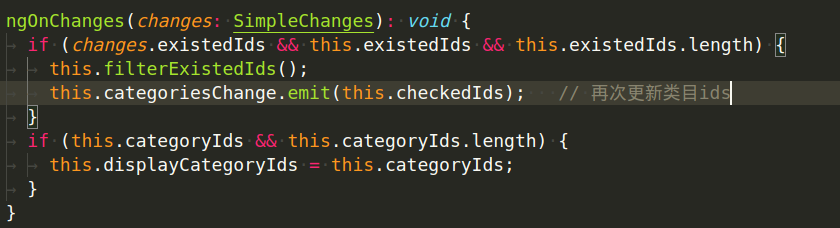

若有收获,就点个赞吧
0 人点赞


