基础
浏览器要用 <base href> 的值为引用 CSS、脚本和图片文件时使用的相对 URL 添加前缀
<base href="/">
如果没有此标签,当通过“深链接”进入该应用时,浏览器就不能加载资源(图片、CSS、脚本)
添加 AppRoutingModule
在 Angular 中,最好在一个独立的顶级模块中加载和配置路由器,它专注于路由功能,然后由根模块 AppModule 导入它。
导出 RouterModule 让路由器的相关指令可以在 AppModule 中的组件中使用。
添加路由定义add routs RouterModule.forRoot(routes)
const appRoutes: Routes = [// 静态路由{path: 'crisis-center',component: CrisisListComponent},// 动态路由{path: 'hero/:id',component: HeroDetailComponent},// data,元数据, 页标题、面包屑以及其它静态只读数据{path: 'heroes',component: HeroListComponent,data: { title: 'Heroes List' }},// 默认路径,作为起点{path: '',redirectTo: '/heroes', // 重定向pathMatch: 'full' // 全匹配,// 另一个可能的值是 'prefix',它会告诉路由器:当剩下的URL 以这个跳转路由中的 prefix 值开头时// 就会匹配上这个跳转路由。},{path: '**',component: PageNotFoundComponent} // 未匹配到,404];@NgModule({imports: [RouterModule.forRoot(appRoutes,{ enableTracing: true } // <-- debugging purposes only 路由事件会记录到控制台)// other imports here],...})export class AppModule { }
添加路由出口 (RouterOutlet)
类似于Vue-router 的 <router-view>
能在 AppComponent 中使用 RouterOutlet,是因为 AppModule 导入了 AppRoutingModule,而 AppRoutingModule 中导出了 RouterModule。
<router-outlet></router-outlet><!-- Routed components go here -->
activatedRoute.outlet: 要把该路由渲染到的 [RouterOutlet](https://angular.cn/api/router/RouterOutlet) 的名字。对于无名路由,它的路由名是 primary,而不是空串。
多处?
路由器链接 RouterLink
<a routerLink="/heroes" routerLinkActive="active">Heroes</a><a [routerLink]="['/products', productId]"> // localhost:4200/products/15<a routerLink="/detail/{{hero.id}}">
路由链接的激活状态
该a标签增加了激活的类routerLinkActiveOptions : 精确匹配才生效
// 等号右边的模板表达式包含一些用空格分隔的 CSS 类名<a routerLink="./" routerLinkActive="active" [routerLinkActiveOptions]="{ exact: true }">Dashboard</a>// 点击后<a class="active"></a>
路由器状态
在导航时的每个生命周期成功完成时,路由器会构建出一个 [ActivatedRoute](https://angular.cn/api/router/ActivatedRoute) 组成的树,它表示路由器的当前状态。 你可以在应用中的任何地方用 [Router](https://angular.cn/api/router/Router) 服务及其 [routerState](https://angular.cn/api/router/Router#routerState) 属性来访问当前的 [RouterState](https://angular.cn/api/router/RouterState) 值。[RouterState](https://angular.cn/api/router/RouterState) 中的每个 [ActivatedRoute](https://angular.cn/api/router/ActivatedRoute) 都提供了从任意激活路由开始向上或向下遍历路由树的一种方式,以获得关于父、子、兄弟路由的信息。
@Component({templateUrl:'template.html'})class MyComponent {constructor(router: Router) {const state: RouterState = router.routerState;const root: ActivatedRoute = state.root;const child = root.firstChild;const id: Observable<string> = child.params.map(p => p.id);//...}}// 一般直接使用ActivatedRoute
激活的路由ActivatedRoute
这个组件对从 URL 中提取的路由参数感兴趣
ActivatedRoute 保存着到这个 HeroDetailComponent 实例的路由信息
import { ActivatedRoute } from '@angular/router';
url, data, paramMap, queryParamMap, fragment, outlet, routeConfig, parent, firstChild, children
url |
路由路径的 Observable 对象,是一个由路由路径中的各个部分组成的字符串数组。 |
|---|---|
data |
一个 Observable,其中包含提供给路由的 data 对象。也包含由解析守卫(resolve guard)解析而来的值。 |
paramMap |
一个 Observable,其中包含一个由当前路由的必要参数和可选参数组成的map对象。用这个 map 可以获取来自同名参数的单一值或多重值。 |
queryParamMap |
一个 Observable,其中包含一个对所有路由都有效的查询参数组成的map对象。 用这个 map 可以获取来自查询参数的单一值或多重值。 |
fragment |
一个适用于所有路由的 URL 的 fragment(片段)的 Observable。 |
_outlet_ |
要把该路由渲染到的 [_RouterOutlet_](https://angular.cn/api/router/RouterOutlet) 的名字。对于无名路由,它的路由名是 _primary_,而不是空串。 |
routeConfig |
用于该路由的路由配置信息,其中包含原始路径。 |
|---|---|
parent |
当该路由是一个子路由时,表示该路由的父级 [ActivatedRoute](https://angular.cn/api/router/ActivatedRoute)。 |
firstChild |
包含该路由的子路由列表中的第一个 [ActivatedRoute](https://angular.cn/api/router/ActivatedRoute)。 |
children |
包含当前路由下所有已激活的子路由。 |
订阅路由paramMap
paramMap 是一个从 URL 中提取的路由参数值的字典。
ParamMap API: has, get, getAll, keys
ngOnInit() {this.route.paramMap.subscribe(params => {this.product = products[+params.get('productId')];});}
下面这个用了switchMap,是因为外部的paramMap + 内部的Observable
ngOnInit() {this.hero$ = this.route.paramMap.pipe(switchMap((params: ParamMap) =>this.service.getHero(params.get('id'))));}
当在组件中订阅一个可观察对象时,你通常总是要在组件销毁时取消这个订阅。 但是也有少数例外情况不需要取消订阅。
_ActivateRoute_中的各种可观察对象就是属于这种情况。_ActivateRoute_及其可观察对象都是由[_Router_](https://angular.cn/api/router/Router)本身负责管理的。[_Router_](https://angular.cn/api/router/Router)会在不再需要时销毁这个路由组件,而注入进去的_ActivateRoute_也随之销毁了。
snapshot静态快照
route.snapshot 是一个路由信息的 静态快照 ,抓取自组件刚刚创建完毕之后。
本应用不需要复用
HeroDetailComponent。 用户总是会先返回英雄列表,再选择另一位英雄。 所以,不存在从一个英雄详情导航到另一个而不用经过英雄列表的情况。 这意味着路由器每次都会创建一个全新的HeroDetailComponent实例
getHero(): void {const id = +this.route.snapshot.paramMap.get('id');}
可选参数
这里的必选还是可选,是从业务应用场景来说的,定义的格式及在地址栏的展示与必选参数不同。必选参数主要是为了区分路径。
必选参数和可选参数的可观察对象订阅的处理是一样的。
this.router.navigate(['/heroes', { id: heroId, foo: 'foo' }])// 在你定义完必要参数之后,再通过一个独立的对象来定义可选参数。bar是必须,后面对象是可选。this.router.navigate(['/heroes', bar, { id: heroId, foo: 'foo' }])// 浏览器地址栏是这样的localhost:4200/heroes;id=15;foo=foo
范例
路由模块
forRoot和forChild
只在根模块
AppRoutingModule中调用[RouterModule.forRoot()](https://angular.cn/api/router/RouterModule#forRoot)(如果在AppModule中注册应用的顶层路由,那就在AppModule中调用)。 在其它模块中,你就必须调用RouterModule.forChild方法来注册附属路由
导入模块的顺序很重要
看看该模块的 imports 数组。注意,AppRoutingModule 是最后一个。最重要的是,它位于 HeroesModule 之后。
imports: [BrowserModule,FormsModule,HeroesModule,AppRoutingModule],
路由动画
子路由(危机中心)
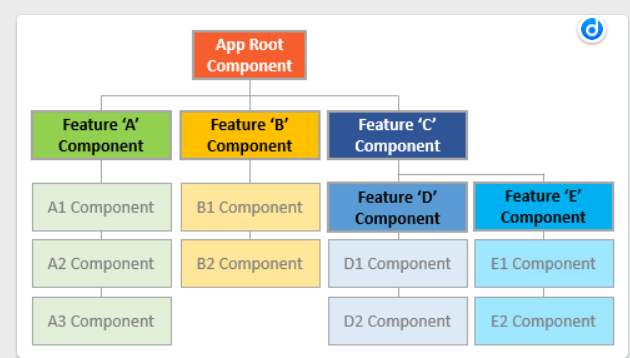
相对导航
- 当调用路由器的
navigateByUrl时,总是要指定完整的绝对路径。 - 如果用
[RouterLink](https://angular.cn/api/router/RouterLink)来代替[Router](https://angular.cn/api/router/Router)服务进行导航,就要使用相同的链接参数数组,不过不再需要提供[relativeTo](https://angular.cn/api/router/NavigationExtras#relativeTo)属性。[ActivatedRoute](https://angular.cn/api/router/ActivatedRoute)已经隐含在了[RouterLink](https://angular.cn/api/router/RouterLink)指令中。this.router.navigate(['../', { id: crisisId, foo: 'foo' }], { relativeTo: this.route });
Location
location 是一个 Angular 的服务,用来与浏览器打交道。goBack(): void {this.location.back();}
路由复用 /缓存
RouteReuseStrategy
/** 路由复用。配置路由path的元数据data,keepAlive为true时缓存路由。* 组件中OnInit中的语句只在第一次进入该组件时执行。* 之后,除非在组件中订阅RoutesRecognized事件主动刷新页面数据,该页面将保持离开时的状态。* 退出重新登录后,会清空路由缓存*/import {RouteReuseStrategy,ActivatedRouteSnapshot,DetachedRouteHandle} from '@angular/router';export class RoutingCache implements RouteReuseStrategy {// 缓存中有的,是否允许还原路由shouldAttach(route: ActivatedRouteSnapshot): boolean {// 在路由是login的时候清空缓存if (route.routeConfig['path'] === 'login') {this.handlers = {};}return !!route.routeConfig && !!this.handlers[route.routeConfig.path];}}
组件中
export class Xxx {constructor(private router: Router,private productListService: ProductListService,private modalService: NzModalService,private message: NzMessageService) {this.router.events.pipe(filter(event => event instanceof RoutesRecognized),pairwise()).subscribe((events: Event[]) => {if (this.shouldRefreshProducts(<RoutesRecognized>events[0])) {this.getProducts(); // 从表单录入页返回或跳转时,刷新产品}});}}
重定向url
routerLink不作用。
你仍然希望以前的 URL 能正常导航。 但你也不想在应用中找到并修改每一个链接,这时候,重定向就可以省去这些琐碎的重构工作。
在重定向的时候,路由器还支持查询参数和片段(fragment)。
- 当使用绝对地址重定向时,路由器将会使用路由配置的
[redirectTo](https://angular.cn/api/router/Route#redirectTo)属性中规定的查询参数和片段。 - 当使用相对地址重定向时,路由器将会使用源地址(跳转前的地址)中的查询参数和片段。
const heroesRoutes: Routes = [{ path: 'heroes', redirectTo: '/superheroes' },{ path: 'hero/:id', redirectTo: '/superhero/:id' },{ path: 'superheroes', component: HeroListComponent, data: { animation: 'heroes' } },{ path: 'superhero/:id', component: HeroDetailComponent, data: { animation: 'hero' } }];
附录
LocationStrategy 以及浏览器 URL 样式
路由器使用浏览器的 history.pushState API 进行导航
除非你有强烈的理由不得不使用 hash 路由,否则就应该坚决使用默认的 HTML 5 路由风格。HashLocationStrategy 策略
总结/关键词
| 路由器部件 | 含义 |
|---|---|
[Router](https://angular.cn/api/router/Router)(路由器) |
为激活的 URL 显示应用组件。管理从一个组件到另一个组件的导航 |
[RouterModule](https://angular.cn/api/router/RouterModule) |
一个独立的 NgModule,用于提供所需的服务提供者,以及用来在应用视图之间进行导航的指令。 |
[Routes](https://angular.cn/api/router/Routes)(路由数组) |
定义了一个路由数组,每一个都会把一个 URL 路径映射到一个组件。 |
[Route](https://angular.cn/api/router/Route)(路由) |
定义路由器该如何根据 URL 模式(pattern)来导航到组件。大多数路由都由路径和组件类构成。 |
[RouterOutlet](https://angular.cn/api/router/RouterOutlet)(路由出口) |
该指令(<[router-outlet](https://angular.cn/api/router/RouterOutlet)>)用来标记出路由器该在哪里显示视图。 |
[RouterLink](https://angular.cn/api/router/RouterLink)(路由链接) |
这个指令把可点击的 HTML 元素绑定到某个路由。点击带有 [routerLink](https://angular.cn/api/router/RouterLink) 指令(绑定到字符串或链接参数数组)的元素时就会触发一次导航。 |
[RouterLinkActive](https://angular.cn/api/router/RouterLinkActive)(活动路由链接) |
当 HTML 元素上或元素内的[routerLink](https://angular.cn/api/router/RouterLink)变为激活或非激活状态时,该指令为这个 HTML 元素添加或移除 CSS 类。 |
[ActivatedRoute](https://angular.cn/api/router/ActivatedRoute)(激活的路由) |
为每个路由组件提供的一个服务,它包含特定于路由的信息,比如路由参数、静态数据、解析数据、全局查询参数和全局碎片(fragment)。 |
[RouterState](https://angular.cn/api/router/RouterState)(路由器状态) |
路由器的当前状态包含了一棵由程序中激活的路由构成的树。它包含一些用于遍历路由树的快捷方法。 |
| 链接参数数组 | 这个数组会被路由器解释成一个路由操作指南。你可以把一个[RouterLink](https://angular.cn/api/router/RouterLink)绑定到该数组,或者把它作为参数传给Router.navigate方法。 |
| 路由组件 | 一个带有[RouterOutlet](https://angular.cn/api/router/RouterOutlet)的 Angular 组件,它根据路由器的导航来显示相应的视图。 |

若有收获,就点个赞吧
0 人点赞


