1. Docker Registry 分类
Docker Registry 有两部分组成:
- Repostitory
- 由特定的一组镜像组成的仓库称为 Repostitory
- 一个 Docker Registry 可以包含多个 Repostitory
- Repostitory 可以分为两个大类
- 官方的仓库,格式 仓库名:标签,如 nginx:latest
- 其它类,如用户仓库、第三方仓库、私有仓库等等
- 一个镜像可以有多个标签
- Index
提供用户认证、镜像检索功能
2. docker-registry 安装使用
docker-registry 是 Docker 官方提供的镜像仓库管理软件,可以提供 docker pull 和 docker push 等操作,但是没有web 界面,镜像管理非常不方便,一般不作为私有仓库使用。
[root@centos-82 ~]# yum install -y docker-registry ## 实际安装软件包是 docker distribution
[root@centos-82 ~]# rpm -ql docker-distribution
/etc/docker-distribution/registry/config.yml ## Configuration/usr/bin/registry/usr/lib/systemd/system/docker-distribution.service ## Service......
[root@centos-82 ~]# vim /etc/docker-distribution/registry/config.yml ## 配置端口和镜像存放目录
version: 0.1log:fields:service: registrystorage:cache:layerinfo: inmemoryfilesystem:rootdirectory: /data/docker-registryhttp:addr: :5000
[root@centos-82 ~]# mkdir /data/docker-registry
[root@centos-82 ~]# systemctl start docker-distribution.service
[root@centos-82 ~]# ss -lntp | grep 5000
LISTEN 0 128 :::5000 :::* users:(("registry",pid=9789,fd=3)
[root@centos-81 ~]# docker tag httpd:v0.2 hub.docker.reg:5000/httpd:v0.2 ## /etc/hosts 配置域名映射
[root@centos-81 ~]# docker push hub.docker.reg:5000/httpd:v0.2 ## docker 默认使用https协议
The push refers to a repository [hub.docker.reg:5000/httpd]Get https://hub.docker.reg:5000/v1/_ping: http: server gave HTTP response to HTTPS client
[root@centos-81 ~]# vim /etc/docker/daemon.json ##添加http协议的registry
{"registry-mirrors":["https://registry.docker-cn.com"],"insecure-registries":["hub.docker.reg:5000"]}
[root@centos-81 ~]# systemctl restart docker
[root@centos-81 ~]# docker push hub.docker.reg:5000/httpd:v0.2
[root@centos-81 ~]# curl -s http://192.168.1.82:5000/v2/httpd/tags/list | python -mjson.tool ## 根据仓库名获取tags
{"name": "httpd","tags": ["v0.2","v0.1"]}
[root@centos-82 ~]# tree /data/docker-registry/
/data/docker-registry/└── docker└── registry└── v2├── blobs│ └── sha256│ ├── 3f│ │ └── 3f22152f75b71784bfb6946248858ace5fad0e1a0db4a208f20607d88810e60c│ │ └── data│ ├── 6d│ │ └── 6df52055d83b6b866af9d4907574421aedfdf3f8c27c1ba45e7d1c9236000f80│ │ └── data│ └── 95│ └── 95090e1ca932d43e6791e981e310d67d50af9ef7fe4ec1fda859064e6533a21c│ └── data└── repositories└── httpd├── _layers│ └── sha256│ ├── 3f22152f75b71784bfb6946248858ace5fad0e1a0db4a208f20607d88810e60c│ │ └── link│ └── 6df52055d83b6b866af9d4907574421aedfdf3f8c27c1ba45e7d1c9236000f80│ └── link├── _manifests│ ├── revisions│ │ └── sha256│ │ └── 95090e1ca932d43e6791e981e310d67d50af9ef7fe4ec1fda859064e6533a21c│ │ └── link│ └── tags│ └── v0.2│ ├── current│ │ └── link│ └── index│ └── sha256│ └── 95090e1ca932d43e6791e981e310d67d50af9ef7fe4ec1fda859064e6533a21c│ └── link└── _uploads
[root@centos-81 ~]# docker image ls | grep hub
[root@centos-81 ~]# docker pull hub.docker.reg:5000/httpd:v0.1 ## 从私有registry拉取镜像
Trying to pull repository hub.docker.reg:5000/httpd ...v0.1: Pulling from hub.docker.reg:5000/httpdDigest: sha256:ec0aa9e4aff0ab1a001f87277324df24281a00513637f0c8045c59c2667f3eb8Status: Downloaded newer image for hub.docker.reg:5000/httpd:v0.1
[root@centos-81 ~]# docker image ls | grep hub
hub.docker.reg:5000/httpd v0.1 562ec613ec3a 4 weeks ago 1.2 MB
3. Harbor 安装使用
3.1. Harbor 介绍
Docker-distribution 虽然能实现私有镜像仓库,但是管理复杂,且没有web界面,不支持搜索等。VMware基于docker distribution二次开发了Harbor,实现了web界面管理仓库,功能性极大的增强。Harbor 的特性:
- 基于多用户,多项目的访问控制
- 镜像复制
- 可以在WEB界面管理镜像仓库,并且支持中文
- 日志审计
3.2. Harbor 安装
3.2.1. 依赖
| Resource | Capacity | Description |
|---|---|---|
| CPU | minimal 2 CPU | 4 CPU is preferred |
| Mem | minimal 4GB | 8GB is preferred |
| Disk | minimal 40GB | 160GB is preferred |
| Software | Version | Description |
|---|---|---|
| Python | version 2.7 or higher | Note that you may have to install Python on Linux distributions (Gentoo, Arch) that do not come with a Python interpreter installed by default |
| Docker engine | version 1.10 or higher | For installation instructions, please refer to: https://docs.docker.com/engine/installation/ |
| Docker Compose | version 1.6.0 or higher | For installation instructions, please refer to: https://docs.docker.com/compose/install/ |
| Openssl | latest is preferred | Generate certificate and keys for Harbor |
| Port | Protocol | Description |
|---|---|---|
| 443 | HTTPS | Harbor portal and core API will accept requests on this port for https protocol |
| 4443 | HTTPS | Connections to the Docker Content Trust service for Harbor, only needed when Notary is enabled |
| 80 | HTTP | Harbor portal and core API will accept requests on this port for http protocol |
3.2.2. 安装和配置
[root@centos-82 ~]# wget https://storage.googleapis.com/harbor-releases/release-1.7.0/harbor-offline-installer-v1.7.4.tgz
[root@centos-82 ~]# tar -xf harbor-offline-installer-v1.7.4.tgz -C /usr/local/ && cd /usr/local/harbor
[root@centos-82 harbor]# readlink -f docker-compose.yml ## 镜像配置文件,一般只需要配置路径即可
/usr/local/harbor/docker-compose.yml
[root@centos-82 harbor]# grep -Ev “^$|#” harbor.cfg
_version = 1.7.0hostname = hub.docker.reg ## docker推拉镜像时需要指定的服务端地址ui_url_protocol = http ## 使用的协议max_job_workers = 6 ## 最大工作进程数customize_crt = on ## ssl密钥相关,仅在https模式下生效ssl_cert = /data/cert/server.crtssl_cert_key = /data/cert/server.keysecretkey_path = /dataadmiral_url = NAlog_rotate_count = 50 ## 日志切割配置log_rotate_size = 200Mhttp_proxy =https_proxy =no_proxy = 127.0.0.1,localhost,core,registryemail_identity = ## Email配置项email_server = smtp.mydomain.comemail_server_port = 25email_username = sample_admin@mydomain.comemail_password = abcemail_from = admin <sample_admin@mydomain.com>email_ssl = falseemail_insecure = falseharbor_admin_password = Harbor12345 ## admin初始密码,可登陆到WEB页面修改auth_mode = db_authldap_url = ldaps://ldap.mydomain.com ## 若关联ldap可以配置该项目ldap_basedn = ou=people,dc=mydomain,dc=comldap_uid = uidldap_scope = 2ldap_timeout = 5ldap_verify_cert = trueldap_group_basedn = ou=group,dc=mydomain,dc=comldap_group_filter = objectclass=groupldap_group_gid = cnldap_group_scope = 2self_registration = ontoken_expiration = 30project_creation_restriction = everyonedb_host = postgresqldb_password = Database.harbor.123 ## 数据库密码db_port = 5432db_user = postgresredis_host = redisredis_port = 6379redis_password =redis_db_index = 1,2,3clair_db_host = postgresqlclair_db_password = root123clair_db_port = 5432clair_db_username = postgresclair_db = postgresclair_updaters_interval = 12uaa_endpoint = uaa.mydomain.orguaa_clientid = iduaa_clientsecret = secretuaa_verify_cert = trueuaa_ca_cert = /path/to/ca.pemregistry_storage_provider_name = filesystemregistry_storage_provider_config =registry_custom_ca_bundle =
[root@centos-82 harbor]# ./install.sh ## 执行安装脚本,依赖(docker-compose,epel源)
[root@centos-82 harbor]# docker image ls ## 涉及到的镜像
REPOSITORY TAG IMAGE ID CREATED SIZEgoharbor/chartmuseum-photon v0.8.1-v1.7.4 7e2272c02339 3 weeks ago 113MBgoharbor/harbor-migrator v1.7.4 968c31d07d2f 3 weeks ago 678MBgoharbor/redis-photon v1.7.4 611d1ead0a28 3 weeks ago 99.7MBgoharbor/clair-photon v2.0.7-v1.7.4 01090529ab14 3 weeks ago 165MBgoharbor/notary-server-photon v0.6.1-v1.7.4 737518b1b943 3 weeks ago 135MBgoharbor/notary-signer-photon v0.6.1-v1.7.4 495dc3326120 3 weeks ago 132MBgoharbor/harbor-registryctl v1.7.4 723aed7bbf8d 3 weeks ago 102MBgoharbor/registry-photon v2.6.2-v1.7.4 f4743bd7b0d9 3 weeks ago 86.7MBgoharbor/nginx-photon v1.7.4 dda34e6afafe 3 weeks ago 35.9MBgoharbor/harbor-log v1.7.4 bf4916eef530 3 weeks ago 81.4MBgoharbor/harbor-jobservice v1.7.4 1b6a0445ae9c 3 weeks ago 84.1MBgoharbor/harbor-core v1.7.4 e603b8750d26 3 weeks ago 95.6MBgoharbor/harbor-portal v1.7.4 2ca1d845cafa 3 weeks ago 40.6MBgoharbor/harbor-adminserver v1.7.4 5706c65d65dc 3 weeks ago 72.3MBgoharbor/harbor-db v1.7.4 08d163f732f3 3 weeks ago 136MB
[root@centos-82 harbor]# docker container ls
CONTAINER ID IMAGE COMMAND ......d5c7eeca50fb goharbor/nginx-photon:v1.7.4 "nginx -g 'daemon of…" ......6ec59a513f9a goharbor/harbor-portal:v1.7.4 "nginx -g 'daemon of…" ......201267927c06 goharbor/harbor-jobservice:v1.7.4 "/harbor/start.sh" ......3711d9548a8b goharbor/harbor-core:v1.7.4 "/harbor/start.sh" ......1c092514ca13 goharbor/harbor-registryctl:v1.7.4 "/harbor/start.sh" ......264c26f4d27c goharbor/harbor-adminserver:v1.7.4 "/harbor/start.sh" ......527ceb179532 goharbor/registry-photon:v2.6.2-v1.7.4 "/entrypoint.sh /etc…" ......127009add4f7 goharbor/harbor-db:v1.7.4 "/entrypoint.sh post…" ......ca8dcdd36bc1 goharbor/redis-photon:v1.7.4 "docker-entrypoint.s…" ......a850c81e3abb goharbor/harbor-log:v1.7.4 "/bin/sh -c /usr/loc…" ......
[root@centos-82 harbor]# netstat -lntp
Active Internet connections (only servers)Proto Recv-Q Send-Q Local Address Foreign Address State PID/Program nametcp 0 0 127.0.0.1:1514 0.0.0.0:* LISTEN 11409/docker-proxytcp6 0 0 :::80 :::* LISTEN 12326/docker-proxytcp6 0 0 :::443 :::* LISTEN 12312/docker-proxytcp6 0 0 :::4443 :::* LISTEN 12299/docker-proxy
[root@centos-82 ~]# cat /etc/docker/daemon.json
{"registry-mirrors":["http://hub-mirror.c.163.com","https://registry.docker-cn.com"],"insecure-registries":["hub.docker.reg"]}
[root@centos-82 ~]# cat /etc/hosts
127.0.0.1 localhost localhost.localdomain localhost4 localhost4.localdomain4::1 localhost localhost.localdomain localhost6 localhost6.localdomain6192.168.1.82 hub.docker.reg
3.2.3. 启停Harbor
- 停止Harbor
[root@centos-82 ~]# cd /usr/local/harbor/ ## change woker directory to harbor root directory.
[root@centos-82 harbor]# docker-compose stop
Stopping nginx ... doneStopping harbor-portal ... doneStopping harbor-jobservice ... doneStopping harbor-core ... doneStopping registryctl ... doneStopping harbor-adminserver ... doneStopping registry ... doneStopping harbor-db ... doneStopping redis ... doneStopping harbor-log ... done
- 启动Harbor
[root@centos-82 ~]# cd /usr/local/harbor/
[root@centos-82 harbor]# docker-compose start
Starting log ... doneStarting registry ... doneStarting adminserver ... doneStarting core ... doneStarting redis ... doneStarting jobservice ... doneStarting registryctl ... doneStarting postgresql ... doneStarting portal ... doneStarting proxy ... done
3.3. Harbor 使用

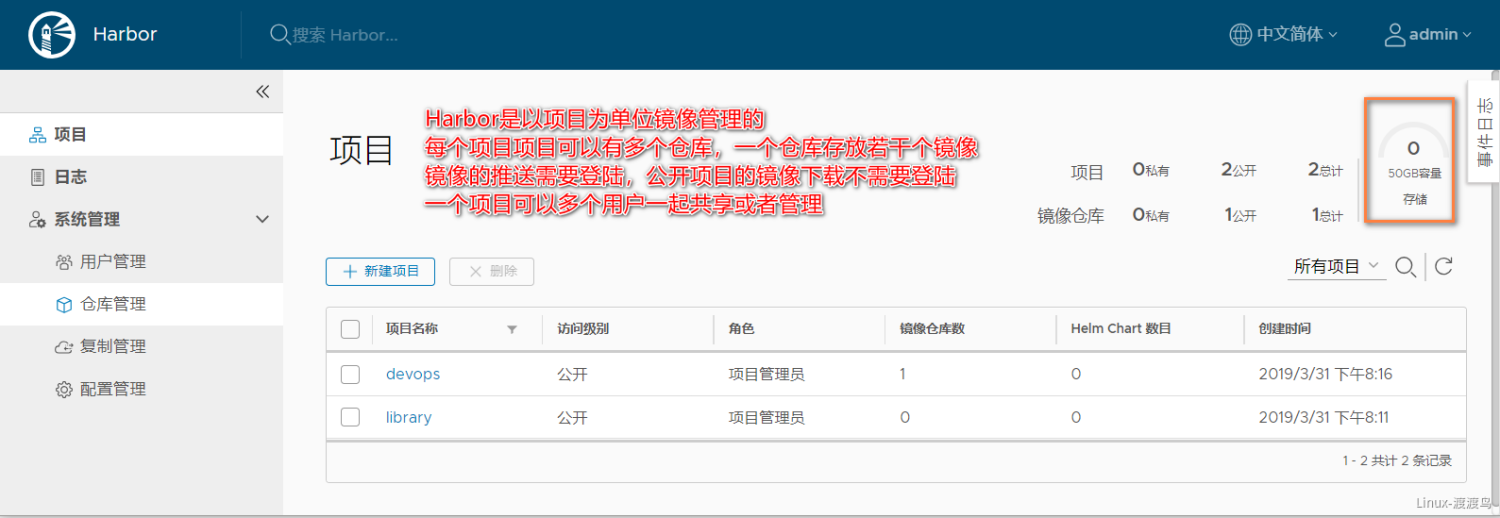
[root@centos-81 ~]# docker tag nginx:latest hub.docker.reg/devops/nginx:latest
[root@centos-81 ~]# docker login -u admin hub.docker.reg ## Login
Password:Login Succeeded
[root@centos-81 ~]# docker push hub.docker.reg/devops/nginx:latest ## Docker push
The push refers to a repository [hub.docker.reg/devops/nginx]6b5e2ed60418: Pushed92c15149e23b: Pushed0a07e81f5da3: Pushedlatest: digest: sha256:5b49c8e2c890fbb0a35f6050ed3c5109c5bb47b9e774264f4f3aa85bb69e2033 size: 948
[root@centos-81 ~]# docker logout hub.docker.reg ## Logout
[root@centos-81 ~]# docker image pull hub.docker.reg/devops/nginx:latest ## Docker pull
Trying to pull repository hub.docker.reg/devops/nginx ...latest: Pulling from hub.docker.reg/devops/nginxDigest: sha256:5b49c8e2c890fbb0a35f6050ed3c5109c5bb47b9e774264f4f3aa85bb69e2033Status: Downloaded newer image for hub.docker.reg/devops/nginx:latest
[root@centos-81 ~]# docker image ls | grep hub.docker.reg
hub.docker.reg/devops/nginx latest f09fe80eb0e7 7 weeks ago 109 MB

若有收获,就点个赞吧
0 人点赞


