一、测试未序列化的结果
com.xxx目录下新建pojo文件夹用于保存实体类,并添加User用户类用于测试@Component // 添加为组件,方便直接调用@AllArgsConstructor@NoArgsConstructor@Datapublic class User {private String name;private Integer age;}
在测试类中添加测试函数 ```java @Test // 表明此为测试函数 public void test() throws JsonProcessingException { // 真实开发一般使用 json 传递对象 User user = new User(“xiaohe”, 20); // 将对象转换成 json 字符串进行传值 String jsonUser = new ObjectMapper().writeValueAsString(user);
// 创建一个键值对,key = user,value = jsonUser redisTemplate.opsForValue().set(“user”, jsonUser);
// 获取加入 redis 中的数据 System.out.println(redisTemplate.opsForValue().get(“user”)); }
// 得到如下结果 {“name”:”xiaohe”, “age”:20}
3. 测试直接将对象传递给`redisTemplate.opsForValue().set(key, value);````java@Test // 表明此为测试函数public void test() throws JsonProcessingException {// 真实开发一般使用 json 传递对象User user = new User("xiaohe", 20);// 创建一个键值对,key = user,value = jsonUserredisTemplate.opsForValue().set("user", user);// 获取加入 redis 中的数据System.out.println(redisTemplate.opsForValue().get("user"));}// 得到如下报错结果// Cannot serialize 表示没有序列化,对象无法进行传输org.springframework.data.redis.serializer.SerializationException: Cannot serialize; nested exception is org.springframework.core.serializer.support.SerializationFailedException: Failed to serialize object using DefaultSerializer; nested exception is java.lang.IllegalArgumentException: DefaultSerializer requires a Serializable payload but received an object of type [com.hyh.pojo.User]at org.springframework.data.redis.serializer.JdkSerializationRedisSerializer.serialize(JdkSerializationRedisSerializer.java:96)at org.springframework.data.redis.core.AbstractOperations.rawValue(AbstractOperations.java:128)at org.springframework.data.redis.core.DefaultValueOperations.set(DefaultValueOperations.java:304)at com.hyh.SpringbootRedisApplicationTests.test(SpringbootRedisApplicationTests.java:67)at sun.reflect.NativeMethodAccessorImpl.invoke0(Native Method)at sun.reflect.NativeMethodAccessorImpl.invoke(NativeMethodAccessorImpl.java:62)at sun.reflect.DelegatingMethodAccessorImpl.invoke(DelegatingMethodAccessorImpl.java:43)at java.lang.reflect.Method.invoke(Method.java:498)...
将实体类进行序列化
// 实践中,一般所有的实体类都会序列化@Component // 添加为组件,方便直接调用@AllArgsConstructor@NoArgsConstructor@Datapublic class User implements Serializable {private String name;private Integer age;}
序列化后再次测试直接传入对象 ```java @Test // 表明此为测试函数 public void test() throws JsonProcessingException { // 真实开发一般使用 json 传递对象 User user = new User(“xiaohe”, 20);
// 创建一个键值对,key = user,value = jsonUser redisTemplate.opsForValue().set(“user”, user);
// 获取加入 redis 中的数据 System.out.println(redisTemplate.opsForValue().get(“user”)); }
// 得到结果 User(name=xiaohe, age=20)
<a name="cMI5U"></a># 二、自定义`Redis`配置类用于序列化1. 项目主文件夹下添加`config`目录,新增`RedisConfig`用于自定义`RedisTemplate`1. `com.xxx`目录下新建`config`文件夹,并添加`RedisConfig`配置类1. 添加自己的`RedisTemplate``myRedisTemplate````java@Bean@SuppressWarnings("all")public RedisTemplate<String, Object> myRedisTemplate(RedisConnectionFactory factory) {// 为了自己开发方便,一般直接使用 <String, Object>RedisTemplate<String, Object> template = new RedisTemplate<String, Object>();template.setConnectionFactory(factory);// 设置 Json 序列化配置Jackson2JsonRedisSerializer jackson2JsonRedisSerializer = new Jackson2JsonRedisSerializer(Object.class);ObjectMapper om = new ObjectMapper();om.setVisibility(PropertyAccessor.ALL, JsonAutoDetect.Visibility.ANY);om.enableDefaultTyping(ObjectMapper.DefaultTyping.NON_FINAL);jackson2JsonRedisSerializer.setObjectMapper(om);// 设置 String 类型序列化StringRedisSerializer stringRedisSerializer = new StringRedisSerializer();// 设置 key 采用 String 的序列化方式template.setKeySerializer(stringRedisSerializer);// 设置 hash 的 key 也采用 String 的序列化方式template.setHashKeySerializer(stringRedisSerializer);// 设置 value 序列化方式采用 jacksontemplate.setValueSerializer(jackson2JsonRedisSerializer);// 设置 hash 的 value 序列化方式采用 jacksontemplate.setHashValueSerializer(jackson2JsonRedisSerializer);template.afterPropertiesSet();return template;}
添加自己的序列化
myRedisTemplate后,重新执行test,此时的对象User user会被一个String类型接管 ```java @Test // 表明此为测试函数 public void test() throws JsonProcessingException { // 真实开发一般使用 json 传递对象 User user = new User(“xiaohe”, 20);// 创建一个键值对,key = user,value = jsonUser redisTemplate.opsForValue().set(“user”, user);
// 获取加入 redis 中的数据 System.out.println(redisTemplate.opsForValue().get(“user”)); }
// 得到结果 User(name=xiaohe, age=20)
// cmd 查询结果 127.0.0.1:6379> keys * 1) “user” // 被String 类型接管
<a name="Bej2X"></a># 三、自定义`utils`工具类1. `com.xxx`目录下新建`utils`文件夹,并添加`RedisUtil`工具类```java/*** Redis工具类* @author ZENG.XIAO.YAN* @date 2018年6月7日*/@Componentpublic final class RedisUtil {// 注入自定义的序列化配置类@Autowired@Qualifier("myRedisTemplate")private RedisTemplate<String, Object> redisTemplate;// =============================common============================/*** 指定缓存失效时间* @param key 键* @param time 时间(秒)* @return*/public boolean expire(String key, long time) {try {if (time > 0) {redisTemplate.expire(key, time, TimeUnit.SECONDS);}return true;} catch (Exception e) {e.printStackTrace();return false;}}/*** 根据 key 获取过期时间* @param key 键 不能为 null* @return 时间(秒) 返回 0 代表为永久有效*/public long getExpire(String key) {return redisTemplate.getExpire(key, TimeUnit.SECONDS);}/*** 判断 key 是否存在* @param key 键* @return true 存在 false 不存在*/public boolean hasKey(String key) {try {return redisTemplate.hasKey(key);} catch (Exception e) {e.printStackTrace();return false;}}/*** 删除缓存* @param key 可以传一个值 或多个*/@SuppressWarnings("unchecked")public void del(String... key) {if (key != null && key.length > 0) {if (key.length == 1) {redisTemplate.delete(key[0]);} else {redisTemplate.delete(CollectionUtils.arrayToList(key));}}}// ============================String=============================/*** 普通缓存 get* @param key 键* @return 值*/public Object get(String key) {return key == null ? null : redisTemplate.opsForValue().get(key);}/*** 普通缓存 set* @param key 键* @param value 值* @return true成功 false失败*/public boolean set(String key, Object value) {try {redisTemplate.opsForValue().set(key, value);return true;} catch (Exception e) {e.printStackTrace();return false;}}/*** 普通缓存放入并设置时间* @param key 键* @param value 值* @param time 时间(秒) time 要大于 0 如果 time 小于等于 0 将设置无限期* @return true 成功 false 失败*/public boolean set(String key, Object value, long time) {try {if (time > 0) {redisTemplate.opsForValue().set(key, value, time, TimeUnit.SECONDS);} else {set(key, value);}return true;} catch (Exception e) {e.printStackTrace();return false;}}/*** 递增* @param key 键* @param delta 要增加几(大于 0)* @return*/public long incr(String key, long delta) {if (delta < 0) {throw new RuntimeException("递增因子必须大于0");}return redisTemplate.opsForValue().increment(key, delta);}/*** 递减* @param key 键* @param delta 要减少几(小于0)* @return*/public long decr(String key, long delta) {if (delta < 0) {throw new RuntimeException("递减因子必须大于0");}return redisTemplate.opsForValue().increment(key, -delta);}// ================================Map=================================/*** HashGet* @param key 键 不能为null* @param item 项 不能为null* @return 值*/public Object hget(String key, String item) {return redisTemplate.opsForHash().get(key, item);}/*** 获取 hashKey 对应的所有键值* @param key 键* @return 对应的多个键值*/public Map<Object, Object> hmget(String key) {return redisTemplate.opsForHash().entries(key);}/*** HashSet* @param key 键* @param map 对应多个键值* @return true 成功 false 失败*/public boolean hmset(String key, Map<String, Object> map) {try {redisTemplate.opsForHash().putAll(key, map);return true;} catch (Exception e) {e.printStackTrace();return false;}}/*** HashSet 并设置时间* @param key 键* @param map 对应多个键值* @param time 时间(秒)* @return true成功 false 失败*/public boolean hmset(String key, Map<String, Object> map, long time) {try {redisTemplate.opsForHash().putAll(key, map);if (time > 0) {expire(key, time);}return true;} catch (Exception e) {e.printStackTrace();return false;}}/*** 向一张 hash 表中放入数据,如果不存在将创建* @param key 键* @param item 项* @param value 值* @return true 成功 false 失败*/public boolean hset(String key, String item, Object value) {try {redisTemplate.opsForHash().put(key, item, value);return true;} catch (Exception e) {e.printStackTrace();return false;}}/*** 向一张 hash 表中放入数据,如果不存在将创建* @param key 键* @param item 项* @param value 值* @param time 时间(秒) 注意:如果已存在的 hash 表有时间,这里将会替换原有的时间* @return true 成功 false 失败*/public boolean hset(String key, String item, Object value, long time) {try {redisTemplate.opsForHash().put(key, item, value);if (time > 0) {expire(key, time);}return true;} catch (Exception e) {e.printStackTrace();return false;}}/*** 删除 hash 表中的值* @param key 键 不能为 null* @param item 项 可以使多个 不能为 null*/public void hdel(String key, Object... item) {redisTemplate.opsForHash().delete(key, item);}/*** 判断 hash 表中是否有该项的值* @param key 键 不能为 null* @param item 项 不能为 null* @return true 存在 false 不存在*/public boolean hHasKey(String key, String item) {return redisTemplate.opsForHash().hasKey(key, item);}/*** hash 递增 如果不存在,就会创建一个 并把新增后的值返回* @param key 键* @param item 项* @param by 要增加几(大于 0)* @return*/public double hincr(String key, String item, double by) {return redisTemplate.opsForHash().increment(key, item, by);}/*** hash 递减* @param key 键* @param item 项* @param by 要减少记(小于 0)* @return*/public double hdecr(String key, String item, double by) {return redisTemplate.opsForHash().increment(key, item, -by);}// ============================set=============================/*** 根据 key 获取 Set 中的所有值* @param key 键* @return*/public Set<Object> sGet(String key) {try {return redisTemplate.opsForSet().members(key);} catch (Exception e) {e.printStackTrace();return null;}}/*** 根据 value 从一个 set 中查询,是否存在* @param key 键* @param value 值* @return true 存在 false 不存在*/public boolean sHasKey(String key, Object value) {try {return redisTemplate.opsForSet().isMember(key, value);} catch (Exception e) {e.printStackTrace();return false;}}/*** 将数据放入 set 缓存* @param key 键* @param values 值 可以是多个* @return 成功个数*/public long sSet(String key, Object... values) {try {return redisTemplate.opsForSet().add(key, values);} catch (Exception e) {e.printStackTrace();return 0;}}/*** 将 set 数据放入缓存* @param key 键* @param time 时间(秒)* @param values 值 可以是多个* @return 成功个数*/public long sSetAndTime(String key, long time, Object... values) {try {Long count = redisTemplate.opsForSet().add(key, values);if (time > 0)expire(key, time);return count;} catch (Exception e) {e.printStackTrace();return 0;}}/*** 获取 set 缓存的长度* @param key 键* @return*/public long sGetSetSize(String key) {try {return redisTemplate.opsForSet().size(key);} catch (Exception e) {e.printStackTrace();return 0;}}/*** 移除值为 value 的* @param key 键* @param values 值可以是多个* @return 移除的个数*/public long setRemove(String key, Object... values) {try {Long count = redisTemplate.opsForSet().remove(key, values);return count;} catch (Exception e) {e.printStackTrace();return 0;}}// ===============================list=================================/*** 获取 list 缓存的内容* @param key 键* @param start 开始* @param end 结束 0 到 -1 代表所有值* @return*/public List<Object> lGet(String key, long start, long end) {try {return redisTemplate.opsForList().range(key, start, end);} catch (Exception e) {e.printStackTrace();return null;}}/*** 获取 list 缓存的长度* @param key 键* @return*/public long lGetListSize(String key) {try {return redisTemplate.opsForList().size(key);} catch (Exception e) {e.printStackTrace();return 0;}}/*** 通过索引 获取 list 中的值* @param key 键* @param index 索引 index>=0 时, 0 表头,1 第二个元素,依次类推;index<0 时,-1,表尾,-2 倒数第二个元素,依次类推* @return*/public Object lGetIndex(String key, long index) {try {return redisTemplate.opsForList().index(key, index);} catch (Exception e) {e.printStackTrace();return null;}}/*** 将 list 放入缓存* @param key 键* @param value 值* @return*/public boolean lSet(String key, Object value) {try {redisTemplate.opsForList().rightPush(key, value);return true;} catch (Exception e) {e.printStackTrace();return false;}}/*** 将 list 放入缓存* @param key 键* @param value 值* @param time 时间(秒)* @return*/public boolean lSet(String key, Object value, long time) {try {redisTemplate.opsForList().rightPush(key, value);if (time > 0)expire(key, time);return true;} catch (Exception e) {e.printStackTrace();return false;}}/*** 将 list 放入缓存* @param key 键* @param value 值* @return*/public boolean lSet(String key, List<Object> value) {try {redisTemplate.opsForList().rightPushAll(key, value);return true;} catch (Exception e) {e.printStackTrace();return false;}}/*** 将 list 放入缓存** @param key 键* @param value 值* @param time 时间(秒)* @return*/public boolean lSet(String key, List<Object> value, long time) {try {redisTemplate.opsForList().rightPushAll(key, value);if (time > 0)expire(key, time);return true;} catch (Exception e) {e.printStackTrace();return false;}}/*** 根据索引修改 list 中的某条数据* @param key 键* @param index 索引* @param value 值* @return*/public boolean lUpdateIndex(String key, long index, Object value) {try {redisTemplate.opsForList().set(key, index, value);return true;} catch (Exception e) {e.printStackTrace();return false;}}/*** 移除 N 个值为 value* @param key 键* @param count 移除多少个* @param value 值* @return 移除的个数*/public long lRemove(String key, long count, Object value) {try {Long remove = redisTemplate.opsForList().remove(key, count, value);return remove;} catch (Exception e) {e.printStackTrace();return 0;}}}
测试使用自定义的工具类
RedisUtil添加自定义工具类
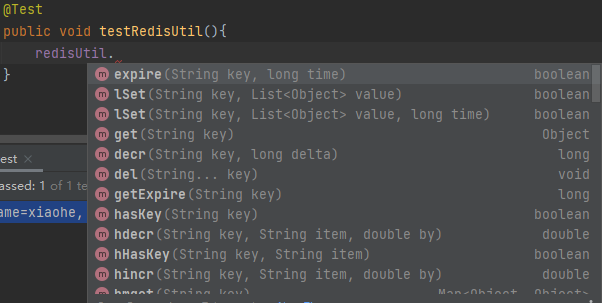
RedisUtil的注入@Autowiredprivate RedisUtil redisUtil;
添加测试类
testRedisUtil,然后就会发现使用redisUtil可以直接像在cmd窗口中一样使用各种熟悉的命令!简直妙啊!

若有收获,就点个赞吧
0 人点赞


