教程链接:教程链接
一、创建springboot项目,引入依赖包
创建项目
springboot-redis,添加Web, DevTools, Lombok, Redis依赖选择的
java版本为java-1.8,springboot版本为springboot-2.6.4<dependencies><dependency><groupId>org.springframework.boot</groupId><artifactId>spring-boot-starter-data-redis</artifactId></dependency><dependency><groupId>org.springframework.boot</groupId><artifactId>spring-boot-starter-web</artifactId></dependency><dependency><groupId>org.springframework.boot</groupId><artifactId>spring-boot-devtools</artifactId><scope>runtime</scope><optional>true</optional></dependency><dependency><groupId>org.springframework.boot</groupId><artifactId>spring-boot-configuration-processor</artifactId><optional>true</optional></dependency><dependency><groupId>org.projectlombok</groupId><artifactId>lombok</artifactId><optional>true</optional></dependency><dependency><groupId>org.springframework.boot</groupId><artifactId>spring-boot-starter-test</artifactId><scope>test</scope></dependency></dependencies>
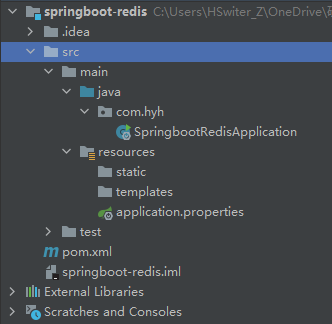
新建项目后,删除不必要的文件,使项目结构更加清晰
pom.xml中添加redis配置# 配置 redisspring.redis.host=127.0.0.1spring.redis.port=6379
SpringbootRedisApplicationTests中添加测试添加
RedisTemplate自动注入@Autowiredprivate RedisTemplate redisTemplate;
@Test测试类中添加具体的测试函数 ```java / redis 基本操作 redisTemplate.opsForValue 用于操作字符串 redisTemplate.opsForList 用于操作 List,类似于 List redisTemplate.opsForSet 用于操作 Set redisTemplate.opsForHash 用于操作 Hash redisTemplate.opsForZset 用于操作 Zset redisTemplate.opsForGeo 用于操作 Geo redisTemplate.opsForHyperLogLog 用于操作 HyperLogLog /

// 除了基本的操作,常用的方法可以通过 redisTemplate 直接使用
/* 获取 redis 的连接对象 RedisConnection connection = redisTemplate.getConnectionFactory().getConnection();
通过 connection 连接对象可以直接使用基本命令connection.flushAll();connection.flushDb();
*/
redisTemplate.opsForValue().set(“mykey”, “xiaohe”); System.out.println(redisTemplate.opsForValue().get(“mykey”));
// 得到结果 xiaohe ```
- 在
springboot 2.x版本后,jedis被替换为lettuce

若有收获,就点个赞吧
0 人点赞


