K8S卷类型
Pod本地存储:emptyDir,hostPath
SAN:iSCSI,FC
NAS:nfs,cifs(samba)
分布式存储:glusterfs,rbd(ceph的块存储接口),cephfs(ceph的文件存储接口)
云存储:EBS, Azure Disk
在查看K8S集群Pod支持的卷类型
[root@master ~]# kubectl explain pod.spec.volumesKIND: PodVERSION: v1RESOURCE: volumes <[]Object>DESCRIPTION:List of volumes that can be mounted by containers belonging to the pod.More info: https://kubernetes.io/docs/concepts/storage/volumesVolume represents a named volume in a pod that may be accessed by anycontainer in the pod.FIELDS:awsElasticBlockStore <Object>AWSElasticBlockStore represents an AWS Disk resource that is attached to akubelet's host machine and then exposed to the pod. More info:https://kubernetes.io/docs/concepts/storage/volumes#awselasticblockstoreazureDisk <Object>AzureDisk represents an Azure Data Disk mount on the host and bind mount tothe pod.azureFile <Object>AzureFile represents an Azure File Service mount on the host and bind mountto the pod.cephfs <Object>CephFS represents a Ceph FS mount on the host that shares a pod's lifetimecinder <Object>Cinder represents a cinder volume attached and mounted on kubelets hostmachine. More info: https://examples.k8s.io/mysql-cinder-pd/README.mdconfigMap <Object>ConfigMap represents a configMap that should populate this volumecsi <Object>CSI (Container Storage Interface) represents ephemeral storage that ishandled by certain external CSI drivers (Beta feature).downwardAPI <Object>DownwardAPI represents downward API about the pod that should populate thisvolumeemptyDir <Object>EmptyDir represents a temporary directory that shares a pod's lifetime.More info: https://kubernetes.io/docs/concepts/storage/volumes#emptydirephemeral <Object>Ephemeral represents a volume that is handled by a cluster storage driver(Alpha feature). The volume's lifecycle is tied to the pod that defines it- it will be created before the pod starts, and deleted when the pod isremoved.Use this if: a) the volume is only needed while the pod runs, b) featuresof normal volumes like restoring from snapshot or capacity tracking areneeded, c) the storage driver is specified through a storage class, and d)the storage driver supports dynamic volume provisioning through aPersistentVolumeClaim (see EphemeralVolumeSource for more information onthe connection between this volume type and PersistentVolumeClaim).Use PersistentVolumeClaim or one of the vendor-specific APIs for volumesthat persist for longer than the lifecycle of an individual pod.Use CSI for light-weight local ephemeral volumes if the CSI driver is meantto be used that way - see the documentation of the driver for moreinformation.A pod can use both types of ephemeral volumes and persistent volumes at thesame time.fc <Object>FC represents a Fibre Channel resource that is attached to a kubelet's hostmachine and then exposed to the pod.flexVolume <Object>FlexVolume represents a generic volume resource that isprovisioned/attached using an exec based plugin.flocker <Object>Flocker represents a Flocker volume attached to a kubelet's host machine.This depends on the Flocker control service being runninggcePersistentDisk <Object>GCEPersistentDisk represents a GCE Disk resource that is attached to akubelet's host machine and then exposed to the pod. More info:https://kubernetes.io/docs/concepts/storage/volumes#gcepersistentdiskgitRepo <Object>GitRepo represents a git repository at a particular revision. DEPRECATED:GitRepo is deprecated. To provision a container with a git repo, mount anEmptyDir into an InitContainer that clones the repo using git, then mountthe EmptyDir into the Pod's container.glusterfs <Object>Glusterfs represents a Glusterfs mount on the host that shares a pod'slifetime. More info: https://examples.k8s.io/volumes/glusterfs/README.mdhostPath <Object>HostPath represents a pre-existing file or directory on the host machinethat is directly exposed to the container. This is generally used forsystem agents or other privileged things that are allowed to see the hostmachine. Most containers will NOT need this. More info:https://kubernetes.io/docs/concepts/storage/volumes#hostpathiscsi <Object>ISCSI represents an ISCSI Disk resource that is attached to a kubelet'shost machine and then exposed to the pod. More info:https://examples.k8s.io/volumes/iscsi/README.mdname <string> -required-Volume's name. Must be a DNS_LABEL and unique within the pod. More info:https://kubernetes.io/docs/concepts/overview/working-with-objects/names/#namesnfs <Object>NFS represents an NFS mount on the host that shares a pod's lifetime Moreinfo: https://kubernetes.io/docs/concepts/storage/volumes#nfspersistentVolumeClaim <Object>PersistentVolumeClaimVolumeSource represents a reference to aPersistentVolumeClaim in the same namespace. More info:https://kubernetes.io/docs/concepts/storage/persistent-volumes#persistentvolumeclaimsphotonPersistentDisk <Object>PhotonPersistentDisk represents a PhotonController persistent disk attachedand mounted on kubelets host machineportworxVolume <Object>PortworxVolume represents a portworx volume attached and mounted onkubelets host machineprojected <Object>Items for all in one resources secrets, configmaps, and downward APIquobyte <Object>Quobyte represents a Quobyte mount on the host that shares a pod's lifetimerbd <Object>RBD represents a Rados Block Device mount on the host that shares a pod'slifetime. More info: https://examples.k8s.io/volumes/rbd/README.mdscaleIO <Object>ScaleIO represents a ScaleIO persistent volume attached and mounted onKubernetes nodes.secret <Object>Secret represents a secret that should populate this volume. More info:https://kubernetes.io/docs/concepts/storage/volumes#secretstorageos <Object>StorageOS represents a StorageOS volume attached and mounted on Kubernetesnodes.vsphereVolume <Object>VsphereVolume represents a vSphere volume attached and mounted on kubeletshost machine
emptyDir
busybox容器负责产生数据,也就是我们常说的sidecar;myapp容器负责向外提供生产服务
[root@master volumes]# cat pod-vol-demo.yamlapiVersion: v1kind: Podmetadata:name: pod-demospec:containers:- name: myappimage: ikubernetes/myapp:v1imagePullPolicy: IfNotPresentports:- containerPort: 80volumeMounts:- name: htmlmountPath: /usr/share/nginx/html/- name: busyboximage: busybox:latestimagePullPolicy: IfNotPresentvolumeMounts:- name: htmlmountPath: /data/command: ["/bin/sh","-c","while true; do echo $(date) >>/data/index.html; sleep 2; done"]volumes:- name: htmlemptyDir: {}
hostPath
hostPath卷方式可以将数据持久化到宿主机本地,如下我们先在本地创建好/data/pod/volume1的目录,并在创建好可访问网页文件,但是这种方式如果要提供统一的内容访问,需要在每一个宿主机上创建相应的目录和网页内容发。
节点1:
[root@master volumes]# mkdir /data/pod/volume1 -p
[root@master volumes]# echo node01 >/data/pod/volume1/index.html
节点2:
[root@master volumes]# mkdir /data/pod/volume1 -p
[root@master volumes]# echo node02 >/data/pod/volume1/index.html
[root@master volumes]# cat pod-hostpath-vol.yamlapiVersion: v1kind: Podmetadata:name: pod-hostpath-volnamespace: defaultspec:containers:- name: myappimage: ikubernetes/myapp:v1volumeMounts:- name: htmlmountPath: /usr/share/nginx/htmlvolumes:- name: htmlhostPath:path: /data/pod/volume1type: DirectoryOrCreate
nfs
通过nfs存储卷的方式可以实现将数据持久化的存储在远端存储上面,以防止数据丢失
[root@master volumes]# cat pod-nfs-vol.yamlapiVersion: v1kind: Podmetadata:name: pod-nfs-volnamespace: defaultspec:containers:- name: myappimage: ikubernetes/myapp:v1volumeMounts:- name: htmlmountPath: /usr/share/nginx/htmlvolumes:- name: htmlnfs:path: /data/volumesserver: 172.16.1.31
PV、PVC
让POD创建过程与底层存储解耦合,如下图PV,PVC,storageClass之间的逻辑关系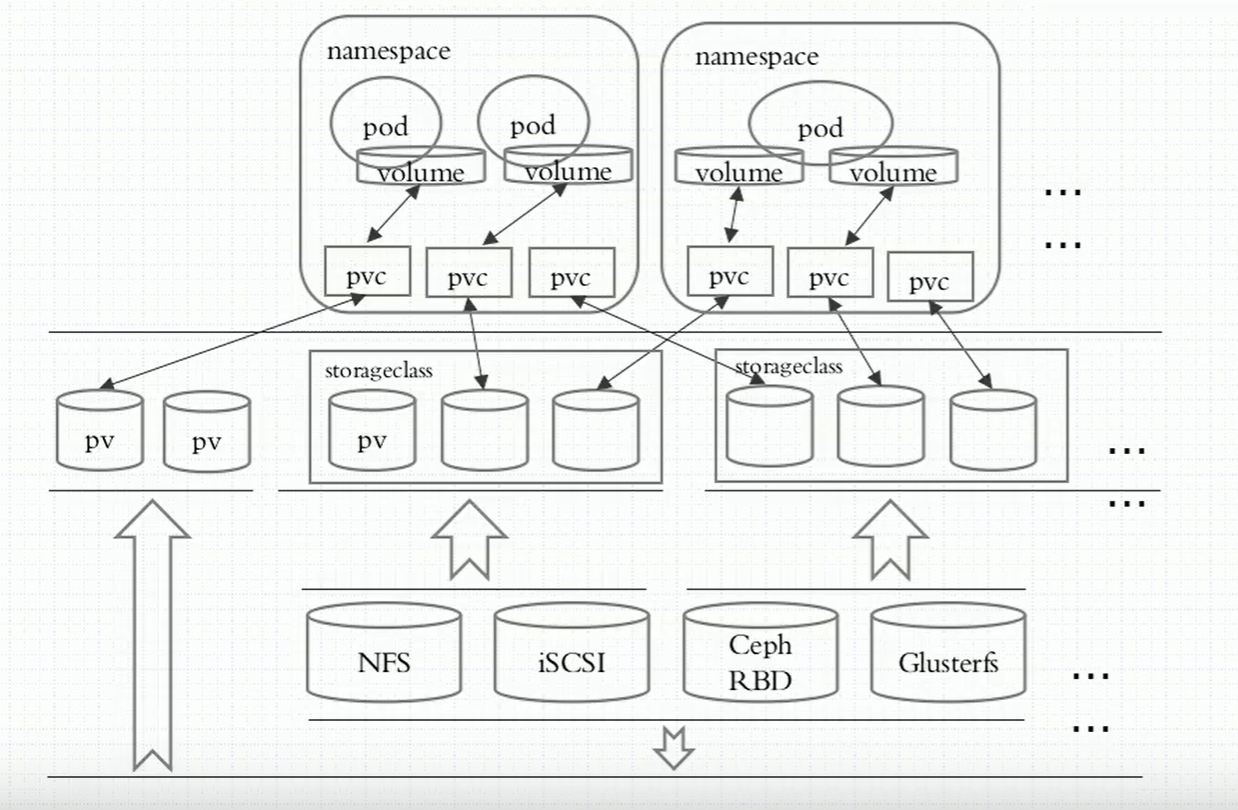

1、示例,创建pv
[root@master volumes]# cat pv-nfs-demo.yamlapiVersion: v1kind: PersistentVolumemetadata:name: pv001labels:name: pv001spec:nfs:path: /data/volumes/v1server: 172.16.1.31accessModes: ["ReadWriteMany", "ReadWriteOnce"]capacity:storage: 2Gi---apiVersion: v1kind: PersistentVolumemetadata:name: pv002labels:name: pv002spec:nfs:path: /data/volumes/v2server: 172.16.1.31accessModes: ["ReadWriteMany", "ReadWriteOnce"]capacity:storage: 4Gi
2、使用pvc创建pod,关联pv
[root@master volumes]# cat pvc-demo.yamlapiVersion: v1kind: PersistentVolumeClaimmetadata:name: mypvcnamespace: defaultspec:accessModes: ["ReadWriteMany"]resources:requests:storage: 2Gi---apiVersion: v1kind: Podmetadata:name: pod-pvcnamespace: defaultspec:containers:- name: myappimage: ikubernetes/myapp:v1volumeMounts:- name: htmlmountPath: /usr/share/nginx/htmlvolumes:- name: htmlpersistentVolumeClaim:claimName: mypvc
configmap
配置容器化应用的方式
1、自定义命令行参数;command,args:[]
2、把配置文件直接备进镜像(但是此种方式耦合度过于紧密)
3、环境变量
1)Cloud Native的应用程序一般可以通过环境变量加载配置
2)Cloud enable,通过entrypoint脚本来预处理变量为配置文件中的配置信息
4、存储卷
怎么
命令行创建configmap
1、命令行创建[root@master manifests]# kubectl create configmap nginx-config --from-literal=nginx_port=8080 --from-literal=server_name=evn.xsc.comconfigmap/nginx-config created2、查看[root@master manifests]# kubectl get cmNAME DATA AGEnginx-config 2 8s3、查看详细描述[root@master manifests]# kubectl describe cm nginx-configName: nginx-configNamespace: defaultLabels: <none>Annotations: <none>Data====nginx_port:----8080server_name:----evn.xsc.comEvents: <none>
通过变量的方式注入配置
[root@master configmap]# kubectl describe cm nginx-configName: nginx-configNamespace: defaultLabels: <none>Annotations: <none>Data====nginx_port:----8080server_name:----evn.xsc.comEvents: <none>pod通过env变量引用configmap的值[root@master configmap]# cat pod-configmap.yamlapiVersion: v1kind: Podmetadata:name: pod-cm-1spec:containers:- image: ikubernetes/myapp:v1name: myappports:- name: httpcontainerPort: 80env:- name: NGINX_SERVER_PORTvalueFrom:configMapKeyRef:name: nginx-configkey: nginx_port- name: NGINX_SERVER_NAMEvalueFrom:configMapKeyRef:name: nginx-configkey: server_name容器内查看注入的变量值[root@master configmap]# kubectl exec -it pod-cm-1 -- /bin/sh/ # printenvMYAPP_SVC_PORT_80_TCP_ADDR=10.98.57.156KUBERNETES_PORT=tcp://10.96.0.1:443KUBERNETES_SERVICE_PORT=443MYAPP_SVC_PORT_80_TCP_PORT=80HOSTNAME=pod-cm-1SHLVL=1MYAPP_SVC_PORT_80_TCP_PROTO=tcpHOME=/rootNGINX_SERVER_PORT=8080NGINX_SERVER_NAME=evn.xsc.com
通过挂载configmap卷的方式传递值
configmap的值[root@master configmap]# kubectl describe cm www.confName: www.confNamespace: defaultLabels: <none>Annotations: <none>Data====www.conf:----server {server_name evn.xsc.com;listen 8088;root /data/web/html;}Events: <none>创建pod[root@master configmap]# cat pod-configmap-3.yamlapiVersion: v1kind: Podmetadata:name: pod-cm-3spec:containers:- image: ikubernetes/myapp:v1name: myappports:- name: httpcontainerPort: 80volumeMounts:- name: nginxconfmountPath: /etc/nginx/conf.d/readOnly: truevolumes:- name: nginxconfconfigMap:name: www.conf进入容器内部可以查看到挂载的值[root@master configmap]# kubectl exec -it pod-cm-3 -- /bin/sh/ #/ #/ # cat /etc/nginx/conf.d/www.confserver {server_name evn.xsc.com;listen 8088;root /data/web/html;}通过挂载configmap的方式可以实现动态修改,当configmap修改完之后,pod内的配置也会实现自动修改
secret
[root@master ~]# kubectl create secret generic mysql-root-password --from-literal=password=abc123..secret/mysql-root-password created[root@master ~]# kubectl describe secret mysql-root-passwordName: mysql-root-passwordNamespace: defaultLabels: <none>Annotations: <none>Type: OpaqueData====password: 8 bytes但是其实secret是通过base64进行编码的,因此其实是很容易解码的[root@master ~]# kubectl get secret mysql-root-password -o yamlapiVersion: v1data:password: YWJjMTIzLi4=kind: Secretmetadata:creationTimestamp: "2021-06-18T08:23:43Z"managedFields:- apiVersion: v1fieldsType: FieldsV1fieldsV1:f:data:.: {}f:password: {}f:type: {}manager: kubectl-createoperation: Updatetime: "2021-06-18T08:23:43Z"name: mysql-root-passwordnamespace: defaultresourceVersion: "186277"uid: de4cadce-e3eb-430d-b7ea-c95e77e690cctype: OpaqueYou have new mail in /var/spool/mail/root[root@master ~]# echo YWJjMTIzLi4= | base64 -dabc123..

若有收获,就点个赞吧
0 人点赞


