RestFUL 风格
总览:
| method | URL格式 | 描述 |
|---|---|---|
| PUT | localhost:9200/索引名/文档类型/文档ID | 创建文档(指定 ID) |
| POST | localhost:9200/索引名/文档类型 | 创建文档(随机 ID) |
| POST | localhost:9200/索引名/文档类型/文档ID/_update | 修改文档(部分修改) |
| DELETE | localhost:9200/索引名/文档类型/文档ID | 删除指定的文档 |
| DELETE | localhost:9200/索引名 | 删除指定的索引 |
| GET | localhost:9200/索引名/文档类型/文档ID | 通过文档 ID 查询文档 |
关于索引的基本操作
添加索引
以添加文档的形式创建索引:

注:指定文档类型的用法已经过时,现在使用 _doc 代替文档类型。
此时查看创建的索引,发现文档的各属性都有了类型。自动类型判断?

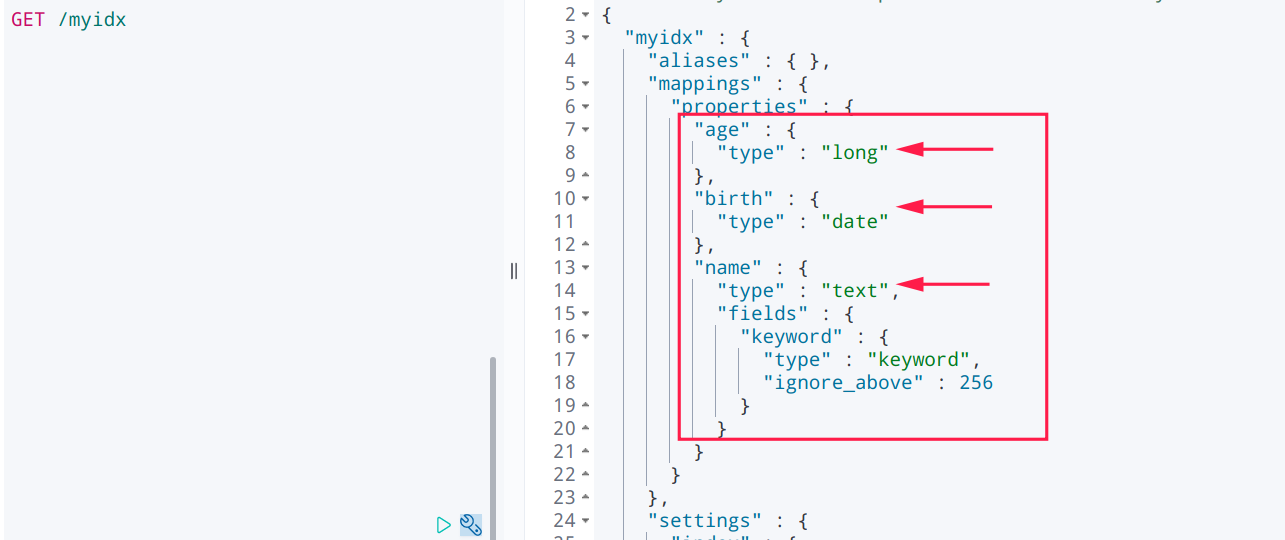
创建索引,同时指定文档中属性的类型:
映射类型文档:https://www.elastic.co/guide/en/elasticsearch/reference/current/mapping-types.html

创建索引时如果添加文档类型则 出现错误,歪?
PUT /idx2/_doc{"mappings": {"properties": {"name": {"type": "text"},"age": {"type": "long"},"birth": {"type": "date"}}}}{"error" : "Incorrect HTTP method for uri [/idx2/_doc?pretty=true] and method [PUT], allowed: [POST]","status" : 405}
推测, 大概是因为指定的类型是文档的, 而不是索引的.
查看索引
GET /索引名 # 查看索引信息
GET /myidx
{"myidx" : {"aliases" : { },"mappings" : {"properties" : { ########## 文档属性类型"age" : {"type" : "long"},"birth" : {"type" : "date"},"name" : {"type" : "text","fields" : {"keyword" : {"type" : "keyword","ignore_above" : 256}}}}},"settings" : {"index" : {"routing" : {"allocation" : {"include" : {"_tier_preference" : "data_content"}}},"number_of_shards" : "1","provided_name" : "myidx","creation_date" : "1638236601941","number_of_replicas" : "1","uuid" : "tpkXV0QKTXC2w8wUIQnRrg","version" : {"created" : "7150299"}}}}}
修改文档
[ PUT /索引名/类型名/文档ID ] 方式下的修改,会删除原文档,创建新文档。
PUT /myidx/mytype/1{"name": "engureeeeeeee","age": 18}
原文档:
{"name": "engure","age": 18,"birth": "1999-01-02"}
修改后:

[ POST /索引名/类型名/文档ID/_update ] 方式下的修改,是部分修改,推荐使用!
POST /myidx/mytype/1/_update{"doc": {"name": "engurggggggggg","age": 188}}
{"_index" : "myidx","_type" : "mytype","_id" : "1","_version" : 3,"result" : "updated","_shards" : {"total" : 2,"successful" : 1,"failed" : 0},"_seq_no" : 2,"_primary_term" : 1}
删除索引
DELETE /索引名比如, DELETE /myidx
关于文档的基本操作
复习上一小结内容,同时补充一些内容
添加文档
PUT users/_doc/1{"name": "engure","age": 18,"birth": "1998-01-01","desc": "00后技术小萌新~","tags": ["技术宅","金属乐","数码迷","直男"]}
查询文档
GET /users/_doc/3
更新文档(2)
1、原 PUT 文档 写法。会删除原文档。不推荐!
PUT users/_doc/1{"name": "engure","age": 18,"birth": "1998-01-01","desc": "00后技术小萌新~","tags": ["技术宅","金属乐","数码迷","直男"]}
2、POST 修改。不会删除原文档,而是在原来的基础上改动。推荐使用!
POST /users/_doc/3/_update{"doc": {"name": "James","desc": "pets lover."}}
简单搜索
GET 索引名/类型/文档ID
简单的条件查询:
# 搜索所有文档GET user/_doc/_search# 按条件搜索GET 索引名/类型/_search?q=属性名1:属性值1&q=属性2:属性值2比如, GET user/_doc/_search?q=name:engure&q=age:18
复杂搜索
排序、分页、高亮、模糊查询、精准查询、、、
其他
查看 ES 状态
GET _cat/healthGET _cat/indices?v

若有收获,就点个赞吧
0 人点赞


