几个核心概念
文档:对应 RDB 中的记录
类型:很少用。可设置,也可不设置
索引:就是数据库
- 分片和副本


一 个 集群 至 少 有 一 个 节点 , 而 一 个 节点 就 是 一 个 ES 进 程 , 节 点 可 以 有 多 个 索引 默认 的 , 如 果 你 创建 索引 , 那么 索引 将 会 有 个 5 个 分 片 ( primary shard,又 称 主 分 片 ) 构成 的 , 每 一 个 主 分 片 会 有 一 个 副本 ( replica shard ,又 称 复制 分 片 )
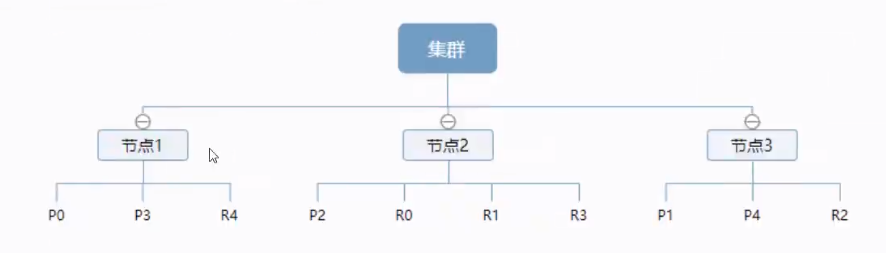
- 倒排索引
了解原理与优势。
- ES 索引与 Lucence 索引
在 ES 中,索引被分为多个分片,每份分片是一个 Lucene 的索引。所以一个 ES 索引是由多个 Lucene 索引组成的。
IK分词器
分 词 : 即 把 一 段 中 文 或 者 别 的 划分 成 一 个 个 的 关键 字 , 我们 在 搜索 时 候 会 把 自己 的 信息 进行 分 词 , 会 把 数据 库 中 或 者 索引 库 中 的 数 据 进行 分 词 , 然 后 进行 一 个 匹配 操作 , 默 认 的 中 文 分 词 是 将 每 个 字 看 成 一 个 词 , 比 如 ‘ 我 爱 狂 神 “ 会 被 分 为 “我 “ 爱 “” 狂 “” 神 ”, 这 显 然 是 不 符合 要 求 的 , 所 以 我 们 需要 安装 中 文 分 词 器 ik 来 解决 这 个 问题 。
如果使用中文,建议使用 ik 分词器!
安装
https://github.com/medcl/elasticsearch-analysis-ik
下载,放入 es 安装目录。
版本要与 ES 一致!

重启观察 sudo tail -f /var/log/elasticsearch/elasticsearch.log


或者:

使用 kibana 测试
最少切分 切分结果内容不重复
{"tokens" : [{"token" : "中国人民","start_offset" : 0,"end_offset" : 4,"type" : "CN_WORD","position" : 0},{"token" : "站起","start_offset" : 4,"end_offset" : 6,"type" : "CN_WORD","position" : 1},{"token" : "来了","start_offset" : 6,"end_offset" : 8,"type" : "CN_WORD","position" : 2}]}
最细粒度切分
{"tokens" : [{"token" : "中国人民","start_offset" : 0,"end_offset" : 4,"type" : "CN_WORD","position" : 0},{"token" : "中国人","start_offset" : 0,"end_offset" : 3,"type" : "CN_WORD","position" : 1},{"token" : "中国","start_offset" : 0,"end_offset" : 2,"type" : "CN_WORD","position" : 2},{"token" : "国人","start_offset" : 1,"end_offset" : 3,"type" : "CN_WORD","position" : 3},{"token" : "人民","start_offset" : 2,"end_offset" : 4,"type" : "CN_WORD","position" : 4},{"token" : "站起来","start_offset" : 4,"end_offset" : 7,"type" : "CN_WORD","position" : 5},{"token" : "站起","start_offset" : 4,"end_offset" : 6,"type" : "CN_WORD","position" : 6},{"token" : "起来","start_offset" : 5,"end_offset" : 7,"type" : "CN_WORD","position" : 7},{"token" : "来了","start_offset" : 6,"end_offset" : 8,"type" : "CN_WORD","position" : 8}]}
继续拆分一个复杂的:
{"tokens" : [{"token" : "老","start_offset" : 0,"end_offset" : 1,"type" : "CN_CHAR","position" : 0},{"token" : "八","start_offset" : 1,"end_offset" : 2,"type" : "TYPE_CNUM","position" : 1},{"token" : "蜜","start_offset" : 2,"end_offset" : 3,"type" : "CN_CHAR","position" : 2},{"token" : "制","start_offset" : 3,"end_offset" : 4,"type" : "CN_CHAR","position" : 3},{"token" : "小","start_offset" : 4,"end_offset" : 5,"type" : "CN_CHAR","position" : 4},{"token" : "汉堡","start_offset" : 5,"end_offset" : 7,"type" : "CN_WORD","position" : 5}]}
ES 不认识 “老八” 和 “小汉堡”,怎么办呢?加入到自定义的字典中!


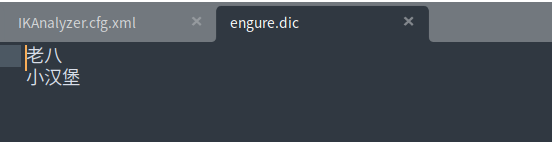
重启 ES,再次尝试,成功!
{"tokens" : [{"token" : "老八","start_offset" : 0,"end_offset" : 2,"type" : "CN_WORD","position" : 0},{"token" : "蜜","start_offset" : 2,"end_offset" : 3,"type" : "CN_CHAR","position" : 1},{"token" : "制","start_offset" : 3,"end_offset" : 4,"type" : "CN_CHAR","position" : 2},{"token" : "小汉堡","start_offset" : 4,"end_offset" : 7,"type" : "CN_WORD","position" : 3}]}
以后类似场景,我们需要自己将分词放在自定义的 dic 文件中进行配置即可!

若有收获,就点个赞吧
0 人点赞


