记录维维的每一篇Hello World

导入工具包
import matplotlib.pyplot as plt
基础使用
折线图
import matplotlib.pyplot as plt# x的值x = [0, 1, 2, 3]# y的值y = [0, 3, 2, 7]# 画图plt.plot(x, y)# 显示plt.show()
散点图
import matplotlib.pyplot as plt# x的值x = [0, 1, 2, 3]# y的值y = [3, 5, 3, 5]# 画图plt.scatter(x, y)# 显示plt.show()
柱状图
import matplotlib.pyplot as plt# x的标签x_text = ['one', 'two', 'three']# x对应的值x_data = [3, 7, 5]# 画图plt.bar(x, data)# 显示plt.show()
饼图
import matplotlib.pyplot as plt# 每块对应的值val = [3, 4, 7]# 画图plt.pie(val)# 显示plt.show()
直方图
import matplotlib.pyplot as pltimport numpy as np# 400个正态分布的随机数data = np.random.normal(100, 15, 400)# 画图, bins值分50块plt.hist(data, bins=50)#显示plt.show()
热力图
import matplotlib.pyplot as pltimport numpy as np# 5×5的随机数矩阵data = np.random.random((5, 5))# 画图plt.imshow(data, cmap=plt.cm.hot, vmin=0, vmax=1)# 颜色参考plt.colorbar()# x的标签plt.xticks(np.arange(5), ['one', 'two', 'three', 'four', 'five'])# y的标签plt.yticks(np.arange(5), ['one', 'two', 'three', 'four', 'five'])# 显示plt.show()
简单应用
男女每个身高阶段的体重的折线分布
import matplotlib.pyplot as pltimport numpy as npimport pandas as pdimport warningswarnings.filterwarnings("ignore")plt.rcParams['font.sans-serif'] = ['SimHei']plt.title(u"身高-体重", c='purple')file_path = 'E:\\Data\\身高-体重\\500\\500_Person_Gender_Height_Weight_Index.csv'data_HW = pd.read_csv(file_path)data_val = data_HW.valuesheader = data_HW.columnshead_name = data_HW[header[0]].unique()head_val0 = np.where(data_val == head_name[0])[0]head_val1 = np.where(data_val == head_name[1])[0]data_val = data_val.reshape(1, -1)[0]height_key = np.arange(150, 190, 5)plt.xticks(height_key, list(map(lambda a, b: f'{a}/{b}', height_key, height_key+5)))# 女性数据key = head_val0*4height0 = data_val[key+1]weight0 = data_val[key+2]weight0_mean = list(map(lambda i: weight0[np.where((height0 < i+5) & (height0 >= i))[0]].mean(), height_key))plt.plot(height_key, weight0_mean, 'r-o', label=u"女孩子")# 男性的数据key = head_val1*4height1 = data_val[key+1]weight1 = data_val[key+2]weight1_mean = list(map(lambda i: weight1[np.where((height1 < i+5) & (height1 >= i))[0]].mean(), height_key))plt.plot(height_key, weight1_mean, 'b-o', label=u"男孩子")plt.legend()plt.show()
预览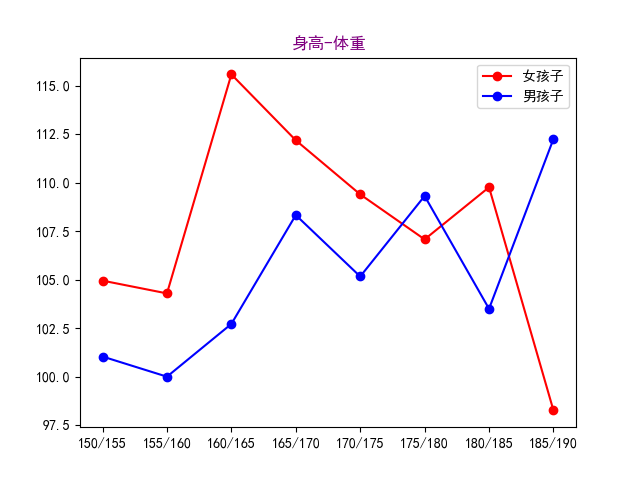
男女身高体重的散点分布
import matplotlib.pyplot as pltimport numpy as npimport pandas as pdimport warningswarnings.filterwarnings("ignore")plt.rcParams['font.sans-serif'] = ['SimHei']plt.title(u"身高-体重", c='purple')file_path = 'E:\\Data\\身高-体重\\500\\500_Person_Gender_Height_Weight_Index.csv'data_HW = pd.read_csv(file_path)data_val = data_HW.valuesheader = data_HW.columnshead_name = data_HW[header[0]].unique()head_val0 = np.where(data_val == head_name[0])[0]head_val1 = np.where(data_val == head_name[1])[0]data_val = data_val.reshape(1, -1)[0]# 女性数据key = head_val0*4height0 = data_val[key+1]weight0 = data_val[key+2]plt.scatter(height0, weight0, c='red', label=u"女孩子")# 男性的数据key = head_val1*4height1 = data_val[key+1]weight1 = data_val[key+2]plt.scatter(height1, weight1, c='blue', label=u"男孩子")plt.xlabel(u"身高")plt.ylabel(u"体重")plt.legend()plt.show()
预览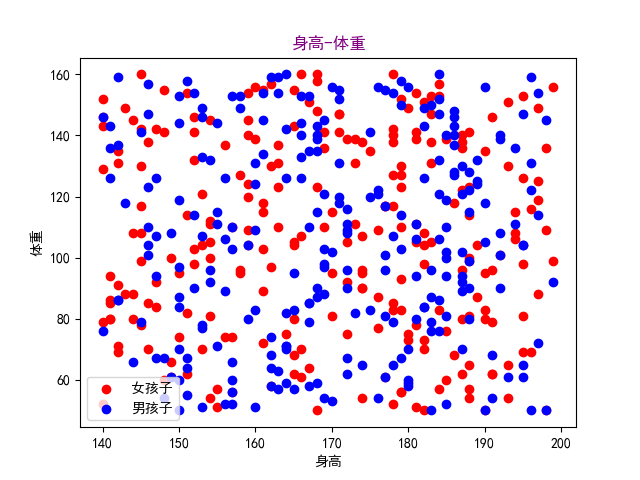
男女每个身高阶段的体重的柱状分布
import matplotlib.pyplot as pltimport numpy as npimport pandas as pdimport warningswarnings.filterwarnings("ignore")plt.rcParams['font.sans-serif'] = ['SimHei']plt.title(u"身高-体重", fontdict=dict(size=20, color='purple'))file_path = 'E:\\Data\\身高-体重\\500\\500_Person_Gender_Height_Weight_Index.csv'data_HW = pd.read_csv(file_path)data_val = data_HW.valuesheader = data_HW.columnshead_name = data_HW[header[0]].unique()head_val0 = np.where(data_val == head_name[0])[0]head_val1 = np.where(data_val == head_name[1])[0]data_val = data_val.reshape(1, -1)[0]height_key = np.arange(150, 190, 5)plt.xticks(height_key, list(map(lambda a, b: f'{a}/{b}', height_key, height_key+5)))# 女性数据key = head_val0*4height0 = data_val[key+1]weight0 = data_val[key+2]weight0_mean = list(map(lambda i: weight0[np.where((height0 < i+5) & (height0 >= i))[0]].mean(), height_key))plt.bar(height_key-0.8, weight0_mean, width=1.2, color='r', label=u"女孩子")# 男性的数据key = head_val1*4height1 = data_val[key+1]weight1 = data_val[key+2]weight1_mean = list(map(lambda i: weight1[np.where((height1 < i+5) & (height1 >= i))[0]].mean(), height_key))plt.bar(height_key+0.8, weight1_mean, width=1.2, color='b', label=u"男孩子")plt.xlabel(u"身高")plt.ylabel(u"体重")plt.legend()plt.show()
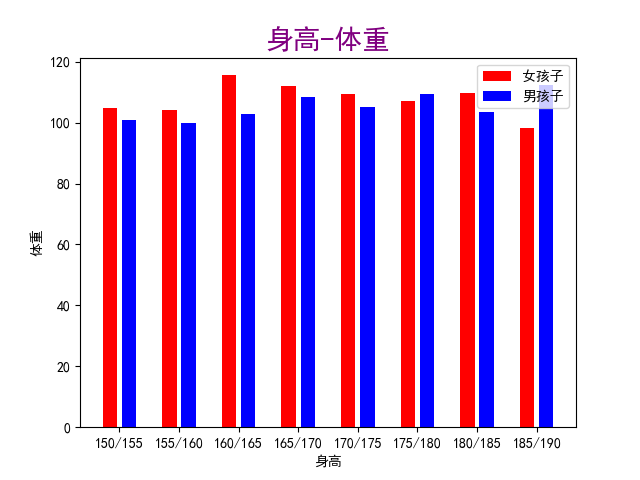
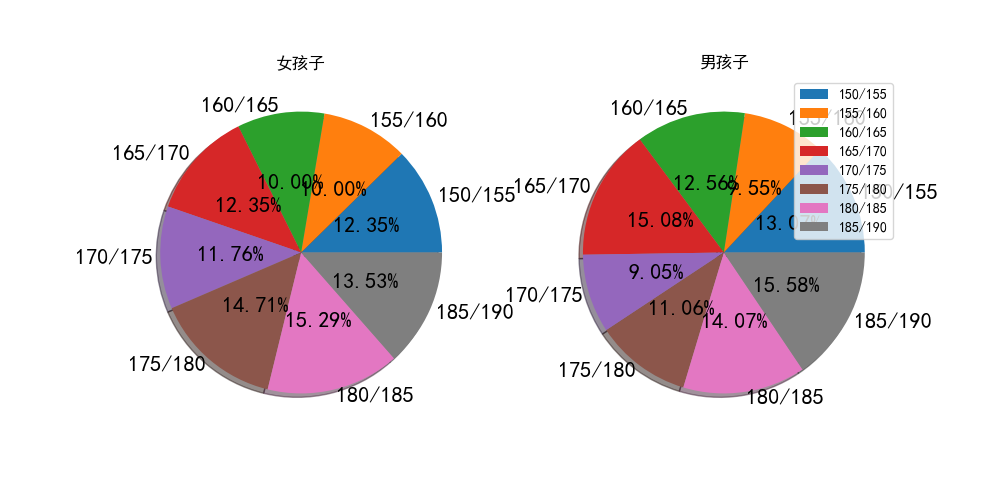
男女每个身高阶段的人数的饼图
import matplotlib.pyplot as pltimport numpy as npimport pandas as pdimport warningswarnings.filterwarnings("ignore")plt.rcParams['font.sans-serif'] = ['SimHei']file_path = 'E:\\Data\\身高-体重\\500\\500_Person_Gender_Height_Weight_Index.csv'data_HW = pd.read_csv(file_path)data_val = data_HW.valuesheader = data_HW.columnshead_name = data_HW[header[0]].unique()head_val0 = np.where(data_val == head_name[0])[0]head_val1 = np.where(data_val == head_name[1])[0]data_val = data_val.reshape(1, -1)[0]plt.figure(figsize=(10, 5), dpi=100)height_key = np.arange(150, 190, 5)height_text = list(map(lambda a, b: f'{a}/{b}', height_key, height_key + 5))# 女性数据key = head_val0 * 4height0 = data_val[key + 1]weight0_mean = list(map(lambda i: np.where((height0 < i + 5) & (height0 >= i))[0].size, height_key))plt_one = plt.subplot(1, 2, 1)plt_one.pie(weight0_mean, labels=height_text, autopct="%1.2f%%",textprops={'fontsize': 16}, labeldistance=1.05,shadow=True, pctdistance=0.5)plt.title("女孩子")# 男性的数据key = head_val1 * 4height1 = data_val[key + 1]weight1_mean = list(map(lambda i: np.where((height1 < i + 5) & (height1 >= i))[0].size, height_key))plt_two = plt.subplot(1, 2, 2)plt_two.pie(weight1_mean, labels=height_text, autopct="%1.2f%%",textprops={'fontsize': 16}, labeldistance=1.05,shadow=True, pctdistance=0.5)plt.title("男孩子")plt.legend()plt.show()
绘画动态爱心
import osimport numpy as npimport matplotlib.pyplot as pltimport matplotlib.animation as animationimport warningswarnings.filterwarnings("ignore")plt.rcParams['font.sans-serif'] = ['SimHei']plt.rcParams['axes.unicode_minus'] = Falsefig = plt.figure(figsize=(10, 5), dpi=100, facecolor='black')plt.grid(ls='--', alpha=0.5)x = np.linspace(-3, 3, 100000)f = np.sqrt(1 - (np.abs(x) - 1) ** 2)h = -2 * np.sqrt(1 - 0.5 * np.abs(x))q = (f - h) / 2 * np.cos(0 * x) + (f + h) / 2plt.subplot(121, facecolor="black")plt.xlim(-3, 3)plt.ylim(-3, 2)plt.title("love", fontdict=dict(color='r', size=24))plt_love = plt.plot(x, q, 'r')[0]plt.subplot(122, facecolor="black")plt.xlim(-3, 3)plt.ylim(-3, 2)plt.title("爱心", fontdict=dict(color='r', size=24))plt.plot(x, f, 'r')plt.plot(x, h, 'r')def up_data(num):q = (f - h) / 2 * np.cos(num * x) + (f + h) / 2plt_love.set_data(x, q)ani = animation.FuncAnimation(fig=fig, func=up_data, frames=200, interval=100)ani.save("E:\\love.gif")os.startfile("E:\\love.gif")
预览
数据案例
下载地址: http://data.dream52.cn/python/matplotlib/hw/500.csv
有趣的公式
心形公式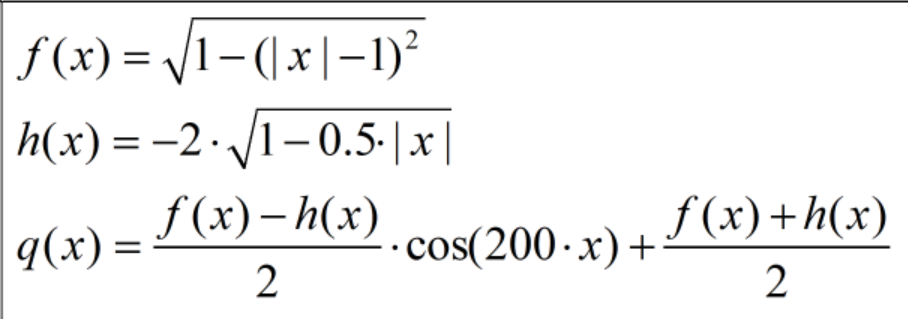
注意事项
Nothing…
python环境
电脑:Windows10
python:3.10.4

若有收获,就点个赞吧
0 人点赞


