1.1 概述
1.1.2 定义
- JDBC是访问数据库的一套API(接口)
- 面向开发者
- 接口:
- 狭义:Java语法层面上的语法约束
- 广义:指的是规范和标准
- 这个是Java操作数据库语言的规范和标准
1.1.3 JDBC体系
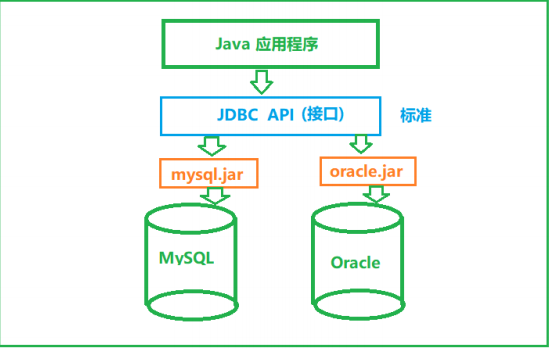
1.1.4 JDBC的重要组件
- 组件:
- 实现编程的类或者接口
- 所属包:
- java.sql包下
- Connection接口:
- 该类型的实例表示一个数据库连接。
- 这个是jdbc基础
- DriverManager驱动管理类
- Connection getConnection(url,user,pwd)
- url:统一资源配置符,确定连接在网络中的位置
- 协议+ip+端口+数据库名?其他参数
- 示例:jabc:mysql://localhost:3306/empdb?useUnicode=true&characterEncoding=UTF-8&useSSL=false
- Connection getConnection(url,user,pwd)
- Statement语句接口
- 该类的实例表示一个SQL语句对象
- 提供的API:
- int executeUpdate(String sql)
- DML增删改,通过用API执行SQL语句,返回值表示影响的行数
- ResultSet executeQuery(String sql)
- DQL执行API,返回的是一个集合对象
- boolean execute(String sql)
- DDL语句执行的方法,参数表示执行的SQL,返回是布尔值
- int executeUpdate(String sql)
- ResultSet结果集
- 结果集接口,保存着从数据库中查询到的数据
- boolean next()控制数据光标移动的API,如果集合有下一行记录,那么返回true,移到下一个光标
- XXXgetXXX(String columnName):获取指定的列的值。
- 结果集接口,保存着从数据库中查询到的数据
PreparedAtatement语句
创建工程
- 引入启动包
1.2.2 JDBC的几大步骤
- 导入jar包
- 加载驱动
- 建立连接:
- 传入参数:
- url:建立连接的数据库
- 格式:协议+IP+数据库名
- user:
- password:
- 预处理SQL语句:
- 获取语句对象
- 进行设置SQL参数
- 执行SQL语句
- 处理结果集
- 关闭资源
- 案例: ```java package com.company;
import java.sql.Connection; import java.sql.DriverManager; import java.sql.Statement;
public class Hello { public static void main(String[] args) throws Exception { Class.forName(“com.mysql.jdbc.Driver”);//加载驱动类 Connection conn = DriverManager.getConnection(“jdbc:mysql://localhost:3306/empdb?useSSL=false”, “root”, “123456”);//建立连接,获取连接对象 Statement smt = conn.createStatement();//获语句对象取 // int row=smt.executeUpdate(“insert into emp(empno,ename,job,sal) values(12344,’悟空’,’保镖’,3000)”); // int row = smt.executeUpdate(“delete from emp where ename=’悟空’”); int row= smt.executeUpdate(“update emp set sal=sal+2000 where ename = ‘赵四’”); System.out.println(row); conn.close(); smt.close(); } }
<a name="dAK22"></a>### 1.3 基本语句的执行<a name="BcaTJ"></a>#### 1.3.1 执行DML语句```javapackage com.qfedu.jdbc;import java.sql.Connection;import java.sql.DriverManager;import java.sql.Statement;public class TestDML {public static void main(String[] args) throws Exception {//1 注册驱动int executeUpdate(String sql) : 是增删改通用的方法。sql就是要执行的语句 int返回值 就是影响的行数。3.3 执行DQL 语句 Class.forName("com.mysql.jdbc.Driver");// alt+ enter//2 创建连接Connection conn = DriverManager. getConnection("jdbc:mysql://localhost:3306/empdb?useSSL=false", "root","123456");//3 执行SQLStatement smt = conn.createStatement();// 插入/* int row = smt.executeUpdate("insert into emp(empno,ename,job,sal) values(999,'张伟','软件开发工程师',14000) ");*/// 删除/*int row = smt.executeUpdate("delete from emp where empno=999");*/// 修改 int row = smt.executeUpdate(" update emp set sal=3000 where ename='王思聪' ");System.out.println(row);//4 关闭资源smt.close();conn.close();}}
int executeUpdate();//执行的是DML语句,返回的是int 类型
1.3.2 执行DQL语句
package com.qfedu.jdbc;


import java.sql.Connection;
import java.sql.DriverManager;
import java.sql.ResultSet;
import java.sql.Statement;

// 测试数据查询
public class TestQuery {
    public static void main(String[] args) throws Exception {
        //注册驱动
        Class.forName("com.mysql.jdbc.Driver");
        //创建连接
       Connection conn= DriverManager.
               getConnection("jdbc:mysql://localhost:3306/empdb?useUnicode=true&characterEncoding=utf-8&useSSL=false",
                       "root","123456");
       //创建语句对象
        Statement smt = conn.createStatement();
        ResultSet rs = smt.executeQuery("select empno, ename,job,sal  from emp where deptno=30 or sal >1000");//执行语句得到结果
        //处理结果
        while( rs.next() ){
             //一次循环读取一行记录
             int no= rs.getInt("empno");
             String name = rs.getString("ename");
             String job = rs.getString("job");
             double sal = rs.getDouble("sal");
             System.out.println(no+"\t"+name+"\t"+job+"\t"+sal);
        }

        //关闭
        rs.close();
        smt.close();
        conn.close();
    }
}
ResultSet executeQuery();//执行的查询语句,返回的是结果集对象
1.3.3执行DDL语句
package com.qfedu.jdbc;

import java.sql.Connection;
import java.sql.DriverManager;
import java.sql.Statement;

public class TestDDL {
    public static void main(String[] args) throws  Exception {
        //注册驱动
        Class.forName("com.mysql.jdbc.Driver");
        //创建连接
        Connection conn= DriverManager.
                getConnection("jdbc:mysql://localhost:3306/empdb?useUnicode=true&characterEncoding=utf-8&useSSL=false",
                        "root","123456");
        //创建语句对象
        Statement smt = conn.createStatement();


        // 执行DDL(创建一张表)
        boolean xx = smt.execute("create table users(\n" +
                "   id int primary key auto_increment,\n" +
                "   username varchar(30) not null,\n" +
                "   password varchar(30) not null \n" +
                ")");
        System.out.println(xx);

        //关闭资源
        smt.close();
        conn.close();
    }
}
boolean execute();//是执行DDL语句,返回的是一个布尔值
1.3.4 常见的错误
1、Caused by: java.net.ConnectException: Connection refused: connect : 服务没开

2、Exception in thread "main" java.lang.ClassNotFoundException: com.mysql.jdbc.Driver :找不到驱动

3Exception in thread "main" java.sql.SQLException: Access denied for user 'root '@'localhost' (using password: YES) 账号或密码错误

Exception in thread "main" com.mysql.jdbc.exceptions.jdbc4.MySQLSyntaxErrorException: Unknown database 'empbd' 数据库名字不对

4 Exception in thread "main" com.mysql.jdbc.exceptions.jdbc4.MySQLSyntaxErrorException: Table 'empdb.emsp' doesn't exist 表存在

5.Exception in thread "main" com.mysql.jdbc.exceptions.jdbc4.MySQLSyntaxErrorException: You have an error in your SQL syntax; check the manual that corresponds to your MySQL server version for the right syntax to use near 'form emp' at line 1  语法错误找near前后

6 Exception in thread "main" com.mysql.jdbc.exceptions.jdbc4.MySQLSyntaxErrorException: Unknown column 'empon' in 'field list' 列名错误


7 Exception in thread "main" java.sql.SQLException: Column 'empno' not found. 没查询却在取


8 Exception in thread "main" java.sql.SQLException: Operation not allowed after ResultSet closed 再关闭ResultSet后继续取数据。
1.4 登录原理
1.4.1 准备数据
create table users(
   id int primary key auto_increment,
   username varchar(30) not null,
   password varchar(30) not null
);
1.4.2 理解
- 登录的本质是查询
- 以账户和密码作为查询条件
- 看是否存在满足条件的记录
- 代码案例: ```java package com.qfedu.jdbc;
import java.sql.Connection; import java.sql.DriverManager; import java.sql.ResultSet; import java.sql.Statement; import java.util.Scanner;
//登录案例 public class LoginDemo {
public static void main(String[] args) throws Exception {

    // 1 接受用户输入
    Scanner scanner = new Scanner(System.in);
    //用户名输入 密码输入
    System.out.println("输入账号密码");
    String uname = scanner.next();
    String pwd = scanner.next();

    // 2 把用户的输入作为筛选条件查询数据库中是否存在记录。
    Class.forName("com.mysql.jdbc.Driver");

    //创建连接
    String url = "jdbc:mysql://localhost:3306/empdb?useUnicode=true&characterEncoding=utf-8&useSSL=false";
    Connection connection =
            DriverManager.getConnection(url,"root","123456");

    //执行SQL
    Statement smt = connection.createStatement();
    String sql = "select * from users where username='"+uname+"' and password='"+pwd+"' ";
    ResultSet rs = smt.executeQuery(sql);


    //处理结果
    if (rs.next()){
        System.out.println("登录成功");
    }else{
        System.out.println("登录失败");
    }
    //关闭资源
    scanner.close();
    rs.close();
    smt.close();
    connection.close();
}
} ```

若有收获,就点个赞吧
0 人点赞


