1.1 异常
1.1.1 作用
在写代码的过程中,难免会出现问题,而用异常则是用来处理这些可能出问题的机制。
1.1.2 出现的原因
- 检查时异常:
- 用户的错误和问题发生的异常,这些异常在编译时就不能忽略
- 运行时异常:
- 可能在编译时能够忽略,在运行过程中异常。
- 错误:
错误不是异常,可能脱离程序的控制在代码中可能忽略。
1.1.4 Exception层次
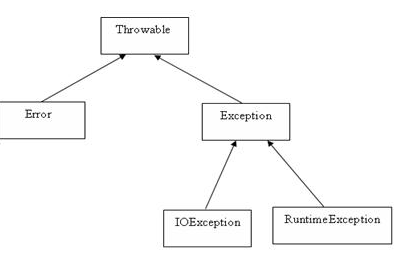
1.2 捕获异常
1.2.1 try和catch
- try用来处理可能出现异常的代码
- catch()中声明异常类型,并捕获响应的异常,并对这些异常进行处理
- 异常即会传到catch的方法块中进行处理
- catch必须与try结合使用
格式:
try{// 程序代码}catch(ExceptionName e1){//Catch 块}
实例:
// 文件名 : ExcepTest.java
import java.io.*;
public class ExcepTest{

public static void main(String args[]){
   try{
      int a[] = new int[2];
      System.out.println("Access element three :" + a[3]);
   }catch(ArrayIndexOutOfBoundsException e){
      System.out.println("Exception thrown  :" + e);
   }
   System.out.println("Out of the block");
}
}
1.2.2 执行可能出现的情况
情况1:
代码没有出现异常,将不执行catch代码块。<br /> 2.情况2:<br /> 代码出现异常,并被catch捕捉,即异常与catch中的代码块一致,将进入catch代码块中执行。 <br /> 3.情况3:<br /> 代码块出现异常,与catch块中声明不匹配,将中断程序。1.2.3 多重捕获块
可能出现多种异常将进行多catch块捕获:
格式如下:try{ // 程序代码 }catch(异常类型1 异常的变量名1){ // 程序代码 }catch(异常类型2 异常的变量名2){ // 程序代码 }catch(异常类型2 异常的变量名2){ // 程序代码 }注意:
- try后面可以添加任意的catch块
- 抛出异常依次向下抛
- 各个catch块顺序规则:自上而下,先子类后父类
实例:
try {
    file = new FileInputStream(fileName);
    x = (byte) file.read();
} catch(FileNotFoundException f) { // Not valid!
    f.printStackTrace();
    return -1;
} catch(IOException i) {
    i.printStackTrace();
    return -1;
}
1.2.4 finally
- 不管代码是否异常都会执行的代码块
- 必须与try结合使用
用来处理一些善后的操作
try{
// 程序代码
}catch(异常类型1 异常的变量名1){
// 程序代码
}catch(异常类型2 异常的变量名2){
// 程序代码
}finally{
// 程序代码
}
案例:
public class ExcepTest{
public static void main(String args[]){
  int a[] = new int[2];
  try{
     System.out.println("Access element three :" + a[3]);
  }catch(ArrayIndexOutOfBoundsException e){
     System.out.println("Exception thrown  :" + e);
  }
  finally{
     a[0] = 6;
     System.out.println("First element value: " +a[0]);
     System.out.println("The finally statement is executed");
  }
}
}
1.3 throw和throws关键字
1.3.1 throw作用
用来抛出一个异常
- 一次只能抛出一个
不同情况:
用来声明异常
- 直接在参数列表后声明异常
抛出的异常不能多于父类
import java.io.*;
public class className
{
public void deposit(double amount) throws RemoteException
{
  // Method implementation
  throw new RemoteException();
}
//Remainder of class definition
}
import java.io.*; public class className { public void withdraw(double amount) throws RemoteException, InsufficientFundsException { // Method implementation } //Remainder of class definition }1.4 自定义异常
1.4.1 应用场景
当我们不能通过系统来捕获到异常时,我们需要自己定义一个异常来解决实际问题。
1.4.2 定义实现方式
继承Throwable类
- 继承Exception类
- 继承RuntimeException类
- 调用父类的构造方法,传入异常信息 ```java package com.test2;
public class AgeException extends RuntimeException{
public AgeException(String message) {
    super(message);
}
}
```java
package com.test2;

import java.util.LinkedList;
import java.util.Vector;

public class Student {
    private String name;
    private int age; // 年龄 1-120之间
    private String sex;// 性别 男 或者 女
    public String getName() {
        return name;
    }

    public void setName(String name) {
        this.name = name;
    }

    public int getAge() {
        return age;
    }


    public String getSex() {
        return sex;
    }
    public void setAge(int age) {
        if(age >=1 && age <= 120) {
            this.age = age;
        }else {
            throw new AgeException("年龄不合适,必须在1~120之间");
        }
    }

    public void setSex(String sex) throws SexException {
        if(sex.equals("男") || sex.equals("女")) {
            this.sex = sex;
        }else {
            throw new SexException("性别不合适,只能是男或者女");
        }
    }
    public static void main(String[] args)  {
        Student stu=new Student();
//        stu.setSex("男滴");
        stu.setAge(155);
    }
}

若有收获,就点个赞吧
0 人点赞


