1.1 前言
1.1.1 框架的概念
是什么:
1.是一个通用的,可复用的软件环境
2.解决问题的一种模板
目的:
1.简化开发步骤
2.提高开发效率
1.1.2 ORM框架
首先ORM是什么:
1.对象关系映射
2.对象与数据库中的数据对应关系
ORM框架是什么:
通过对象与数据库中的关系,将程序中的对象持久化到数据库中
1.1.3 ORM框架与JDBC完成ORM的区别
- JDBC中存在大量的冗余操作比如:
- 获取连接
- 预处理SQL语句
- 执行SQL语句
- 处理执行SQL语句的结果
- 等等
- JDBC查询效率低
- ORM框架对于一些数据库ORM的操作进行封装
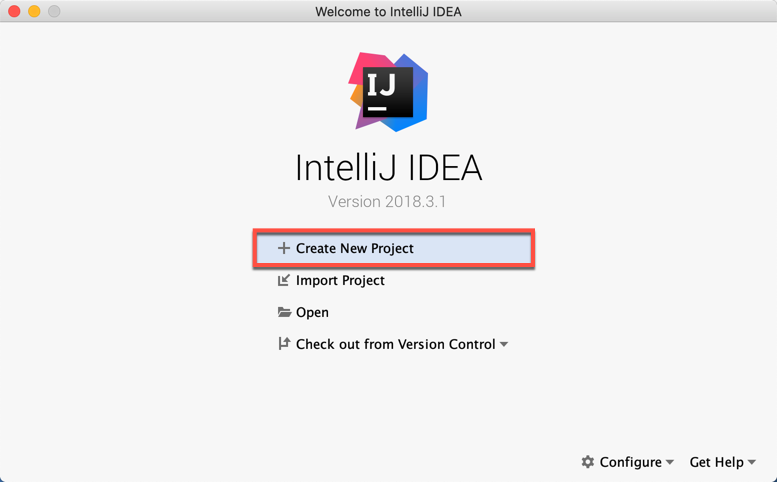
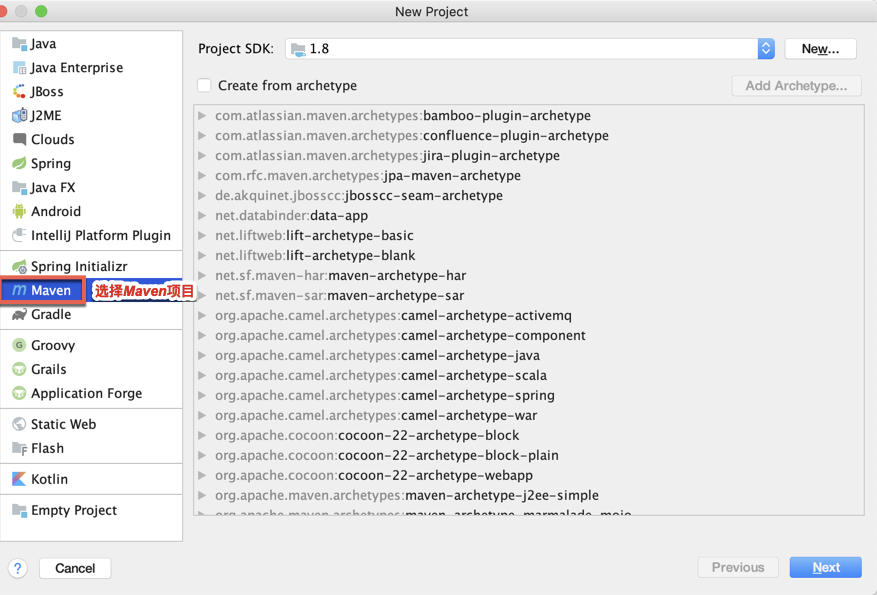
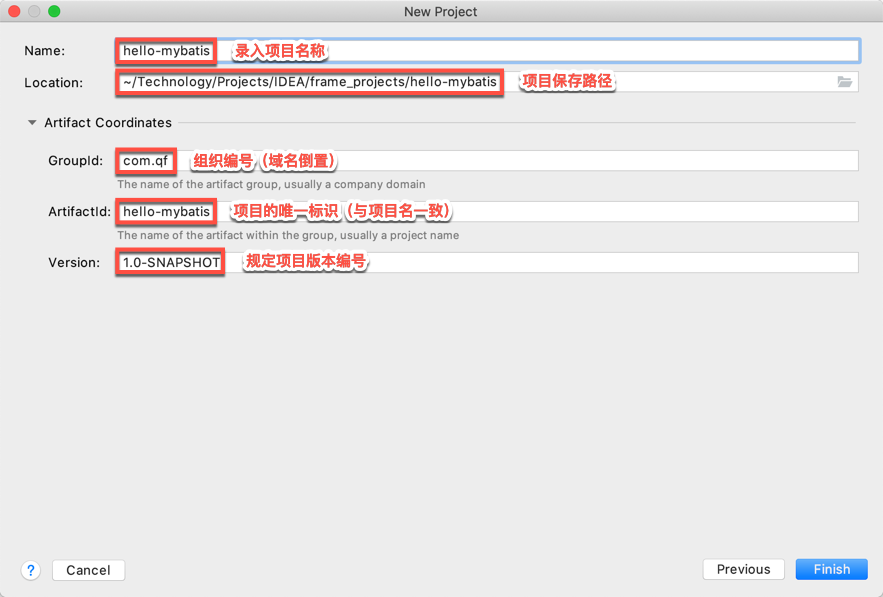
- 引入Mybatis依赖坐标
- 相关坐标如下: ```java <?xml version=”1.0” encoding=”UTF-8”?>
<modelVersion>4.0.0</modelVersion><!--项目配置--><groupId>com.qf</groupId><artifactId>hello-mybatis</artifactId><version>1.0-SNAPSHOT</version><!--依赖--><dependencies><!--MyBatis核心依赖--><dependency><groupId>org.mybatis</groupId><artifactId>mybatis</artifactId><version>3.4.6</version></dependency><!--MySql驱动依赖--><dependency><groupId>mysql</groupId><artifactId>mysql-connector-java</artifactId><version>5.1.47</version></dependency></dependencies>
<a name="6XLU2"></a>
#### 1.2.5 创建MyBatis配置文件
- 创建并配置mybatis-config.xml
```java
<?xml version="1.0" encoding="UTF-8" ?>
<!DOCTYPE configuration PUBLIC "-//mybatis.org//DTD Config 3.0//EN"
"http://mybatis.org/dtd/mybatis-3-config.dtd">
<!--MyBatis配置-->
<configuration>
<!--JDBC环境配置、选中默认环境-->
<environments default="MySqlDB">
<!--MySql数据库环境配置-->
<environment id="MySqlDB">
<!--事务管理-->
<transactionManager type="JDBC"/>
<!--连接池-->
<dataSource type="org.apache.ibatis.datasource.pooled.PooledDataSourceFactory">
<property name="driver" value="com.mysql.jdbc.Driver"/>
<!-- &转义& -->
<property name="url" value="jdbc:mysql://localhost:3306/x?useUnicode=true&characterEncoding=utf-8"/>
<property name="username" value="xxx"/>
<property name="password" value="xxx"/>
</dataSource>
</environment>
</environments>
<!--Mapper注册-->
<mappers>
<!--注册Mapper文件的所在位置-->
<mapper resource="xxxMapper.xml"/>
</mappers>
</configuration>
1.2.6 Map映射
- 写一个map接口
- 配置map映射xml文件
<?xml version="1.0" encoding="UTF-8" ?>
<!DOCTYPE configuration
      PUBLIC "-//mybatis.org//DTD Config 3.0//EN"
      "http://mybatis.org/dtd/mybatis-3-config.dtd">
<configuration>
  <properties resource="mysql.properties"></properties>
  <settings>
      <setting name="logImpl" value="STDOUT_LOGGING"/>
  </settings>
  <plugins>
      <plugin interceptor="com.github.pagehelper.PageInterceptor">
          <property name="helperDialect" value="mysql"/>
      </plugin>
  </plugins>
  <environments default="el1">
      <environment id="el1">
          <!--事务管理-->
          <transactionManager type="JDBC"></transactionManager>
          <dataSource type="POOLED">
              <property name="driver" value="${driver}"/>
              <property name="url" value="${url}"/>
              <property name="username" value="${username}"/>
              <property name="password" value="${password}"/>
          </dataSource>
      </environment>
  </environments>
  <mappers>
      <mapper resource="com/qfedu/ls/map/StudentMapper.xml"></mapper>
  </mappers>
</configuration>
- namespace指明工作空间:即对用的map(dao)接口
- 查询语句要指明相应的返回值的对象类型
指明mapper的配置文件的路径有三种方式:
- 方式1
- 方式2
方式3
<!-- 第一种:注册sql映射文件-->
  <mapper resource="com/spldeolin/mapper/UserMapper.xml" />

  <!-- 第二种:注册接口   sql映射文件必须与接口同名,并且放在同一目录下-->
  <!--<mapper class="com.spldeolin.mapper.UserMapper" />-->

  <!-- 第三种:注册基于注解的接口  基于注解   没有sql映射文件,所有的sql都是利用注解写在接口上-->
  <!--<mapper class="com.spldeolin.mapper.TeacherMapper" />-->

  <!-- 第四种:批量注册  需要将sql配置文件和接口放到同一目录下-->
  <package name="com.spldeolin.mapper" />
1.2.7 Map.xml文件中的关系
一个类中含有另一个类实例为属性
<?xml version="1.0" encoding="UTF-8"?>
<!DOCTYPE mapper
      PUBLIC "-//mybatis.org//DTD Mapper 3.0//EN"
      "http://mybatis.org/dtd/mybatis-3-mapper.dtd">
<mapper namespace="com.qfedu.ls.map.IdCardMapper">
 <resultMap id="idMap" type="com.qfedu.ls.entity.IdCard">
   <id property="cid" column="cid"></id>
    <result property="cno" column="cno"></result>
    <association property="pe" javaType="com.qfedu.ls.entity.Persion">
       <id property="pid" column="pid"></id>
       <result property="pname" column="pname"></result>
    </association>
 </resultMap>
 <select id="queryById" resultMap="idMap">
    select cid,pname,cno,p.pid from idcard i left join person p on i.pid=p.pid where cid=#{id}
 </select>
</mapper>
使用association进行属性对象的配置,通过javaType指明对象类型
一个类中包含另一个类对象的集合
<?xml version="1.0" encoding="UTF-8"?>
<!DOCTYPE mapper
      PUBLIC "-//mybatis.org//DTD Mapper 3.0//EN"
      "http://mybatis.org/dtd/mybatis-3-mapper.dtd">
<mapper namespace="com.qfedu.ls.map.TreeMapper">
  <sql id="Tree_Leaf">
      t.tid,t.tname,l.lname from tree t
  </sql>
  <resultMap id="ThreeMap" type="com.qfedu.ls.entity.Tree">
      <id property="id" column="tid"></id>
      <result property="tname" column="tname"></result>
      <collection property="list" ofType="com.qfedu.ls.entity.Leaf">
          <id property="lid" column="lid"></id>
          <result property="lname" column="lname"></result>
      </collection>
  </resultMap>
  <select id="query" resultMap="ThreeMap" >
      select <include refid="Tree_Leaf"></include> LEFT JOIN leaf l on t.tid=l.tid where t.tid=#{id}
  </select>
</mapper>
通过collection指明属性集合对象的配置,SQL语句配置通过resultMap指明类型 collection中通过ofType指明对象类型
id标签表示类中的主键
- result表示属性
1.2.8 将map包下的xml文件放在编译后的根目录下
在pom.xml中配置
<build>
      <resources>
          <!--告诉maven,你编译的时候,把我java下面的,.xml文件也给我编译进去-->
          <resource>
              <directory>src/main/java</directory>
              <includes>
                  <include>**/*.xml</include>
              </includes>
              <filtering>true</filtering>
          </resource>
          <resource>
              <directory>${basedir}/src/main/web/lib</directory>
              <targetPath>BOOT-INF/lib/</targetPath>
              <filtering>false</filtering>
              <includes>
                  <include>**/*.jar</include>
              </includes>
          </resource>
          <resource>
              <directory>src/main/resources</directory>
              <filtering>true</filtering>
          </resource>
      </resources>

  </build>
1.3 MyBatis的CURD
<?xml version="1.0" encoding="UTF-8"?>
<!DOCTYPE mapper
      PUBLIC "-//mybatis.org//DTD Mapper 3.0//EN"
      "http://mybatis.org/dtd/mybatis-3-mapper.dtd">
<mapper namespace="com.qfedu.ls.map.UserMapper">
  <insert id="add">
     insert into users(username,password) values (#{username},#{password})
  </insert>
  <delete id="delete">
      delete from users where id=#{id}
  </delete>
  <update id="update">
      update users set username=#{username},password=#{password} where id=#{id}
  </update>
  <select id="findById" resultType="user">
      select * from users where id=#{id}
  </select>
</mapper>
1.4 SQL相关
1.4.1 动态SQL语句
<?xml version="1.0" encoding="UTF-8"?>
<!DOCTYPE mapper
      PUBLIC "-//mybatis.org//DTD Mapper 3.0//EN"
      "http://mybatis.org/dtd/mybatis-3-mapper.dtd">
<mapper namespace="com.qfedu.ls.map.GirlMapper">
  <resultMap id="GirlMap" type="com.qfedu.ls.entity.Girl">
      <id property="id" column="id"></id>
      <result property="name" column="gname"></result>
      <result property="age" column="age"></result>
      <result property="level" column="level"></result>
  </resultMap>
  <select id="queryByGirl" resultMap="GirlMap" >
      select id,gname,age,level from tb_girl where age in
<!--        <where>-->
<!--            <if test="id!=null and id!=0">-->
<!--                and id=#{id}-->
<!--            </if>-->
<!--            <if test="name!=null and ''!=name ">-->
<!--                and name=#{name}-->
<!--            </if>-->
<!--            <if test="age!=null and ''!=age">-->
<!--                and age=#{age}-->
<!--            </if>-->
<!--            <if test="level and ''!=level">-->
<!--                and age=#{level}-->
<!--            </if>-->
<!--        </where>-->
<!--            <choose>-->
<!--                <when test="id!=null and id!=0">-->
<!--                    and id=#{id}-->
<!--                </when>-->
<!--                <when test="name!=null and ''!=name ">-->
<!--                    and gname=#{name}-->
<!--                </when>-->
<!--                <when test="age!=null and ''!=age">-->
<!--                    and age=#{age}-->
<!--                </when>-->
<!--                <when test="level and ''!=level">-->
<!--                    and age=#{level}-->
<!--                </when>-->
<!--            </choose>-->
          <foreach collection="list" open="(" close=")" item="item"  separator=",">
              #{item}
          </foreach>
  </select>
</mapper>
1.4.2
<select id="selectBookByCondition" resultType="com.qf.mybatis.part2.dynamic.Book">
  SELECT id , name , author , publish , sort
  FROM t_books
  <where>
      <if test="id != null"> <!-- WHERE,会自动忽略前后缀(如:and | or) -->
          id = #{id}
      </if>

      <if test="name != null">
          and name = #{name}
      </if>

      <if test="author != null">
          and author = #{author}
      </if>

      <if test="publish != null">
          and publish = #{publish}
      </if>

      <if test="sort != null">
          and sort = #{sort}
      </if>
  </where>
</select>
1.4.3
<update id="updateBookByCondition">
  UPDATE t_books
  <set>
      <if test="name != null"><!-- where子句中满足条件的if,会自动忽略后缀(如:,) -->
          name = #{name} ,
      </if>

      <if test="author != null">
          author = #{author} ,
      </if>

      <if test="publish != null">
          publish = #{publish} ,
      </if>

      <if test="sort != null">
          sort = #{sort} ,
      </if>
  </set>
  WHERE id = #{id}
</update>
1.4.4
<delete id="deleteBookByIds">
      DELETE FROM t_books
      WHERE id IN
      <foreach collection="list" open="(" separator="," close=")"  item="id" index="i">
              #{id}
      </foreach>
</delete>
| 参数 | 描述 | 取值 | | —- | —- | —- | | collection | 容器类型 | list、array、map | | open | 起始符 | ( | | close | 结束符 | ) | | separator | 分隔符 | , | | index | 下标号 | 从0开始,依次递增 | | item | 当前项 | 任意名称(循环中通过 #{任意名称} 表达式访问) |
1.5 缓存(Cache)
1.5.1 简介
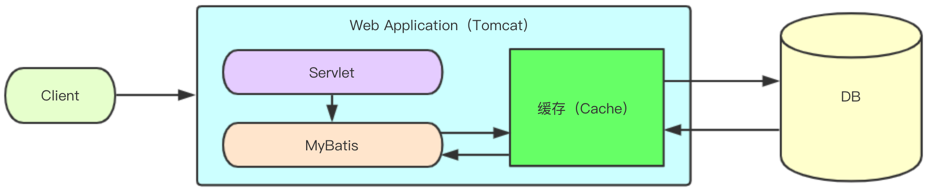
内存中的一块存储空间,服务于某个应用程序,旨在将频繁读取的数据临时保存在内存中,便于二次快速访问。
| 无缓存:用户在访问相同数据时,需要发起多次对数据库的直接访问,导致产生大量IO、读写硬盘的操作,效率低下 |
|---|
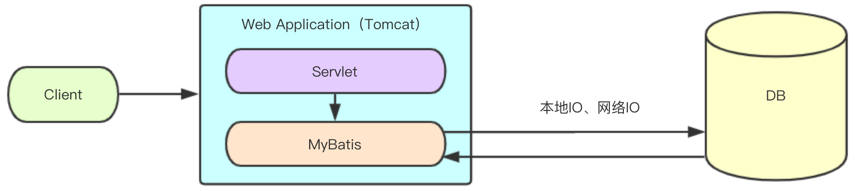
| 有缓存:首次访问时,查询数据库,将数据存储到缓存中;再次访问时,直接访问缓存,减少IO、硬盘读写次数、提高效率 |
|---|
1.5.2 一级缓存
SqlSession级别的缓存,同一个SqlSession的发起多次同构查询,会将数据保存在一级缓存中。
1.5.3 二级缓存
SqlSessionFactory级别的缓存,同一个SqlSessionFactory构建的SqlSession发起的多次同构查询,会将数据保存在二级缓存中。

若有收获,就点个赞吧
0 人点赞


