什么是I/O
I/O,即是输入(In)和输出(Out),java的io是实现输入和输出的基础,可以方便的实现数据的输入和输出操作。在java中把不同的输入/输出源(键盘,文件,网络连接等)抽象表述为“流”(stream)。通过流的形式允许java程序使用相同的方式来访问不同的输入/输出源。stram是从起源(source)到接收的(sink)的有序数据。
I/O流的分类
与C语言只有单一类型FILE* 包打天下不同,Java拥有一个流家族,包含各种输入/输出流类型,其数量超过60个。
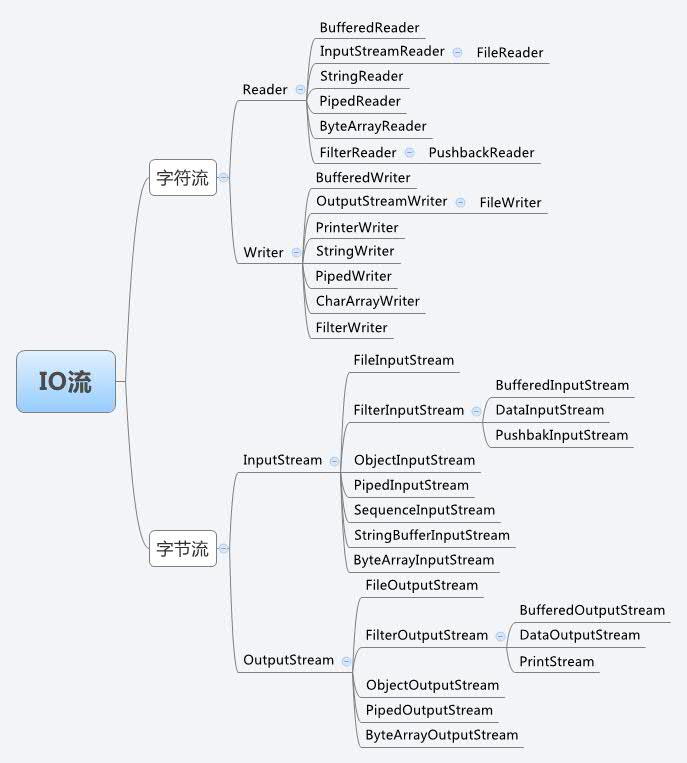
- 根据处理数据类型的不同分为:字符流和字节流
- 根据数据流向不同分为:输入流和输出流
字符流和字节流
字符流的由来: 因为数据编码的不同,而有了对字符进行高效操作的流对象。本质其实就是基于字节流读取时,去查了指定的码表。
字节流和字符流的区别:
- 读写单位不同:字节流以字节(8bit)为单位,字符流以字符为单位,根据码表映射字符,一次可能读多个字节。
- 处理对象不同:字节流能处理所有类型的数据(如图片、avi等),而字符流只能处理字符类型的数据。
- 字节流:一次读入或读出是8位二进制。
- 字符流:一次读入或读出是16位二进制。
输入流和输出流
输入流只能进行读操作,输出流只能进行写操作,程序中需要根据待传输数据的不同特性而使用不同的流。
输入流:InputStream或者Reader:从文件中读到程序中
输出流:OutputStream或者Writer:从程序中输出到文件中
结论:只要是处理纯文本数据,就优先考虑使用字符流。 除此之外都使用字节流。
节点流
节点流:直接与数据源相连,读入或读出。
直接使用节点流,读写不方便,为了更快的读写文件,才有了处理流。

常用的节点流
- 父 类 :InputStream 、OutputStream、 Reader、 Writer
- 文 件 :FileInputStream 、 FileOutputStrean 、FileReader 、FileWriter 文件进行处理的节点流
- 数 组 :ByteArrayInputStream、 ByteArrayOutputStream、 CharArrayReader 、CharArrayWriter 对数组进- 行处理的节点流(对应的不再是文件,而是内存中的一个数组)
- 字符串 :StringReader、 StringWriter 对字符串进行处理的节点流
- 管 道 :PipedInputStream 、PipedOutputStream 、PipedReader 、PipedWriter 对管道进行处理的节点流
处理流
处理流和节点流一块使用,在节点流的基础上,再套接一层,套接在节点流上的就是处理流。如BufferedReader.处理流的构造方法总是要带一个其他的流对象做参数。一个流对象经过其他流的多次包装,称为流的链接。
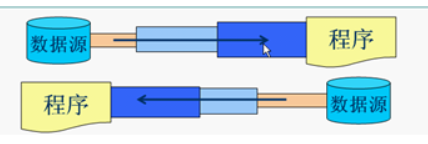
常用的处理流
- 缓冲流:BufferedInputStrean 、BufferedOutputStream、 BufferedReader、 BufferedWriter 增加缓冲功能,避免频繁读写硬盘。
- 转换流:InputStreamReader 、OutputStreamReader实现字节流和字符流之间的转换。
- 数据流: DataInputStream 、DataOutputStream 等-提供将基础数据类型写入到文件中,或者读取出来。
转换流
InputStreamReader 、OutputStreamWriter 要InputStream或OutputStream作为参数,实现从字节流到字符流的转换。
InputStreamReader(InputStream); //通过构造函数初始化,使用的是本系统默认的编码表GBK。InputStreamReader(InputStream,String charSet); //通过该构造函数初始化,可以指定编码表。OutputStreamWriter(OutputStream); //通过该构造函数初始化,使用的是本系统默认的编码表GBK。OutputStreamwriter(OutputStream,String charSet); //通过该构造函数初始化,可以指定编码表。
字节流
Java API中,主要有 InputStream 和 OutputStream 作为字节流的基类。
InputStream/OutputStream
InputStream:
public abstract class InputStream implements Closeable {//从数据中读入一个字节,并返回该字节。这个read方法在碰到输入流的结尾时返回-1public abstract int read() throws IOException;/*** 读入一个字节数组,并返回实际读入的字节数,或者在碰到输入流的结尾时返回-1* 这个read方法最多读入b.length个字符*/public int read(byte b[]) throws IOException {return read(b, 0, b.length);}/*** 读入一个字节数组。这个read方法返回实际读入的字节数,或者在碰到输入流的结尾时返回-1*@param b 数据读入的数组*@param off 第一个读入字节应该被放置的位置在b中的偏移量*@param len 读入字节的最大数量*/public int read(byte b[], int off, int len) throws IOException {if (b == null) {throw new NullPointerException();} else if (off < 0 || len < 0 || len > b.length - off) {throw new IndexOutOfBoundsException();} else if (len == 0) {return 0;}int c = read();if (c == -1) {return -1;}b[off] = (byte)c;int i = 1;try {for (; i < len ; i++) {c = read();if (c == -1) {break;}b[off + i] = (byte)c;}} catch (IOException ee) {}return i;}//在输入流中跳过n个字节,返回实际跳过的字节数(如果碰到输入流的结尾,则可能小于n)public long skip(long n) throws IOException {long remaining = n;int nr;if (n <= 0) {return 0;}int size = (int)Math.min(MAX_SKIP_BUFFER_SIZE, remaining);byte[] skipBuffer = new byte[size];while (remaining > 0) {nr = read(skipBuffer, 0, (int)Math.min(size, remaining));if (nr < 0) {break;}remaining -= nr;}return n - remaining;}//返回在不阻塞的情况下可获取的字节数(阻塞意味着当前线程将失去它对资源的占用)public int available() throws IOException {return 0;}//关闭这个输入流public void close() throws IOException {}/***在输入流的当前位置打一个标记(并非所有的流都支持这个特性)。如果从输入流中已经读入的*字节多于readlimit个,则这个流允许忽略这个标记*/public synchronized void mark(int readlimit) {}/***返回到最后一个标记,随后对read的调用将重新读入这些字节。如果当前没有任何标记,则这个流*不被重置*/public synchronized void reset() throws IOException {throw new IOException("mark/reset not supported");}//如果这个流支持打标记,则返回truepublic boolean markSupported() {return false;}}
OutputStream:
public abstract class OutputStream implements Closeable, Flushable {//写出一个字节的数据public abstract void write(int b) throws IOException;//写出所有字节到数组b中public void write(byte b[]) throws IOException {write(b, 0, b.length);}/***写出某个范围的字节到数组b中*@param b 数据写出的数组*@param off 第一个写出字节在b中的偏移量*@param len 写出字节的最大数量*/public void write(byte b[], int off, int len) throws IOException {if (b == null) {throw new NullPointerException();} else if ((off < 0) || (off > b.length) || (len < 0) ||((off + len) > b.length) || ((off + len) < 0)) {throw new IndexOutOfBoundsException();} else if (len == 0) {return;}for (int i = 0 ; i < len ; i++) {write(b[off + i]);}}//冲刷输出流,也就是将所有缓冲的数据发送到目的地public void flush() throws IOException {}//冲刷并关闭输出流public void close() throws IOException {}}
InputStream类有一个抽象的 read() 方法,这个方法对读入一个字节并且返回读入的字节,或者在遇到输入源的结尾返回-1 。在设计具体的输入流类时,必须覆盖这个方法以提供适用的功能。此外InputStream还有若干个非抽象的方法,可以读入一个字节数组或者跳过大量的字节,这些方法都调用了抽象的 read() 方法,因此子类只需要覆盖这一个方法。
与此类似,OutputStream类定义了一个抽象的 write() 方法,它可以向某个输出位置写出一个字节。
read和write方法在执行时都将阻塞,直至字节确实被读入或写出。这就意味着流不能被立即访问,那么当前的线程将被阻塞。这使得在这两个方法等待指定的流变为可用的这段时间里,其他的线程就有机会去执行有用的工作。
available方法使我们可以去检查当前可读入的字节数量,这意味着像下面这样的代码就不可能被阻塞:
int bytesAvailable = in.available();if(bytesAvailable > 0){byte[] data = new byte[bytesAvailable];in.read(data);}
当你完成对输入/输出流的读写时,应该通过调用close方法来关闭它,这个调用会释放掉十分有限的操作系统资源。如果一个应用程序打开了过多的输入/输出流而没有关闭,那么系统资源将被耗尽。关闭一个输出流的同时还会冲刷用于该输出流的缓冲区:所有被临时置于缓冲区中,以便用更大的包的形式传递的字节在关闭输出流时都将被送出。特别是如果不关闭文件,那么写出字节的最后一个包可能将永远也得不到传递。当然,我们可以用flush方法人为地冲刷这些输出。
FileInputStream/FileOutputStream
输入和输出是相对于流而言。向流里输入数据,也就是从文件读取数据;从流中输出数据,也就是向文件写入数据。
FileInputStream/FileOutputStream就是两个操作文件的输入输出流。这里主要需要了解一下它们的构造器。
FileInputStream
public class FileInputStream extends InputStream{//使用name字符串指定路径名的文件创建一个新的文件输入流public FileInputStream(String name) throws FileNotFoundException {this(name != null ? new File(name) : null);}//使用file对象指定路径名的文件创建一个新的文件输入流public FileInputStream(File file) throws FileNotFoundException {String name = (file != null ? file.getPath() : null);SecurityManager security = System.getSecurityManager();if (security != null) {security.checkRead(name);}if (name == null) {throw new NullPointerException();}if (file.isInvalid()) {throw new FileNotFoundException("Invalid file path");}fd = new FileDescriptor();fd.attach(this);path = name;open(name);}}
FileOutputStream
public class FileOutputStream extends OutputStream{//由name字符串指定路径名的文件创建一个新的文件输出流public FileOutputStream(String name) throws FileNotFoundException {this(name != null ? new File(name) : null, false);}//由name字符串指定路径名的文件创建一个新的文件输出流,如果append为true,那么数据将被添加到//文件尾,而具有相同名字的已有文件不会被删除,否则,这个方法会删除所有具有相同名字的已有文件public FileOutputStream(String name, boolean append)throws FileNotFoundException{this(name != null ? new File(name) : null, append);}//由file对象指定路径名的文件创建一个新的文件输出流public FileOutputStream(File file) throws FileNotFoundException {this(file, false);}//由file对象指定路径名的文件创建一个新的文件输出流,如果append为true,那么数据将被添加到//文件尾,而具有相同名字的已有文件不会被删除,否则,这个方法会删除所有具有相同名字的已有文件public FileOutputStream(File file, boolean append)throws FileNotFoundException{String name = (file != null ? file.getPath() : null);SecurityManager security = System.getSecurityManager();if (security != null) {security.checkWrite(name);}if (name == null) {throw new NullPointerException();}if (file.isInvalid()) {throw new FileNotFoundException("Invalid file path");}this.fd = new FileDescriptor();fd.attach(this);this.append = append;this.path = name;open(name, append);}}
看一个简单的实例来体验一下简单的用法:
public class Test {public static void main(String[] args) {input("C:\\Users\\HP\\Desktop\\1.txt");output("C:\\Users\\HP\\Desktop\\2.txt","今天是个学习的好日子!");}/*** 从文件里读取内容* @param path 要读取的文件的路径*/private static void input(String path){FileInputStream fileInputStream = null;try {//从根据已有文件的路径创建一个文件输入流fileInputStream = new FileInputStream(path);//返回这个输入流中可以被读的剩下的bytes字节的估计值int length = fileInputStream.available();//根据估计值创建byte数组byte[] bytes = new byte[length];//向数组里读入文件里的数据fileInputStream.read(bytes);//根据数组创建一个字符串,然后输出。String result = new String(bytes);System.out.println(result);} catch (IOException e){e.printStackTrace();} finally {if(fileInputStream!=null){try{//关闭流fileInputStream.close();}catch (IOException e){e.printStackTrace();}}}}/*** 向文件里写入内容* @param content 要写入的内存* @param path 要写入的文件路径*/private static void output(String path ,String content){FileOutputStream fileOutputStream = null;try{fileOutputStream = new FileOutputStream(path);//将内容转为字节数组byte[] bytes = content.getBytes();//向文件里写入内容fileOutputStream.write(bytes);}catch (IOException e){e.printStackTrace();}finally {if(fileOutputStream!=null){try{fileOutputStream.close();}catch (IOException e){e.printStackTrace();}}}}}
注意:
- 在实际的项目中,所有的IO操作都应该放到子线程中操作,避免堵住主线程。
- FileInputStream在读取文件内容的时候,我们传入文件的路径, 如果这个路径下的文件不存在,那么在执行readFile()方法时会报FileNotFoundException异常。
- FileOutputStream在写入文件的时候,我们传入文件的路径, 如果这个路径下的文件不存在,那么在执行writeFile()方法时, 会默认给我们创建一个新的文件。还有重要的一点,不会报异常。
ObjectInputStream/ObjectOutputStream
对象输入/输出流,这两个类支持将指定的对象写出或读回,但对象需要实现了序列化接口。
ObjectInputStream
public class ObjectInputStreamextends InputStream implements ObjectInput, ObjectStreamConstants{//构造器public ObjectInputStream(InputStream in) throws IOException {verifySubclass();bin = new BlockDataInputStream(in);handles = new HandleTable(10);vlist = new ValidationList();serialFilter = ObjectInputFilter.Config.getSerialFilter();enableOverride = false;readStreamHeader();bin.setBlockDataMode(true);}//从ObjectInputStream中读入一个对象,特别是,这个方法会读回对象的类、类的前面以及这个类及其超类//中所有非静态和非瞬时的域的值。它执行的反序列化允许恢复多个对象引用public final Object readObject()throws IOException, ClassNotFoundException{if (enableOverride) {return readObjectOverride();}// if nested read, passHandle contains handle of enclosing objectint outerHandle = passHandle;try {Object obj = readObject0(false);handles.markDependency(outerHandle, passHandle);ClassNotFoundException ex = handles.lookupException(passHandle);if (ex != null) {throw ex;}if (depth == 0) {vlist.doCallbacks();}return obj;} finally {passHandle = outerHandle;if (closed && depth == 0) {clear();}}}}
ObjectOutputStream
public class ObjectOutputStreamextends OutputStream implements ObjectOutput, ObjectStreamConstants{//构造器public ObjectOutputStream(OutputStream out) throws IOException {verifySubclass();bout = new BlockDataOutputStream(out);handles = new HandleTable(10, (float) 3.00);subs = new ReplaceTable(10, (float) 3.00);enableOverride = false;writeStreamHeader();bout.setBlockDataMode(true);if (extendedDebugInfo) {debugInfoStack = new DebugTraceInfoStack();} else {debugInfoStack = null;}}//写出指定的对象到ObjectOutputStream,这个方法将存储指定对象的类、类的签名以及这个类及其//超类中所有非静态和非瞬时的域的值public final void writeObject(Object obj) throws IOException {if (enableOverride) {writeObjectOverride(obj);return;}try {writeObject0(obj, false);} catch (IOException ex) {if (depth == 0) {writeFatalException(ex);}throw ex;}}}
保存和加载序列化对象:
User user1 = new User("chavy",1);User user2 = new User("Pawn",2);//写出指定的对象ObjectOutputStream objectOutputStream = new ObjectOutputStream(new FileOutputStream("3.txt"));objectOutputStream.writeObject(user1);objectOutputStream.writeObject(user2);//以写出时的顺序获取它们ObjectInputStream objectInputStream = new ObjectInputStream(new FileInputStream("3.txt"));User user3 = (User)objectInputStream.readObject(); //user1User user4 = (User)objectInputStream.readObject(); //user2
对于对象的输入输出流实现使用了Java的对象序列化,因此想要操作的对象必须是实现了序列化接口的对象。这里不多解释。
字符流
PrintWriter
对于文本输出,可以使用PrintWritert,这是一个打印流,只做输出不做输入。这个类拥有以文本格式打印字符串和数字的方法,它还有一个将PrintWriter链接到FileWriter的便捷方法。
public class PrintWriter extends Writer {//创建一个给定的写出器写出的新的PrintWriterpublic PrintWriter (Writer out) {this(out, false);}public PrintWriter(OutputStream out) {this(out, false);}//创建一个向给定文件写出的新的PrintWriterpublic PrintWriter(String fileName) throws FileNotFoundException {this(new BufferedWriter(new OutputStreamWriter(new FileOutputStream(fileName))),false);}//创建一个指定编码方式的向给定文件写出的新的PrintWriterpublic PrintWriter(String fileName, String csn)throws FileNotFoundException, UnsupportedEncodingException{this(toCharset(csn), new File(fileName));}//创建一个向给定文件写出的新的PrintWriterpublic PrintWriter(File file) throws FileNotFoundException {this(new BufferedWriter(new OutputStreamWriter(new FileOutputStream(file))),false);}//创建一个指定编码方式的向给定文件写出的新的PrintWriterpublic PrintWriter(File file, String csn)throws FileNotFoundException, UnsupportedEncodingException{this(toCharset(csn), file);}//打印一个字符串,后面紧跟一个行终止符。 此处省略int,long,double等多种类型的print重载方法public void print(String s) {if (s == null) {s = "null";}write(s);}//打印一个字符串并换行。 此处省略int,long,double等多种类型的println重载方法public void println(String x) {synchronized (lock) {print(x);println();}}//按照格式字符串指定的方式打印给定的值public PrintWriter printf(String format, Object ... args) {return format(format, args);}//如果产生格式化或输出错误,则返回true。public boolean checkError() {if (out != null) {flush();}if (out instanceof java.io.PrintWriter) {PrintWriter pw = (PrintWriter) out;return pw.checkError();} else if (psOut != null) {return psOut.checkError();}return trouble;}}
还是一个简单的栗子:
    private static void print() throws FileNotFoundException {

        OutputStream outputStream = new FileOutputStream("3.txt");
        PrintWriter printWriter = new PrintWriter(outputStream);

        printWriter.println("哈哈哈hhh");
        printWriter.print(2019);
        printWriter.print(".");
        printWriter.print("10.9");
        printWriter.println();
        printWriter.println(123);
        printWriter.close();

    }
处理流
BufferedInputStream/BufferedOutputStream
BufferedInputStream/BufferedOutputStream就是一个处理流,它为InputStream/OutputStream创建一个缓冲区,变成一个带缓冲的输入输出流,再在此基础上进行操作。
BufferedInputStream
public class BufferedInputStream extends FilterInputStream {

    //创建一个带缓冲的输入流,带缓冲区的输入流在从流中读入字符时,不会每次都对设备访问。
    //当缓冲区填满或当流被冲刷时,数据就被写出
    public BufferedInputStream(InputStream in) {
        this(in, DEFAULT_BUFFER_SIZE);
    }

    public BufferedInputStream(InputStream in, int size) {
        super(in);
        if (size <= 0) {
            throw new IllegalArgumentException("Buffer size <= 0");
        }
        buf = new byte[size];
    }
}
BufferedOutputStream
public class BufferedOutputStream extends FilterOutputStream {

     public BufferedOutputStream(OutputStream out) {
        this(out, 8192);
    }

    public BufferedOutputStream(OutputStream out, int size) {
        super(out);
        if (size <= 0) {
            throw new IllegalArgumentException("Buffer size <= 0");
        }
        buf = new byte[size];
    }
}
一个简单的使用栗子,把上面文件输入输出流改变一下使用缓冲流:
   private static void input(String path){

        FileInputStream fileInputStream = null;
        BufferedInputStream bufferedInputStream = null;

        try {
            //从根据已有文件的路径创建一个文件输入流
            fileInputStream = new FileInputStream(path);

           //使用缓冲流
            bufferedInputStream = new BufferedInputStream(fileInputStream);

            //返回这个输入流中可以被读的剩下的bytes字节的估计值
            int length = bufferedInputStream.available();
            //根据估计值创建byte数组
            byte[] bytes = new byte[length];
            //向数组里读入文件里的数据
            bufferedInputStream.read(bytes);
            //根据数组创建一个字符串,然后输出。
            String result = new String(bytes);
            System.out.println(result);
        } catch (IOException e){
            e.printStackTrace();
        } finally {
            if(fileInputStream!=null){
                try{
                    //关闭流
                    assert bufferedInputStream != null;
                    bufferedInputStream.close();
                    fileInputStream.close();
                }catch (IOException e){
                    e.printStackTrace();
                }
            }
        }
    }
DataInput/DataOutput
文本格式对于测试和调试而言会显得很方便,因为它是人类可阅读的,但是它并不像以二进制格式传递数据那样高效。DataInput和DataOutput就是两个提供了对于二进制数据的输入输出的方法的接口。
DataInput
public interface DataInput {

    /**
     *将字节读入到数组b中,其间阻塞直至所有字节都读入
     *@param b 数据读入的缓冲区
     */
    void readFully(byte b[]) throws IOException;

    /**
     *将字节读入到数组b中,期间阻塞直至所有字节都读入
     *@param b 数据读入的缓冲区
     *@param off 数据起始位置的偏移量
     *@param len 读入字节的最大数量
     */
    void readFully(byte b[], int off, int len) throws IOException;

    //跳过n个字节,期间阻塞直至所有字节都被跳过
    int skipBytes(int n) throws IOException;

    //读入由“修订过的UTF-8”格式的字符构成的字符串
    String readUTF() throws IOException;

    /**
     *以下方法作用是:读入一个给定类型的值
     */
    boolean readBoolean() throws IOException;

    byte readByte() throws IOException;

    int readUnsignedByte() throws IOException;

    short readShort() throws IOException;

    int readUnsignedShort() throws IOException;

    char readChar() throws IOException;

    int readInt() throws IOException;

    long readLong() throws IOException;

    float readFloat() throws IOException;

    double readDouble() throws IOException;

    String readLine() throws IOException;

}
DataOutput
public interface DataOutput {

    //写出由“修订过的UTF-8”格式的字符构成的字符串
    void writeUTF(String s) throws IOException;

    //同上
    void write(int b) throws IOException;

    void write(byte b[]) throws IOException;

    void write(byte b[], int off, int len) throws IOException;

    //写出一个给定类型的值
    void writeBoolean(boolean v) throws IOException;

    void writeByte(int v) throws IOException;

    void writeShort(int v) throws IOException;

    void writeChar(int v) throws IOException;

    void writeInt(int v) throws IOException;

    void writeLong(long v) throws IOException;

    void writeFloat(float v) throws IOException;

    void writeDouble(double v) throws IOException;

    void writeBytes(String s) throws IOException;

    //写出字符串中的所有字符
    void writeChars(String s) throws IOException;

}
DataInputStream和DataOutputStream实现了这两接口,以进行二进制的读写操作。为了从文件中读入二进制数据,可以将DataInputStream与某个字节源相组合使用。
FileOutputStream fileOutputStream = new FileOutputStream(path);
DataOutputStream dataOutputStream = new DataOutputStream(fileOutputStream);
其他类
RandomAccessFile 随机访问文件
RandomAccessFile类可以在文件中的任何位置查找或写入数据。磁盘文件都是随机访问的,但是与网络套接字通信的输入/输出却不是。你可以打开一个随机访问文件,只用于读入或者同时用于读写,你可以通过使用字符串“r”(用于读入访问)或“rw”(用于读入/写出访问)作为构造器的第二个参数来指定这个选项。
public class RandomAccessFile implements DataOutput, DataInput, Closeable {

    /**
     *@param file 要打开的文件
     *@param mode "r"表示只读模式;"rw"表示读/写模式;"rws"表示每次更新时,都对数据和元数据的
     *                写磁盘操作进行同步的读/写模式;"rwd"表示每次更新时,只对数据的写磁盘操作进行
     *                同步的读/写模式
     */
    public RandomAccessFile(String name, String mode)
        throws FileNotFoundException
    {
        this(name != null ? new File(name) : null, mode);
    }

    public RandomAccessFile(File file, String mode)
        throws FileNotFoundException
    {
        String name = (file != null ? file.getPath() : null);
        int imode = -1;
        if (mode.equals("r"))
            imode = O_RDONLY;
        else if (mode.startsWith("rw")) {
            imode = O_RDWR;
            rw = true;
            if (mode.length() > 2) {
                if (mode.equals("rws"))
                    imode |= O_SYNC;
                else if (mode.equals("rwd"))
                    imode |= O_DSYNC;
                else
                    imode = -1;
            }
        }
        if (imode < 0)
            throw new IllegalArgumentException("Illegal mode \"" + mode
                                               + "\" must be one of "
                                               + "\"r\", \"rw\", \"rws\","
                                               + " or \"rwd\"");
        SecurityManager security = System.getSecurityManager();
        if (security != null) {
            security.checkRead(name);
            if (rw) {
                security.checkWrite(name);
            }
        }
        if (name == null) {
            throw new NullPointerException();
        }
        if (file.isInvalid()) {
            throw new FileNotFoundException("Invalid file path");
        }
        fd = new FileDescriptor();
        fd.attach(this);
        path = name;
        open(name, imode);
    }

    //返回文件指针的当前位置
    public native long getFilePointer() throws IOException;

    //将文件指针设置到距文件开头pos个字节处
    public void seek(long pos) throws IOException {
        if (pos < 0) {
            throw new IOException("Negative seek offset");
        } else {
            seek0(pos);
        }
    }

    //返回文件按照字节来度量的长度
    public native long length() throws IOException;
}
ZipInputStream/ZipOutputStream ZIP文档
ZIP文档(通常)以压缩格式存储了一个或多个文件,每个ZIP文件都有一个头,包含诸如每个文件名字和所使用的压缩方法等信息。在Java中,你可以使用ZipInputStream/ZipOutputStream这两个类对ZIP文档进行读写操作。需要注意一点是这两个类是在java.util.zip包下的
ZipInputStream
public class ZipInputStream extends InflaterInputStream implements ZipConstants {

    //创建一个ZipInputStream,使得我们可以从给定的InputStream向其中填充数据
    public ZipInputStream(InputStream in) {
        this(in, StandardCharsets.UTF_8);
    }

    //为下一项返回ZipEntry对象,或者在没有更多的项时返回null
    public ZipEntry getNextEntry() throws IOException {
        ensureOpen();
        if (entry != null) {
            closeEntry();
        }
        crc.reset();
        inf.reset();
        if ((entry = readLOC()) == null) {
            return null;
        }
        if (entry.method == STORED) {
            remaining = entry.size;
        }
        entryEOF = false;
        return entry;
    }

    //关闭这个ZIP文件中当前打开的项。之后可以使用getNextEntry()读入下一项
    public void closeEntry() throws IOException {
        ensureOpen();
        while (read(tmpbuf, 0, tmpbuf.length) != -1) ;
        entryEOF = true;
    }

}
ZipOutputStream
public class ZipOutputStream extends DeflaterOutputStream implements ZipConstants {

    public ZipOutputStream(OutputStream out) {
        this(out, StandardCharsets.UTF_8);
    }

    /**
     *设置用于这个ZipOutputStream的默认压缩方法,这个压缩方法会作用于所有没用指定压缩方法的项上
     *@param method 压缩方法,DEFLATED或STORED
     */
    public void setMethod(int method) {
        if (method != DEFLATED && method != STORED) {
            throw new IllegalArgumentException("invalid compression method");
        }
        this.method = method;
    }

    /**
     *设置后续的各个DEFLATED项的默认压缩级别。这里默认值是Deflater.DEFAULT_COMPRESSION
     *@param level 压缩级别 从0到9
     */
    public void setLevel(int level) {
        def.setLevel(level);
    }

    //将给定的ZipEntry中的信息写出到输出流中,并定位用于写出数据的流,然后这些数据可以通过write()
    //写出到这个输出流中
    public void putNextEntry(ZipEntry e) throws IOException {
        ensureOpen();
        if (current != null) {
            closeEntry();       // close previous entry
        }
        if (e.xdostime == -1) {
            // by default, do NOT use extended timestamps in extra
            // data, for now.
            e.setTime(System.currentTimeMillis());
        }
        if (e.method == -1) {
            e.method = method;  // use default method
        }
        // store size, compressed size, and crc-32 in LOC header
        e.flag = 0;
        switch (e.method) {
        case DEFLATED:
            // store size, compressed size, and crc-32 in data descriptor
            // immediately following the compressed entry data
            if (e.size  == -1 || e.csize == -1 || e.crc   == -1)
                e.flag = 8;

            break;
        case STORED:
            // compressed size, uncompressed size, and crc-32 must all be
            // set for entries using STORED compression method
            if (e.size == -1) {
                e.size = e.csize;
            } else if (e.csize == -1) {
                e.csize = e.size;
            } else if (e.size != e.csize) {
                throw new ZipException(
                    "STORED entry where compressed != uncompressed size");
            }
            if (e.size == -1 || e.crc == -1) {
                throw new ZipException(
                    "STORED entry missing size, compressed size, or crc-32");
            }
            break;
        default:
            throw new ZipException("unsupported compression method");
        }
        if (! names.add(e.name)) {
            throw new ZipException("duplicate entry: " + e.name);
        }
        if (zc.isUTF8())
            e.flag |= EFS;
        current = new XEntry(e, written);
        xentries.add(current);
        writeLOC(current);
    }

    //关闭这个ZIP文件中当前打开的项
    public void closeEntry() throws IOException {
        ensureOpen();
        if (current != null) {
            ZipEntry e = current.entry;
            switch (e.method) {
            case DEFLATED:
                def.finish();
                while (!def.finished()) {
                    deflate();
                }
                if ((e.flag & 8) == 0) {
                    // verify size, compressed size, and crc-32 settings
                    if (e.size != def.getBytesRead()) {
                        throw new ZipException(
                            "invalid entry size (expected " + e.size +
                            " but got " + def.getBytesRead() + " bytes)");
                    }
                    if (e.csize != def.getBytesWritten()) {
                        throw new ZipException(
                            "invalid entry compressed size (expected " +
                            e.csize + " but got " + def.getBytesWritten() + " bytes)");
                    }
                    if (e.crc != crc.getValue()) {
                        throw new ZipException(
                            "invalid entry CRC-32 (expected 0x" +
                            Long.toHexString(e.crc) + " but got 0x" +
                            Long.toHexString(crc.getValue()) + ")");
                    }
                } else {
                    e.size  = def.getBytesRead();
                    e.csize = def.getBytesWritten();
                    e.crc = crc.getValue();
                    writeEXT(e);
                }
                def.reset();
                written += e.csize;
                break;
            case STORED:
                // we already know that both e.size and e.csize are the same
                if (e.size != written - locoff) {
                    throw new ZipException(
                        "invalid entry size (expected " + e.size +
                        " but got " + (written - locoff) + " bytes)");
                }
                if (e.crc != crc.getValue()) {
                    throw new ZipException(
                         "invalid entry crc-32 (expected 0x" +
                         Long.toHexString(e.crc) + " but got 0x" +
                         Long.toHexString(crc.getValue()) + ")");
                }
                break;
            default:
                throw new ZipException("invalid compression method");
            }
            crc.reset();
            current = null;
        }
    }

}
下面是一个典型的通读ZIP文件的代码栗子:
    void zipInput() throws IOException {
        ZipInputStream zipInputStream = new ZipInputStream(new FileInputStream("1.zip"));
        ZipEntry zipEntry;
        ZipFile zipFile = new ZipFile("1.zip");
        while ((zipEntry = zipInputStream.getNextEntry()) != null){
            InputStream inputStream = zipFile.getInputStream(zipEntry);
            //读入数据操作
            zipInputStream.closeEntry();
        }
        zipInputStream.close();
    }

    void zipOutput() throws IOException {
        FileOutputStream fileOutputStream = new FileOutputStream("1.zip");
        ZipOutputStream zipOutputStream = new ZipOutputStream(fileOutputStream);
        //for all files
        {
            ZipEntry zipEntry = new ZipEntry(filename);
            zipOutputStream.putNextEntry(zipEntry);
            zipOutputStream.closeEntry();
        }
        zipOutputStream.close();
    }
ZIP输入流是一个能够展示流的抽象化的强大之处的实例。当你读入以压缩格式存储的数据时,不必担心边请求边解压数据的问题,而且ZIP格式的字节源并非必须时文件,也可以是来自网络连接的ZIP数据。事实上,当Applet的类加载器读入JAR文件时,它就是读入和解压来自网络的数据。
几个接口API
Closeable
public interface Closeable extends AutoCloseable {

    public void close() throws IOException;
}
该接口扩展了AutoCloseable接口,因此,对任何Closeable进行操作时,都可以使用try-with-resource语句。
Flushable
public interface Flushable {

    void flush() throws IOException;
}
Readable
public interface Readable {

    //尝试向cb读入其可持有数量的char值。返回读入char值得数量,
    //或者当从这个Readable中无法再获得更多的值时返回-1
    public int read(java.nio.CharBuffer cb) throws IOException;
}
Appendable
public interface Appendable {

    //向这个Appendable中追加给定的码元或者给定的序列中的所有码元,返回this
    Appendable append(CharSequence csq) throws IOException;

    Appendable append(CharSequence csq, int start, int end) throws IOException;

    Appendable append(char c) throws IOException;
}
CharSequence
public interface CharSequence {

    //返回在这个序列中的码元的数量
    int length();

    //返回给定索引处的码元
    char charAt(int index);

    //返回由存储在startIndex到endIndex-1处的所有码元构成的CharSequence
    CharSequence subSequence(int start, int end);
}

若有收获,就点个赞吧
0 人点赞


