一、HBase
1. 定义
HBase 是一种分布式、可拓展、支持海量数据存储的 NoSQL 数据库
2. 数据模型
逻辑上来说,HBase 的数据模型像关系型数据库,所有的数据存储在一张表中,有行有列。但是从底层物理逻辑{k-v}上来看,HBase 更像一个 multi-dimensional map
- . 逻辑结构

- HBase 物理存储

数据模型
NameSpace
命名空间,类似于MySQL 数据库的 DataBase 概念,每个命名空间下有许多表,HBase 默认有两个命名空间,hbase 和 default ,其中 hbase 存放的是 HBase 内置的表,default 表是用户默认使用的表。
Region
它是一些 Row_Key的集合,类似以 MySQL 表的概念,不同的是,HBase 在定义表时,只需要声明列族即可,不需要声明具体的列。这就意味着,HBase 字段可以是动态、按需指定的。
Row
类似于 MySQL 表的主键,HBase 表中的每行数据都是有一个RowKey 和多个Column(列)组成,数据都是按照 RowKey 的字典顺序进行排序,查询数据时只能通过RowKey 进行检索,所以 RowKey的设计非常重要。
Column
HBase 的每个列都是有 Column Family (列族) 和 Column Qualifier (列限定符) 进行限定,列限定符无需提前定义,数据插入值现指定
TimeStamp
时间戳,用于标识数据的不同版本,每条数据写入时,如果不指定时间戳,系统会以当前时间直接加上
Cell
由 (RowKey,column family,column qualifier,time stamp),唯一确定,cell 中的数据没有类型,全部都是以字节码形式存储
3. HBase 基本架构

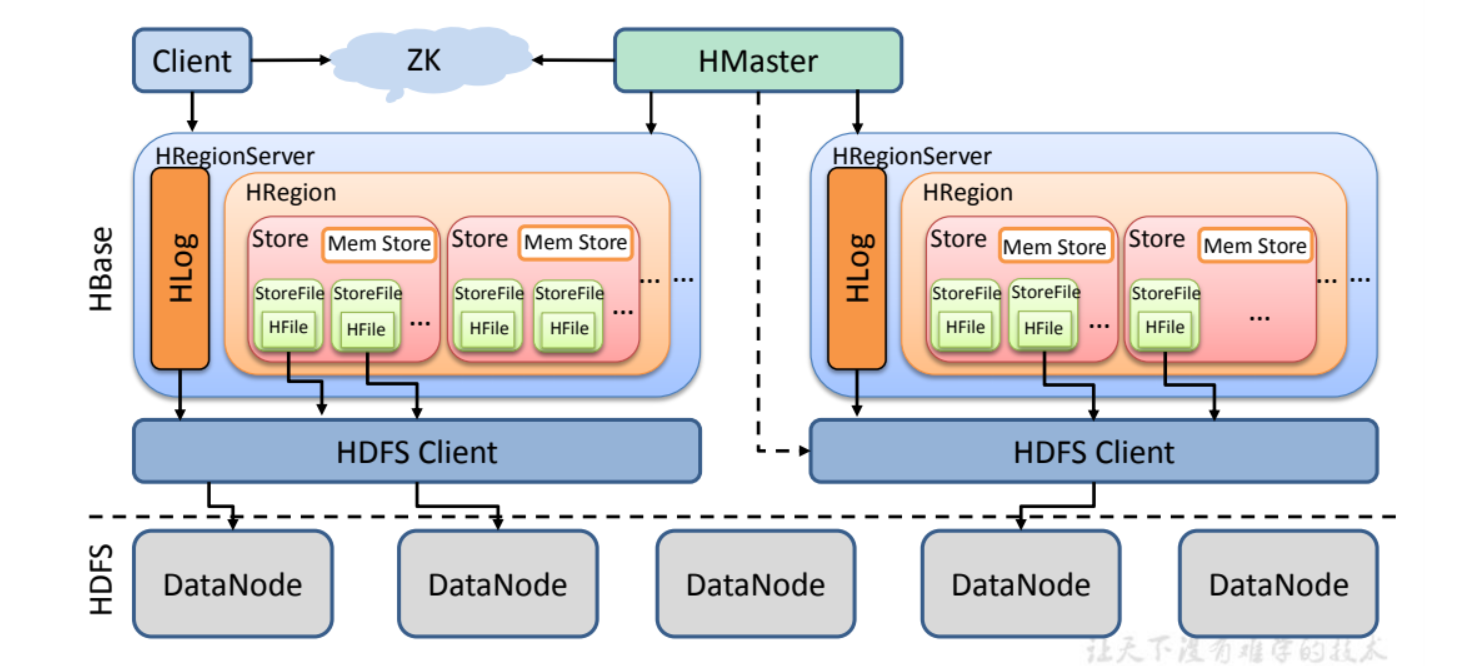
Region Server
Region Server 是 Region 的管理者,其实现类是 HRegionServer,主要作用是:
- 对数据的操作 : get 、put 、 delete
- 对分区的操作 : splitRegion 、CompactRegion
Master
Master 是 所有 Region Server 的管理者,其实现类是 HMaster ,主要作用是:
- 对表的操作 : create 、 delete、 alter
- 对 Region Server 的操作 : 分配 Regions 到 每个 Region Server 上,监控每个 Region Server 的状态,负载均衡和故障转移。
Zookeeper
HBase 通过 Zookeeper 实现 Master 的高可用、Region Server 的监控、元数据的入口以及集群配置的维护工作。
HDFS
HDFS 为 HBase 提供最底层的数据存储服务,同时为 HBase 提供高可用的支持
二、部署和使用
1. 部署
准备
- 启动 hadoop
sbin/start-dfs.sh sbin/start-yarn.sh // myhadoop start - 启动Zookeeper
bin/zkServer start
- 启动 hadoop
上传并解压
tar -zxvf ./hbase-1.3.1-bin.tar.gz -C /opt/module/修改配置文件
export JAVA_HOME=/opt/module/jdk1.8.0_212export HBASE_MANAGES_ZK=false
```xml
hbase.rootdir hdfs://hadoop102:8020/HBase hbase.cluster.distributed true hbase.master.port 16000 hbase.zookeeper.quorum hadoop102,hadoop103,hadoop104 hbase.zookeeper.property.dataDir /opt/module/zookeeper-3.5.7/zkData
- 修改 regionservers```javahadoop102hadoop103hadoop104
拷贝 hadoop 配置文件
cp /opt/module/hadoop-3.1.3/etc/hadoop/core-site.xml /opt/module/hbase-1.3.1/conf/cp /opt/module/hadoop-3.1.3/etc/hadoop/hdfs-site.xml /opt/module/hbase-1.3.1/conf/
分发
xsync xsync hbase/
启动
- 分别启动
bin/habase-daemon.sh start master bin/hbase-daemon,sh start regionserver - 全部启动
bin/start-hbase.shbin/stop-hbase.sh 如果启动报如下错误
[allen@hadoop102 hbase-1.3.1]$ bin/hbase-daemon.sh  start  master
starting master, logging to /opt/module/hbase-1.3.1/logs/hbase-allen-master-hadoop102.out
Java HotSpot(TM) 64-Bit Server VM warning: ignoring option PermSize=128m; support was removed in 8.0
Java HotSpot(TM) 64-Bit Server VM warning: ignoring option MaxPermSize=128m; support was removed in 8.0
修改 hbase-env.sh 将如下内容注释掉即可。jdk 的问题
# Configure PermSize. Only needed in JDK7. You can safely remove it for JDK8+
#export HBASE_MASTER_OPTS="$HBASE_MASTER_OPTS -XX:PermSize=128m -XX:MaxPermSize=128m"
#export HBASE_REGIONSERVER_OPTS="$HBASE_REGIONSERVER_OPTS -XX:PermSize=128m -XX:MaxPermSize=128m"
如果 hmaster 启动不了 查看日志 提示如下 :修改 hbase-site.xml 9000端口换成8020
java.net.ConnectException: Call From hadoop102/192.168.10.102 to hadoop102:9000 failed on connection exception: java.net.ConnectException: 拒绝连接; For more details see:  http://wiki.apache.org/hadoop/ConnectionRefused
   at sun.reflect.NativeConstructorAccessorImpl.newInstance0(Native Method)
   at sun.reflect.NativeConstructorAccessorImpl.newInstance(NativeConstructorAccessorImpl.java:62)
   at sun.reflect.DelegatingConstructorAccessorImpl.newInstance(DelegatingConstructorAccessorImpl.java:45)
   at java.lang.reflect.Constructor.newInstance(Constructor.java:423)
   at org.apache.hadoop.net.NetUtils.wrapWithMessage(NetUtils.java:783)
   at org.apache.hadoop.net.NetUtils.wrapException(NetUtils.java:730)
   at org.apache.hadoop.ipc.Client.call(Client.java:1415)
   at org.apache.hadoop.ipc.Client.call(Client.java:1364)
   at org.apache.hadoop.ipc.ProtobufRpcEngine$Invoker.invoke(ProtobufRpcEngine.java:206)
   at com.sun.proxy.$Proxy16.setSafeMode(Unknown Source)
   at sun.reflect.NativeMethodAccessorImpl.invoke0(Native Method)
   at sun.reflect.NativeMethodAccessorImpl.invoke(NativeMethodAccessorImpl.java:62)
   at sun.reflect.DelegatingMethodAccessorImpl.invoke(DelegatingMethodAccessorImpl.java:43)
   at java.lang.reflect.Method.invoke(Method.java:498)
   at org.apache.hadoop.io.retry.RetryInvocationHandler.invokeMethod(RetryInvocationHandler.java:187)
   at org.apache.hadoop.io.retry.RetryInvocationHandler.invoke(RetryInvocationHandler.java:102)
   at com.sun.proxy.$Proxy16.setSafeMode(Unknown Source)
   at org.apache.hadoop.hdfs.protocolPB.ClientNamenodeProtocolTranslatorPB.setSafeMode(ClientNamenodeProtocolTranslatorPB.java:602)
   at sun.reflect.NativeMethodAccessorImpl.invoke0(Native Method)
   at sun.reflect.NativeMethodAccessorImpl.invoke(NativeMethodAccessorImpl.java:62)
   at sun.reflect.DelegatingMethodAccessorImpl.invoke(DelegatingMethodAccessorImpl.java:43)
   at java.lang.reflect.Method.invoke(Method.java:498)
   at org.apache.hadoop.hbase.fs.HFileSystem$1.invoke(HFileSystem.java:302)
   at com.sun.proxy.$Proxy17.setSafeMode(Unknown Source)
   at org.apache.hadoop.hdfs.DFSClient.setSafeMode(DFSClient.java:2264)
   at org.apache.hadoop.hdfs.DistributedFileSystem.setSafeMode(DistributedFileSystem.java:986)
   at org.apache.hadoop.hdfs.DistributedFileSystem.setSafeMode(DistributedFileSystem.java:970)
   at org.apache.hadoop.hbase.util.FSUtils.isInSafeMode(FSUtils.java:525)
   at org.apache.hadoop.hbase.util.FSUtils.waitOnSafeMode(FSUtils.java:971)
   at org.apache.hadoop.hbase.master.MasterFileSystem.checkRootDir(MasterFileSystem.java:428)
   at org.apache.hadoop.hbase.master.MasterFileSystem.createInitialFileSystemLayout(MasterFileSystem.java:152)
   at org.apache.hadoop.hbase.master.MasterFileSystem.<init>(MasterFileSystem.java:127)
   at org.apache.hadoop.hbase.master.HMaster.finishActiveMasterInitialization(HMaster.java:714)
   at org.apache.hadoop.hbase.master.HMaster.access$600(HMaster.java:198)
   at org.apache.hadoop.hbase.master.HMaster$2.run(HMaster.java:1868)
   at java.lang.Thread.run(Thread.java:748)
Caused by: java.net.ConnectException: 拒绝连接
   at sun.nio.ch.SocketChannelImpl.checkConnect(Native Method)
   at sun.nio.ch.SocketChannelImpl.finishConnect(SocketChannelImpl.java:717)
   at org.apache.hadoop.net.SocketIOWithTimeout.connect(SocketIOWithTimeout.java:206)
   at org.apache.hadoop.net.NetUtils.connect(NetUtils.java:529)
   at org.apache.hadoop.net.NetUtils.connect(NetUtils.java:493)
   at org.apache.hadoop.ipc.Client$Connection.setupConnection(Client.java:606)
   at org.apache.hadoop.ipc.Client$Connection.setupIOstreams(Client.java:700)
   at org.apache.hadoop.ipc.Client$Connection.access$2800(Client.java:367)
   at org.apache.hadoop.ipc.Client.getConnection(Client.java:1463)
   at org.apache.hadoop.ipc.Client.call(Client.java:1382)
   ... 29 more
2022-03-22 16:20:05,396 FATAL [hadoop102:16000.activeMasterManager] master.HMaster: Unhandled exception. Starting shutdown.
- 分别启动
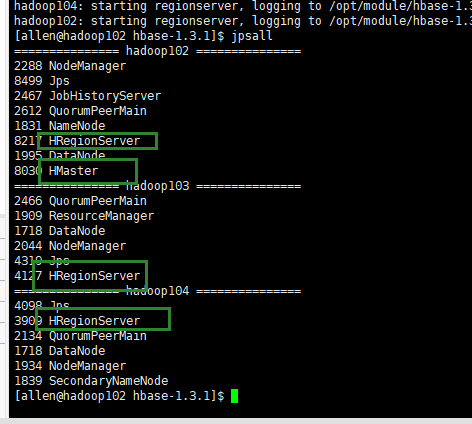
master 启动失败 https://blog.csdn.net/qq_40555400/article/details/123689534
-
 2. shell 操作
 基本操作
- 进入 HBase 客户端命令行
bin/hbase shell - 查看帮助
help - 查看数据库中有哪些表
list
- 进入 HBase 客户端命令行
- 表的操作
- 创建表
create <tablename> , <column family>```xml hbase(main):009:0> create ‘student’ , ‘info’ 0 row(s) in 1.3010 seconds
- 创建表
=> Hbase::Table - student
hbase(main):010:0> list
TABLE
student
1 row(s) in 0.0070 seconds
=> [“student”] hbase(main):011:0>
   - 插入数据  ` put <tablename> , <rowkey>, <column family:column > ,<data> `
```xml
hbase(main):011:0> put 'student','1001','info:sex','male'
0 row(s) in 0.0960 seconds

hbase(main):012:0> put 'student','1001','info:age','18'
0 row(s) in 0.0120 seconds

hbase(main):013:0>  put 'student','1002','info:name','Janna'
0 row(s) in 0.0080 seconds

hbase(main):014:0> put 'student','1002','info:sex','female'
0 row(s) in 0.0070 seconds

hbase(main):015:0>
- 扫描表
scan <tablename>```xml hbase(main):020:0> scan ‘student’ ROW COLUMN+CELL
1001 column=info:age, timestamp=1647941602781, value=18
1001 column=info:sex, timestamp=1647941593262, value=male
1002 column=info:age, timestamp=1647941658762, value=20
1002 column=info:name, timestamp=1647941611628, value=Janna
1002 column=info:sex, timestamp=1647941617009, value=female
2 row(s) in 0.0190 seconds
   - 查看表结构  ` describe <tablename> `
```xml
hbase(main):021:0> describe 'student'
Table student is ENABLED
student
COLUMN FAMILIES DESCRIPTION
{NAME => 'info', BLOOMFILTER => 'ROW', VERSIONS => '1', IN_MEMORY => 'false', KEEP_DELETED_CELLS => 'FALSE', DATA_BLOCK_ENCODING => 'NONE', TTL => 'FOREVER', COMPRESSION => 'NONE', MIN_VERSIONS => '0', BLO
CKCACHE => 'true', BLOCKSIZE => '65536', REPLICATION_SCOPE => '0'}
1 row(s) in 0.0270 seconds
- 更新指定字段
put <tablename> , <rowkey>, <column family:column > ,<data>```xml hbase(main):022:0> put ‘student’, ‘1001’,’info:age’ ,22 0 row(s) in 0.0100 seconds
hbase(main):023:0> scan ‘student’
ROW COLUMN+CELL
1001 column=info:age, timestamp=1647941838316, value=22
1001 column=info:sex, timestamp=1647941593262, value=male
1002 column=info:age, timestamp=1647941658762, value=20
1002 column=info:name, timestamp=1647941611628, value=Janna
1002 column=info:sex, timestamp=1647941617009, value=female
2 row(s) in 0.0140 seconds
   - 查看指定行/列数据   ` get <tablename> ,<rowkey> `
```xml
hbase(main):024:0> get 'student' , '1001'
COLUMN                                               CELL
 info:age                                            timestamp=1647941838316, value=22
 info:sex                                            timestamp=1647941593262, value=male
1 row(s) in 0.0140 seconds

hbase(main):025:0> get 'student' , '1001' ,'info:age'
COLUMN                                               CELL
 info:age                                            timestamp=1647941838316, value=22
1 row(s) in 0.0080 seconds
- 统计数据行数
count <tablename>```xml hbase(main):026:0> count ‘student’ 2 row(s) in 0.0150 seconds
=> 2 hbase(main):027:0>
   - 删除某一行全部数据  ` deleteall <tablename> ,  <roekey> `
```xml
hbase(main):032:0> put 'student' ,'1003','info:name' ,'21'
0 row(s) in 0.0050 seconds

hbase(main):033:0> deleteall 'student','1002'
0 row(s) in 0.0160 seconds

hbase(main):035:0> scan 'student'
ROW                                                  COLUMN+CELL
 1001                                                column=info:age, timestamp=1647941838316, value=22
 1001                                                column=info:sex, timestamp=1647941593262, value=male
 1003                                                column=info:name, timestamp=1647942159648, value=21
2 row(s) in 0.0060 seconds
- 删除某一行的某一列数据
delete <tablename> , <rowkey> , <column family:column >```xml hbase(main):036:0> delete ‘student’,’1003’,’info:name’ 0 row(s) in 0.0100 seconds
hbase(main):037:0> scan ‘student’
ROW COLUMN+CELL
1001 column=info:age, timestamp=1647941838316, value=22
1001 column=info:sex, timestamp=1647941593262, value=male
1 row(s) in 0.0070 seconds
   - 清空数据  ` disable <tablename>       truncate <tablename> `
```xml
hbase(main):038:0> truncate 'student'
Truncating 'student' table (it may take a while):
 - Disabling table...
 - Truncating table...
0 row(s) in 3.3970 seconds
- 删除表
disable <tablename> drop <tablename>```xml hbase(main):041:0> disable ‘student’ 0 row(s) in 2.2310 seconds
hbase(main):042:0> drop ‘student’ 0 row(s) in 1.2360 seconds
hbase(main):043:0> list
TABLE
0 row(s) in 0.0050 seconds
=> [] hbase(main):044:0>
<a name="GhIrH"></a>
## 三、HBase 进阶
<a name="SXahC"></a>
### 1. 架构原理
- StoreFile
保存实际数据的物理文件,StoreFile 以 Hfile 的形式 存储在 HDFS 上,每个 Sore 都会有 一个或者多个 StoreFile ,数据在每个 StoreFile(HFile) 中都是有序的。
- MemStore
写缓存,由于 Hfile 中的数据要求是有序的,所以数据先是存储在 MemStore 中进行排序,排好序后,达到刷写的时机后,刷写到 HFile 中,每次刷写都会形成一个新的 HFile。
- WAL
由于数据需要经过 MemStore 排序后才能刷写道 HFile 中,这样数据在内存中 很容易丢失。为了解决这个问题,引入 WAL( Write-Ahead-Logfile)文件,数据会先写入到 WAL 文件汇总,然后在写入 MemStore 中。当内存数据丢失的时候 可以通过这个日志进行重建。
<a name="fEMdi"></a>
### 2. 写流程
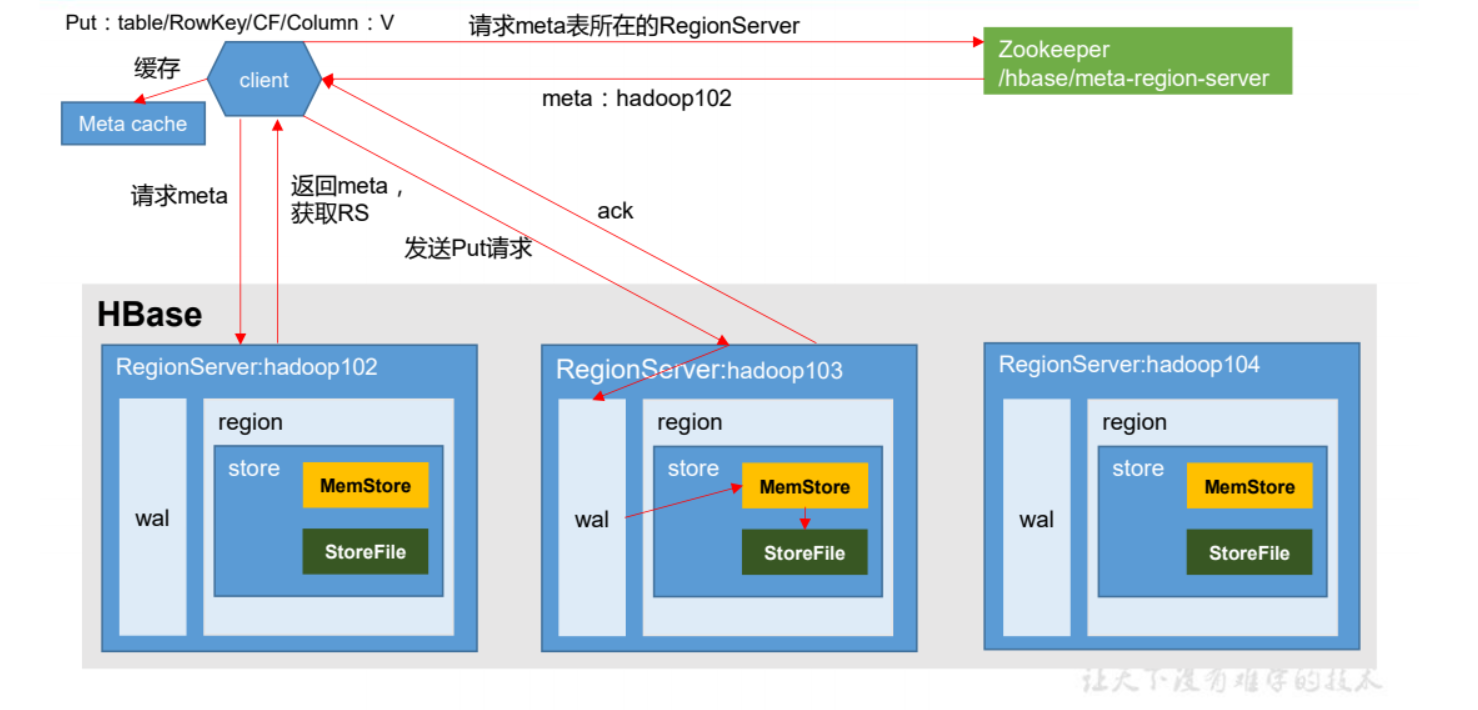
1. Client 先访问 zookeeper,获取 hbase:meta 位于哪个 Region Server 。
1. 访问对应的 Region Server,获取 hbase:meta 表,根据请求的 namespace:table/rowkey,查询出目标数据位于哪个 Region Server 中的哪个 Region 中。并将该 table 的 region 信息以及 meta 表的位置信息缓存在客户端的 meta cache,方便下次访问。
1. 与目标 Region Server 进行通讯;
1. 将数据顺序写入到 WAL 中, 然后写入到 MemStore 中,数据会在MenStore 中排序
1. 向客户端 发送 ack
1. 等待达到 MemStore 的刷写时机后,将数据刷写道 HFile 中
<a name="AaHPL"></a>
### 3. MemStore Flush
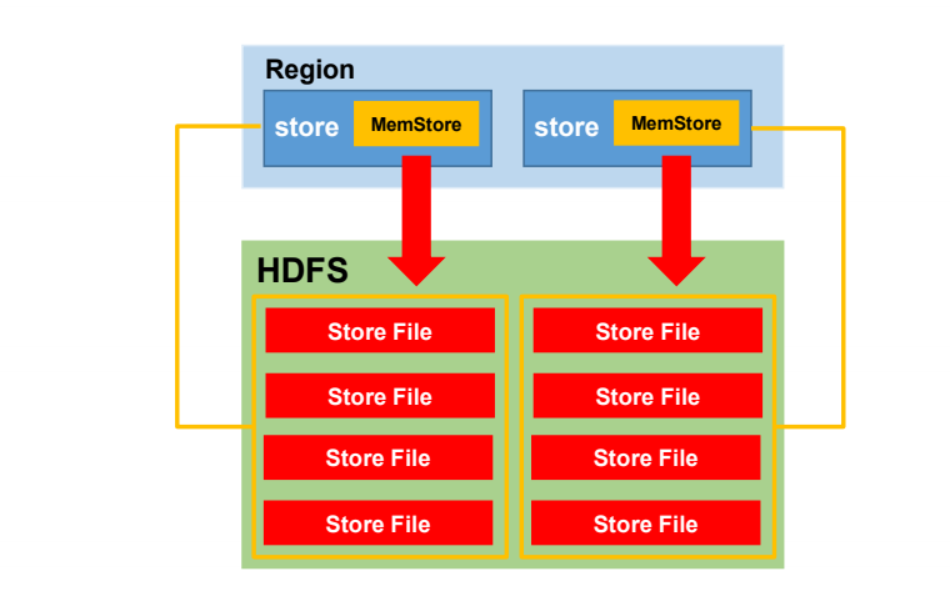<br />MemStore 刷写时机:
- 当某个 memstroe 的大小达到了 hbase.hregion.memstore.flush.size(默认值 128M),
其所在 region 的所有 memstore 都会刷写。<br />当 memstore 的大小达到了<br />hbase.hregion.memstore.flush.size(默认值 128M)<br />* hbase.hregion.memstore.block.multiplier(默认值 4)<br />时,会阻止继续往该 memstore 写数据。
- 当 region server 中 memstore 的总大小达到
java_heapsize<br />*hbase.regionserver.global.memstore.size(默认值 0.4)<br />*hbase.regionserver.global.memstore.size.lower.limit(默认值 0.95),<br />region 会按照其所有 memstore 的大小顺序(由大到小)依次进行刷写。直到 region server<br />中所有 memstore 的总大小减小到上述值以下。<br />当 region server 中 memstore 的总大小达到<br />java_heapsize*hbase.regionserver.global.memstore.size(默认值 0.4)<br />时,会阻止继续往所有的 memstore 写数据。
- 到达自动刷写的时间,也会触发 memstore flush。自动刷新的时间间隔由该属性进行
配置 hbase.regionserver.optionalcacheflushinterval(默认 1 小时)。
- 当 WAL 文件的数量超过 hbase.regionserver.max.logs,region 会按照时间顺序依次进
行刷写,直到 WAL 文件数量减小到 hbase.regionserver.max.log 以下(该属性名已经废弃,<br />现无需手动设置,最大值为 32)。
<a name="OVj5N"></a>
### 4. 读流程
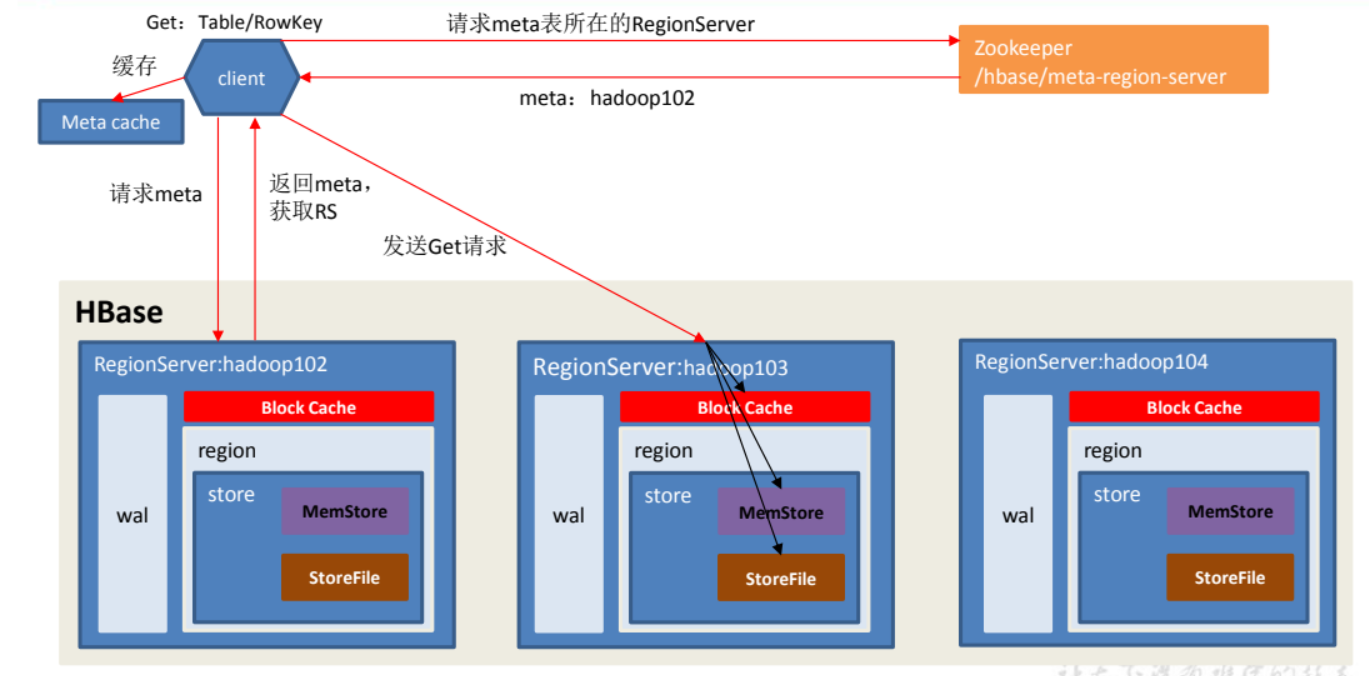
1. Client 先访问 zookeeper,获取 hbase:meta 表位于哪个 Region Server。
1. 访问对应的 Region Server,获取 hbase:meta 表,根据读请求的 namespace:table/rowkey,
查询出目标数据位于哪个 Region Server 中的哪个 Region 中。并将该 table 的 region 信息以<br />及 meta 表的位置信息缓存在客户端的 meta cache,方便下次访问。
3. 与目标 Region Server 进行通讯;
3. 分别在 Block Cache(读缓存),MemStore 和 Store File(HFile)中查询目标数据,并将
查到的所有数据进行合并。此处所有数据是指同一条数据的不同版本(time stamp)或者不<br />同的类型(Put/Delete)。
5. 将从文件中查询到的数据块(Block,HFile 数据存储单元,默认大小为 64KB)缓存到
Block Cache。
6. 将合并后的最终结果返回给客户端。
<a name="DhJ9x"></a>
### 5. StoreFile Compaction
由于memstore每次刷写都会生成一个新的HFile,且同一个字段的不同版本(timestamp)和不同类型(Put/Delete)有可能会分布在不同的 HFile 中,因此查询时需要遍历所有的 HFile。为了减少 HFile 的个数,以及清理掉过期和删除的数据,会进行 StoreFile Compaction。<br />Store Compaction 分为两种 : Minor Compaction 和 Major Compaction 。区别在于 Minor Compaction 会将临近的若干个小的 HFile 合并成一个较大的 HFile ,但是不会清理过期和删除的数据;Major Compaction 会将 一个Store 下面的所有 HFile 合并成一个大的 HFile,并且会清理掉过期和删除的数据<br />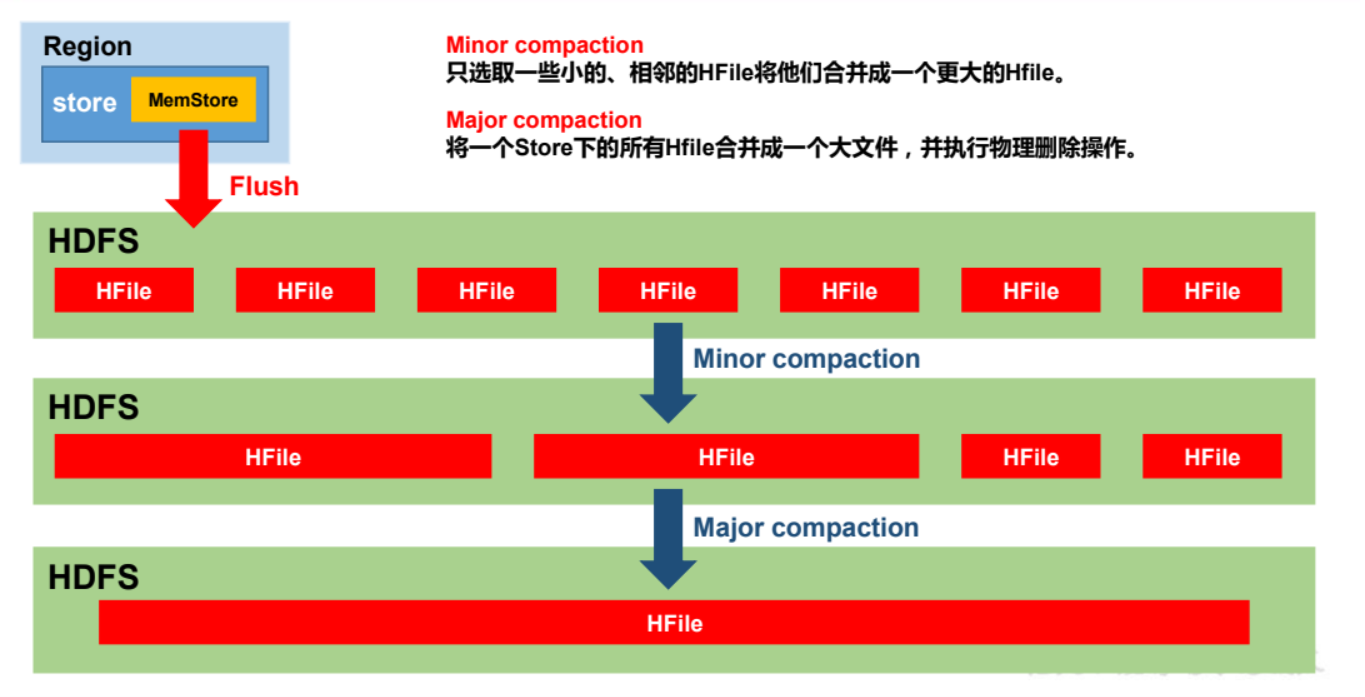
<a name="QYdCm"></a>
### 6. Region Split
默认情况下,每个 Table 起初只有一个 Region,随着数据的不断写入,Region 会自动进行拆分。刚拆分时,两个子 Region 都位于当前的 Region Server,但处于负载均衡的考虑,HMaster 有可能会将某个 Region 转移给其他的 Region Server。<br />Region Split 时机:<br />当一个Region 中的 某个 Store 下所有的 StoreFile 总量大小 超过 <br />Min(R^2 * "hbase.hregion.memstore.flush.size",hbase.hregion.max.filesize"),<br />该 Region 就会进行拆分,其中 R 为当前 Region Server 中属于该 Table 的个数<br />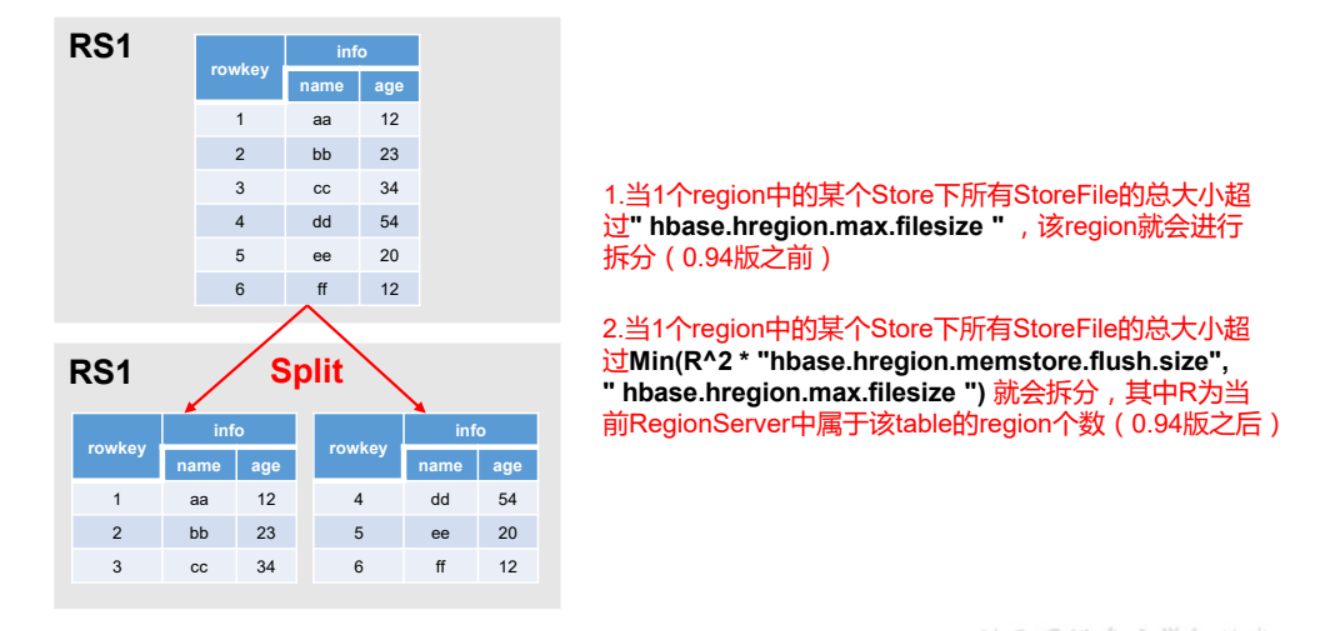
<a name="OMYlb"></a>
## 四、API 操作
<a name="kxG9Q"></a>
### 1. 环境准备
新建 maven 项目,在 pom 中 添加依赖
```xml
<dependencies>
<dependency>
<groupId>org.apache.hbase</groupId>
<artifactId>hbase-server</artifactId>
<version>1.3.1</version>
</dependency>
<dependency>
<groupId>org.apache.hbase</groupId>
<artifactId>hbase-client</artifactId>
<version>1.3.1</version>
</dependency>
</dependencies>
创建 java 类 写入如下:
public class HbaseApi {
    public static Configuration conf;

    static {
//使用 HBaseConfiguration 的单例方法实例化
        conf = HBaseConfiguration.create();
        conf.set("hbase.zookeeper.quorum", "192.168.10.103");
        conf.set("hbase.zookeeper.property.clientPort", "2181");
    }

}
2. 判断某个表是否存在
  public static boolean isTableExist(String tableName) throws
            MasterNotRunningException,
            ZooKeeperConnectionException, IOException {
//在 HBase 中管理、访问表需要先创建 HBaseAdmin 对象
        //Connection connection =
        ConnectionFactory.createConnection(conf);
//HBaseAdmin admin = (HBaseAdmin) connection.getAdmin();
        HBaseAdmin admin = new HBaseAdmin(conf);
        return admin.tableExists(tableName);
    }
3. 创建表
 public static void createTable(String tableName, String...
            columnFamily) throws
            MasterNotRunningException, ZooKeeperConnectionException,
            IOException {
        HBaseAdmin admin = new HBaseAdmin(conf);
//判断表是否存在
        if (isTableExist(tableName)) {
            System.out.println("表" + tableName + "已存在");
//System.exit(0);
        } else {
//创建表属性对象,表名需要转字节
            HTableDescriptor descriptor = new
                    HTableDescriptor(TableName.valueOf(tableName));
//创建多个列族
            for (String cf : columnFamily) {
                descriptor.addFamily(new HColumnDescriptor(cf));
            }
//根据对表的配置,创建表
            admin.createTable(descriptor);
            System.out.println("表" + tableName + "创建成功!");
        }
    }
4. 删除表
  public static void dropTable(String tableName) throws
            MasterNotRunningException,
            ZooKeeperConnectionException, IOException {
        HBaseAdmin admin = new HBaseAdmin(conf);
        if (isTableExist(tableName)) {
            admin.disableTable(tableName);
            admin.deleteTable(tableName);
            System.out.println("表" + tableName + "删除成功!");
        } else {
            System.out.println("表" + tableName + "不存在!");
        }
    }
5. 向表中插入数据
   public static void addRowData(String tableName, String rowKey,
                                  String columnFamily,
                                  String column, String value) throws IOException {
//创建 HTable 对象
        HTable hTable = new HTable(conf, tableName);
//向表中插入数据
        Put put = new Put(Bytes.toBytes(rowKey));
//向 Put 对象中组装数据

        put.add(Bytes.toBytes(columnFamily), Bytes.toBytes(column), Bytes.toBytes(value));
        hTable.put(put);
        hTable.close();
        System.out.println("插入数据成功");
    }
6. 删除多行数据
    public static void deleteMultiRow(String tableName, String... rows)
            throws IOException {
        HTable hTable = new HTable(conf, tableName);
        List<Delete> deleteList = new ArrayList<Delete>();
        for (String row : rows) {
            Delete delete = new Delete(Bytes.toBytes(row));
            deleteList.add(delete);
        }
        hTable.delete(deleteList);
        hTable.close();
    }
7. 获取所有数据
    public static void getAllRows(String tableName) throws IOException {
        HTable hTable = new HTable(conf, tableName);
//得到用于扫描 region 的对象
        Scan scan = new Scan();
//使用 HTable 得到 resultcanner 实现类的对象
        ResultScanner resultScanner = hTable.getScanner(scan);
        for (Result result : resultScanner) {
            Cell[] cells = result.rawCells();
            for (Cell cell : cells) {
//得到 rowkey
                System.out.println(" 行 键 :" +
                        Bytes.toString(CellUtil.cloneRow(cell)));
//得到列族
                System.out.println(" 列 族 " +
                        Bytes.toString(CellUtil.cloneFamily(cell)));
                System.out.println(" 列 :" +
                        Bytes.toString(CellUtil.cloneQualifier(cell)));
                System.out.println(" 值 :" +
                        Bytes.toString(CellUtil.cloneValue(cell)));
            }
        }
    }
8. 获取一行数据
    public static void getRow(String tableName, String rowKey) throws
            IOException {
        HTable table = new HTable(conf, tableName);
        Get get = new Get(Bytes.toBytes(rowKey));
//get.setMaxVersions();显示所有版本
        //get.setTimeStamp();显示指定时间戳的版本
        Result result = table.get(get);
        for (Cell cell : result.rawCells()) {
            System.out.println(" 行 键 :" +
                    Bytes.toString(result.getRow()));
            System.out.println(" 列 族 " +
                    Bytes.toString(CellUtil.cloneFamily(cell)));
            System.out.println(" 列 :" +
                    Bytes.toString(CellUtil.cloneQualifier(cell)));
            System.out.println(" 值 :" +
                    Bytes.toString(CellUtil.cloneValue(cell)));
            System.out.println("时间戳:" + cell.getTimestamp());
        }
    }
9. 获取某一行指定列的数据
    public static void getRowQualifier(String tableName, String rowKey,
                                       String family,
                                       String qualifier) throws IOException {
        HTable table = new HTable(conf, tableName);
        Get get = new Get(Bytes.toBytes(rowKey));
        get.addColumn(Bytes.toBytes(family),
                Bytes.toBytes(qualifier));
        Result result = table.get(get);
        for (Cell cell : result.rawCells()) {
            System.out.println(" 行 键 :" +
                    Bytes.toString(result.getRow()));
            System.out.println(" 列 族 " +
                    Bytes.toString(CellUtil.cloneFamily(cell)));
            System.out.println(" 列 :" +
                    Bytes.toString(CellUtil.cloneQualifier(cell)));
            System.out.println(" 值 :" +
                    Bytes.toString(CellUtil.cloneValue(cell)));
        }
    }
10 使用 HBase-MapReduce 导入数据
在本地创建一个 tsv 格式的文件:fruit.tsv
1001 Apple Red
1002 Pear Yellow
1003 Pineapple Yellow
创建 Hbase 表
hbase(main):005:0> create 'fruit' , 'info'
- 将 fruit.tsv 上传到 hdfs 中
[allen@hadoop102 hbase-2.2.6]$ hadoop fs -mkdir -p /hbasedemo[allen@hadoop102 hbase-2.2.6]$ hadoop fs -put ./fruit.tsv /hbasedemo
- 执行 MapReduce 导入数据
bin/hbase org.apache.hadoop.hbase.mapreduce.ImportTsv -Dimporttsv.separator=" " -Dimporttsv.columns=HBASE_ROW_KEY,info:name,info:cokir fruit hdfs://hadoop102:8020/hbasedemo
- 查看数据
hbase(main):004:0> scan 'fruit'
ROW                                                  COLUMN+CELL
1002                                                column=info:cokir, timestamp=1648027999301, value=Yellow
1002                                                column=info:name, timestamp=1648027999301, value=Pear
1003                                                column=info:cokir, timestamp=1648027999301, value=Yellow
1003                                                column=info:name, timestamp=1648027999301, value=Pineapple
pple                                                column=info:name, timestamp=1648027999301, value=Red
3 row(s)
Took 0.0250 seconds
五 HBase 与 Hive
1.比较
- Hive
- Hive 是一个数据仓库,他的本质是将 HDFS 中已经存储的文件 在 mysql 中 做了个双射关系,可以方便我们使用 HQL 去 管理查询
- Hive 主要是用来进行数据分析、清洗。由于执行时间长,适用于离线数据的分析清洗
- Hive 是基于 HDFS MapReduce 的。它将数据存储在 DataNode 上,用户编写的 HQL 最终会被转换成 MapReduce 代码去执行。
HBase
- HBase 是一种数据库,面向列族存储的非关系型数据库。用于存储结构化和非结构化的数据,但是它只是适用于 单表操作 ,不能多表关联查询。
- HBase 是基于HDFS 的,实际对应的是 HFile ,存放在 DataNode 中,被 ResionServer 以 Region 的方式进行管理
- HBase 延迟较低,适用于 在线业务处理。面对大量的数据,HBase 可以在线单表大量存储,同时提供了高效的数据访问速度。
2. hive 关联 hbase
描述 : 建立 Hive 表,关联 HBase 表,插入数据到 Hive 表的同时能够影响 HBase 表。
在 hive 中创建表,并关联 HBase
CREATE TABLE hive_emp_table(
empno int,
ename string,
sal double)
STORED BY 'org.apache.hadoop.hive.hbase.HBaseStorageHandler'
WITH SERDEPROPERTIES ("hbase.columns.mapping" = ":key,info:ename,info:sal")
TBLPROPERTIES ("hbase.table.name" = "hbase_emp_table");
提示:完成之后,可以分别进入 Hive 和 HBase 查看,都生成了对应的表
不能直接 load 数据进入到 hive 表中,需要创建临时表
CREATE TABLE emp_table(
empno int,
ename string,
sal double)
row format delimited fields terminated by ' ';
向 创建的临时表中 load 数据
load data local inpath '/opt/module/hive/emp.txt' into table emp_table;
通过 insert 命令向 原表中插入数据
insert into table hive_emp_table select * from emp_table;查看 hive 表和 hbase 表 ```bash hive> select * from hive_emp_table; ….. IST_SINK_3:3, 1 allen 888888.0 2 hive 22222.0 3 spart 2.3 2022-03-23 21:42:16,143 INFO [ReadOnlyZKClient-hadoop102:2181,hadoop103:2181,hadoop104:2181@0x586b78d7] zookeeper.ZooKeeper: Session: 0x300001ba61c000a closed
hbase(main):009:0> scan ‘hbase_emp_table’
ROW COLUMN+CELL
1 column=info:ename, timestamp=1648042860283, value=allen
1 column=info:sal, timestamp=1648042860283, value=888888.0
2 column=info:ename, timestamp=1648042860283, value=hive
2 column=info:sal, timestamp=1648042860283, value=22222.0
3 column=info:ename, timestamp=1648042860283, value=spart
3 column=info:sal, timestamp=1648042860283, value=2.3
3 row(s)
Took 0.1541 seconds
hbase(main):010:0>
<a name="PjGmW"></a>
### 3. hbase 关联 hive
描述 : 在 HBase 中已经存储了某一张表 hbase_emp_table,然后在 Hive 中创建一个外部表来关联 HBase 中的 hbase_emp_table 这张表,使之可以借助 Hive 来分析 HBase 这张表中的数据。

   1. 在 Hive 中创建外部表
```bash

CREATE EXTERNAL TABLE relevance_hbase_emp(
empno int,
ename string,
sal double)
STORED BY 'org.apache.hadoop.hive.hbase.HBaseStorageHandler'
WITH SERDEPROPERTIES ("hbase.columns.mapping" =":key,info:ename,info:sal")
TBLPROPERTIES ("hbase.table.name" = "hbase_emp_table");
创建完成后就可以进行一些操作了
hive> select * from relevance_hbase_emp;
2022-03-23 22:04:51,463 INFO  [dc35e36a-5296-40d2-b65a-184ca3674794 main] exec.ListSinkOperator: RECORDS_OUT_INTERMEDIATE:0, RECORDS_OUT_OPERATOR_LIST_SINK_3:3,
1    allen    888888.0
2    hive    22222.0
3    spart    2.3
2022-03-23 22:04:51,469 INFO  [ReadOnlyZKClient-hadoop102:2181,hadoop103:2181,hadoop104:2181@0x0981d9d2] zookeeper.ZooKeeper: Session: 0x200001bad31000f closed
2022-03-23 22:04:51,469 INFO  [ReadOnlyZKClient-hadoop102:2181,hadoop103:2181,hadoop104:2181@0x0981d9d2-EventThread] zookeeper.ClientCnxn: EventThread shut down
Time taken: 0.149 seconds, Fetched: 3 row(s)
2022-03-23 22:04:51,470 INFO  [dc35e36a-5296-40d2-b65a-184ca3674794 main] CliDriver: Time taken: 0.149 seconds, Fetched: 3 row(s)
2022-03-23 22:04:51,470 INFO  [dc35e36a-5296-40d2-b65a-184ca3674794 main] conf.HiveConf: Using the default value passed in for log id: dc35e36a-5296-40d2-b65a-184ca3674794
2022-03-23 22:04:51,470 INFO  [dc35e36a-5296-40d2-b65a-184ca3674794 main] session.SessionState: Resetting thread name to  main
五、HBase 优化
1. 高可用
在 HBase 中 HMaster 负责监控 HRegionServer 的生命周期,均衡 RegionServer 的负载,
如果 HMaster 挂掉了,那么整个 HBase 集群将陷入不健康的状态,并且此时的工作状态并
不会维持太久。所以 HBase 支持对 HMaster 的高可用配置。关闭 Hbase 集群
bin/stop-hbase.sh
在 conf 目录下创建 backup-masters 文件,配置高可用 HMaster 节点
touch conf/backup-masters
echo hadoop103 > conf/backup-masters
将整个 conf 目录 scp 到其他节点
scp -r conf/ hadoop103:/opt/module/hbase/scp -r conf/ hadoop104:/opt/module/hbase/
- 打开页面测试查看

2. 预分区
每一个 region 维护着 StartRow 与 EndRow,如果加入的数据符合某个 Region 维护的
RowKey 范围,则该数据交给这个 Region 维护。那么依照这个原则,我们可以将数据所要
投放的分区提前大致的规划好,以提高 HBase 性能。
预分区方式有以下几种:
- 手动设置分区
Hbase> create 'staff1','info','partition1',SPLITS => ['1000','2000','3000','4000']
- 生成 16 进制分区
create 'staff2','info','partition2',{NUMREGIONS => 15, SPLITALGO => 'HexStringSplit'}
create ‘staff3’,’partition3’,SPLITS_FILE => ‘splits.txt’
   4. 通过 java APi  进行分区
```java
//自定义算法,产生一系列 hash 散列值存储在二维数组中
byte[][] splitKeys = 某个散列值函数
//创建 HbaseAdmin 实例
HBaseAdmin hAdmin = new HBaseAdmin(HbaseConfiguration.create());
//创建 HTableDescriptor 实例
HTableDescriptor tableDesc = new HTableDescriptor(tableName);
//通过 HTableDescriptor 实例和散列值二维数组创建带有预分区的 Hbase 表
hAdmin.createTable(tableDesc, splitKeys);
3. RowKey 设计
一条数据的唯一标识就是 RowKey,那么这条数据存储于哪个分区,取决于 RowKey 处于哪个一个预分区的区间内,设计 RowKey 的主要目的 ,就是让数据均匀的分布于所有的region 中,在一定程度上防止数据倾斜。接下来我们就谈一谈 RowKey 常用的设计方案。
- 允许在 HDFS 中添加内容 ```java
属性:dfs.support.append 解释:开启 HDFS 追加同步,可以优秀的配合 HBase 的数据同步和持久化。默认值为 true。
2. 优化 DataNode 允许的最大文件打开数
```java
属性:dfs.datanode.max.transfer.threads
解释:HBase 一般都会同一时间操作大量的文件,根据集群的数量和规模以及数据动作,
设置为 4096 或者更高。默认值:4096
优化延迟高的数据等待时间
属性:dfs.image.transfer.timeout
解释:如果对于某一次数据操作来讲,延迟非常高,socket 需要等待更长的时间,建议把
该值设置为更大的值(默认 60000 毫秒),以确保 socket 不会被 timeout 掉。
优化数据的写入效率 ```java 属性:mapreduce.map.output.compress mapreduce.map.output.compress.codec 解释:开启这两个数据可以大大提高文件的写入效率,减少写入时间。第一个属性值修改为 true,第二个属性值修改为:org.apache.hadoop.io.compress.GzipCodec 或者其 他压缩方式。
5. 设置 RPC 监听数量
```java
属性:Hbase.regionserver.handler.count
解释:默认值为 30,用于指定 RPC 监听的数量,可以根据客户端的请求数进行调整,读写
请求较多时,增加此值。
优化 HStore 文件大小
属性:hbase.hregion.max.filesize
解释:默认值 10737418240(10GB),如果需要运行 HBase 的 MR 任务,可以减小此值,
因为一个 region 对应一个 map 任务,如果单个 region 过大,会导致 map 任务执行时间
过长。该值的意思就是,如果 HFile 的大小达到这个数值,则这个 region 会被切分为两个 Hfile。
优化 HBase 客户端缓存
属性:hbase.client.write.buffer
解释:用于指定 Hbase 客户端缓存,增大该值可以减少 RPC 调用次数,但是会消耗更多内
存,反之则反之。一般我们需要设定一定的缓存大小,以达到减少 RPC 次数的目的。
指定 scan.next 扫描 HBase 所获取的行数
属性:hbase.client.scanner.caching
解释:用于指定 scan.next 方法获取的默认行数,值越大,消耗内存越大。
flush、compact、split 机制
当 MemStore 达到阈值,将 Memstore 中的数据 Flush 进 Storefile;compact 机制则是把 flush
出来的小文件合并成大的 Storefile 文件。split 则是当 Region 达到阈值,会把过大的 Region一分为二。
hbase.hregion.memstore.flush.size:134217728

若有收获,就点个赞吧
0 人点赞


