一、概述
yarn 是一个运算平台,负责为程序提供运算资源,相当于一个分布式操作系统,MapReduce 相当于运行在操作系统上的程序。
1. 基础架构
Yarn 主要是由 ResourcesManager、NodeManager、ApplicationMaster、以及Container 等组件组成
2. 工作机制

- Mr 程序提交到客户端所在的节点
- YarnRunner 向 ResourceManager 提交请求,申请application。RM 返回资源提交路径和 application ID
- 客户端将 运行 Job 所需要的信息(包括,切分文件、配置文件、Jar包)提交到指定路径,
- 提交完成后,向 RM发送请求,请求运行 MrApplication 。
- RM 将用户请求转化为 一个Task ,放入到任务调度队列中
- 当任务被调度的时候,某一个 DataNode 领取到 Task 任务
- 该 DataNode 根据 Task 创建容器
- 访问 资源路径,下载对应的资源
- 准备妥当后,向 RM 发送请求,请求运行 MapTask 容器
- RM 将运行 MapTask 的任务分配给其他个节点,这几个节点收到后,创建容器
- 创建完成后,MR 向这几个节点发送任务启动脚本,这几个节点分别启动 MapTask,执行 map 操作
- MR 等待所有节点运行完成后,向 RM 申请资源运行 ReduceTask
- ReduceTask 拉取 MapTask 结果中对应的分区数据
- 程序运行 完成后。MR 向 RM 请求注销自己。
3. 作业提交过程


- 作业提交
- 客户端调用 job.waitForCompletion 方法,向 RM 提交 MapReduce 作业,申请获得 jobID
- RM 向 client 返回 该 job 资源的提交路径 和 jobID
- client 提交 jar包、切片信息和配置文件到指定的资源文件目录下
- 提交完成后,向 RM 申请运行 MrAPPMaster
- 作业初始化
- RM 收到 客户端的请求后,将该 job 添加到容量调度器中
- 该 job 被调度,某一个 DataNode 领取到该任务,创建 MrAPPmaster
- 下载 资源文件到本地
- 任务分配
- MrAPPmaster 向 RM 申请运行多个 MapTask 任务资源
- MR 将 运行 MapTask 任务分配到 另外两个 NodeManager,另外两个 NodeManager 领取任务并创建容器。
- 任务运行
- MR 向两个接收到任务的 Node 发送 程序启动脚本,这些节点分别启动 MapTask ,
- MrAPPmaster 等待所有 MapTask 运行完成后 向 RM 申请容器,运行 ReduceTask
- ReduceTask 向 MapTask 获取对应分区数据
- 程序完成后 MrAPPmaster 向 RM 申请注销自己
进度和状态更新
yarn 中的任务将其进度和状态(包括 counter ),返回给应用管理器。客户端每秒(通过 mapreduce.client.progressmonitor.pollinterval )向应用管理器请求进度更新,展示给用户
作业完成
除了向应用管理器请求作业进度外,客户端每5s都通过调用 waitForCompletion() 来检查作业是否完成,时间间隔通过 mapreduce.client.completion.pollinterval来设置。作业完成之后,应用管理器和container 会清理工作状态。作业的信息会被历史服务器存储以备之后查看
二、 yarn 调度器和调度算法
目前,hadoop 作业有三种调度方式, FIFO、容量(Capacity Scheduler)和公平(Fair Scheduler),默认资源调度器是容量调度器。CDH 是 公平调度器。
<property><description>The class to use as the resource scheduler.</description><name>yarn.resourcemanager.scheduler.class</name><value>org.apache.hadoop.yarn.server.resourcemanager.scheduler.capacity.CapacityScheduler</value></property>
1.先进先出调度器 (FIFO)
FIFO 调度器 (First In First Out):

优点:简单移动
-
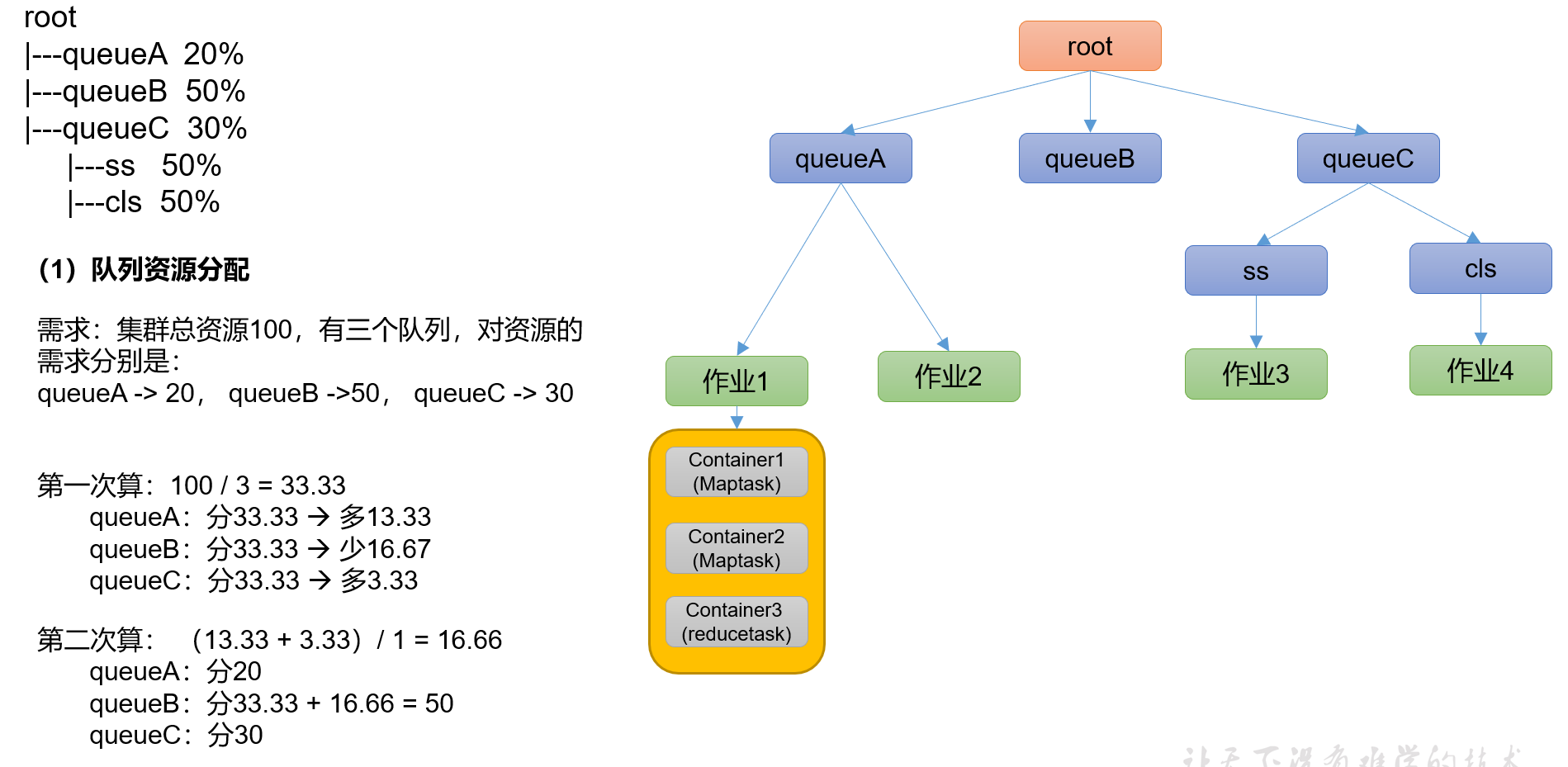
2. 容量调度器(Capacity Scheduler)
容量调度器是 Yahoo 开发的多用户调度器

特点
- 多队列 : 拥有多个队列,每个队列拥有一定的资源量,队列内采用先进先出调度策略
- 容量保证: 管理员可以为每个队列设置最低资源保障和最高资源资源使用上限
- 灵活性:如果某个队列中资源有剩余,可以暂时共享给其他需要资源的队列,一旦该队列有新的应用程序提交,借用的资源会归还给该队列。
- 多租户: 支持多个用户共享集群和多应用程序共同运行,为了防止同一个用户或作业独占队列中的资源,该调度器会对同一用户提交的作业所占资源量进行限定。
- 资源分配算法

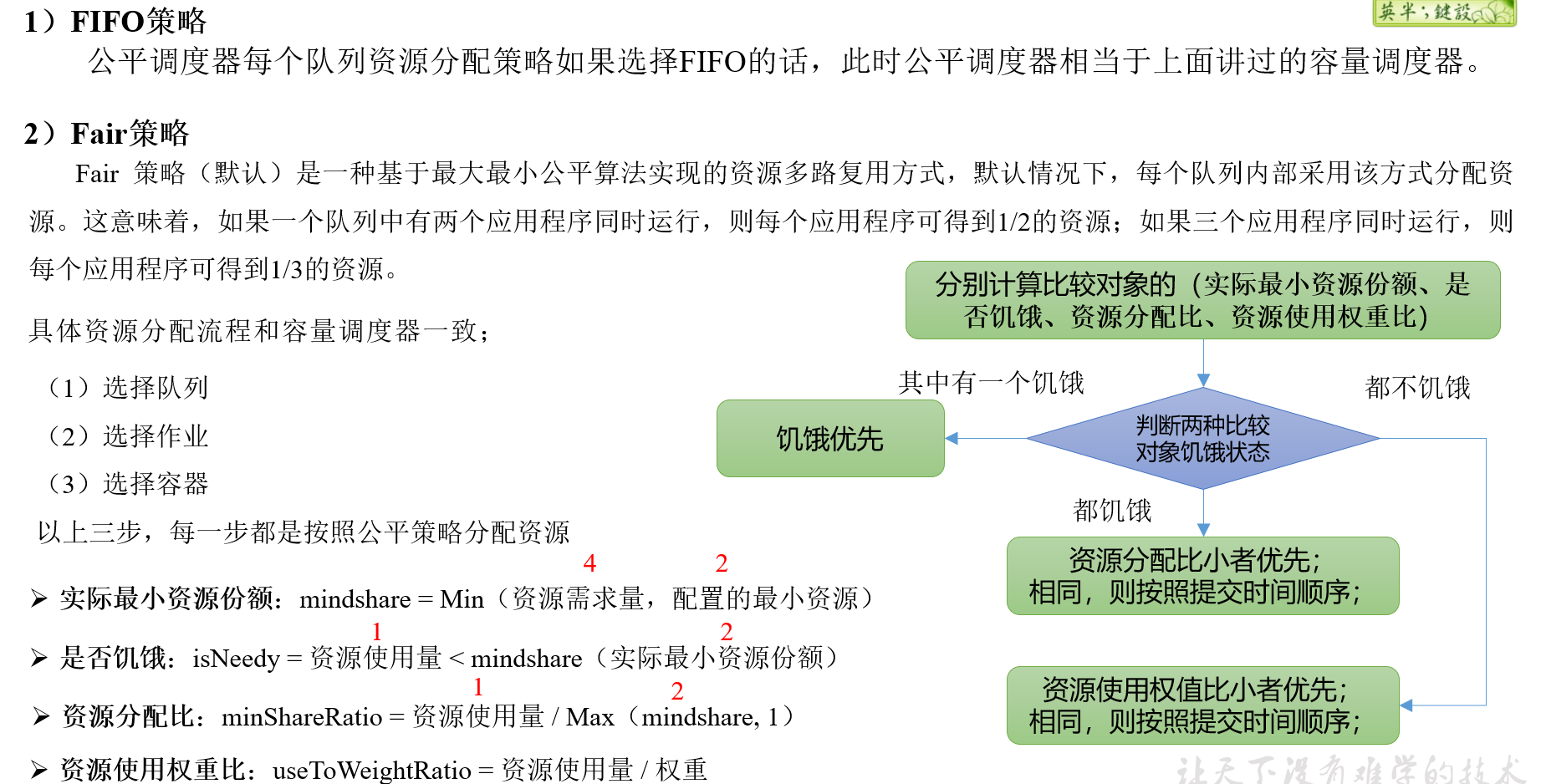
3.公平调度器(Fair Scheduler)
Fair Schedulere是Facebook开发的多用户调度器。
- 缺额

- 资源分配方式

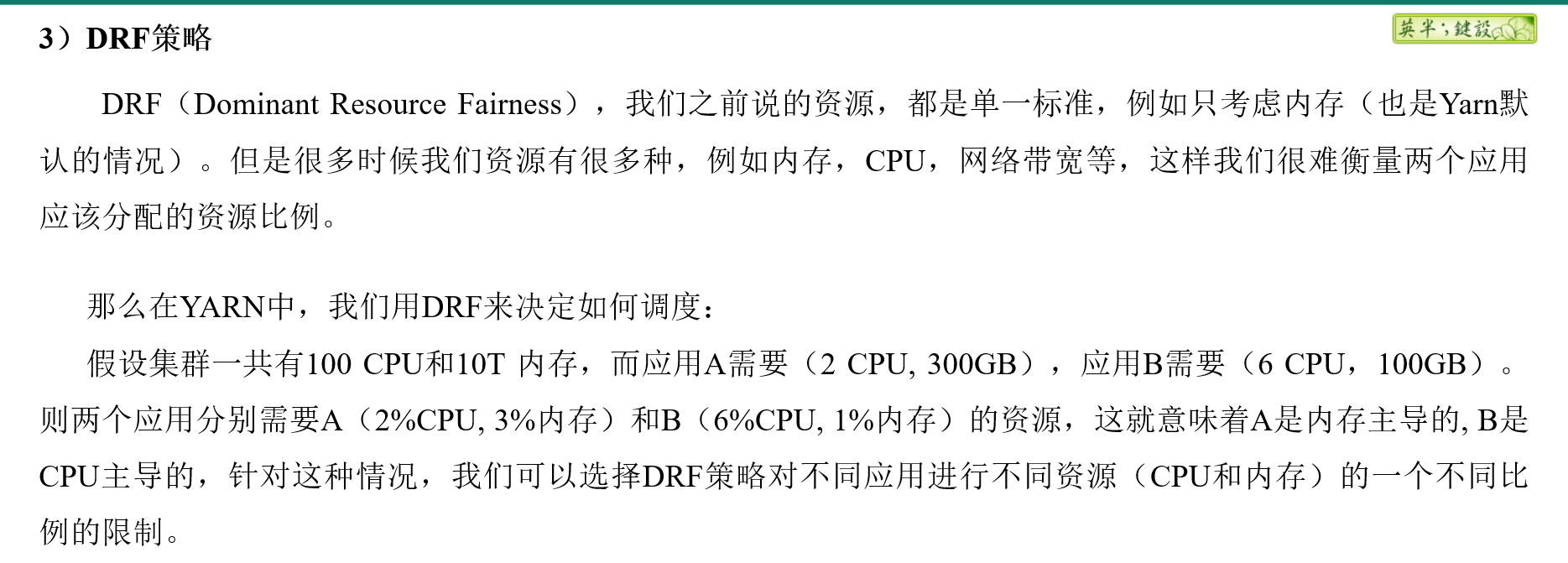
- DRF策略
三、Yarn 常用命令
Yarn 的状态查询除了可以在
1. 查看任务
列出所有的 Application yarn application -list
[allen@hadoop102 ~]$ yarn application -list2022-03-21 15:26:03,922 INFO client.RMProxy: Connecting to ResourceManager at hadoop103/192.168.10.103:8032Total number of applications (application-types: [], states: [SUBMITTED, ACCEPTED, RUNNING] and tags: []):0Application-Id Application-Name Application-Type User Queue State Final-State Progress Tracking-URL[allen@hadoop102 ~]$
根据Application状态过滤:yarn application -list -appStates (所有状态:ALL、NEW、NEW_SAVING、SUBMITTED、ACCEPTED、RUNNING、FINISHED、FAILED、KILLED)
[allen@hadoop102 ~]$ yarn application -list -appStates FINISHED2022-03-21 15:27:19,355 INFO client.RMProxy: Connecting to ResourceManager at hadoop103/192.168.10.103:8032Total number of applications (application-types: [], states: [FINISHED] and tags: []):0Application-Id Application-Name Application-Type User Queue State Final-State Progress Tracking-URL[allen@hadoop102 ~]$
kill 掉 Application yarn application -kill
[allen@hadoop102 hadoop-3.1.3]$ yarn application -kill application_1612577921195_00012021-02-06 10:23:48,530 INFO client.RMProxy: Connecting to ResourceManager at hadoop103/192.168.10.103:8032Application application_1612577921195_0001 has already finished
2. Yarn logs 日志
查询 application 日志 yarn logs -applicationId
查询 Container 日志 yarn logs -applicationId
-containerId 3. 查看尝试运行的任务
列出所有Application尝试的列表: yarn applicationattempt -list <ApplicationId
[allen@hadoop102 hadoop-3.1.3]$ yarn applicationattempt -list application_1612577921195_00012021-02-06 10:26:54,195 INFO client.RMProxy: Connecting to ResourceManager at hadoop103/192.168.10.103:8032Total number of application attempts :1ApplicationAttempt-Id State AM-Container-Id Tracking-URLappattempt_1612577921195_0001_000001 FINISHED container_1612577921195_0001_01_000001 http://hadoop103:8088/proxy/application_1612577921195_0001/
打印ApplicationAttemp状态:yarn applicationattempt -status
[allen@hadoop102 hadoop-3.1.3]$ yarn applicationattempt -status appattempt_1612577921195_0001_0000012021-02-06 10:27:55,896 INFO client.RMProxy: Connecting to ResourceManager at hadoop103/192.168.10.103:8032Application Attempt Report :ApplicationAttempt-Id : appattempt_1612577921195_0001_000001State : FINISHEDAMContainer : container_1612577921195_0001_01_000001Tracking-URL : http://hadoop103:8088/proxy/application_1612577921195_0001/RPC Port : 34756AM Host : hadoop104Diagnostics :
4. 查看容器
列出所有Container:yarn container -list
```java [allen@hadoop102 hadoop-3.1.3]$ yarn container -list appattempt_1612577921195_0001_000001 2021-02-06 10:28:41,396 INFO client.RMProxy: Connecting to ResourceManager at hadoop103/192.168.10.103:8032 Total number of containers :0 Container-Id Start Time Finish Time State Host Node Http Address
- 打印Container 状态 (注:只有在任务跑的途中才能看到container的状态)```java[allen@hadoop102 hadoop-3.1.3]$ yarn container -status container_1612577921195_0001_01_0000012021-02-06 10:29:58,554 INFO client.RMProxy: Connecting to ResourceManager at hadoop103/192.168.10.103:8032Container with id 'container_1612577921195_0001_01_000001' doesn't exist in RM or Timeline Server.
5. 查看节点状态
列出所有节点 yarn node -list -all
[allen@hadoop102 ~]$ yarn node -list -all2022-03-21 15:52:31,087 INFO client.RMProxy: Connecting to ResourceManager at hadoop103/192.168.10.103:8032Total Nodes:3Node-Id Node-State Node-Http-Address Number-of-Running-Containershadoop104:38352 RUNNING hadoop104:8042 0hadoop103:37477 RUNNING hadoop103:8042 0hadoop102:45112 RUNNING hadoop102:8042 0[allen@hadoop102 ~]$
6. yarn rmadmin 更新配置
加载队列配置:yarn rmadmin -refreshQueues
[allen@hadoop102 ~]$ yarn rmadmin -refreshQueues2022-03-21 15:55:52,283 INFO client.RMProxy: Connecting to ResourceManager at hadoop103/192.168.10.103:8033[allen@hadoop102 ~]$
7. 查看队列
打印队列信息:yarn queue -status
[allen@hadoop102 ~]$ yarn queue -status default2022-03-21 15:58:53,876 INFO client.RMProxy: Connecting to ResourceManager at hadoop103/192.168.10.103:8032Queue Information :Queue Name : defaultState : RUNNINGCapacity : 100.0%Current Capacity : .0%Maximum Capacity : 100.0%Default Node Label expression : <DEFAULT_PARTITION>Accessible Node Labels : *Preemption : disabledIntra-queue Preemption : disabled[allen@hadoop102 ~]$
五 案例
1. 生产环境核心配置
- 案例需求
从1G数据中,统计每个单词出现次数。服务器3台,每台配置4G内存,4核CPU,4线程。
- 需求分析
1G 数据 ,分区大小 默认是 128M。所有就需要 1G/128M = 8 个MapTask
一个 ReduceTask 一个 MrAPPMaster 所以共10个
三台服务器, 10/3 =3.333 分配是 4 3 3
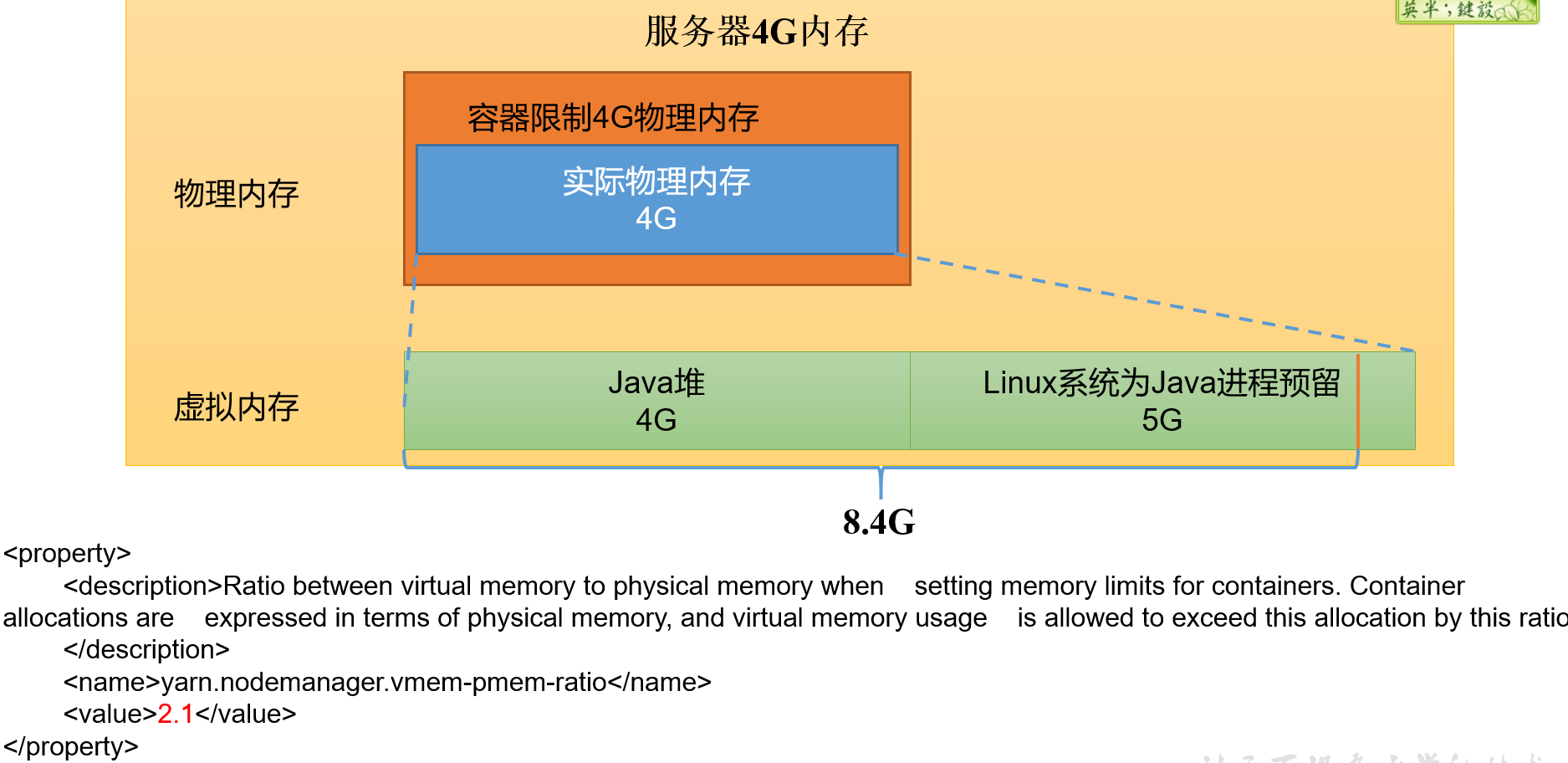
- 修改 yarn-site.xml
```java
The class to use as the resource scheduler. yarn.resourcemanager.scheduler.class org.apache.hadoop.yarn.server.resourcemanager.scheduler.capacity.CapacityScheduler
- 分发配置注意:如果集群的硬件资源不一致,要每个NodeManager单独配置- 重启集群```java[allen@hadoop102 hadoop-3.1.3]$ sbin/stop-yarn.sh[allen@hadoop103 hadoop-3.1.3]$ sbin/start-yarn.sh
执行 WordCount 程序
[allen@hadoop102 hadoop-3.1.3]$ hadoop jar share/hadoop/mapreduce/hadoop-mapreduce-examples-3.1.3.jar wordcount /input /output
观察 Yarn 任务执行界面
<ip>:8088
2. 任务调度器多队列提交案例
在生产环境怎么创建队列
- 调度器默认就一个 default 队列
- 按照框架:hive/spark/flink 每个框架放入指定队列
- 按照业务模块:登录注册、购物车、下单等
- 创建多队列的好处
- 防止单个程序把所有的资源全部耗尽
- 实现服务降级使用
- 需求
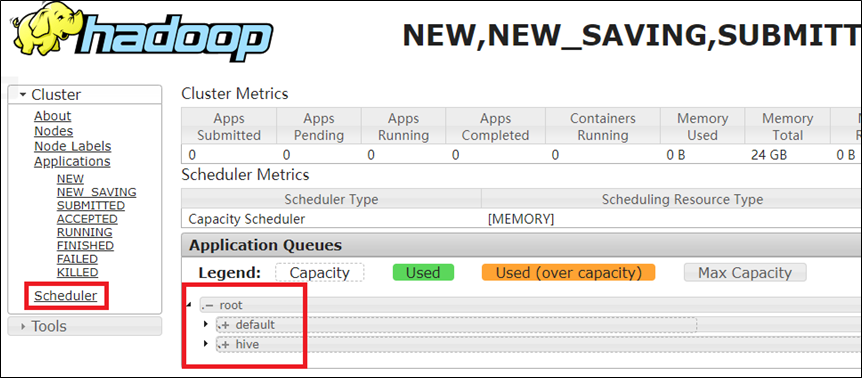
- default队列占总内存的40%,最大资源容量占总资源60%,hive队列占总内存的60%,最大资源容量占总资源80%。
- 配置
```java
yarn.scheduler.capacity.root.queues default,hive The queues at the this level (root is the root queue).
- 分发配置文件
- 重启yarn 或者 yarn rmadmin -refreshQueues 刷新队列
- 向 hive 队列中提交任务
- jar
```java
[allen@hadoop102 hadoop-3.1.3]$ hadoop jar share/hadoop/mapreduce/hadoop-mapreduce-examples-3.1.3.jar wordcount -D mapreduce.job.queuename=hive /input /output
注: -D表示运行时改变参数值
code ```java public class WcDrvier {
public static void main(String[] args) throws IOException, ClassNotFoundException, InterruptedException {
Configuration conf = new Configuration();
conf.set(“mapreduce.job.queuename”,”hive”);
//1. 获取一个Job实例 Job job = Job.getInstance(conf);
。。。 。。。
//6. 提交Job boolean b = job.waitForCompletion(true); System.exit(b ? 0 : 1); } }
<a name="aNHr8"></a>
### 3. 公平调度器 案例

- 需求

创建两个队列,分别是test和allen(以用户所属组命名)。期望实现以下效果:若用户提交任务时指定队列,则任务提交到指定队列运行;若未指定队列,test用户提交的任务到root.group.test队列运行,allen提交的任务到root.group.allen队列运行(注:group为用户所属组)。<br />公平调度器的配置涉及到两个文件,一个是yarn-site.xml,另一个是公平调度器队列分配文件fair-scheduler.xml(文件名可自定义)。

- 参看资料
   - [https://hadoop.apache.org/docs/r3.1.3/hadoop-yarn/hadoop-yarn-site/FairScheduler.html](https://hadoop.apache.org/docs/r3.1.3/hadoop-yarn/hadoop-yarn-site/FairScheduler.html)
   - [https://blog.cloudera.com/untangling-apache-hadoop-yarn-part-4-fair-scheduler-queue-basics/](https://blog.cloudera.com/untangling-apache-hadoop-yarn-part-4-fair-scheduler-queue-basics/)
- 操作
   - 修改yarn-site.xml文件,加入以下参数
```java
<property>
    <name>yarn.resourcemanager.scheduler.class</name>
    <value>org.apache.hadoop.yarn.server.resourcemanager.scheduler.fair.FairScheduler</value>
    <description>配置使用公平调度器</description>
</property>

<property>
    <name>yarn.scheduler.fair.allocation.file</name>
    <value>/opt/module/hadoop-3.1.3/etc/hadoop/fair-scheduler.xml</value>
    <description>指明公平调度器队列分配配置文件</description>
</property>

<property>
    <name>yarn.scheduler.fair.preemption</name>
    <value>false</value>
    <description>禁止队列间资源抢占</description>
</property>
配置fair-scheduler.xml
<?xml version="1.0"?>
<allocations>
<!-- 单个队列中Application Master占用资源的最大比例,取值0-1 ,企业一般配置0.1 -->
<queueMaxAMShareDefault>0.5</queueMaxAMShareDefault>
<!-- 单个队列最大资源的默认值 test atguigu default -->
<queueMaxResourcesDefault>4096mb,4vcores</queueMaxResourcesDefault>

<!-- 增加一个队列test -->
<queue name="test">
<!-- 队列最小资源 -->
<minResources>2048mb,2vcores</minResources>
<!-- 队列最大资源 -->
<maxResources>4096mb,4vcores</maxResources>
<!-- 队列中最多同时运行的应用数,默认50,根据线程数配置 -->
<maxRunningApps>4</maxRunningApps>
<!-- 队列中Application Master占用资源的最大比例 -->
<maxAMShare>0.5</maxAMShare>
<!-- 该队列资源权重,默认值为1.0 -->
<weight>1.0</weight>
<!-- 队列内部的资源分配策略 -->
<schedulingPolicy>fair</schedulingPolicy>
</queue>
<!-- 增加一个队列atguigu -->
<queue name="atguigu" type="parent">
<!-- 队列最小资源 -->
<minResources>2048mb,2vcores</minResources>
<!-- 队列最大资源 -->
<maxResources>4096mb,4vcores</maxResources>
<!-- 队列中最多同时运行的应用数,默认50,根据线程数配置 -->
<maxRunningApps>4</maxRunningApps>
<!-- 队列中Application Master占用资源的最大比例 -->
<maxAMShare>0.5</maxAMShare>
<!-- 该队列资源权重,默认值为1.0 -->
<weight>1.0</weight>
<!-- 队列内部的资源分配策略 -->
<schedulingPolicy>fair</schedulingPolicy>
</queue>

<!-- 任务队列分配策略,可配置多层规则,从第一个规则开始匹配,直到匹配成功 -->
<queuePlacementPolicy>
<!-- 提交任务时指定队列,如未指定提交队列,则继续匹配下一个规则; false表示:如果指定队列不存在,不允许自动创建-->
<rule name="specified" create="false"/>
<!-- 提交到root.group.username队列,若root.group不存在,不允许自动创建;若root.group.user不存在,允许自动创建 -->
<rule name="nestedUserQueue" create="true">
   <rule name="primaryGroup" create="false"/>
</rule>
<!-- 最后一个规则必须为reject或者default。Reject表示拒绝创建提交失败,default表示把任务提交到default队列 -->
<rule name="reject" />
</queuePlacementPolicy>
</allocations>
- 分发并重启 ```java [allen@hadoop102 hadoop]$ xsync yarn-site.xml [allen@hadoop102 hadoop]$ xsync fair-scheduler.xml
[allen@hadoop103 hadoop-3.1.3]$ sbin/stop-yarn.sh [allen@hadoop103 hadoop-3.1.3]$ sbin/start-yarn.sh // myhadoop start
- 测试提交任务
```java
[allen@hadoop102 hadoop-3.1.3]$ hadoop jar /opt/module/hadoop-3.1.3/share/hadoop/mapreduce/hadoop-mapreduce-examples-3.1.3.jar pi -Dmapreduce.job.queuename=root.test 1 1

若有收获,就点个赞吧
0 人点赞


