必会!
参考文档:
作者:Sunshine_Lin
采用面向对象的方式,对上一篇【从零开始实现webpack核心打包过程】(面向过程)进行了封装,零散的方法封装成类调用,更具有webpack的形状,通过config.js配置
github代码仓库: https://github.com/all-smile/webpack-easy
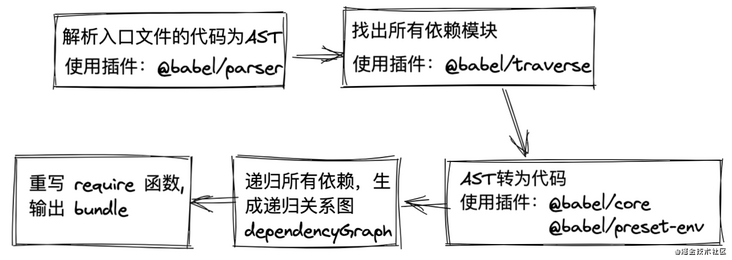
原图理解
- 首先肯定是要先解析入口文件entry,将其转为AST(抽象语法树),使用@babel/parser
- 然后使用@babel/traverse去找出入口文件所有依赖模块
- 然后使用@babel/core+@babel/preset-env将入口文件的AST转为Code
- 将2中找到的入口文件的依赖模块,进行遍历递归,重复执行1,2,3
- 重写require函数,并与4中生成的递归关系图一起,输出到bundle中
代码实现
webpack具体实现原理是很复杂的,这里只是简单实现一下,了解一下webpack是怎么运作的。在代码实现过程中,大家可以自己console.log一下,看看ast,dependcies,code这些具体长什么样,我这里就不展示了,自己去看会比较有成就感,嘿嘿!!
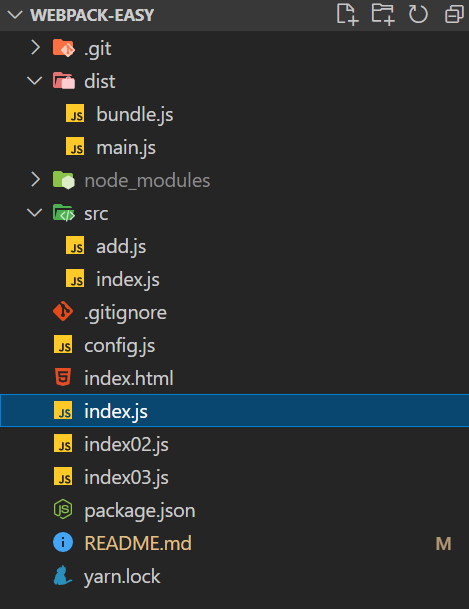
项目目录
config.js
这个文件中模拟webpack的配置
const path = require('path')module.exports = {entry: './src/index.js',output: {path: path.resolve(__dirname, './dist'),filename: 'main.js'}}
入口文件
src/index.js是入口文件
// src/indeximport add from "./add.js";console.log(add(1 , 2))// src/add.jsexport default (a, b) => a + b
1. 定义Compiler类
// index.jsclass Compiler {constructor(options) {// webpack 配置const { entry, output } = options// 入口this.entry = entry// 出口this.output = output// 模块this.modules = []}// 构建启动run() {}// 重写 require函数,输出bundlegenerate() {}}
2. 解析入口文件,获取 AST
我们这里使用@babel/parser,这是babel7的工具,来帮助我们分析内部的语法,包括 es6,返回一个 AST 抽象语法树
const fs = require('fs')const parser = require('@babel/parser')const options = require('./webpack.config')const Parser = {getAst: path => {// 读取入口文件const content = fs.readFileSync(path, 'utf-8')// 将文件内容转为AST抽象语法树return parser.parse(content, {sourceType: 'module'})}}class Compiler {constructor(options) {// webpack 配置const { entry, output } = options// 入口this.entry = entry// 出口this.output = output// 模块this.modules = []}// 构建启动run() {const ast = Parser.getAst(this.entry)}// 重写 require函数,输出bundlegenerate() {}}new Compiler(options).run()
3. 找出所有依赖模块
Babel 提供了@babel/traverse(遍历)方法维护这 AST 树的整体状态,我们这里使用它来帮我们找出依赖模块。
const fs = require('fs')const path = require('path')const options = require('./webpack.config')const parser = require('@babel/parser')const traverse = require('@babel/traverse').defaultconst Parser = {getAst: path => {// 读取入口文件const content = fs.readFileSync(path, 'utf-8')// 将文件内容转为AST抽象语法树return parser.parse(content, {sourceType: 'module'})},getDependecies: (ast, filename) => {const dependecies = {}// 遍历所有的 import 模块,存入dependeciestraverse(ast, {// 类型为 ImportDeclaration 的 AST 节点 (即为import 语句)ImportDeclaration({ node }) {const dirname = path.dirname(filename)// 保存依赖模块路径,之后生成依赖关系图需要用到const filepath = './' + path.join(dirname, node.source.value)dependecies[node.source.value] = filepath}})return dependecies}}class Compiler {constructor(options) {// webpack 配置const { entry, output } = options// 入口this.entry = entry// 出口this.output = output// 模块this.modules = []}// 构建启动run() {const { getAst, getDependecies } = Parserconst ast = getAst(this.entry)const dependecies = getDependecies(ast, this.entry)}// 重写 require函数,输出bundlegenerate() {}}new Compiler(options).run()
4. AST 转换为 code
将 AST 语法树转换为浏览器可执行代码,我们这里使用@babel/core 和 @babel/preset-env。
const fs = require('fs')const path = require('path')const options = require('./webpack.config')const parser = require('@babel/parser')const traverse = require('@babel/traverse').defaultconst { transformFromAst } = require('@babel/core')const Parser = {getAst: path => {// 读取入口文件const content = fs.readFileSync(path, 'utf-8')// 将文件内容转为AST抽象语法树return parser.parse(content, {sourceType: 'module'})},getDependecies: (ast, filename) => {const dependecies = {}// 遍历所有的 import 模块,存入dependeciestraverse(ast, {// 类型为 ImportDeclaration 的 AST 节点 (即为import 语句)ImportDeclaration({ node }) {const dirname = path.dirname(filename)// 保存依赖模块路径,之后生成依赖关系图需要用到const filepath = './' + path.join(dirname, node.source.value)dependecies[node.source.value] = filepath}})return dependecies},getCode: ast => {// AST转换为codeconst { code } = transformFromAst(ast, null, {presets: ['@babel/preset-env']})return code}}class Compiler {constructor(options) {// webpack 配置const { entry, output } = options// 入口this.entry = entry// 出口this.output = output// 模块this.modules = []}// 构建启动run() {const { getAst, getDependecies, getCode } = Parserconst ast = getAst(this.entry)const dependecies = getDependecies(ast, this.entry)const code = getCode(ast)}// 重写 require函数,输出bundlegenerate() {}}new Compiler(options).run()

5. 递归解析所有依赖项,生成依赖关系图
const fs = require('fs')const path = require('path')const options = require('./webpack.config')const parser = require('@babel/parser')const traverse = require('@babel/traverse').defaultconst { transformFromAst } = require('@babel/core')const Parser = {getAst: path => {// 读取入口文件const content = fs.readFileSync(path, 'utf-8')// 将文件内容转为AST抽象语法树return parser.parse(content, {sourceType: 'module'})},getDependecies: (ast, filename) => {const dependecies = {}// 遍历所有的 import 模块,存入dependeciestraverse(ast, {// 类型为 ImportDeclaration 的 AST 节点 (即为import 语句)ImportDeclaration({ node }) {const dirname = path.dirname(filename)// 保存依赖模块路径,之后生成依赖关系图需要用到const filepath = './' + path.join(dirname, node.source.value)dependecies[node.source.value] = filepath}})return dependecies},getCode: ast => {// AST转换为codeconst { code } = transformFromAst(ast, null, {presets: ['@babel/preset-env']})return code}}class Compiler {constructor(options) {// webpack 配置const { entry, output } = options// 入口this.entry = entry// 出口this.output = output// 模块this.modules = []}// 构建启动run() {// 解析入口文件const info = this.build(this.entry)this.modules.push(info)this.modules.forEach(({ dependecies }) => {// 判断有依赖对象,递归解析所有依赖项if (dependecies) {for (const dependency in dependecies) {this.modules.push(this.build(dependecies[dependency]))}}})// 生成依赖关系图const dependencyGraph = this.modules.reduce((graph, item) => ({...graph,// 使用文件路径作为每个模块的唯一标识符,保存对应模块的依赖对象和文件内容[item.filename]: {dependecies: item.dependecies,code: item.code}}),{})}build(filename) {const { getAst, getDependecies, getCode } = Parserconst ast = getAst(filename)const dependecies = getDependecies(ast, filename)const code = getCode(ast)return {// 文件路径,可以作为每个模块的唯一标识符filename,// 依赖对象,保存着依赖模块路径dependecies,// 文件内容code}}// 重写 require函数,输出bundlegenerate() {}}new Compiler(options).run()

6. 重写 require 函数,输出 bundle
const fs = require('fs')const path = require('path')const options = require('./webpack.config')const parser = require('@babel/parser')const traverse = require('@babel/traverse').defaultconst { transformFromAst } = require('@babel/core')const Parser = {getAst: path => {// 读取入口文件const content = fs.readFileSync(path, 'utf-8')// 将文件内容转为AST抽象语法树return parser.parse(content, {sourceType: 'module'})},getDependecies: (ast, filename) => {const dependecies = {}// 遍历所有的 import 模块,存入dependeciestraverse(ast, {// 类型为 ImportDeclaration 的 AST 节点 (即为import 语句)ImportDeclaration({ node }) {const dirname = path.dirname(filename)// 保存依赖模块路径,之后生成依赖关系图需要用到const filepath = './' + path.join(dirname, node.source.value)dependecies[node.source.value] = filepath}})return dependecies},getCode: ast => {// AST转换为codeconst { code } = transformFromAst(ast, null, {presets: ['@babel/preset-env']})return code}}class Compiler {constructor(options) {// webpack 配置const { entry, output } = options// 入口this.entry = entry// 出口this.output = output// 模块this.modules = []}// 构建启动run() {// 解析入口文件const info = this.build(this.entry)this.modules.push(info)this.modules.forEach(({ dependecies }) => {// 判断有依赖对象,递归解析所有依赖项if (dependecies) {for (const dependency in dependecies) {this.modules.push(this.build(dependecies[dependency]))}}})// 生成依赖关系图const dependencyGraph = this.modules.reduce((graph, item) => ({...graph,// 使用文件路径作为每个模块的唯一标识符,保存对应模块的依赖对象和文件内容[item.filename]: {dependecies: item.dependecies,code: item.code}}),{})this.generate(dependencyGraph)}build(filename) {const { getAst, getDependecies, getCode } = Parserconst ast = getAst(filename)const dependecies = getDependecies(ast, filename)const code = getCode(ast)return {// 文件路径,可以作为每个模块的唯一标识符filename,// 依赖对象,保存着依赖模块路径dependecies,// 文件内容code}}// 重写 require函数 (浏览器不能识别commonjs语法),输出bundlegenerate(code) {// 输出文件路径const filePath = path.join(this.output.path, this.output.filename)// 懵逼了吗? 没事,下一节我们捋一捋const bundle = `(function(graph){function require(module){function localRequire(relativePath){return require(graph[module].dependecies[relativePath])}var exports = {};(function(require,exports,code){eval(code)})(localRequire,exports,graph[module].code);return exports;}require('${this.entry}')})(${JSON.stringify(code)})`// 把文件内容写入到文件系统fs.writeFileSync(filePath, bundle, 'utf-8')}}new Compiler(options).run()
7. 看看main里的代码
实现了上面的代码,也就实现了把打包后的代码写到main.js文件里,咱们来看看那main.js文件里的代码吧:
(function (graph) {function require(module) {if (!module) {return;}function localRequire(relativePath) {return require(graph[module].dependecies[relativePath]);}var exports = {};(function (require, exports, code) {eval(code);})(localRequire, exports, graph[module].code);return exports;}require("./src/index.js");})({"./src/index.js": {dependecies: { "./add.js": "./src\\add.js" },code: '"use strict";\n\nvar _add = _interopRequireDefault(require("./add.js"));\n\nfunction _interopRequireDefault(obj) { return obj && obj.__esModule ? obj : { "default": obj }; }\n\nconsole.log((0, _add["default"])(1, 2));',},"./src\\add.js": {dependecies: {},code: '"use strict";\n\nObject.defineProperty(exports, "__esModule", {\n value: true\n});\nexports["default"] = void 0;\n\nvar _default = function _default(a, b) {\n return a + b;\n};\n\nexports["default"] = _default;',},});
大家可以执行一下main.js的代码,输出结果是:
3

若有收获,就点个赞吧
0 人点赞


