时间统计
借助插件统计打包时间
1、各阶段的打包耗时
npm install speed-measure-webpack-plugin -D
使用
const SpeedMeasurePlugin = require('speed-measure-webpack-plugin')const smp = new SpeedMeasurePlugin();module.exports = {configureWebpack: smp.wrap({plugins: []})}

2、打包进度以及耗时展示
npm i progress-bar-webpack-plugin chalk -D

# chalk 也可以不用单独下载@vue/cli-shared-utils 包里自带的有
const ProgressBarPlugin = require('progress-bar-webpack-plugin');
const { chalk } = require('@vue/cli-shared-utils')

module.exports = {
  configureWebpack: smp.wrap({
    plugins: [
      new ProgressBarPlugin({
        format: ' build [:bar] ' + chalk.green.bold(':percent') + ' (:elapsed seconds)',
        clear: false
      }),
    ]
  })
}

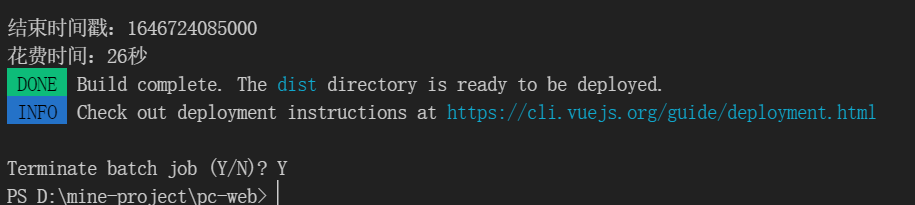
在代码里插入时间统计
统计打包时间
// 开始时间
let startTime = '';
async function build(args, api, options) {
  startTime = Date.parse(new Date())
  console.log('build开始时间戳:' + startTime)
  const fs = require('fs-extra')
  // other code...

  return new Promise((resolve, reject) => {
    // other code...
    if (args.target === 'app' && !isLegacyBuild) {
      if (!args.watch) {
        console.log('结束时间戳:' + Date.parse(new Date()))
        console.log('花费时间:' + (Date.parse(new Date()) - startTime) / 1000 + '秒')
        done(`Build complete. The ${chalk.cyan(targetDirShort)} directory is ready to be deployed.`)
        info(`Check out deployment instructions at ${chalk.cyan(`https://cli.vuejs.org/guide/deployment.html`)}\n`)
      } else {
        done(`Build complete. Watching for changes...`)
      }
    }
  })
}
统计npm run serve 时间
// 开始时间
let startTime = '';
async function serve(args) {
    startTime = Date.parse(new Date())
    console.log('serve开始时间戳:' + startTime)
    info('Starting development server...')
    // other code...

    console.log()
    console.log(`  App running at:`)
    console.log(`  - Local:   ${chalk.cyan(urls.localUrlForTerminal)} ${copied}`)
    console.log('结束时间戳:' + Date.parse(new Date()))
    console.log('花费时间:' + (Date.parse(new Date()) - startTime) / 1000 + '秒')console.timeEnd("serve")
    // other code...
}

Webpack缓存原理: https://zhuanlan.zhihu.com/p/376543854
Cache缓存
HardSourceWebpackPlugin是 webpack 的插件,用于为模块提供中间缓存步骤。为了看到结果,你需要使用这个插件运行 webpack 两次:第一次构建需要正常的时间。第二次构建将明显更快。
cnpm i hard-source-webpack-plugin -D
使用
const HardSourceWebpackPlugin = require('hard-source-webpack-plugin');

module.exports = {
  configureWebpack: smp.wrap({
    plugins: [
      new HardSourceWebpackPlugin(),
    ]
  })
}
主要参数如下:
- cacheDirectory: 缓存的路径
- configHash: 转换webpack配置,根据不同的配置生成不同的缓存
- environmentHash:构建的依赖或者插件发送改变是使用心得缓存
- maxAge: 最大缓存时间
- sizeThreshold:最大缓存内存,超出就删除所有缓存
https://www.npmjs.com/package/hard-source-webpack-plugin
cache-loader
多线程加快构建
大项目使用
适用于多线程打包的插件有happypack 和 thread-loader。happypack已经不维护了
https://www.npmjs.com/package/thread-loader
thread-loader自身会消耗时间来启动,可以适用于大项目里比较耗时的loader。
排除静态的依赖
externals和DllPlugin
sourceMap
优化构建时的搜索路径
组件化、模块化,按需加载
对页面性能友好的同时,也可以加快打包构建的速度

若有收获,就点个赞吧
0 人点赞


