1. 什么是HMR
- Hot Module Replacement是指当你对代码修改并保存后,webpack将会对代码进行得新打包,并将新的模块发送到浏览器端,浏览器用新的模块替换掉旧的模块,以实现在不刷新浏览器的前提下更新页面。
- 相对于
live reload刷新页面的方案,HMR的优点在于可以保存应用的状态,提高了开发效率
2. 搭建HMR项目
2.1 安装依赖的模块
cnpm i webpack webpack-cli webpack-dev-server mime html-webpack-plugin express socket.io events -S
2.2 package.json
package.json
{"name": "hot_hmr","version": "1.0.0","description": "","main": "index.js","scripts": {"build": "webpack","dev": "webpack-dev-server"},"keywords": [],"author": "","license": "ISC","dependencies": {},"devDependencies": {"html-webpack-plugin": "^4.5.2","webpack": "4.39.1","webpack-cli": "3.3.6","webpack-dev-server": "3.7.2"}}
2.2 webpack.config.js
webpack.config.js
const path = require('path');const webpack = require('webpack');const HtmlWebpackPlugin = require('html-webpack-plugin');module.exports = {mode:'development',entry: './src/index.js',output: {filename: 'main.js',path: path.join(__dirname, 'dist')},devServer: {contentBase:path.join(__dirname, 'dist')},plugins:[new HtmlWebpackPlugin({template:'./src/index.html',filename:'index.html'})]}
2.3 src\index.js
src\index.js
let root = document.getElementById('root');function render(){let title = require('./title').default;root.innerHTML= title;}render();
2.4 src\title.js
src\title.js
export default 'hello';
2.5 src\index.html
src\index.html
<!DOCTYPE html><html lang="en"><head><meta charset="UTF-8"><meta name="viewport" content="width=device-width, initial-scale=1.0"><meta http-equiv="X-UA-Compatible" content="ie=edge"><title>webpack热更新</title></head><body><div id="root"></div></body></html>
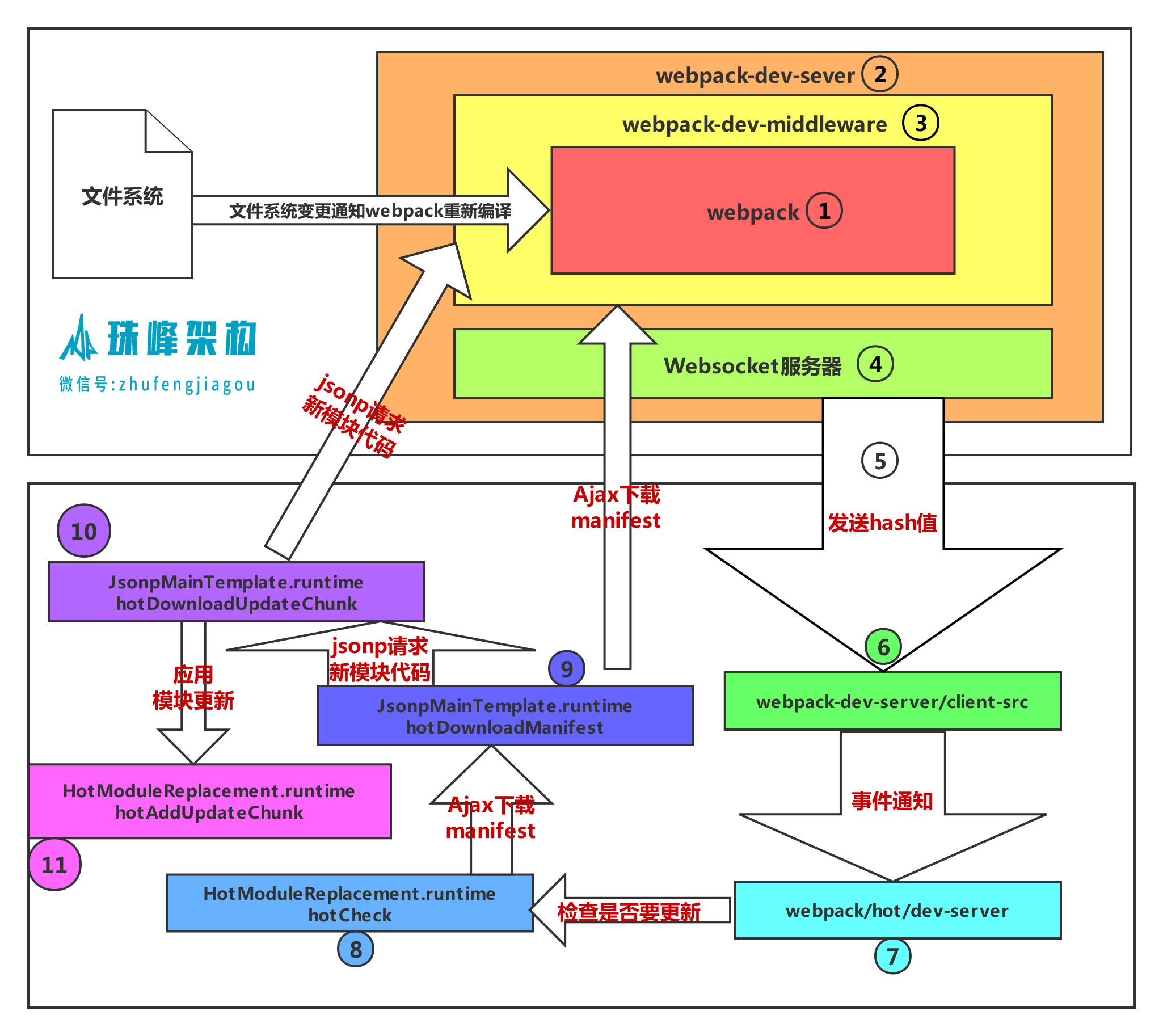
3.流程图

链接 : http://img.zhufengpeixun.cn/webpackhmr.png
4.实现
4.1 webpack.config.js
const path = require("path");const webpack = require("webpack");const HtmlWebpackPlugin = require("html-webpack-plugin");module.exports = {mode: "development",entry: "./src/index.js",output: {filename: "main.js",path: path.join(__dirname, "dist"),},devServer: {hot: true, // 开启模块热更新contentBase: path.join(__dirname, "dist"),},plugins: [new HtmlWebpackPlugin({template: "./src/index.html",filename: "index.html",}),new webpack.HotModuleReplacementPlugin()]};
4.2 index.js
src\index.js
import '../webpackHotDevClient';let root = document.getElementById("root");function render() {let title = require("./title");root.innerHTML = title;}render();if(module.hot){module.hot.accept(['./title'],()=>{render();});}
4.2 src\title.js
src\title.js
module.exports = 'title7';
4.3 src\index.html
src\index.html
<!DOCTYPE html><html lang="en"><head><meta charset="UTF-8"><meta name="viewport" content="width=device-width, initial-scale=1.0"><meta http-equiv="X-UA-Compatible" content="ie=edge"><title>webpack热更新</title></head><body><div id="root"></div><script src="/socket.io/socket.io.js"></script></body></html>
4.4 webpack-dev-server.js
webpack-dev-server.js
const path = require("path");const fs = require("fs");const express = require("express");const mime = require("mime");const webpack = require("webpack");let config = require("./webpack.config");let compiler = webpack(config);//1. 创建webpack实例//2. 启动webpack-dev-server服务器class Server {constructor(compiler) {//4. 添加webpack的`done`事件回调,在编译完成后会向浏览器发送消息let lastHash;let sockets = [];compiler.hooks.done.tap("webpack-dev-server", (stats) => {lastHash = stats.hash;sockets.forEach((socket) => {socket.emit("hash", stats.hash);socket.emit("ok");});});let app = new express();compiler.watch({}, (err) => {console.log("编译成功");});//3. 添加webpack-dev-middleware中间件const webpackDevMiddleware = (req, res, next) => {if (req.url === "/favicon.ico") {return res.sendStatus(404);}let filename = path.join(config.output.path, req.url.slice(1));try {let stats = fs.statSync(filename);if (stats.isFile()) {let content = fs.readFileSync(filename);res.header("Content-Type", mime.getType(filename));res.send(content);} else {next();}} catch (error) {return res.sendStatus(404);}};app.use(webpackDevMiddleware);this.server = require("http").createServer(app);//4. 使用sockjs在浏览器端和服务端之间建立一个 websocket 长连接//将 webpack 编译打包的各个阶段的状态信息告知浏览器端,浏览器端根据这些`socket`消息进行不同的操作//当然服务端传递的最主要信息还是新模块的`hash`值,后面的步骤根据这一`hash`值来进行模块热替换let io = require("socket.io")(this.server);io.on("connection", (socket) => {sockets.push(socket);if (lastHash) {//5.发送hash值socket.emit("hash", lastHash);socket.emit("ok");}});}//9. 创建http服务器并启动服务listen(port) {this.server.listen(port, () => {console.log(port + "服务启动成功!");});}}//3. 创建Server服务器let server = new Server(compiler);server.listen(8000);
4.5 webpackHotDevClient.js
webpackHotDevClient.js
let socket = io("/");let currentHash;let hotCurrentHash; // lastHash 上一次的hash值class Emitter {constructor() {this.listeners = {};}on(type, listener) {this.listeners[type] = listener;}emit(type) {this.listeners[type] && this.listeners[type]();}}let hotEmitter = new Emitter();const onConnected = () => {console.log("客户端连接成功");};//6. 客户端会监听到此hash消息socket.on("hash", (hash) => {currentHash = hash;});//7. 客户端收到`ok`的消息 当收到ok事件后 刷新Appsocket.on("ok", () => {debugger;reloadApp(true);});socket.on("connect", onConnected);hotEmitter.on("webpackHotUpdate", function () {if (!hotCurrentHash || hotCurrentHash == currentHash) {return (hotCurrentHash = currentHash);}hotCheck();});//8.执行hotCheck方法进行更新function hotCheck() {// 询问服务器 这次编译相对于上一次编译 改变了哪些hotDownloadManifest().then((update) => {let chunkIds = Object.keys(update.c);chunkIds.forEach((chunkId) => {//10. 通过JSONP请求获取到最新的模块代码块hotDownloadUpdateChunk(chunkId);});});}// 拿到变化的文件function hotDownloadManifest() {return new Promise(function (resolve) {let request = new XMLHttpRequest();let requestPath = "/" + hotCurrentHash + ".hot-update.json";request.open("GET", requestPath, true);request.onreadystatechange = function () {if (request.readyState === 4) {let update = JSON.parse(request.responseText);resolve(update);}};request.send();});}function hotDownloadUpdateChunk(chunkId) {var script = document.createElement("script");script.charset = "utf-8";// /main.xxx.hot-update.jsscript.src = "/" + chunkId + "." + hotCurrentHash + ".hot-update.js";document.head.appendChild(script);}// ok 的时候 重新刷新Appfunction reloadApp(hot) {if (hot) {// 如果为true,热更新hotEmitter.emit("webpackHotUpdate");} else {// 不支持热更新 直接加载window.location.reload();}}window.hotCreateModule = () => {var hot = {_acceptedDependencies: {}, //接收的依赖accept: function (dep, callback) {for (var i = 0; i < dep.length; i++) {hot._acceptedDependencies[dep[i]] = callback;}},};return hot;};//11. 补丁JS取回来后会调用`webpackHotUpdate`方法window.webpackHotUpdate = (chunkId, moreModules) => {for (let moduleId in moreModules) {let oldModule = __webpack_require__.c[moduleId]; //获取老模块let { parents, children } = oldModule; //父亲们 儿子们var module = (__webpack_require__.c[moduleId] = {i: moduleId,l: false,exports: {},parents,children,hot: window.hotCreateModule(),});// 更新为最新moreModules[moduleId].call(module.exports,module,module.exports,__webpack_require__);module.l = true;parents.forEach((parent) => {let parentModule = __webpack_require__.c[parent];parentModule.hot &&parentModule.hot._acceptedDependencies[moduleId] &&parentModule.hot._acceptedDependencies[moduleId]();});hotCurrentHash = currentHash;}};
5、总结
调试模式
node debugger.js
热更新 配置
- devServer 开启 hot:true
- new webpack.HotModuleReplacementPlugin()
热更新原理
webpack:处理配置
http: 相应请求
socket服务器:
客户端请求index.html 生成index.html main.js
服务器请求生成的资源
websocket客户端通过长链接链接到websocket服务器
每当源文件发生改变后,会通知webpack重新打包,websocket服务器会向客户端发消息,重新拉新的代码,更新
服务端devServer操作
首先通过devServer,开启一个本地服务,启用webpack的watch监听,是每次编译拿到最新结果得重点。 初始化webpack,初始化compiler对象, 注册webpack的done事件回调,每次拿到结果后,通过中间件设置展示访问的index页面,注册socket 在每次编译完后,emit最新的hash和ok通知客户端做相应操作
步骤
- 启动webpack-dev-server服务器
- 创建webpack实例
- 创建Server服务器
- 添加webpack的done事件回调,编译完成后向客户端发消息
- 创建express应用app
- 添加webpack-dev-middleware中间件,中间件负责返回生成的文件
- 设置文件系统为内存文件系统
- 创建http服务器并启动服务
- 使用sockjs在浏览器和服务端之间建立一个websock长链接,创建socket服务器
客户端
客户端的操作也需要依赖webpack.HotModuleReplacementPlugin()这个插件,会将每次编译差异部分的代码,写入到不同文件中,客户端要做的就是拿到这些文件,下载通过script引入,执行全局的webpackHotUpdate方法,将需要更新的模块中的方法进行执行
步骤
- webpack-dev-server/client-src/default/index.js 监听hash消息,保存hash值
- 客户端收到ok消息,会调用reloadApp方法进行更新
- reloadApp方法中会判断是否支持热更新,不支持之间刷新页面,支持会发射webpackHotUpdate事件
- 当监听到webpackHotUpdate事件后,后进行check方法检查
- check方法后调用module.hot.check方法
- 通过调用JsonpMainTemplate.runtime.js 的webpackUpdateChunk方法通过jsonP获取最新的代码块
- 布丁JS取回来后,会继续调用HotModuleReplace.runtime 的hotAddUpdateChunk方法动态更新模块代码
- 调用hotApply方法进行热更新

若有收获,就点个赞吧
0 人点赞