一、前言
从零到壹实现一个 React
setState 更新
React 生命周期
二、使用 webpack 搭建环境
a bundler for javascript and frinds 原则上只能打包 js 文件,通过 loader 机制,将非 js 文件打包到一起
- 安装 webpack webpack-cli
- 安装 babel-loader @babel/core @babel/preset-env
- 处理 jsx,安装@babel/plugin-transform-react-jsx
webpack 配置
module.exports = {entry: {main: './main.js',},mode: 'development',module: {rules: [{test: /\.js$/,use: {loader: 'babel-loader',options: {presets: ['@babel/preset-env'],plugins: [['@babel/plugin-transform-react-jsx',{ pragma: 'createElement' },],],},},},],},optimization: {minimize: false,},};
三、在main.js中使用jsx语法表现视图
当前目录:

function createElement(tarName, attributes, ...children) {let ele = document.createElement(tarName);for (const attribute in attributes) {ele.setAttribute(attribute, attributes[attribute]);}for (const child of children) {if (typeof child === 'string') {child = document.createTextNode(child);}ele.appendChild(child);}return ele;}document.body.appendChild(<div id="a" class="c"><div>1</div><div>2</div><div>3</div></div>);// var a = createElement("div", {// id: "a",// "class": "c"// }, createElement("div", null, "1"), createElement("div", null, "2"), createElement("div", null, "3"));
这是就可以在js中去些jsx了
四、渲染自定义组件
将react处理的逻辑分离到rock-react.js中,现在的目录结构

在main.js 中使用,rock-react.js中处理
main.js代码如下:
import { createElement, Component, renderDOM } from './rock-react.js';class MyComponent extends Component {render() {return (<div><h1>我是MyComponent</h1>{this.children}</div>);}}renderDOM(<MyComponent id="a" class="c"><div>1</div><div>2</div><div>3</div></MyComponent>,document.body);
rock-react.js 代码如下
class ElementWrapper {constructor(type) {this.root = document.createElement(type);}setAttribute(name, value) {this.root.setAttribute(name, value);}appendChild(component) {this.root.appendChild(component.root);}}class TextWrapper {constructor(content) {this.root = document.createTextNode(content);}}export class Component {constructor(content) {debugger;this.props = Object.create(null);this.children = [];this._root = null;}setAttribute(name, value) {this.props[name] = value;}appendChild(component) {this.children.push(component);}get root() {if (!this._root) {this._root = this.render().root;}return this._root;}}export function createElement(type, attributes, ...children) {let ele;if (typeof type === 'string') {// 元素处理ele = new ElementWrapper(type);} else {// 自定义组件处理ele = new type();}// 属性处理for (const attribute in attributes) {ele.setAttribute(attribute, attributes[attribute]);}// children处理let insertChildren = (children) => {for (const child of children) {if (typeof child === 'string') {// 处理文本节点child = new TextWrapper(child);}// 子元素是数组,递归处理插入到元素上if (typeof child === 'object' && child instanceof Array) {insertChildren(child);} else {ele.appendChild(child);}}};insertChildren(children);return ele;}export function renderDOM(component, parentElement) {parentElement.appendChild(component.root);}
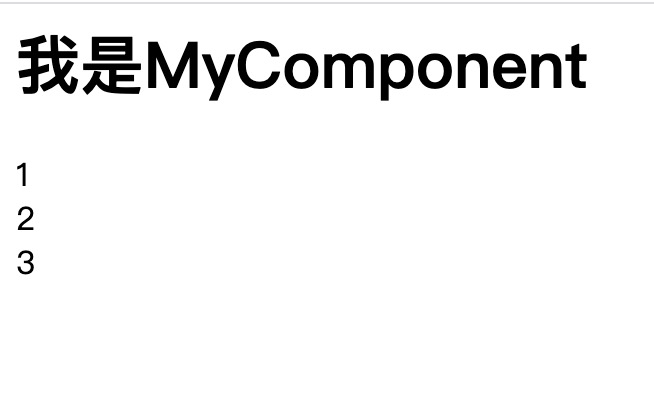
五、处理setState
1、 使用range替代根节点,重构rock-react.js
const RENDER_TO_DOM = Symbol('render to dom');class ElementWrapper {constructor(type) {this.root = document.createElement(type);}setAttribute(name, value) {this.root.setAttribute(name, value);}appendChild(component) {let range = document.createRange();range.setStart(this.root, this.root.childNodes.length);range.setEnd(this.root, this.root.childNodes.length);component[RENDER_TO_DOM](range);}[RENDER_TO_DOM](range) {range.deleteContents();range.insertNode(this.root);}}class TextWrapper {constructor(content) {this.root = document.createTextNode(content);}[RENDER_TO_DOM](range) {range.deleteContents();range.insertNode(this.root);}}export class Component {constructor(content) {this.props = Object.create(null);this.children = [];this._root = null;}setAttribute(name, value) {this.props[name] = value;}appendChild(component) {this.children.push(component);}// 使用range,DOM API进行操作[RENDER_TO_DOM](range) {this.render()[RENDER_TO_DOM](range);}}export function createElement(type, attributes, ...children) {let ele;if (typeof type === 'string') {// 元素处理ele = new ElementWrapper(type);} else {// 自定义组件处理ele = new type();}// 属性处理for (const attribute in attributes) {ele.setAttribute(attribute, attributes[attribute]);}// children处理let insertChildren = (children) => {for (const child of children) {if (typeof child === 'string') {// 处理文本节点child = new TextWrapper(child);}// 子元素是数组,递归处理插入到元素上if (typeof child === 'object' && child instanceof Array) {insertChildren(child);} else {ele.appendChild(child);}}};insertChildren(children);return ele;}export function renderDOM(component, parentElement) {let range = document.createRange();// 首尾设置正确的值,有可能有注释节点range.setStart(parentElement, 0);range.setEnd(parentElement, parentElement.childNodes.length);range.deleteContents();component[RENDER_TO_DOM](range);}
2、实现最终的setState的更新
main.js 代码如下:
const RENDER_TO_DOM = Symbol('render to dom');class ElementWrapper {constructor(type) {this.root = document.createElement(type);}setAttribute(name, value) {console.log(name.match(/^on([\s\S]+)$/), '///');if (name.match(/^on([\s\S]+)$/)) {this.root.addEventListener(RegExp.$1.replace(/^[\s\S]/, (c) => c.toLowerCase()),value);} else {if (name === 'className') {this.root.setAttribute('class', value);} else {this.root.setAttribute(name, value);}}}appendChild(component) {let range = document.createRange();range.setStart(this.root, this.root.childNodes.length);range.setEnd(this.root, this.root.childNodes.length);component[RENDER_TO_DOM](range);}[RENDER_TO_DOM](range) {range.deleteContents();range.insertNode(this.root);}}class TextWrapper {constructor(content) {this.root = document.createTextNode(content);}[RENDER_TO_DOM](range) {range.deleteContents();range.insertNode(this.root);}}export class Component {constructor(content) {this.props = Object.create(null);this.children = [];this._root = null;}setAttribute(name, value) {this.props[name] = value;}appendChild(component) {this.children.push(component);}// 使用range,DOM API进行操作[RENDER_TO_DOM](range) {this._range = range;this.render()[RENDER_TO_DOM](range);}rerender() {// 处理range的bug,先插入在删除// 保存老得rangelet oldRange = this._range;// 创建一个新的range,放到老得range的start位置let range = document.createRange();range.setStart(this._range.startContainer, oldRange.startOffset);range.setEnd(oldRange.startContainer, oldRange.startOffset);this[RENDER_TO_DOM](range);// 老得range挪到新range之后oldRange.setStart(range.endContainer, range.endOffset);oldRange.deleteContents();}setState(newState) {if (this.state === null || typeof this.state !== 'object') {this.state = newState;this.rerender();return;}let merge = (oldState, newState) => {for (const p in newState) {if (oldState[p] === null || typeof oldState[p] !== 'object') {oldState[p] = newState[p];} else {merge(oldState[p], newState[p]);}}};merge(this.state, newState);this.rerender();}}export function createElement(type, attributes, ...children) {let ele;if (typeof type === 'string') {// 元素处理ele = new ElementWrapper(type);} else {// 自定义组件处理ele = new type();}// 属性处理for (const attribute in attributes) {ele.setAttribute(attribute, attributes[attribute]);}// children处理let insertChildren = (children) => {for (const child of children) {if (typeof child === 'string') {// 处理文本节点child = new TextWrapper(child);}// 自节点为空,跳过这个处理if (child === null) {continue;}// 子元素是数组,递归处理插入到元素上if (typeof child === 'object' && child instanceof Array) {insertChildren(child);} else {ele.appendChild(child);}}};insertChildren(children);return ele;}export function renderDOM(component, parentElement) {let range = document.createRange();// 首尾设置正确的值,有可能有注释节点range.setStart(parentElement, 0);range.setEnd(parentElement, parentElement.childNodes.length);range.deleteContents();component[RENDER_TO_DOM](range);}
我们已经可以使用上面的代码,完成下面的小例子了
地址
此时,不足之处在于,每次更新,会对root跟节点全部更新,下面我们将要改造成局部改变,局部更新
六、虚拟DOM的原理和关键实现
1、去掉this.root这个DOM元素的代理,创建虚拟DOM
const RENDER_TO_DOM = Symbol('render to dom');export class Component {constructor(content) {this.props = Object.create(null);this.children = [];this._root = null;}setAttribute(name, value) {this.props[name] = value;}appendChild(component) {this.children.push(component);}get vdom() {return this.render().vdom;}// 使用range,DOM API进行操作[RENDER_TO_DOM](range) {this._range = range;this.render()[RENDER_TO_DOM](range);}rerender() {// 处理range的bug,先插入在删除// 保存老得rangelet oldRange = this._range;// 创建一个新的range,放到老得range的start位置let range = document.createRange();range.setStart(this._range.startContainer, oldRange.startOffset);range.setEnd(oldRange.startContainer, oldRange.startOffset);this[RENDER_TO_DOM](range);// 老得range挪到新range之后oldRange.setStart(range.endContainer, range.endOffset);oldRange.deleteContents();}setState(newState) {if (this.state === null || typeof this.state !== 'object') {this.state = newState;this.rerender();return;}let merge = (oldState, newState) => {for (const p in newState) {if (oldState[p] === null || typeof oldState[p] !== 'object') {oldState[p] = newState[p];} else {merge(oldState[p], newState[p]);}}};merge(this.state, newState);this.rerender();}}class ElementWrapper extends Component {constructor(type) {super(type);this.type = type;this.root = document.createElement(type);}get vdom() {return this;/*{type: this.type,props: this.props,children: this.children.map((child) => child.vdom),};*/}get vchildren() {return this.children.map((child) => child.vdom);}// setAttribute(name, value) {// if (name.match(/^on([\s\S]+)$/)) {// this.root.addEventListener(// RegExp.$1.replace(/^[\s\S]/, (c) => c.toLowerCase()),// value// );// } else {// if (name === 'className') {// this.root.setAttribute('class', value);// } else {// this.root.setAttribute(name, value);// }// }// }// appendChild(component) {// let range = document.createRange();// range.setStart(this.root, this.root.childNodes.length);// range.setEnd(this.root, this.root.childNodes.length);// component[RENDER_TO_DOM](range);// }// 完成虚拟DOM到实体DOM的更新[RENDER_TO_DOM](range) {range.deleteContents();// 自己创建一个rootlet root = document.createElement(this.type);// 处理attributesfor (const name in this.props) {let value = this.props[name];if (name.match(/^on([\s\S]+)$/)) {root.addEventListener(RegExp.$1.replace(/^[\s\S]/, (c) => c.toLowerCase()),value);} else {if (name === 'className') {root.setAttribute('class', value);} else {root.setAttribute(name, value);}}}// 处理childrenfor (const child of this.children) {let childRange = document.createRange();childRange.setStart(root, root.childNodes.length);childRange.setEnd(root, root.childNodes.length);child[RENDER_TO_DOM](childRange);}range.insertNode(root);}}class TextWrapper extends Component {constructor(content) {super(content);this.content = content;(this.type = '#text'), (this.root = document.createTextNode(content));}get vdom() {return this;/*{type: '#text',content: this.content,};*/}[RENDER_TO_DOM](range) {range.deleteContents();range.insertNode(this.root);}}export function createElement(type, attributes, ...children) {let ele;if (typeof type === 'string') {// 元素处理ele = new ElementWrapper(type);} else {// 自定义组件处理ele = new type();}// 属性处理for (const attribute in attributes) {ele.setAttribute(attribute, attributes[attribute]);}// children处理let insertChildren = (children) => {for (const child of children) {if (typeof child === 'string') {// 处理文本节点child = new TextWrapper(child);}// 自节点为空,跳过这个处理if (child === null) {continue;}// 子元素是数组,递归处理插入到元素上if (typeof child === 'object' && child instanceof Array) {insertChildren(child);} else {ele.appendChild(child);}}};insertChildren(children);return ele;}export function renderDOM(component, parentElement) {let range = document.createRange();// 首尾设置正确的值,有可能有注释节点range.setStart(parentElement, 0);range.setEnd(parentElement, parentElement.childNodes.length);range.deleteContents();component[RENDER_TO_DOM](range);}
2、实现VDOM比对
const RENDER_TO_DOM = Symbol('render to dom');

// 空range处理
function replaceContent(range, node) {
  // if (!range) return;
  range.insertNode(node);
  range.setStartAfter(node);
  range.deleteContents();

  range.setStartBefore(node);
  range.setEndAfter(node);
}

export class Component {
  constructor(content) {
    this.props = Object.create(null);
    this.children = [];
    this._root = null;
    this._range = null;
  }
  setAttribute(name, value) {
    this.props[name] = value;
  }
  appendChild(component) {
    this.children.push(component);
  }

  get vdom() {
    return this.render().vdom;
  }

  // 使用range,DOM API进行操作
  [RENDER_TO_DOM](range) {
    this._range = range;
    this._vdom = this.vdom; // 这是一个getter
    this.render()[RENDER_TO_DOM](range);
  }

  update() {
    let isSameNode = (oldNode, newNode) => {
      // 类型不同
      if (oldNode.type !== newNode.type) return false;
      // 属性不同
      for (const name in newNode.props) {
        if (newNode.props[name] !== oldNode.props[name]) {
          return false;
        }
      }
      // 属性数量不同
      if (
        Object.keys(oldNode.props).length > Object.keys(newNode.props).length
      ) {
        return false;
      }
      // 文本的内容不同
      if (newNode.type === '#text') {
        if (newNode.content !== oldNode.content) return false;
      }
      return true;
    };
    let update = (oldNode, newNode) => {
      // 对比根节点,对比children
      // type, props, children
      // #text content
      if (isSameNode(oldNode, newNode)) {
        //取出oldNode的range替换 新旧节点不一样
        newNode[RENDER_TO_DOM](oldNode._range);
        return;
      }
      // 新旧节点一致
      newNode._range = oldNode._range;

      // 处理children
      let newChildren = newNode.vchildren;
      let oldChildren = oldNode.vchildren;

      if (!newChildren || !newChildren.length) {
        return;
      }

      let tailRange = oldChildren[oldChildren.length - 1]._range;

      for (let i = 0; i < newChildren.length; i++) {
        let newChild = newChildren[i];
        let oldChild = oldChildren[i];
        if (i < oldChildren.length) {
          update(oldChild, newChild);
        } else {
          let range = document.createRange();
          range.setStart(tailRange.endContainer, tailRange.endOffset);
          range.setEnd(tailRange.endContainer, tailRange.endOffset);
          newChild[RENDER_TO_DOM](range);
          tailRange = range;
        }
      }
    };
    let vdom = this.vdom;
    update(this._vdom, vdom);
    this._vdom = vdom;
  }

  setState(newState) {
    debugger;
    if (this.state === null || typeof this.state !== 'object') {
      this.state = newState;
      // this.rerender();
      this.update();
      return;
    }
    let merge = (oldState, newState) => {
      for (const p in newState) {
        if (oldState[p] === null || typeof oldState[p] !== 'object') {
          oldState[p] = newState[p];
        } else {
          merge(oldState[p], newState[p]);
        }
      }
    };
    merge(this.state, newState);
    this.update();
  }
}

class ElementWrapper extends Component {
  constructor(type) {
    super(type);
    this.type = type;
    this.root = document.createElement(type);
  }

  get vdom() {
    this.vchildren = this.children.map((child) => child.vdom);
    return this;
  }

  // 完成虚拟DOM到实体DOM的更新
  [RENDER_TO_DOM](range) {
    this._range = range;
    // range.deleteContents();
    // 自己创建一个root
    let root = document.createElement(this.type);

    // 处理attributes
    for (const name in this.props) {
      let value = this.props[name];
      if (name.match(/^on([\s\S]+)$/)) {
        root.addEventListener(
          RegExp.$1.replace(/^[\s\S]/, (c) => c.toLowerCase()),
          value
        );
      } else {
        if (name === 'className') {
          root.setAttribute('class', value);
        } else {
          root.setAttribute(name, value);
        }
      }
    }

    if (!this.vchildren) {
      this.vchildren = this.children.map((child) => child.vdom);
    }
    // 处理children
    for (const child of this.vchildren) {
      let childRange = document.createRange();
      childRange.setStart(root, root.childNodes.length);
      childRange.setEnd(root, root.childNodes.length);
      child[RENDER_TO_DOM](childRange);
    }

    replaceContent(range, root);
    // range.insertNode(root);
  }
}

class TextWrapper extends Component {
  constructor(content) {
    super(content);
    this.type = '#text';
    this.content = content;
    // this.root = document.createTextNode(content);
  }

  get vdom() {
    return this;
  }

  [RENDER_TO_DOM](range) {
    this._range = range;
    let root = document.createTextNode(this.content);
    replaceContent(range, root);
    // range.deleteContents();
    // range.insertNode(this.root);
  }
}

export function createElement(type, attributes, ...children) {
  let ele;
  if (typeof type === 'string') {
    // 元素处理
    ele = new ElementWrapper(type);
  } else {
    // 自定义组件处理
    ele = new type();
  }

  // 属性处理
  for (const attribute in attributes) {
    ele.setAttribute(attribute, attributes[attribute]);
  }
  // children处理
  let insertChildren = (children) => {
    for (const child of children) {
      if (typeof child === 'string') {
        // 处理文本节点
        child = new TextWrapper(child);
      }
      // 子节点为空,跳过这个处理
      if (child === null) {
        continue;
      }
      // 子元素是数组,递归处理插入到元素上
      if (typeof child === 'object' && child instanceof Array) {
        insertChildren(child);
      } else {
        ele.appendChild(child);
      }
    }
  };
  insertChildren(children);
  return ele;
}

export function renderDOM(component, parentElement) {
  let range = document.createRange();
  // 首尾设置正确的值,有可能有注释节点
  range.setStart(parentElement, 0);
  range.setEnd(parentElement, parentElement.childNodes.length);
  range.deleteContents();
  component[RENDER_TO_DOM](range);
}

若有收获,就点个赞吧
0 人点赞


