1、效果
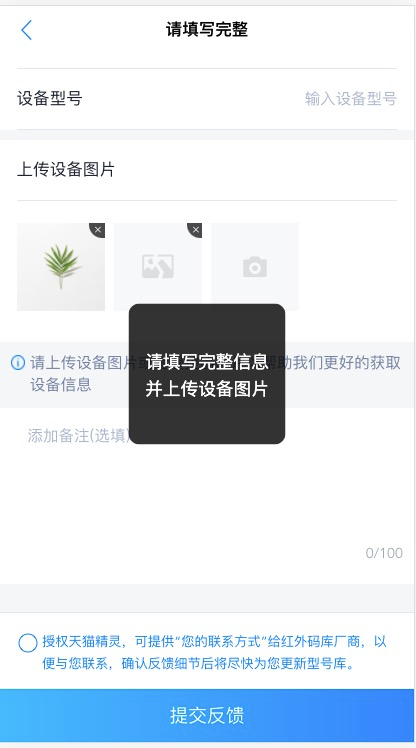
2、功能实现
Toast/index.js
import ToastVue from './toast.vue';var Toast = {};let ToastTpl = null;Toast.install = function (Vue) {Vue.prototype.$mytoast = (opts = {}) => {let defaultOpts = {text: '展示Toast', // 默认显示位置duration: 2500, // 持续时间toastSty: '',};for (let property in opts) {if (opts.hasOwnProperty(property) === true) {defaultOpts[property] = opts[property]; // 使用 options 的配置}}var options = JSON.parse(JSON.stringify(defaultOpts));if (!ToastTpl) {// 1、 创建构造器,定义好提示信息的模版// 2、创建实例,挂在到文档以后的地方ToastTpl = new ToastVue({el: document.createElement('div'),});}ToastTpl.show = true;//ToastTpl.text = options.text;//ToastTpl.type = options.type;//ToastTpl.toastSty = options.toastSty;for (var key in options) {if (options.hasOwnProperty(key) === true) {ToastTpl[key] = options[key];}}clearTimeout(this.time);document.body.appendChild(ToastTpl.$el); // 3、 把创建的实例添加到body中// 永不关闭if (options.duration === 'forever') {return;}this.time = setTimeout(() => {ToastTpl.show = false;if (options.callback) {options.callback(options);}}, options.duration);};};export default Toast;
Toast/toast.vue
<template><div class="vue-toast" v-show="show" :style="toastSty"><span v-html="text"></span></div></template><script>import Vue from 'vue';export default Vue.extend({name: 'TnToast',componentName: 'TnToast',data() {return {show: false,};},props: {text: {type: String,default: '这是toast',},type: {type: String,default: '',},toastSty: {type: String,default: '',},},});</script><style lang="scss" scoped>.vue-toast {position: fixed;box-sizing: border-box;left: 50%;top: 50%;transform: translate(-50%, -50%);width: 100px;height: 100px;padding: 15px;text-align: center;background: rgba(0, 0, 0, 0.8);border-radius: 10px;display: flex;justify-content: center;align-items: center;span {color: #fff;font-size: 16px;line-height: 25px;}}</style>
3、使用
main.js 中
import Toast from './components/MyToast/index.js';Vue.use(Toast);
this.$mytoast({text: '请填写完整信息并上传设备图片',duration: 1000,toastSty: 'width:157px;height:141px;'})
4、参考

若有收获,就点个赞吧
0 人点赞


