前言
官方Github地址:https://felangel.github.io/bloc/#/
在理解BLoC之前,最好先对 Stream 有基础了解。
Bloc的目的是将展示层与逻辑层拆分开,使flutter代码层次更清晰,易于测试和复用。
参考
- https://blog.csdn.net/yumi0629/article/details/82759447
- https://www.didierboelens.com/2018/08/reactive-programming—-streams—-bloc/
架构
Bloc的设计秉承了三个核心价值:
- 简洁
- 强大
- 可测试
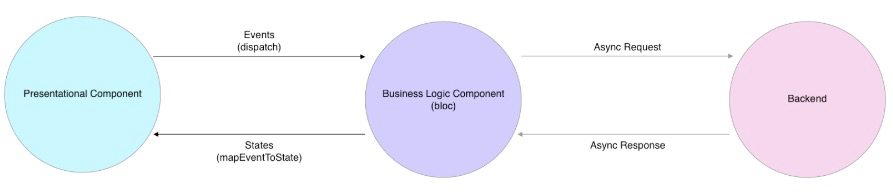
数据层(Data Layer)
数据层用于从一个或多个数据源获取或操作数据,数据层可以被分为两部分:
- Data Provider
- Repository
这一层,是应用的最底层,负责数据库交互、网络请求和其他的异步数据源操作。
Data Provider
Data Provider负责提供原始数据(raw data)。数据提供层通常会暴露简单的API执行CRUD操作。
class DataProvider {Future<RawData> readData() async {// Read from DB or make network request etc...}}
Repository
Repository层是一个或多个Data Provider与Bloc层交互的包裹器。
class Repository {final DataProviderA dataProviderA;final DataProviderB dataProviderB;Future<Data> getAllDataThatMeetsRequirements() async {final RawDataA dataSetA = await dataProviderA.readData();final RawDataB dataSetB = await dataProviderB.readData();final Data filteredData = _filterData(dataSetA, dataSetB);return filteredData;}}
如上面代码所示,repository layer可以与多个data providers交互,并在将结果提交给Business Logic层之前对数据进行转换。
逻辑层(Bloc Layer)
Bloc层主要职责是根据展示层输入的events反馈新的state。可以把Bloc层想象为一个介于UI层(Presentation Layer)和数据层之间的桥梁。bloc层获取由用户输入产生的evnets并与repository交互并生成新的,可以被展示层消费的新的state。
class BusinessLogicComponent extends Bloc {final Repository repository;Stream mapEventToState(event) async* {if (event is AppStarted) {yield await repository.getAllDataThatMeetsRequirements();}}}
逻辑层之间的通讯
Every bloc has a state stream which other blocs can subscribe to in order to react to changes within the bloc.
Blocs 可以依赖其他的 blocs 来响应自身状态的改变。
class MyBloc extends Bloc {final OtherBloc otherBloc;StreamSubscription otherBlocSubscription;MyBloc(this.otherBloc) {otherBlocSubscription = otherBloc.state.listen((state) {// React to state changes here.// Dispatch events here to trigger changes in MyBloc.});}@overridevoid dispose() {otherBlocSubscription.cancel();super.dispose();}}
展示层(Presentation Layer)
展示层负责根据bloc的状态渲染自身,同时,它也负责管理用户的输入及应用对应event的生命周期。
class PresentationComponent {final Bloc bloc;PresentationComponent() {bloc.dispatch(AppStarted());}build() {// render UI based on bloc state}}
核心理念
Events(事件)
Events are the input to a Bloc. They are commonly dispatched in response to user interactions such as button presses or lifecycle events like page loads.
事件是BLoC的输入,他们通常被(例如:button点击、页面加载这样的)用户操作所触发。
States(状态)
States are the output of a Bloc and represent a part of your application’s state. UI components can be notified of states and redraw portions of themselves based on the current state.
Transitions(转变)
当从一个状态(state)变成另外一种状态的这种改变称为Transition。一个Transition包含三部分:
- 当前状态 (current state)
- 触发状态改变的事件 (event)
- 下一个状态 (next state)
Streams(流)
Stream代表一系列的异步数据。
A stream is a sequence of asynchronous data.
Blocs(业务逻辑组件)
每个Bloc必须继承至bloc package的基础 Bloc 类。
import 'package:bloc/bloc.dart';class CounterBloc extends Bloc<CounterEvent, int> {// add codes here ...@overrideint get initialState => 0;@overrideStream<int> mapEventToState(CounterEvent event) async* {switch (event) {case CounterEvent.decrement:yield currentState - 1;break;case CounterEvent.increment:yield currentState + 1;break;}}}
- 每个Bloc必须定义一个初始 state。
- 每个Bloc必须实现基类的 mapEventToState 函数,这个函数将event作为输入的参数,且必须返回一个Stream类型的新的state。
- 可以在任何时机通过currentState属性访问当前的bloc state值。
- 每个Bloc(Business Logic Component)都有dispatch 方法,该方法通过event触发执行 mapEventToState函数。
onTransition
通过复写onTransition方法,可以在Bolc的state发生改变之前获取状态信息。Tip:
onTransitionis a great place to add bloc-specific logging/analytics
onError
通过复写 onError 方法,可以获取Bloc中产生的异常。
Tip:
onErroris a great place to add bloc-specific error handling.
BlocDelegate(Bloc委托)
使用Bloc的另外一个附带好处是,可以在同一个地方访问所有的 Transitions。如果希望响应所有的Transitions,可以创建一个BlocDelegate。
Flutter BLoC
BlocBuilder
BlocBuilder 是一个实现了 Bolc 和 builder 函数的 Flutter widget。BlocBuilder 与 StreamBuilder 很相似,但其拥有更为简洁的API,减少了大量模版代码的编写。
BlocProvider
BlocProvider 是能够通过 BlocProvider.of<T>(context) 向子组件提供bloc 的Flutter widget。BlocProvider 被当作注入组件使用。因此,单例的bloc可以被多个子组件共享。
MultiBlocProvider
BlocListener
MultiBlocListener

若有收获,就点个赞吧
0 人点赞


