1、动画
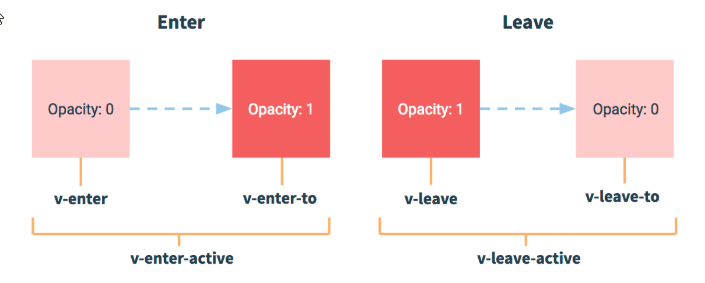
<template><div class="home"><transition><p v-show="isShow">hello world</p></transition><button @click="handleClick">toggle</button></div></template>
<script>export default {name: 'home',data(){return {isShow:true}},methods:{handleClick(){this.isShow = !this.isShow}}}</script>
Tip:scoped避免样式干扰
//注释掉的内容不需要关注Tip:scoped避免样式干扰<style scoped>/* .v-leave,.v-enter-to{opacity: 1;} */.v-leave-active,.v-enter-active{transition: opacity 1s;}.v-leave-to,.v-enter{opacity: 0;}</style>
2、将动画封装成插槽
//组件Fade.vue<template><transition><slot name="fade"></slot></transition></template><script>export default {name:"Fade"}</script><style lang="less" scoped>.v-leave-active,.v-enter-active{transition: opacity 2s;}.v-enter,.v-leave-to{opacity: 0;}</style>
//使用<template><div class="about"><fade><h1 slot="fade" v-show="isShow">This is an about page</h1></fade></div></template><script>import Fade from '../components/Fade'export default {name: 'home',data(){return {isShow:true,isPlay:false}},components:{Fade}}</script>

若有收获,就点个赞吧
0 人点赞


