1 数据约束 (掌握)
1.1 默认值约束
添加数据时,如果针对已设置默认值字段没有赋值,则使用设置的默认值赋值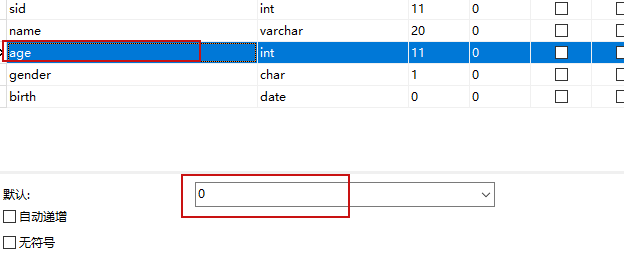
1.2 非空
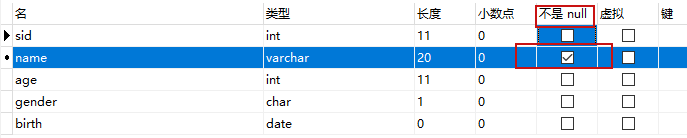
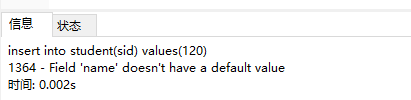
1.3唯一


1.4 自增
自增值不能单独使用,一般配合主键或者唯一索引使用
插入数据时,一般不用给自增的字段赋值,每次插入数据时,自增值自动+1
mysql中记录了表的自增字段的最大值,即使删除数据,再次插入,自增字段的值根据mysql记录的最大值+1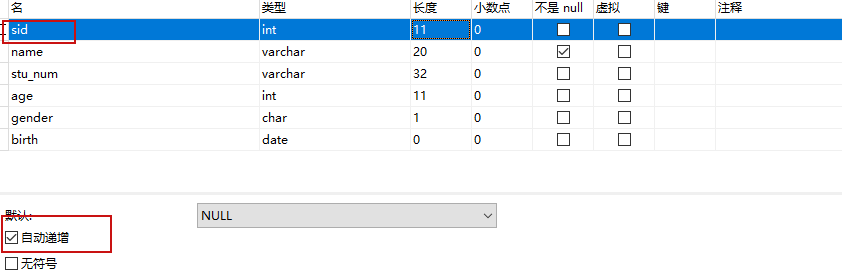
1.5主键
用来标识唯一的记录
很多时候使用自增值的字段做主键
主键相当于非空+唯一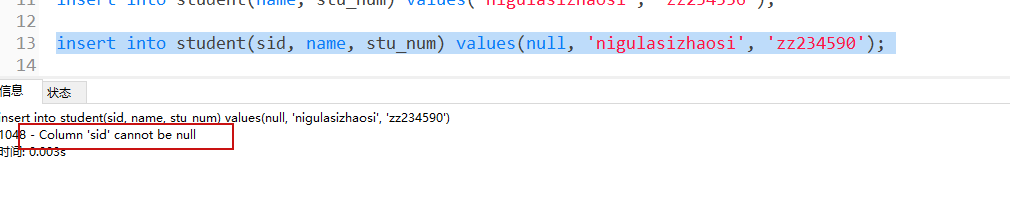
可以给多个字段设置主键,称为联合主键。插入数据时,联合主键的多个字段值都相同时,才表示相同记录
1.6 外键 (了解)
通过外键可以将两个表关联起来,外键是被其他表的字段约束的字段
2 数据库设计
2.1 三大范式
第一范式:数据表中的字段要保持原子性,即每个字段都是不可再分的最小数据单元
第二范式:满足第一范式的基础上,表中其他字段要和主键字段有关联
第三范式:满足第二范式的基础上,表中其他字段要和主键字段有直接关联
注意:设计表时,有些做法并不一定满足范式的要求。
2.2 表之间的关系
一对一关系
比如居民表和身份证信息表
一个居民对应一个唯一的身份证信息,一个身份证信息对应一个唯一的居民信息
一对多/多对一关系
一个部门下有多个员工,多个员工属于一个部门
多对多关系
一个学生可以选多门不同的课,一门课可以多个不同的学生选
多对多的关系都会有一个中间表,来连接其他两张表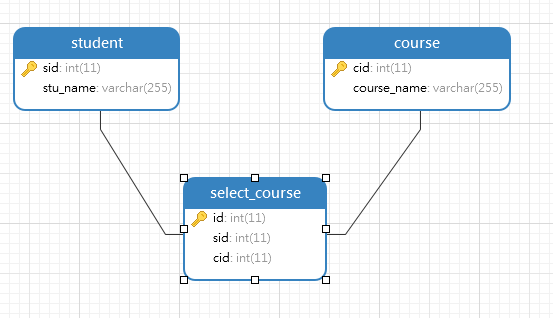
2.3 多表查询(重点)
2.3.1内连接
只有关联的数据才能查出
select emp.emp_name, dept.dept_name from employee emp inner join department dept on emp.dept_id=dept.did where emp.emp_name=’Jordan’ |
|---|
涉及三张表的内连接查询
| — 已知学生名字,要查询课程名称 select c.course_name from student s inner join select_course sc on s.sid=sc.sid inner join course c on c.cid=sc.cid where s.stu_name=’lisi’ |
|---|
2.3.2左外连接
针对两张表,先出现的表称为左表,后出现的表称为右表
左外连接,左表中的数据都会查询出来,如果右表没有关联的数据,显示为null
| select * from department dept left join employee emp on emp.dept_id=dept.did |
|---|
2.3.3右外连接
与左外连接类似
| select * from employee emp right join department dept on emp.dept_id=dept.did |
|---|
2.3.4自连接
同种性质的数据,而且数据间有层级关系,就可以设计成自连接表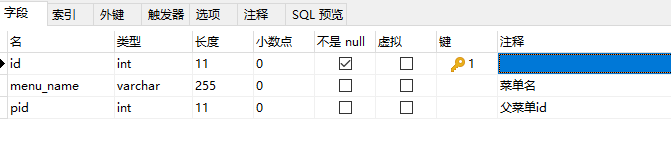

| select c.id, c.menu_name from menu p inner join menu c on c.pid=p.id where p.menu_name=’文件’ |
|---|
2.3.5 嵌套查询 (了解)
将一个查询块嵌套在另一个查询块的 WHERE 子句或 HAVING 短语的条件中的查询称为嵌套查询,嵌套的查询称为子查询
常用的关键字(谓词):in/any/all/exists等
有些嵌套查询的做法可以用其他sql语句实现,比如 in 可以用 or替代
| — 查询10楼的部门有哪些员工 select did from department where floor=10; — dept_id=1 or dept_id=3 — in 本质上也是范围查询,范围可能不是连续的 select from employee where dept_id in (1, 3); select from employee where dept_id in (select did from department where floor=10) select from employee where dept_id not in (select did from department where floor=10) — 查询比篮球事业部其中任意一个员工年龄都大的员工记录(最小的大) select e.age from department d inner join employee e on e.dept_id=d.did where d.dept_name=’篮球事业部’; — > Any 比最小的大 select from employee where age > Any ( select e.age from department d inner join employee e on e.dept_id=d.did where d.dept_name=’篮球事业部’ ) — > All 比最大的大 select from employee where age > All ( select e.age from department d inner join employee e on e.dept_id=d.did where d.dept_name=’篮球事业部’ ) — 查询部门和员工存在有关联的员工数据 — 1 Jordan 1 23 ,select did from department where department.did=1 select from employee where EXISTS (select did from department where department.did=employee.dept_id) |
|---|
3 事务
逻辑上的一组操作,组成这组操作的各个单元,要不全部执行成功,要不全部不成功。
事务的语句:
start transaction 开启事务
commit 提交事务
rollback 回滚事务
事务的特性:
ACID
原子性、一致性、隔离性、持久性
事务操作:
| mysql> start transaction; Query OK, 0 rows affected (0.00 sec) mysql> select from account; +——+—————+————+ | id | name | money | +——+—————+————+ | 1 | zhangsan | 100000 | | 2 | lisi | 10000 | +——+—————+————+ 2 rows in set (0.00 sec) mysql> update account set money=money-1000 where id=1; Query OK, 1 row affected (0.02 sec) Rows matched: 1 Changed: 1 Warnings: 0 mysql> select from account; +——+—————+———-+ | id | name | money | +——+—————+———-+ | 1 | zhangsan | 99000 | | 2 | lisi | 10000 | +——+—————+———-+ 2 rows in set (0.00 sec) mysql> update account set money=money+1000 where id=2; Query OK, 1 row affected (0.00 sec) Rows matched: 1 Changed: 1 Warnings: 0 mysql> select from account; +——+—————+———-+ | id | name | money | +——+—————+———-+ | 1 | zhangsan | 99000 | | 2 | lisi | 11000 | +——+—————+———-+ 2 rows in set (0.00 sec) mysql> commit; Query OK, 0 rows affected (0.00 sec) —————————————————————————————————————————————————- mysql> start transaction; Query OK, 0 rows affected (0.00 sec) mysql> update account set money=money-1000 where id=1; Query OK, 1 row affected (0.00 sec) Rows matched: 1 Changed: 1 Warnings: 0 mysql> select from account; +——+—————+———-+ | id | name | money | +——+—————+———-+ | 1 | zhangsan | 98000 | | 2 | lisi | 11000 | +——+—————+———-+ 2 rows in set (0.00 sec) mysql> update1 account set money=money+1000 where id=2; ERROR 1064 (42000): You have an error in your SQL syntax; check the manual that corresponds to your MySQL server version for the right syntax to use near ‘update1 account set money=money+1000 where id=2’ at line 1 mysql> select from account; +——+—————+———-+ | id | name | money | +——+—————+———-+ | 1 | zhangsan | 98000 | | 2 | lisi | 11000 | +——+—————+———-+ 2 rows in set (0.00 sec) mysql> rollback; Query OK, 0 rows affected (0.03 sec) mysql> select from account; +——+—————+———-+ | id | name | money | +——+—————+———-+ | 1 | zhangsan | 99000 | | 2 | lisi | 11000 | +——+—————+———-+ 2 rows in set (0.00 sec) |
|---|
4 索引
索引是一种快速查询机制,一般,使用索引的情况下可以大大提升查询效率
索引类型:普通索引、唯一索引、主键索引、全文索引等
一般什么情况下建索引:
经常查询的表;记录很多的表;where 后经常使用的查询字段
索引不是越多越好,索引的缺点:
占存储空间;增删改的时候需要重构索引,影响执行效率
我们一般使用InnoDB的存储引擎,该引擎默认使用B+tree索引
B+数索引(了解)
参考课件中的图,更方便理解
你知道哪些存储引擎?根据知道的引擎做一个简单的比较?
InnoDB/Memory/MyISAM
InnoDB 支持事务、支持行级锁、支持外键

若有收获,就点个赞吧
0 人点赞


