MySQL
1. 准备工作
1.1 配置环境变量
C:\Program Files\MySQL\MySQL Server 5.7\bin
将MySQL安装目录下bin文件夹配置到环境变量path中
1.2 设置服务状态
徽标 + R 输入 services.msc 打开系统服务界面
将MySQL57服务右键设置为自动启动
1.3 测试连接
mysql -u root -p9999 这种方式将密码以明文的方式展示,不安全
mysql -u root -p 回车 然后输入密码 推荐使用这种方式
mysql -h 123.45.2.120 -u root -p 可以使用-h 添加其他主机地址 如果不指定则默认连接本机
ipconfig查看本机地址
ping + 主机地址查看本机与对应地址网络是否通畅
shutdown -i 呼出远程关机对话框
shutdown - a 取消远程关机
2. SQL语句分类
DDL 数据定义语言 用于创建,修改表、数据库等
DML 数据操纵语句 比如 增 删 改
DQL 数据查询语句 查询
DCL 数据控制语句 比如 授权 提交 回滚等
3. DDL 定义语句
3.1 创建数据库
创建数据库 CREATE DATABASE [IF NOT EXISTS] 数据库名;
删除数据库 DROP DATABASE [IF EXISTS] 数据库名;
查看数据库 SHOW DATABASES;
使用数据库 USE 数据库名;
3.2 创建表
创建表 create table city( cid int not null comment ‘城市编号’, cname varchar(6) not null comment ‘城市名称’ );
显示表结构 desc city;
显示表创建语句 show create table city;
4. 列的类型
int 对应java中的int类型 可以通过unsigned设置无符号
double 对应java中的double
char 固定长度字符串
varchar 可变长字符串
datetime 年月日时分秒
# 创建表create table stu(studentNo int(4) not null comment '学号',loginPwd varchar(20) comment '登录密码',studentName varchar(20) comment '学生姓名',sex tinyint(1) comment '性别取值0女或者1男',gradeId int(11) comment '班级编号',phone varchar(50) not null comment '联系方式',address varchar(255) not null comment '地址',bornDate datetime comment '出生日期',email varchar(50) not null comment '邮箱',identityCard varchar(18) comment '身份证号');
5. 列的属性
UNSIGNED
无符号的
声明该数据列不允许负数ZEROFILL
0填充的
不足位数的用0来填充,如 int(3),5则为 005AUTO_INCREMENT
自动增长的,每添加一条数据,自动在上一个记录数上加1
通常用于设置主键,且为整数类型
可定义起始值和步长NULL 和 NOT NULL
默认为NULL,即没有插入该列的数值
如果设置为NOT NULL,则该列必须有值DEFAULT
默认的
用于设置默认值
例如,性别字段,默认为“男”,否则为“女”;若无指定该列的值,则默认为“男”的值
# 创建表
create table person(
    pid int primary key auto_increment comment '主键',
    pname varchar(20) not null comment '名字',
    psex char(1) default '男',
    page int unsigned not null comment '年龄',
    pnum int(5) zerofill comment '测试0填充'
);


select * from person;
6. 表的属性
表的注释 create table a( aid int, aname varchar(10) )comment ‘表a’;
表的引擎 create table b( bid int )engine=myisam;
表的编码 create table c( cid int )charset=gbk;
7. MyISAM和InnoDB的区别?
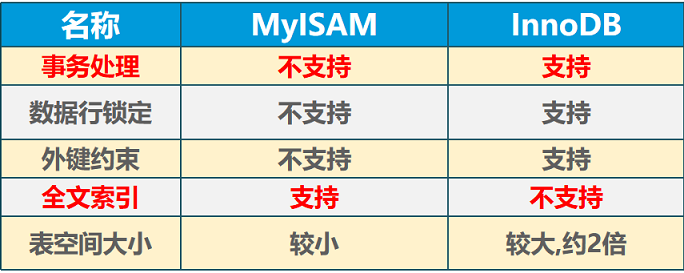
8. 表对应文件
表对应文件在Program Data 文件夹下 Data文件夹中
此文件夹默认隐藏,需要手动显示
C:\ProgramData\MySQL\MySQL Server 5.7\Data\2114
9. 修改表
# 修改表名
alter table a rename as abc;

# 添加字段
alter table abc add asize int not null comment '新添加的一列';

# 修改列的类型 和 属性(不能改列名)
alter table abc modify asize varchar(20) not null comment '修改类型为varchar';

# 修改列的名称 类型 和 属性
alter table abc change asize size int(3) not null comment '修改为int类型';

# 删除某一列
alter table abc drop size;
10.删除表
drop table if exists abc;
11.外键
我们可以使用外键来使两个表产生关联关系
# 创建部门表
# 主键 primary key 不能为空 不能重复

# 主表  父表
create table dep(
    did int primary key auto_increment comment '部门编号',
    dname varchar(20)  not null comment '部门名称'
);

# 从表 子表
create table emp(
    eid int primary key auto_increment comment '员工编号',
    ename varchar(10) not null comment '员工名称',
    eage int unsigned not null comment '员工年龄',
    depid int not null comment '关联部门表中的编号'
);

# 外键 foreign key
# 外键命名规范 FK_开头 后边加上要指定外键的列名 即可
alter table emp add constraint FK_depid foreign key(depid) references dep(did);

# 删除外键
# 因为在创建外键的同时  mysql会自动添加一个索引 index  所以 删除外键 也要删除 index

# 删除外键
alter table emp drop foreign key FK_depid;


# 删除索引
alter table emp drop index FK_depid;
也可以在创建表的同时 创建外键约束
实际开发中 我们不使用物理外键 而是使用逻辑外键
# 创建部门表
# 主键 primary key 不能为空 不能重复

# 主表  父表
create table dep(
    did int primary key auto_increment comment '部门编号',
    dname varchar(20)  not null comment '部门名称'
);

# 从表 子表
# 创建表的同时 创建外键
create table emp(
    eid int primary key auto_increment comment '员工编号',
    ename varchar(10) not null comment '员工名称',
    eage int unsigned not null comment '员工年龄',
    depid int not null comment '关联部门表中的编号',
    constraint FK_depid foreign key(depid) references dep(did)
);

# 删除索引和外键
alter table emp drop foreign key FK_depid;

alter table emp drop index FK_depid;
12. DML
12.1 添加
添加数据使用insert into + 表名 (列名) values (值);
# 添加数据
# 方式1
insert into emp(eid,ename,eage,depid) values(2,'广坤',18,2);

# 方式2
insert into emp(eage,ename,depid) values(19,'刘能',2);

# 方式3
insert into emp values(4,'小宝',20,1);

# 方式4
insert into emp  values(5,'富贵',20,1),(6,'富贵',20,1),(7,'富贵',20,1),(8,'富贵',20,1);
12.2 删除
删除数据使用delete from + 表名 + where 条件
# 删除数据
# 删除编号为5的人
delete from emp where eid = 5;

# 删除名字为富贵的人
delete from emp where ename = '富贵';

# 删除名字为赵四 并且年龄为17

delete from emp where ename = '赵四' and eage = 17;

# 删除所有的数据  所以删除通常要加条件
delete from emp;
12.3 修改数据
update + 表名 + set 列名 = 值 ,列名 = 值 where 条件;
# 修改数据
# update + 表名 + set 列名 =  值 ,列名 =  值  where 条件;


# 将人事部 改为 人力资源部
update dep set dname = '人力资源部' where did = 1;


# 将员工编号为1 的人 名字改为 刘能 年龄 改为 20
update emp set ename = '刘能',eage = 20 where eid = 1;
13.DQL
数据查询语句
select语句 使用频率最高的SQL语句 最复杂的SQL语句
13.1 基本查询
# 查询
# * 表示所有的列
select * from emp;

# 查询名字信息
select ename from emp;

# 查询名字和年龄
select ename,eage from emp;
13.2 as关键字
# 给列取别名  使用as关键字

select ename as '员工姓名' , eage as '员工年龄' from emp;

# as关键字可以省略 但是不推荐省略
select ename  '姓名' , eage  '年龄' from emp;


# as关键给表取别名
select e.eage,e.ename,e.depid   from emp as e;
13.3 去重复
# 使用distinct 关键字 去除重复记录 (数据)
select distinct ename from emp;
13.4 where条件
# and   和  &&
# 查询名字为  赵四 并且 年龄为 19 的人的 地址 和 邮箱信息

select ename ,address,email from emp where ename = '赵四' && eage = 19;

# or 和  ||
# 查询部门编号 为 1  或者 年龄为 17岁的人员信息
select * from emp where depid = 1 || eage = 17;

# is  not null  或者  is null  查询身份证号不为空的人员信息
select * from emp where identity is  null;

# 查询名字 不为赵四的人的信息
select * from emp where ename!= '赵四';


# between and  查询年龄在 18 ~ 20 之间的人员信息
select * from emp where eage between 18 and 20;
13.5 模糊查询
# like  模糊查询
# 查询名字中带'四'的人员信息
# % 表示匹配 0个 或者 多个 任意字符
select * from emp where ename like '%四%';

# 查询名字以四结尾的人的信息
select * from emp where ename like '%四';

# 查询名字以 四 开头的人信息
select * from emp where ename like '四%';

# 查询名字 以赵开头 并且 名字为三个字的人的信息
# _  一个 下划线表示一个 任意字符

select * from emp where ename like '赵__';

# 查询 年龄 在  15,16,17,18  这些之中的

select * from emp where eage in(15,16,17,18);
14. 连接查询
等值连接
# 查询
select * from emp;

# 等值连接查询
select * from emp,dep where emp.depid =  dep.did;

# 指定具体的列来查询
select e.ename,e.eage,d.dname from emp as e,dep as d where e.depid =  d.did;
内连接
# 内连接查询 查询结果与等值连接相同
select * from emp inner join  dep on emp.depid = dep.did;
左外连接
# 外连接
# 左外连接  以左表为主表 右表不匹配的行 以null填充
select * from emp left join  dep on emp.depid = dep.did;
右外连接
# 右外连接  以右表为主表  左表不匹配的 以null填充
select * from emp right join  dep on emp.depid = dep.did;
三表连接查询
# 三表连接查询
select * from emp,dep,city where emp.depid = dep.did and emp.cityid = city.cid;

select * from emp inner join dep inner join  city on emp.depid = dep.did and emp.cityid = city.cid;
自连接
CREATE TABLE `course` (
  `cid` int(11) NOT NULL AUTO_INCREMENT,
  `profession` varchar(255) DEFAULT NULL,
  `cname` varchar(255) DEFAULT NULL,
  PRIMARY KEY (`cid`)
) ENGINE=InnoDB AUTO_INCREMENT=11 DEFAULT CHARSET=utf8;
# 正常查询
select * from course;

# 自连接 一个表当做两个表来用
select c1.profession,c2.cname from course as c1 , course as c2 where c1.cid = c2.profession;
15. 排序
将员工信息 按照年龄排序 升序
在 字段 之后书写 asc 表示升序 默认就为升序 所以asc可以不写
select * from emp order by eage asc;

# desc 表示降序

select * from emp order by eage desc;
16. 分页
limit 分页
limit m,n m表示从m+1条数据开始显示 n表示显示n条数据
# 显示前三条数据
select * from emp limit 0,3;

select * from emp limit 3,3;

select * from emp limit 6,3;

# limit之后跟一个参数 表示显示前几条
select * from emp limit 6;
17. 常用函数
# mysql函数
# 系统函数
select version();

# 日期函数
select now();

# 字符串函数
select CONCAT('a','b','c');

# 聚合函数 (统计函数)
# count(1) 表示统计当前表第一列
select count(1) from emp;


# sum 求和 计算所有员工年龄总和
select sum(eage) as '年龄总和' from emp;

# avg 求员工平均年龄
select avg(eage) as '平均年龄' from emp;

# max 求最大值
select max(eage),ename from emp;


# 查询年龄最大的员工信息
select * from emp where eage in (select max(eage) from emp);

# min 求最小值
select min(eage) from emp;
18. 分组
# 分组 可以统计的是整个组的数据 不能再算个人的数据
# 按照部门分组 计算年龄总和
select sum(eage),depid from emp group by depid;

# 按照部门分组 计算每个部门的人数
select count(1),depid from emp group by depid;

# having通常结合 group by 分组关键字使用 用来过滤分组以后的数据
# 按照部门分组 计算每个部门的人数   统计部门人数大于3的部门

select count(1),depid from emp group by depid having count(1) > 3;

# 查询名字为赵四的人
select * from emp where ename = '赵四';

select * from emp having ename = '赵四';
19. 事务
事务 相当于将多条sql语句 编写在一起 用来完成一个完整操作
事务四大原则 ACID特性(原则)
A Atomicity 原子性:一个事务相当于一个原子 是不能拆分的 要么都执行 要么都不执行
C Consistency 一致性:是指事务执行前后的数据要保持一致 数据不能凭空消失
I Isolation 隔离性:事务执行中的数据 其他事务是不能访问的
D Durability 持久性:通过事务提交的数据 将永久持久化到数据库
事务相当于将sql语句 进行了封装 如果一切按照预期执行 那么就刷新到硬盘
如果有问题 就回滚到最初的状态
create table  accounta(
    aid int not null,
    money int not null
);

create table  accountb(
    bid int not null,
    money int not null
);

# 开启事务  关闭自动提交
start transaction;

update accounta set money = money - 1000 where aid = 1;

update accountb set money = money + 1000 where bid = 1;

commit; # 执行commit  事务会自动结束

rollback; # 执行rollback 事务会自动结束


select * from accounta;

select * from accountb;
20. 授权
# grant 授权
# 创建用户
create user 'zhaosi';

# 创建用户并且指定密码
create user 'guangkun' identified by 'admin1230';

# 授予查询 添加权限 给 guangkun用户  在  2114数据库所有表
grant select,insert on `2114`.* to 'guangkun';

grant insert on `2114`.* to 'guangkun';

# 撤销 guangkun用户 添加权限 针对 2114数据库 所有表
revoke insert on `2114`.* from 'guangkun';

# 授予所有的权限 对 guangkun用于  针对 2114数据库
grant all on `2114`.*  to 'guangkun';

# 删除用户
drop user 'guangkun';

drop user 'zhaosi';

若有收获,就点个赞吧
0 人点赞


