[toc]
MySQL
1. 为什么要使用数据库
如果采用文件方式保存项目运行所需数据,有什么弊端???1. 占用空间太大2. 文件同时操作,同步操作很差3. 不安全4. 文件没有明确的规范,无法规范化的完成增删改查操作。项目是对于数据持久化存储有明确的需求。用户的基本信息,浏览记录,个人偏好,订单信息... 都需要保存!!!这里我们就需要DBMS 系统 Database Manager System
2. 数据库介绍
关系型数据库
    Oracle MySQL DB2 SQL Server

非关系型数据库
    Redis MongoDB Hive MemoryCache

数据库整体的结构

3. MySQL有多牛皮
世界上最大的数据库服务器提供商 Oracle 贵,一般人用不起。
MySQL作者 三个酒鬼 瑞X。【开源免费】【免费开发社区】

给MySQL加插件
    InnoDB 划时代的插件。
目前 MySQL 版权和更新都是有 Oracle 主导。
MySQL Version 5.7 5.5 5.6 目前的最新版本 8

MySQL 性能很彪悍。美国航母管理物资使用的就是MySQL数据库。
4. SQL概述
    SQL(i/ˈɛs kjuː ˈɛl/或聆听i/ˈsiːkwəl/,Structured Query Language:结构化查询语言)是一种特定目的编程语言,用于管理关系数据库管理系统(RDBMS),或在关系流数据管理系统(RDSMS)中进行流处理。
    SQL基于关系代数和元组关系演算,包括一个数据定义语言和数据操纵语言。SQL的范围包括数据插入、查询、更新和删除,数据库模式创建和修改,以及数据访问控制。尽管SQL经常被描述为,而且很大程度上是一种声明式编程(4GL),但是其也含有过程式编程的元素。
    SQL是对埃德加·科德的关系模型的第一个商业化语言实现,这一模型在其1970年的一篇具有影响力的论文《一个对于大型共享型数据库的关系模型》中被描述。尽管SQL并非完全按照科德的关系模型设计,但其依然成为最为广泛运用的数据库语言。
    SQL在1986年成为美国国家标准学会(ANSI)的一项标准,在1987年成为国际标准化组织(ISO)标准。此后,这一标准经过了一系列的增订,加入了大量新特性。虽然有这一标准的存在,但大部分的SQL代码在不同的数据库系统中并不具有完全的跨平台性。
5. SQL语句
5.1 数据库基本操作
-- 数据库连接
cmd > mysql -hlocalhost -uroot -p123456
-- mysql 明确当前操作的数据库为MySQL数据库,或者是告知命令提示符,目前启动的程序是哪一个程序。
-- -h 数据库软件所在的服务器【IP地址】,域名和主机名。如果是本机localhost可以省略
-- -u 用户名,连接数据库对应的用户名,可以有对应的权限控制。root 最高权限用户。DBA or Leader
-- Database Administrator 数据库管理工程师
-- -p 密码 password

-- 本机操作
cmd > mysql -uroot -p
Enter password: ******

-- 展示当前数据库服务器所有的数据库
mysql > show databases;

-- 创建数据库
mysql > create database javaee2113;

-- 查看数据库创建流程和部分数据 【注意】CHARACTER SET utf8
mysql > show create database javaee2113;
# +------------+---------------------------------------------------------------------+
# | Database   | Create Database                                                     |
# +------------+---------------------------------------------------------------------+
# | javaee2113 | CREATE DATABASE `javaee2113` /*!40100 DEFAULT CHARACTER SET utf8 */ |
# +------------+---------------------------------------------------------------------+

-- 删库
mysql > drop database javaee2113;

-- 选择数据表操作对应的数据库是哪一个
mysql > use javaee2113;

-- 创建数据表  table
mysql > create table student
(
    # id 是字段名,int为数据类型,对应Java中的int类型
    id int,
    # name 是字段名, varchar是可变长字符串,对应Java中的String类型
    # 32 表示当前 varchar允许的最多字符个数为32个,用户使用几个,提供几个。
    name varchar(32),
    # gender 是字段名,性别 tinyint = 可以转换为 Java中的boolean
    gender tinyint(1),
    # info  是字段名 text 长文本,对应Java的String类型
    info text
);

-- 查看数据库表结构
mysql > desc student;
+--------+-------------+------+-----+---------+-------+
| Field  | Type        | Null | Key | Default | Extra |
+--------+-------------+------+-----+---------+-------+
| id     | int(11)     | YES  |     | NULL    |       |
| name   | varchar(32) | YES  |     | NULL    |       |
| gender | tinyint(1)  | YES  |     | NULL    |       |
| info   | text        | YES  |     | NULL    |       |
+--------+-------------+------+-----+---------+-------+

-- 查看当前数据库中的所有数据表
mysql > show tables;

-- 删除数据表
mysql > drop table student;

-- 退出数据库
mysql > exit;
5.2 修改表结构 alter
-- 一般情况下不会使用,从项目的设计初期,整个表结构和项目结构已明确,很少出出现
-- 修改表结构情况。如果需要修改,基本上是 DBA 或者 leader 来完成。
-- 通常情况下,会使用工具来完成。

-- 1. 添加字段到指定表当前 tips: 默认添加到数据表中最后一个字段
-- float(10, 2) 数据整体位数为10位,要求保留两位小数 最大数据 99999999.99
alter table student add salary float(10, 2);

-- 2. 指定位置添加字段 在 name 字段之后添加 age 字段
alter table student add age int after name;

-- 3. 删除字段
alter table student drop salary;

-- 4. 修改字段 modify change
-- modify 修改字段的数据类型
alter table student modify name varchar(64);
-- change 替换指定字段为字段数据内容,可以修改字段名和数据类型
alter table student change info description varchar(255);
5.3 添加数据 insert 操作
-- 1. 规规矩矩
-- SQL中字符或者字符串使用单引号
insert into student(id, name, age, gender, description)
values(1, '苟磊', 16, 0, '航海中路简配丐版圆润彭于晏');
-- Query OK, 1 row affected (0.00 sec) 操作成功,数据表一行受到影响

-- 2. 偷工减料的规规矩矩
-- tips: 省略字段名,当时values中数据内容必须严格对照字段要求
insert into student values(2, '大哥', 15, 1, '千锋郑州最美班主任');
insert into student values(3, 15, 1, '千锋郑州最美班主任');
-- ERROR 1136 (21S01): Column count doesn't match value count at row 1

-- 3. 要啥给啥 【最常用】
insert into student(id, name, age) values(3, '二贝', 12);

insert into student(id, name, age,gender,description) values(4, '狗鸽', 16, 0, '航海中路彭于晏');
insert into student(id, name, age,gender,description) values(5, '臀哥', 16, 0, '航海中路彭于晏');
insert into student(id, name, age,gender,description) values(6, '卤蛋', 16, 0, '航海中路彭于晏');
insert into student(id, name, age,gender,description) values(7, '二贝', 14, 0, '千峰最二');
insert into student(id, name, age,gender,description) values(8, '牛魔王', 1600, 0, '红孩儿他爹');
insert into student(id, name, age,gender,description) values(9, '哪吒', 1500, 0, '三头六臂');
insert into student(id, name, age,gender,description) values(10, '木吒', 160, 0, '哪吒他哥');
insert into student(id, name, age,gender,description) values(11, '金吒', 161, 0, '哪吒他大哥');
insert into student(id, name, age,gender,description) values(12, '孙悟空', 1600, 0, '齐天大圣');
insert into student(id, name, age,gender,description) values(13, '猪八戒', 1670, 0, '猪刚鬣');
insert into student(id, name, age,gender,description) values(14, '沙僧', 3000, 0, '苦行僧');
insert into student(id, name, age,gender,description) values(15, '唐三藏', 30, 0, '迂腐和尚');
insert into student(id, name, age,gender,description) values(16, '白骨精', 1000, 0, '三打白骨精');
insert into student(id, name, age,gender,description) values(17, '哮天犬', 160, 0, '黑狗');
insert into student(id, name, age,gender,description) values(18, '二郎神', 1678, 0, '三只眼');
insert into student(id, name, age,gender,description) values(19, '观音', 16000, 0, '收服红孩儿');
insert into student(id, name, age,gender,description) values(20, '降龙罗汉', 1690, 0, '伏虎罗汉');
5.4 修改/更新数据 update 【慎用】
-- 在没有给予任何数据约束的情况下,会直接修改整个数据表的所有匹配内容
update student set name = '狗鸽';

-- 删除所有数据
delete from student;

-- 给予条件修改对应字段内容
-- 修改 id 为 7 对应数据行中的字段 name 数据 改为 肉松小贝
update student set name = '肉松小贝' where id = 7;

-- 同时修改多个字段
update student
set name = '蛋总', age = 15, description = '航海中路吴彦祖'
where id = 6;
5.4 删除数据 delete 【慎用】
-- 没有任何条件约束情况下,会清除数据表中所有内容。
delete from student;

-- 限制条件,进行删除数据行操作
delete from student where id = 1;
delete from student where id > 5;
delete from student where name = '狗鸽';
5.5 事务处理 【存档点】
-- 关闭SQL语句自动提交.autocommit默认为1,SQL语句提交直接对数据表数据进行永久性操作
-- autocommit 为 0. 在没有触发提交操作之前,所有的SQL语句操作都是未确认的临时操作。
set autocommit = 0;

-- 关闭事务操作,开启自动提交
set autocommit = 1;

-- 回滚,撤销 set autocommit = 0 or commit; 到 rollback 之间的所有SQL语句操作
rollback;

-- 提交 set autocommit = 0 or rollback; 到 commit 所有SQL语句
-- commit 操作不会影响 autocommit 数据
-- 需要关闭事务,手动 set autocommit = 1;
commit
6. 数据约束
6.1 默认值 default
-- 使用default给予指定字段默认数据,在用于添加操作过程中,没有给予对应字段数据,该字段数据内容采用默认值
create table person1
(
    id int,
    name varchar(32),
    country varchar(32) default '中华人民共和国'
);

desc person1;
# +---------+-------------+------+-----+-----------------------+-------+
# | Field   | Type        | Null | Key | Default               | Extra |
# +---------+-------------+------+-----+-----------------------+-------+
# | id      | int(11)     | YES  |     | NULL                  |       |
# | name    | varchar(32) | YES  |     | NULL                  |       |
# | country | varchar(32) | YES  |     | 中华人民共和国           |       |
# +---------+-------------+------+-----+-----------------------+-------+

-- 插入数据操作演示
-- 没有赋值带有 default 修饰字段内容,字段数据采用默认值
insert into person1(id, name) values(1, '苟磊');
-- 给予带有 default 修饰的字段数据,当前对应字段采用 插入数据操作赋值数据
insert into person1(id, name, country) values (2, '大哥', 'PRC');
6.2 非空 not null
-- 使用 not null 修饰的字段,不可以为 null, null在数据库中是没有数据,

create table person2
(
    id      int not null, -- 非空 NN
    name    varchar(32),
    country varchar(32) default '中华人民共和国'
);
# +---------+-------------+------+-----+-----------------------+-------+
# | Field   | Type        | Null | Key | Default               | Extra |
# +---------+-------------+------+-----+-----------------------+-------+
# | id      | int(11)     | NO   |     | NULL                  |       |
# | name    | varchar(32) | YES  |     | NULL                  |       |
# | country | varchar(32) | YES  |     | 中华人民共和国          |       |
# +---------+-------------+------+-----+-----------------------+-------+

-- 添加数据演示
-- 正确情况,给予 id 字段合理数据
insert into person2(id, name)
values (1, '磊锅');

-- [HY000][1364] Field 'id' doesn't have a default value
-- id 字段没有默认值,需要提供数据,不可以为null
insert into person2(name)
values ('磊鸽');

-- [23000][1048] Column 'id' cannot be null
-- id 不可以赋值为 null
insert into person2(id, name)
values (null, '磊鸽');

select *
from person2;
6.3 唯一 unique
-- 唯一字段,在当前数据表中,不可以重复

create table person3
(
    id      int unique,
    name    varchar(32) not null,
    country varchar(32) default '中国'
);

# +---------+-------------+------+-----+---------+-------+
# | Field   | Type        | Null | Key | Default | Extra |
# +---------+-------------+------+-----+---------+-------+
# | id      | int(11)     | YES  | UNI | NULL    |       |
# | name    | varchar(32) | NO   |     | NULL    |       |
# | country | varchar(32) | YES  |     | 中国     |       |
# +---------+-------------+------+-----+---------+-------+

-- 添加 SQL 语句演示
insert into person3(id, name, country)
values (1, '狗鸽', 'PRC');

-- [23000][1062] Duplicate entry '1' for key 'id'
-- 无法添加数据行,因为id字段已经存在存储数据为 1 的数据行
insert into person3(id, name, country)
values (1, '苟磊', '中华人民共和国');

-- null 不作为唯一数据判定
insert into person3(id, name, country)
values(null, '苟磊', '中华人民共和国');
insert into person3(id, name, country)
values(null, '吴某', '中华人民共和国');

select *
from person3;
6.4 主键 primary key
-- 非空 + 唯一 主键修饰字段不可以为空,并且在整个数据表中唯一
-- 主键修饰一般不会涉及到业务逻辑内容,例如 年龄,性别.
-- 主键可以用于修饰数据行唯一指定数据,例如 ID号,用户的手机号,用户的身份证号
create table person4
(
    id int primary key ,
    name varchar(32) not null ,
    country varchar(32) default '中华人民共和国'
);

# +---------+-------------+------+-----+-----------------------+-------+
# | Field   | Type        | Null | Key | Default               | Extra |
# +---------+-------------+------+-----+-----------------------+-------+
# | id      | int(11)     | NO   | PRI | NULL                  |       |
# | name    | varchar(32) | NO   |     | NULL                  |       |
# | country | varchar(32) | YES  |     | 中华人民共和国          |       |
# +---------+-------------+------+-----+-----------------------+-------+

create table person4
(
    id      int primary key,
    name    varchar(32) not null,
    country varchar(32) default '中华人民共和国'
);

insert into person4(id, name, country)
values (1, '狗鸽', '中国');

-- [23000][1062] Duplicate entry '1' for key 'PRIMARY'
-- 主键数据不可以重复!!!
insert into person4(id, name, country)
values (1, '苟磊', 'PRC');

-- [23000][1048] Column 'id' cannot be null
-- 主键数据不能为null!!!
insert into person4(id, name, country)
values (null, '苟磊', 'PRC');

select * from person4;
6.5 自增加 auto_increment
-- 自增加数据在添加数据行的过程中,针对于所修饰字段自动累加。
-- 自增加修饰字段必须是一个 key => unique primary key

create table person5
(
    id int primary key auto_increment,
    name varchar(32) not null,
    country varchar(32) default 'PRC'
);

# +---------+-------------+------+-----+---------+----------------+
# | Field   | Type        | Null | Key | Default | Extra          |
# +---------+-------------+------+-----+---------+----------------+
# | id      | int(11)     | NO   | PRI | NULL    | auto_increment |
# | name    | varchar(32) | NO   |     | NULL    |                |
# | country | varchar(32) | YES  |     | PRC     |                |
# +---------+-------------+------+-----+---------+----------------+


-- auto_increment 从 1 开始
insert into person5(name) values ('郭德纲');
insert into person5(name) values ('于谦');
insert into person5(name) values ('高峰');
insert into person5(name) values ('栾云平');

-- id 数据赋值为 7 同时会影响 id 自增加累计结果,下一个数据从8开始
insert into person5(id, name) values (7, '郭麒麟');
-- 阎鹤祥 ID为8
insert into person5(name) values ('阎鹤祥');

-- id 数据赋值为5 按照主键要求,id不可以重复。5没有对应数据,可以添加
-- 5 小于目前自增加累计数据情况,不影响目前的自增加累加
insert into person5(id, name) values(5, '岳云鹏');
-- 孙越 id 为 9
insert into person5(name) values('孙越');

delete from person5 where id = 9;
insert into person5(id, name) values(6, '孙越');

-- delete 操作对于自增长数据累加没有影响。按照之前的累加结果进行赋值操作。
-- 张鹤伦 id 为 10
insert into person5(name) values ('张鹤伦');
insert into person5(name) values ('郎鹤焱');

-- 截断数据表所有内容,数据表数据全部清除,同时自增累加复原,从1开始
truncate person5;

insert into person5(name) values ('张云雷');

select * from person5;
6.6 外键约束
+----------+-------------+------+-----+---------+----------------+
| Field    | Type        | Null | Key | Default | Extra          |
+----------+-------------+------+-----+---------+----------------+
| id       | int(11)     | NO   | PRI | NULL    | auto_increment |
| name     | varchar(32) | NO   |     | NULL    |                |
| deptName | varchar(32) | NO   |     | NULL    |                |
+----------+-------------+------+-----+---------+----------------+
# create table employee
# (
#     id int primary key auto_increment,
#     name varchar(32) not null ,
#     deptName varchar(32) not null
# );
#
# insert into employee(name, deptName) VALUES ('苟磊', '宇宙第一Java教学部');
# insert into employee(name, deptName) VALUES ('老黑', '宇宙第一Java教学部');
# insert into employee(name, deptName) VALUES ('老万', '宇宙第一Java教学部');
# insert into employee(name, deptName) VALUES ('老高', '宇宙第一Java教学部');
# insert into employee(name, deptName) VALUES ('帅栋', '宇宙第一Java教学部');
# insert into employee(name, deptName) VALUES ('杨仔', '宇宙第一Java教学部');
# insert into employee(name, deptName) VALUES ('博哥', '宇宙第一Java教学部');
# insert into employee(name, deptName) VALUES ('大哥', '美少女SingleDog');
# insert into employee(name, deptName) VALUES ('二贝', '美少女SingleDog');
# insert into employee(name, deptName) VALUES ('吴某', '干饭不?');
# insert into employee(name, deptName) VALUES ('桐哥', '干饭不?');
-- 以上方式存储,会导致部门信息大量冗余。考虑单独设计部门表,将部门表数据行ID给予
-- 员工表使用。降低数据的冗余和空间浪费
drop table employee;

-- 部门表 [主表] 提供数据给其他表使用
create table dept
(
    id int primary key auto_increment,
    deptName varchar(32) not null
);

-- 员工表 [从表] 需要使用主表字段数据。
create table employee
(
    id int primary key auto_increment,
    name varchar(32) not null ,
    deptId int not null
);

-- 添加部门表数据
insert into dept(deptName) values ('宇宙第一Java教学部');
insert into dept(deptName) values ('美少女SingleDog');
insert into dept(deptName) values ('干饭不?');

select *
from dept;

-- 添加员工数据,需要考虑部门表中是否有对应部门数据内容
insert into employee(name, deptId) values ('苟磊', 1);
insert into employee(name, deptId) values ('老黑', 1);
insert into employee(name, deptId) values ('老万', 1);
insert into employee(name, deptId) values ('老高', 1);
insert into employee(name, deptId) values ('帅栋', 1);
insert into employee(name, deptId) values ('杨仔', 1);
insert into employee(name, deptId) values ('博哥', 1);
insert into employee(name, deptId) values ('二贝', 2);
insert into employee(name, deptId) values ('大哥', 2);
insert into employee(name, deptId) values ('吴某', 3);
insert into employee(name, deptId) values ('桐哥', 3);

-- 部门id为10的数据不存在!!!该添加 理论不应该出现通过情况!!!
-- but 现在没有约束,需要提供【外键约束】
insert into employee(name, deptId) values ('隔壁老王吧', 10);

-- 在添加从表数据行过程中,需要判断主表是否有对应字段数据存在,如果没有,从表无法添加
-- 对应数据
delete from employee where id = 12;

-- 修改表结构
alter table employee
    -- add添加 constraint声明 employee_dept_id_fk 外键名
    add constraint employee_dept_id_fk
        -- foreign key (deptId)  employee表中哪一个字段作为外键字段
        -- references dept(id) 当前外键字段引用指向哪一个数据表,并且明确该数据表中的哪一个字段
        foreign key (deptId) references dept (id);

-- [23000][1452] Cannot add or update a child row: a foreign key constraint fails
-- (`javaee2113`.`employee`, CONSTRAINT `employee_dept_id_fk` FOREIGN KEY (`deptId`) REFERENCES `dept` (`id`))
-- 无法添加 隔壁老王吧 因为目前指定的deptId在主表 dept 中不存在,这里存在【外键约束】
insert into employee(name, deptId) values ('隔壁老王吧', 10);

-- 修改主表字段数据,部门id 为 1 的数据 修改为 部门为 10
-- [23000][1451] Cannot delete or update a parent row: a foreign key constraint fails
-- (`javaee2113`.`employee`, CONSTRAINT `employee_dept_id_fk` FOREIGN KEY (`deptId`) REFERENCES `dept` (`id`))
-- 无法修改 主表id字段数据,因为从表正在使用,存在【外键约束】
update dept set id = 10 where id = 1;

-- 外键约束优点和缺点
-- 优点
--      1. 辅助数据校验,保证数据添加,修改,删除一致性和安全性。
-- 缺点
--      1. 从表数据需要添加和修改,首先需要修改主表数据内容
--      2. 主表数据需要修改和删除,首先需要修改从表数据内容
--      3. 数据变成一坨(面条),操作极为不便

select *
from employee;

select employee.id, employee.name, dept.deptName
from employee, dept
where employee.deptId = dept.id;
6.7 级联操作
-- 级联删除 主表数据行删除,从表所有相关数据内容,全部删除
-- 级联修改 主表数据行修改,从表所有相关数据内容,全部修改
-- 删除原本的外键约束
alter table employee
    drop foreign key employee_dept_id_fk;

-- 添加新的外键
alter table employee
    -- add添加 constraint声明 employee_dept_id_fk 外键名
    add constraint employee_dept_id_fk
        -- foreign key (deptId)  employee表中哪一个字段作为外键字段
        -- references dept(id) 当前外键字段引用指向哪一个数据表,并且明确该数据表中的哪一个字段
        foreign key (deptId) references dept (id)
            on delete cascade -- 级联删除
            on update cascade; -- 级联修改

-- 修改主表字段,所有从表内容全部修改
update dept set id = 10 where id = 1;

-- 删除主表字段数据,所有对应从表数据行全部删除
delete from dept where id = 3;

select *
from dept;

select *
from employee;
7. SQL 查询 DQL 【重点重点重点】
7.1 基本格式
7.1.1 查什么从哪里查什么条件
select 目标字段有什么
from 字段在哪一个数据表中
条件约束
7.1.2 指定字段查询
-- 查询章节走起  欧力给 --
-- 7.1.1 查什么从哪里查什么条件
select id, name, age, gender, description
from student;

-- 【禁用】会导致指定数据表中的所有数据行,所有字段内容全部展示,影响效率
select *
from student;
7.1.3 字段数据计算
-- 获取字段数据,对字段数据内容进行计算操作
select id, name, salary * 12
from student;

select id, name, salary * 0.5
from student;
7.1.4 字段别名
-- 查询字段名称起别名
select id as '编号', name as '姓名', salary * 12 as '年薪'
from student;

select id as '编号', name as '姓名', salary * 0.5 as '绩效'
from student;

-- 别名对于数据库字段没有影响,随便起,一般不用
select id as '姓名', name as '姓名', salary * 0.5 as '姓名'
from student;
7.1.5 去重查询
-- 未去重
select gender
from student;

-- 去重查询,可以查询当前字段在目前的情况下有多少个数据可能性
select distinct gender
from student;
7.2 排序
-- 7.2 排序
-- order by 排序 按照年龄升序排序 SQL排序默认升序,可以省略 asc
select id, name, age
from student
order by age;

-- desc 降序
select id, name, age
from student
order by age desc;

select id, name, age, salary
from student;

-- 年龄降序,如果年龄一致,选择工资升序排序
select id, name, age, salary
from student
order by age desc, salary asc;
7.3 条件限制查询 where
7.3.1 基本格式
select 目标查询字段
from 所在数据表名称
where 条件;
7.3.2 等值判断 =
-- 找出员工编号为110的员工信息
select employee_id, first_name
from t_employees
where employee_id = 110;

-- 找出部门ID为30的所有员工
select employee_id, first_name, department_id
from t_employees
where department_id = 30;
7.3.3 不等值判断(> < >= <= != <>)
-- 找出员工id号大于180的所有员工信息
select employee_id, first_name, last_name
from t_employees
where employee_id > 180;

-- 找出员工id号小于120的所有员工信息
select employee_id, first_name, hire_date
from t_employees
where employee_id < 120;

-- 找出员工id不为100的员工信息
-- != 不等于,适用于大多数语言中,阅读性更好
select employee_id, first_name
from t_employees
where employee_id != 100;

-- <> SQL语句特有的不等于
select employee_id, first_name
from t_employees
where employee_id <> 100;
7.3.4 逻辑判断(and, or, not)
-- 查询在员工表内容,要求工资大于10000并且部门编号为80 对应的ID号,名,工资和部门ID
select employee_id, first_name, salary, department_id
from t_employees
where salary > 10000 and department_id = 80;

select employee_id, first_name, salary, department_id
from t_employees
where salary > 10000 && department_id = 80;

-- 查询在员工表内容,要求工资小于2500或者部门编号为90 对应的ID号,名,工资和部门ID
select employee_id, first_name, salary, hire_date,  department_id
from t_employees
where salary < 2500 or department_id = 90;
7.3.5 区间 between and
-- 区间 between and ==> 8000 <= n <= 10000
-- 找出工资在8000 ~ 10000 之间的员工
select employee_id, first_name, salary, department_id
from t_employees
where salary between 8000 and 10000;

select employee_id, first_name, salary, department_id
from t_employees
where salary >= 8000 && salary <= 10000;

-- No! 不允许这样完成,该写法类似于 salary >= 8000 || salary <= 10000;
select employee_id, first_name, salary, department_id
from t_employees
where 8000 <= salary <= 10000;
7.3.6 NULL 值判断
-- NULL值判断
-- is null 对应字段数据为 null
-- is not null 对应字段数据不为 null

-- 找出所有没有提成的小伙伴信息
select employee_id, first_name, salary
from t_employees
where commission_pct is null;

-- 找出所有有提成的小伙伴信息
select employee_id, first_name, salary
from t_employees
where commission_pct is not null;
7.3.7 枚举查询 in
-- 枚举查询 in
-- 查询部门编号为60, 70, 90员工名字和对应部门编号
-- in查询效率较低,推荐使用多条件拼接完成查询操作
select employee_id, first_name, department_id
from t_employees
where department_id in (60, 70, 90);

select employee_id, first_name, department_id
from t_employees
where department_id = 60 || department_id = 70 || department_id = 90;
7.3.8 模糊查询 like
-- 模糊查询 like
-- % 匹配任意个数字符,可以是多个,可以是一个,也可以没有
-- _ 匹配一个字符
-- 查询员工名字D开头的有哪些人
-- 指定 D 开头,后面有四个字符
select employee_id, first_name
from t_employees
where first_name like 'D____';

-- 指定 D 开头,后面字符个数不限
select employee_id, first_name
from t_employees
where first_name like 'D%';

-- 查询姓名中带有字母 x 的内容
select employee_id, first_name
from t_employees
where first_name like '%x%';

-- 不区分大小写
select employee_id, first_name
from t_employees
where first_name like '%X%';
7.3.9 分支结构查询
-- case
--  when condition1 then ret1
--  when condition2 then ret2
--  when condition3 then ret3
-- end
-- case end 相当于对 salary 字段进行的二次的数据处理
-- 不可以继续认为是salary数据,需要提供别名,给予SQL语句操作
select employee_id,
       first_name,
       case
           when salary >= 5000 and salary < 7000 then 'D'
           when salary >= 7000 and salary < 9000 then 'C'
           when salary >= 9000 and salary < 11000 then 'B'
           when salary >= 11000 and salary < 13000 then 'A'
           when salary >= 13000 then 'S'
           else 'E'
           end as 'SalaryLevel' -- 整个结果需要提供一个别名使用
from t_employees
where employee_id < 150;
7.4 时间查询
select 时间查询函数
| 时间函数 | 功能描述 |
|---|---|
| sysdate() | 当前系统时间(年,月,日, 时,分,秒) |
| current_timestamp() | 当前系统时间(年,月,日, 时,分,秒) |
| curdate() | 当前日期 |
| curtime() | 当前时间 |
| week() | 指定日期是这一年的第几周 |
| hour() | 指定日期是今天第几个小时 |
| minite() | 指定日期是小时的第几分钟 |
| second() | 指定日期是分钟的第几秒 |
-- 时间查询
select sysdate();
select current_timestamp();
select curdate();
select curtime();
select week(sysdate());
select hour(sysdate());
select minute(sysdate());
select second(sysdate());
7.5 字符串应用
| 方法 | 功能描述 |
|---|---|
| concat(str1, str2, str3…) | 拼接多个字符串 |
| insert(str, pos, len, newStr) | 在指定字符串位置pos,长度限制len,插入新字符串 |
| lower(str) | 大写转小写 |
| upper(str) | 小写转大写 |
| substring(str,pos, len) | 指定字符串,从pos位置开始,长度限制len |
-- 字符串应用函数
select concat('天蝎座', ', 性格特征 记仇 腹黑');
-- 数据库下标从 1 开始
select insert('123456789', 2, 5, '大老黑');
select lower('ABCDEFG');
select upper('abcdefg');
select substring('123456789', 2, 2);
7.6 内置方法
| 方法 | 功能描述 |
|---|---|
| sum() | 指定字段一列总会 |
| avg() | 指定字段一列平均值 |
| max() | 指定字段一列中的最大值 |
| min() | 指定字段一列中的最小值 |
| count() | 指定字段有多少行 |
-- 内置函数
-- 总和
select sum(salary)
from t_employees;

-- 平均数
select avg(salary)
from t_employees;

-- 最大值
select max(salary)
from t_employees;

-- 最小值
select min(salary)
from t_employees;

-- 计数员工ID号
select count(employee_id)
from t_employees;

-- * 通配符,有多少行数据算多少人
select count(*)
from t_employees;

-- 1 ==> true 有数据行就算 1
-- 一个不知名的老前辈(在世)告诉我,这个效率高,为什么我不知道,你们就听,我就一讲
select count(1)
from t_employees;
7.7 分组查询 group by
-- 分组查询 group by
-- 查询各部门人数是多少
-- 1. 需要按照department_id进行分组
-- 2. 计数需要使用count, 根据用户的employee_id进行计数操作
select department_id, count(employee_id)
from t_employees
group by department_id;

-- 查询各部门的平均工资
-- 1. 需要按照department_id进行分组
-- 2. 平均工资使用avg方法计算
select department_id, avg(salary)
from t_employees
group by department_id;

-- 查询各部门,各岗位的人数
-- 1. 需要按照department_id进行分组
-- 2. 需要按照岗位job_id进行分组
-- 3. 记录人数,count(employee_id)
select department_id, job_id, count(employee_id)
from t_employees
group by department_id, job_id;

-- [42000][1140] In aggregated query without GROUP BY, expression #1 of SELECT list contains nonaggregated
-- column 'company.t_employees.department_id'; this is incompatible with sql_mode=only_full_group_by
select department_id, count(employee_id)
from t_employees;
7.8 分组过滤查询 group by having
select 字段
from 表名
where 条件过滤(分组之前)
group by 分组条件
having 条件过滤(分组之后)

-- 找出上级ID为 100,部门ID为 100,50,30,80最高工资
-- 1. 目标字段 部门ID,最高工资 max(salary)
-- 2. 目标数据表 t_employees
-- 3. 条件先行限制 where manager_id = 100
-- 4. 分组 group by 部门ID
-- 5. 分组结果中 找出 100, 50, 30, 80
select department_id, max(salary)
from t_employees
where manager_id = 100
group by department_id
having department_id in (100, 50, 30, 80);

-- Column employee_id must be either aggregated, or mentioned in GROUP BY clause
-- 分组之后的 having 条件过滤,要求使用的字段,在 分组操作之前必须存在,因为 having 是在
-- group by 分组之后的临时数据,进行条件过滤,不可以使用原数据表中的数据内容,字段内容
select max(salary)
from t_employees
where manager_id = 100
group by department_id
having employee_id = 110; -- ERROR
7.9 限定查询 limit
-- 限定 limit
-- limit count; 从数据表第一行数据开始,获取指定行数内容
-- limit offset, count; 从数据表指定 offset 位置开始,获取count数据行个数
select employee_id, first_name
from t_employees
limit 5;

select employee_id, first_name
from t_employees
limit 10;

select employee_id, first_name
from t_employees
limit 0, 5;

select employee_id, first_name
from t_employees
limit 5, 5;

select employee_id, first_name
from t_employees
limit 10, 5;

# select fieldName
# from tbName
# limit (pageCount - 1) * itemCount, itemCount;
# limit (1 - 1) * 10, 10; ==> limit 0, 10
# limit (2 - 1) * 10, 10; ==> limit 10, 10
7.10 基本查询总结
select fieldName
from tbName
where condition_
group by 分组
having 分组过滤
order by 排序 [asc/desc]
limit offset, count;

-- from 数据来源,从那张表中查询数据
-- where 查询数据的条件
-- group by 分组
-- having 分组之后条件约束
-- select 查询指定的字段
-- order by 排序要求
-- limit 限制结果行数
7.11 子查询【重点,难点】
7.11.1 基本格式
select fieldName
from tbName
where (子查询结果);
7.11.2 子查询结果作为条件判断约束
-- 查询工资高于Jack的员工id和姓名
-- 1. 找出Jack员工的工资
select salary
from t_employees
where first_name = 'Jack';

-- 2. 依据Jack的工资找出高于该数据的员工ID和姓名
select employee_id, first_name
from t_employees
where salary > 8400;

-- 子查询实现
select employee_id, first_name
from t_employees
where salary > (select salary from t_employees where first_name = 'Jack');
7.11.3 子查询结果作为枚举限制 in
-- 演示 in 使用
-- 查询和Jack同部门的员工信息
-- 1. 找出Jack对应的部门ID号数据
select department_id
from t_employees
where first_name = 'Jack';

-- 2. 找出同部门员工
select employee_id, first_name
from t_employees
where department_id in (80);

-- 3. 子查询整合
select employee_id, first_name
from t_employees
where department_id in (select department_id
                        from t_employees
                        where first_name = 'Jack');

-- 查询和Jack不同部门的员工信息
-- 1. 找出Jack对应的部门ID号数据
select department_id
from t_employees
where first_name = 'Jack';

-- 2. 找出不同部门员工
select employee_id, first_name
from t_employees
where department_id not in (80);

-- 3. 子查询整合
select employee_id, first_name
from t_employees
where department_id not in (select department_id
                            from t_employees
                            where first_name = 'Jack');
7.11.4 子查询结果作为一张表,从表内查询指定数据
-- 子查询结果作为一张表,从表内查询指定数据
-- 查询员工表中工资前五名的员工信息
select employee_id, first_name, salary
from t_employees
order by salary desc
limit 5;

-- 1. 按照工资降序
select employee_id, first_name, salary
from t_employees
order by salary desc;

-- 2. 以上结果看作是一个临时数据表,在临时表中,二次查询 Ctrl + Enter SQL 语句执行
select employee_id, first_name, salary
from (select employee_id, first_name, salary
      from t_employees
      order by salary desc) as temp -- temp 是子查询结果的临时表名
limit 5;
7.12 表连接查询【重点】
7.12.1 数据表结构分析
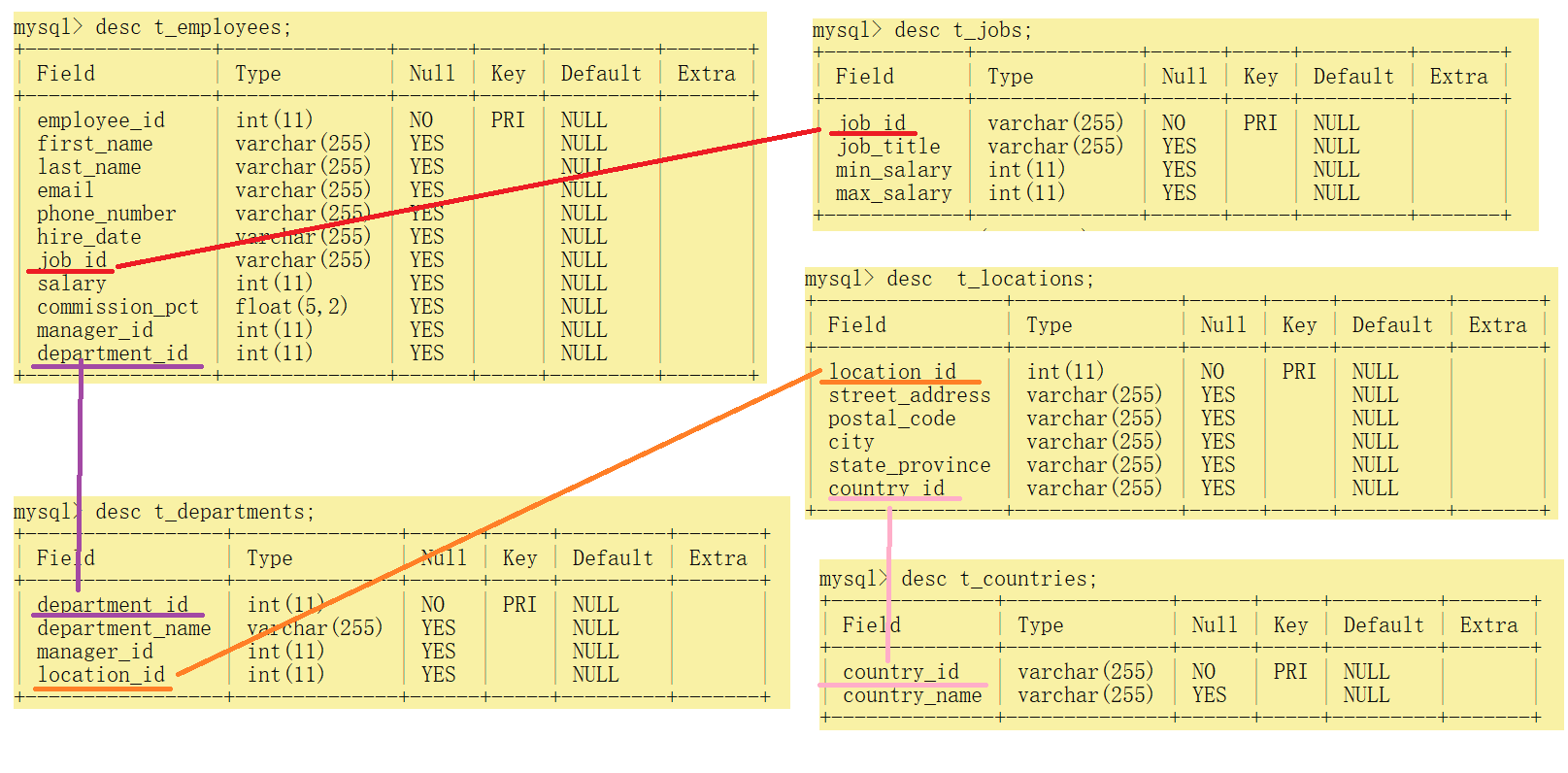
7.12.2 笛卡尔乘积【避免】
-- 在多表联查情况下,如果没有明确表与表之间的数据约束,会导致
-- 多表数据行相乘匹配,结果不对
select employee_id, first_name, department_name
from t_employees, t_departments;
7.12.3 内连接查询 inner join on 两张表
-- 找出员工的ID号,员工名字和部门名
-- 1. 员工的ID号,员工名字 ==> 所在表 t_employees
-- 2. 部门名  ==> 所在表 t_departments
-- 3. 联系方式 ==> 员工表中的部门id号和部门表的id号有对应关系。
-- 完整的表名约束。对应字段归属权
select t_employees.employee_id, t_employees.first_name, t_departments.department_name
from t_employees
         inner join t_departments
                    on t_employees.department_id = t_departments.department_id;

-- 给予表名简称,简化操作,提高效率,同时约束字段归属权
select te.employee_id, te.first_name, td.department_name
from t_employees te
         inner join t_departments td
                    on te.department_id = td.department_id;

-- 因为发现所有的字段并没有在两张表中,同时出现,字段归属权明确,不需要指定查询字段对应表关系。
-- 简化表格名称,用于后期的条件约束限制
select employee_id, first_name, department_name
from t_employees te
         inner join t_departments td
                    on te.department_id = td.department_id;

-- 内连接查询,简单,但是适用的场景表格数据不多。
select employee_id, first_name, department_name
from t_employees,
     t_departments
where t_employees.department_id = t_departments.department_id;
7.12.4 内连接查询 inner join on 三张表
-- 三表
-- B -> A <- C
-- 找出员工ID号,员工名字,部门名,Job名称
-- 1. 员工ID,员工名字 ==> t_employees
-- 2. 部门名 ==> t_departments
-- 3. Job名称 ==> t_jobs
-- 4. t_employees.department_id = t_departments.department_id
-- 5. t_employees.job_id = t_jobs.job_id
select employee_id, first_name, department_name, job_title
from t_employees te
         inner join t_departments td
                    on te.department_id = td.department_id
         inner join t_jobs tj
                    on te.job_id = tj.job_id;

-- 三表
-- A -> B -> C
-- 找出员工ID号,员工名字,部门名,城市
-- 1. 员工ID,员工名字 ==> t_employees
-- 2. 部门名 ==> t_departments
-- 3. 城市 ==> t_locations;
-- 4. t_employees.department_id = t_departments.department_id
-- 5. t_departments.location_id = t_locations.location_id
select employee_id, first_name, department_name, city
from t_employees te
         inner join t_departments td
                    on te.department_id = td.department_id
         inner join t_locations tl
                    on td.location_id = tl.location_id;
7.12.5 内连接查询 inner join on 四张表
# 内连接查询 inner join on 四张表
-- 找出员工ID号,员工名字,部门名,城市,国家
-- 1. 员工ID,员工名字 ==> t_employees
-- 2. 部门名 ==> t_departments
-- 3. 城市 ==> t_locations
-- 4. 国家 ==> t_countries
-- 5. t_employees.department_id = t_departments.department_id
-- 6. t_departments.location_id = t_locations.location_id
-- 7. t_locations.country_id = t_countries.country_id
select employee_id, first_name, department_name, city, country_name
from t_employees te
         inner join t_departments td
                    on te.department_id = td.department_id
         inner join t_locations tl
                    on td.location_id = tl.location_id
         inner join t_countries tc
                    on tl.country_id = tc.country_id;
7.12.6 内连接查询 inner join on 五张表
# 内连接查询 inner join on 五张表
-- 找出员工ID号,员工名字,部门名,job名字,城市,国家
-- 1. 员工ID,员工名字 ==> t_employees
-- 2. 部门名 ==> t_departments
-- 3. 城市 ==> t_locations
-- 4. 国家 ==> t_countries
-- 5. Job名称 ==> t_jobs
-- 6. t_employees.department_id = t_departments.department_id
-- 7. t_departments.location_id = t_locations.location_id
-- 8. t_locations.country_id = t_countries.country_id
-- 9. t_employees.job_id = t_jobs.job_id
select employee_id, first_name, department_name, job_title, city, country_name
from t_employees te
         inner join t_departments td
                    on te.department_id = td.department_id
         inner join t_jobs tj
                    on te.job_id = tj.job_id
         inner join t_locations tl
                    on td.location_id = tl.location_id
         inner join t_countries tc
                    on tl.country_id = tc.country_id;
7.12.7 左外连接 left join on
-- 左表作为主表,查询字段全部展示。右表作为匹配表,如果没有可以匹配左表的数据,显示null
-- 左表为部门表,要求展示所有的部门
-- 右表为员工表,员工表匹配部门表,展示员工信息 ID FirstName
select department_name, employee_id, first_name
from t_departments td -- from 之后是 左表
         left join t_employees te
                   on td.department_id = te.department_id; -- left join 右表
7.12.8 右外连接 right join on
-- 右表作为主表, 查询字段全部展示。左表作为匹配表,如果没有可以匹配右表的数据,显示null
-- 左表为部门表,部门表匹配展示,如果没有展示null
-- 右表为员工表,要求展示所有员工
select department_name, employee_id, first_name
from t_departments td -- t_departments 左表
         right join t_employees te -- t_employees 右表
                    on td.department_id = te.department_id;

若有收获,就点个赞吧
0 人点赞


