1. 常用命令
gzip:GNU zip
作用:压缩(解压)文件,压缩文件的后缀名为.gz
语法:gzip [-d] 文件
特点:只能压缩文件,不能压缩目录,不保留源文件
bzip2
作用:压缩(解压)文件,压缩后的文件后缀为.bz2
语法:bzp2 [-kd] [文件]
-k:产生压缩文件盒保留原文件
-d:解压缩
- 案例:
[root@localhost test]# bzip2 services[root@localhost test]# lsaaa services.bz2[root@localhost test]# bzip2 -d services.bz2[root@localhost test]# lsaaa services[root@localhost test]# bzip2 -k services[root@localhost test]# lsaaa services services.bz2[root@localhost test]# bzip2 aaabzip2: Input file aaa is a directory.[root@localhost test]# bunzip2 services.bz2bunzip2: Output file services already exists.
zip
作用:压缩(解压)文件,压缩文件的后缀为.zip
语法:zip [-r] [压缩后的文件名] [文件或目录]
-r:压缩目录的时候需要使用
- 案例:
[root@localhost test]# ls
aaa  services
[root@localhost test]# zip services

zip error: Nothing to do! (services.zip)
[root@localhost test]# zip services.zip services
  adding: services (deflated 80%)
[root@localhost test]# ls
aaa  services  services.zip
[root@localhost test]# zip -r services.zip

zip error: Nothing to do! (services.zip)
[root@localhost test]# unzip services.zip
Archive:  services.zip
replace services? [y]es, [n]o, [A]ll, [N]one, [r]ename: r
new name: hahaha
  inflating: hahaha
[root@localhost test]# ls
aaa  hahaha  services  services.zip
[root@localhost test]# cd ..
[root@localhost opt]# ls
rh  test  vmware-tools-distrib
[root@localhost opt]# zip test.zip

zip error: Nothing to do! (test.zip)
[root@localhost opt]# zip test.zip test
  adding: test/ (stored 0%)
[root@localhost opt]# ll
总用量 4
drwxr-xr-x. 2 root root   6 3月  26 2015 rh
drwxr-xr-x. 3 root root  67 7月  24 10:44 test
-rw-r--r--. 1 root root 160 7月  24 10:46 test.zip
drwxr-xr-x. 9 root root 145 3月  22 17:10 vmware-tools-distrib
[root@localhost opt]# zip -r test.zip test
updating: test/ (stored 0%)
  adding: test/aaa/ (stored 0%)
  adding: test/services (deflated 80%)
  adding: test/services.zip (stored 0%)
  adding: test/hahaha (deflated 80%)
[root@localhost opt]# ll
总用量 400
drwxr-xr-x. 2 root root      6 3月  26 2015 rh
drwxr-xr-x. 3 root root     67 7月  24 10:44 test
-rw-r--r--. 1 root root 409121 7月  24 10:46 test.zip
drwxr-xr-x. 9 root root    145 3月  22 17:10 vmware-tools-distrib
tar
作用:文件、目录打包,解包
语法:tar [-zxvfcj] [压缩后的文件名] [文件或目录]
-z:使用gzip命令进行压缩或解压
-c:将文件或目录进行打包,后缀是.tar
-x:解包(extract)
-j:使用bzip2命令压缩或解压
-v:显示压缩或解压的过程
-f:指定文件名,必须的一个选项
- 案例:
[root@localhost test]# tar -cf aa.tar aaa/
[root@localhost test]# ls
aaa  aa.tar  hahaha  services  services.zip
[root@localhost test]# tar -xf aa.tar
[root@localhost test]# ls
aaa  aa.tar  hahaha  services  services.zip
[root@localhost test]# rm -rf aaa
[root@localhost test]# ls
aa.tar  hahaha  services  services.zip
[root@localhost test]# tar -xf aa.tar
[root@localhost test]# ls
aaa  aa.tar  hahaha  services  services.zip
[root@localhost test]# gzip aa.tar
[root@localhost test]# ls
aaa  aa.tar.gz  hahaha  services  services.zip
[root@localhost test]# tar -zcvf aaa.tar.gz aaa
aaa/
aaa/hahaha
aaa/services
aaa/services.zip
[root@localhost test]# ls
aaa  aaa.tar.gz  aa.tar.gz  hahaha  services  services.zip
[root@localhost test]# rm -rf aaa
[root@localhost test]# ls
aaa.tar.gz  aa.tar.gz  hahaha  services  services.zip
[root@localhost test]# tar -zxvf aaa.tar.gz
aaa/
aaa/hahaha
aaa/services
aaa/services.zip
[root@localhost test]# ls
aaa  aaa.tar.gz  aa.tar.gz  hahaha  services  services.zip
[root@localhost test]# tar -zxvf aaa.tar.gz  -C /usr
aaa/
aaa/hahaha
aaa/services
aaa/services.zip
[root@localhost test]# cd /usr/
[root@localhost usr]# ls
aaa  bin  etc  games  include  lib  lib64  libexec  local  sbin  share  src  tmp
shutdown
作用:系统关机命令
语法:shutdown [-chr] 时间
-c:表示取消操作
-h:关机
-r:重启
- 案例:
现在立刻马上关机
shutdown -h now
指定时间关机
shutdown -h 10:40
halt
poweroff
init 0
重启
reboot
init 6
常用快捷操作
Ctrl + c 结束当前进程
Ctrl + z 挂起当前线程,放后台
Ctrl + r 查看命令历史(history)
方向键上下键:查看执行过的命令
Ctrl + l 清屏(clear)
2. vim编辑器
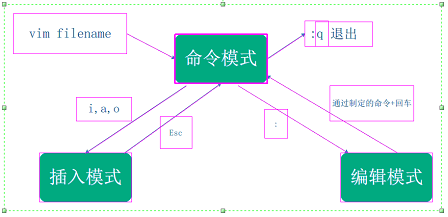
vim工作模式
命令模式:一般模式
编辑模式:底行模式,命令行模式
插入模式:文本编辑模式
插入命令
| 命令名 | 作用 |
|---|---|
| i | 在光标之前插入文本 |
| a | 在文本的开始插入文本、行首 |
| I(shift+i) | 在文本的开始插入文本、行首 |
| A(shift+a) | 在文本的结尾插入文本,行末 |
| o | 在光标的下方插入新行 |
| O(shift+o) | 在光标所处的上方插入新行 |
保存和退出
| 命令 | 作用 |
|---|---|
| :w | 保存修改,但不退出 |
| :w newFileName | 另存为指定文件 |
| :w >> 文件名 | 将本文件中的内容追加到其他文件中去,其他文件必须存在 |
| :wq | 保存并退出 |
| :q! | 不保存并退出 |
| :q | 直接退出,但是如果修改了会有提示 |
| :wq! | 保存修改并退出,可以忽略文件的只读属性 |
定位命令
| 命令名 | 作用 |
|---|---|
| :set nu | 设置并显示行号 |
| :set nonu | 取消显示行号 |
| gg | 直接回到第一行 |
| G(shift+g) | 到最后一行 |
| nG | 到第n行 |
| :n | 定位到第n行 |
删除命令
| 命令名 | 作用 |
|---|---|
| x | 删除光标所在位置的字符 |
| nx | 删除从光标位置开始计算的后面的n个字符 |
| dd | 删除光标所在行 |
| ndd | 删除从光标开始的n行 |
| :n1,n2d | 删除指定范围的行 |
| dG | 从光标处删除至最后一行 |
| D | 从光标位置删除至行的末尾 |
复制和剪切
| 命令名 | 作用 |
|---|---|
| yy,y,Y | 复制当前行 |
| p | 粘贴到光标所在行的下方 |
| P | 粘贴到光标的上方 |
| nyy,nY | 复制光标起的n行 |
| dd | 剪切当前行 |
| ndd | 剪切光标起的n行 |
替换和取消
| 命令名 | 作用 |
|---|---|
| r | 替换光标位置的字符 |
| R | 从光标位置开始替换 |
| u | undo,取消上一步操作 |
| Ctrl + r | 撤销上一步操作 |
替换和搜索
%表示全文,g表示全局替换,s表示开始,c表示替换时要询问
| 命令名 | 作用 |
|---|---|
| /字符串 | 向后搜索指定的字符串 |
| ?字符串 | 向前搜索指定的字符串 |
| n | 搜索字符串下一个出现的位置 |
| N | 搜索字符串的上一个出现的位置 |
| :%s/老字符串/新字符串/g | 全文替换指定字符 |
| :n1,n2s/老字符串/新字符串/g :n1,n2s/^/#aaaa/g |
在指定范围内替换指定字符 :r !which cd |
可视化字符模式
| 命令名 | 作用 |
|---|---|
| v | 字符视图模式 |
| V | 行视图模式 |
3. 高级设置
IP地址的修改
可视化修改
setup启动虚拟界面进行设置(7以下,不包含7)
修改配置文件
编辑文件[root@localhost /]# vim /etc/sysconfig/network-scripts/ifcfg-ens33
重启网卡服务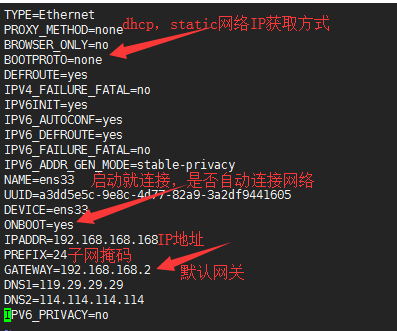
ping
作用:测试网络的连通性
语法:ping [-c] IP地址
ifconfig
作用:显示网卡的配置信息
语法:ifconfig [-a] [网卡设备的名称]
案例
[root@localhost /]# ifconfig -a ens33
ens33: flags=4163<UP,BROADCAST,RUNNING,MULTICAST>  mtu 1500
        inet 192.168.168.168  netmask 255.255.255.0  broadcast 192.168.168.255
        inet6 fe80::4010:bac1:704:344  prefixlen 64  scopeid 0x20<link>
        ether 00:0c:29:82:cf:2c  txqueuelen 1000  (Ethernet)
        RX packets 7766  bytes 791824 (773.2 KiB)
        RX errors 0  dropped 0  overruns 0  frame 0
        TX packets 6757  bytes 1735278 (1.6 MiB)
        TX errors 0  dropped 0 overruns 0  carrier 0  collisions 0
netstat
作用:用于检测主键的网络配置
语法:netstat [-atunl] [端口号]
-a:显示所有连接的端口信息
-b:仅显示tcp通讯相关信息
-c:仅显示ucp通讯相关信息
-n:使用数字方式
- 案例
4. 用户管理
useradd
- 语法:useradd [选项] 用户名
passwd
- 语法:passwd [用户名]
userdel
- 语法:userdel [-r] 用户名
-r:删除账号的时候,删除宿主目录
5. 磁盘空间的命令
- du
查看文件或目录的大小
du [-ahsb] [文件名或目录]
- df
-h:易读方式显示
-M:以MB方式显示
-k:以KB的方式显示
- free
6. 权限相关
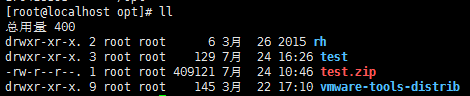
d:这个位置表示文件的类型:d,l,-
接下来的3位rwx:当前用户对该文件的权限问题(目录权限)
r:表示读-4,w:表示写-2,x:表示执行-1
接下去了的3位r-x:当前用户所属组对该文件的权限
最后3位r-x:表示其他用户对该文件的权限
修改文件的权限

若有收获,就点个赞吧
0 人点赞


