Elasticsearch是一个分布式搜索和分析引擎
官网介绍:
- 为所有类型的数据提供近乎实时的搜索和分析
- 分布式
- 存储和分析日志、指标和安全事件数据
- 地理信息,生物信息研究工具
- 使用机器学习实时自动建模数据的行为
- 向应用程序或网站添加搜索框
Logstash 和 Beats 用来收集,聚合数据存储到Elasticsearch中,日志收集系统
Kibana是一个数据可视化的平台,可以用来分析、管理和共享数据,还有监控堆栈。
数据存储:
将数据存储为JSON文档的复杂数据结构,当集群中有多个 Elasticsearch 节点时,存储的文档分布在整个集群中,并且可以从任何节点立即访问。
倒排索引
根据文章内容中的关键字建立索引
倒排索引列出出现在任何文档中的每个唯一单词,并标识每个单词出现的所有文档。
以前是根据ID查内容,倒排索引之后是根据内容查ID,然后再拿着ID去查询出来真正需要的东西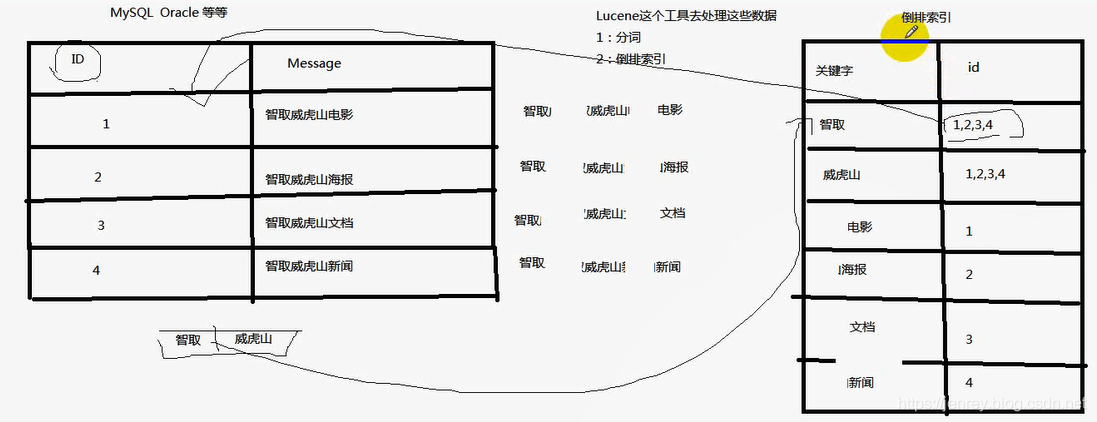
什么是Lucene
Lucene就是一个jar包,里面包含了各种建立倒排索引的方法,java开发的时候只需要导入这个jar包就可以开发了。
ES 和 Lucene的区别
Lucene不是分布式的。
ES的底层就是Lucene,ES是分布式的。ES就是分布式的集群,每一个节点其实就是Lucene,当用户搜索的时候,会随机挑一台,然后这台机器自己知道数据在哪,不用我们管这些底层、
ES 优点
1.分布式的功能
2、数据高可用,集群高可用
3.API更简单
4.API更高级。
5.支持的语言很多
6.支持PB级别的数据
7.完成搜索的功能和分析功能
基于Lucene,隐藏了Lucene的复杂性,提供简单的API
ES与数据库存储类比
| 关系型数据库 | ES | |
|---|---|---|
| 数据库database | 索引 index | |
| 表 table | type | |
| 数据 | 文档 document | ES里面最小的数据单元 |
| 列 | field |

默认情况下,Elasticsearch 索引每个字段中的所有数据,每个索引字段都有一个专用的、优化的数据结构
es对每种属性properties,都会有两个字段存储,比如一个商品的名称字段,会有name和name.keyword
普通的name字段用来分词检索,name.keyword字段用来做一些聚合的操作比如分组查询等
无模式能力,不需要指定字段的类型bool/float,会自动映射
Elasticsearch 提供了一个简单、一致的 REST API 来管理您的集群以及索引和搜索您的数据
ES的作用
1)全文检索:
类似 select from product where product_name like ‘%牙膏%’
类似百度效果(电商搜索的效果)
2)结构化搜索:
类似 select from product where product_id = ‘1’
3)数据分析
类似 select count (*) from product
Elasticsearch如何实现 SQL语句中 Group By 和 Limit 的功能
点击前往
ElasticSearch模糊和精确查询
#### 准备数据PUT w1{"mappings": {"properties":{"t1":{"type": "text"},"t2": {"type": "keyword"}}}}POST w1/_doc{"t1": "hi single dog","t2": "hi single dog"}GET w1/_search# 1.t1类型为text,会经过分词,match查询时条件也会经过分词,所以下面两种查询都能查到结果GET w1/_doc/_search{"query": {"match": {"t1": "hi single dog"}}}#2.GET w1/_doc/_search{"query": {"match": {"t1": "hi"}}}# 3.t2类型为keyword类型,不会经过分词,match查询时条件会经过分词,所以只能当值为"hi single dog"时能查询到GET w1/_doc/_search{"query": {"match": {"t2": "hi"}}}#4.GET w1/_doc/_search{"query": {"match": {"t2": "hi single dog"}}}# 5.t1类型为text,会经过分词,term查询时条件不会经过分词,所以只有当值为"hi"时能查询到GET w1/_doc/_search{"query": {"term": {"t1": "hi single dog"}}}#6.GET w1/_doc/_search{"query": {"term": {"t1": "hi"}}}# 7.t2类型为keyword类型,不会经过分词,term查询时条件不会经过分词,所以只能当值为"hi single dog"时能查询到GET w1/_doc/_search{"query": {"term": {"t2": "hi single dog"}}}#8.GET w1/_doc/_search{"query": {"term": {"t2": "hi"}}}
图解
| 序号 | 查询条件 | 查询条件的分词情况 | 数据的分词情况 | 匹配情况 |
|---|---|---|---|---|
| 1 | GET w1/_doc/_search { “query”: { “match”: { “t1”: “hi single dog” } } } |
①->③->㈡=hi+single+dog | ①->Ⅰ+Ⅱ+Ⅲ=hi+single+dog | 成功 |
| 2 | GET w1/_doc/_search { “query”: { “match”: { “t1”: “hi” } } } |
①->2->㈠=hi | ①->Ⅰ+Ⅱ+Ⅲ=hi+single+dog | 成功 |
| 3 | GET w1/_doc/_search { “query”: { “match”: { “t2”: “hi” } } } |
④->⑤->㈠=hi | ④=hi single dog | 失败 |
| 4 | GET w1/_doc/_search { “query”: { “match”: { “t2”: “hi single dog” } } } |
④->⑥->㈡=hi single dog | ④=hi single dog | 成功 |
| 5 | GET w1/_doc/_search { “query”: { “term”: { “t1”: “hi single dog” } } } |
①->③->㈣=hi single dog | ①->Ⅰ+Ⅱ+Ⅲ=hi+single+dog | 失败 |
| 6 | GET w1/_doc/_search { “query”: { “term”: { “t1”: “hi” } } } |
①->2->㈢=hi | ①->Ⅰ+Ⅱ+Ⅲ=hi+single+dog | 成功 |
| 7 | GET w1/_doc/_search { “query”: { “term”: { “t2”: “hi single dog” } } } |
④->⑥->㈣=hi single dog | ④=hi single dog | 成功 |
| 8 | GET w1/_doc/_search { “query”: { “term”: { “t2”: “hi” } } } |
④->⑤->㈢=hi | ④=hi single dog | 失败 |
docker安装 ES & kibana 7.15.0命令
#需要创建同一个网络才可以识别并连接docker network create esnetwork# 拉取 esdocker pull docker.elastic.co/elasticsearch/elasticsearch:7.15.0#运行 esdocker run -d --name es7_15 --net esnetwork -p 9200:9200 -p 9300:9300 -e "discovery.type=single-node" docker.elastic.co/elasticsearch/elasticsearch:7.15.0# 拉取kibanadocker pull docker.elastic.co/kibana/kibana:7.15.0# 运行kibana这里ELASTICSEARCH_HOSTS指定的es端口是镜像内部的端口,并不是映射出来的本机端口,需要注意!不然kibana会启动失败,因为识别不到esdocker run -d --name kibana7_15 --net esnetwork -p 5601:5601 -e "ELASTICSEARCH_HOSTS=http://es7:9200" docker.elastic.co/kibana/kibana:7.15.0# docker 正在运行的容器docker ps# 进入容器内部docker exec -it 容器id bash
-d 后台运行
—name 指定容器名称
—net 指定网络
-p 本机端口:镜像端口 将镜像端口映射到本机端口
-e 运行选项 可用来指定启动配置
windows安装es和将es注册成服务
es开始密码验证
es忘记密码重置
修改config/elasticsearch.yml配置文件
xpack.security.enabled: false
通过命令删除安全索引
#获取所有索引curl -XGET "127.0.0.1:9200/_cat/indices#删除安全索引curl -XDELETE 127.0.0.1:9200/.security-7
再将配置xpack.security.enabled改成true
- 重新生成密码
./bin/elasticsearch-setup-passwords interactive
es深度查询
es解决只能查询10000条数据方案es加快索引速度
tune-for-indexing-speed

若有收获,就点个赞吧
0 人点赞


